Merging Meshes Godot
An asset by EmberNoGlow
Install Asset
Install via Godot
To maintain one source of truth, Godot Asset Library is just a mirror of the old asset library so you can download directly on Godot via the integrated asset library browser
Quick Information

Merging Meshes Godot
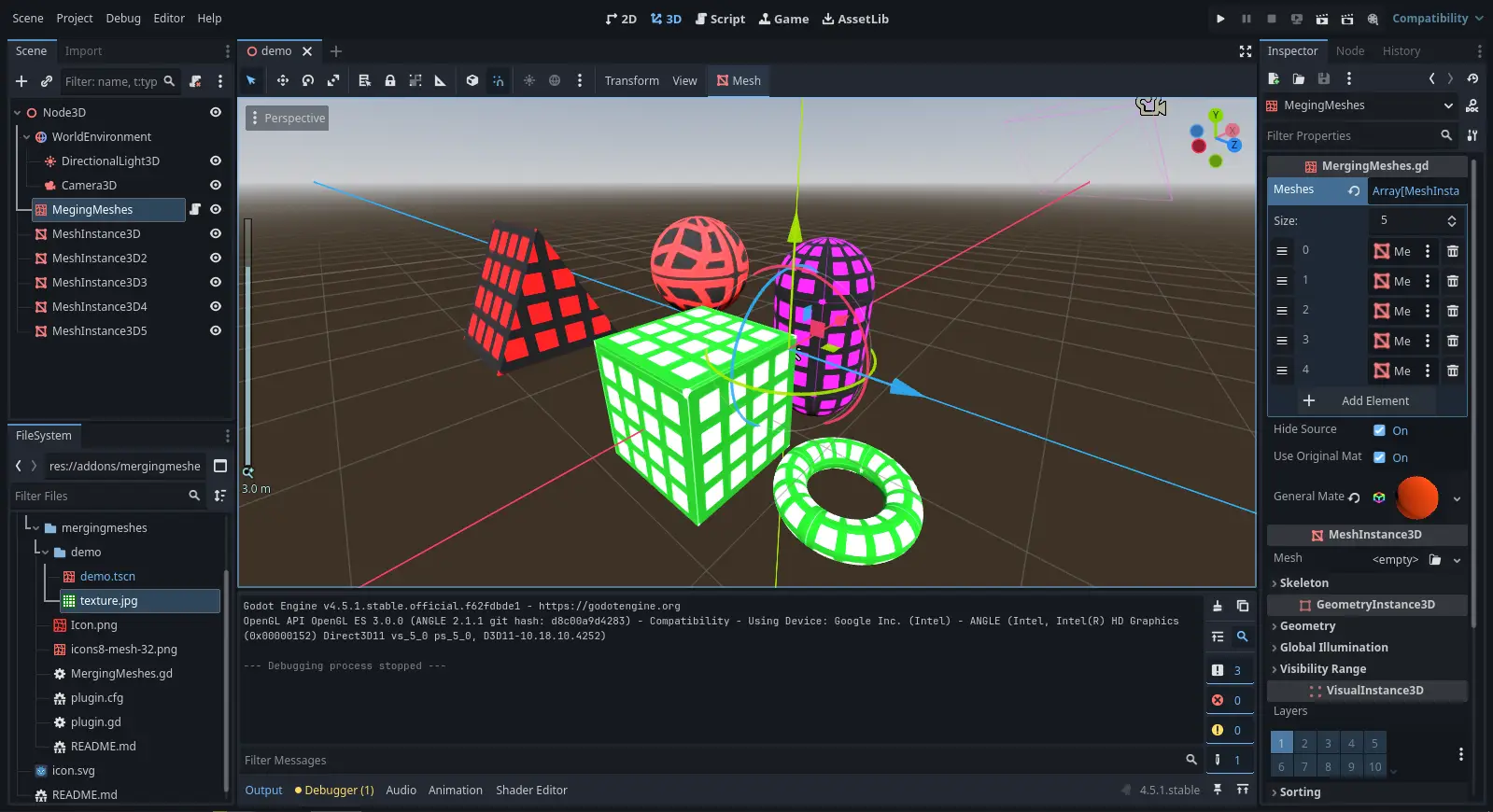
Merging Meshes is an add-on for Godot 4 that is designed to optimize scenes with a large number of MeshInstance3D and procedural geometry.More info on github.Usage1. Download and enable the addon (Make sure that the folder is located in "addons").2. Add a "MergingMeshes" node to your scene.3. In the Inspector panel, add your "MeshInstance3D" nodes to the "meshes" parameter.4. Optional: Assign a "Material3D" to the "GeneralMaterial" parameter to set the material for the merged mesh or use Original mesh materials.5. Recommended: Keep the "HideSource" parameter enabled to automatically hide the original "MeshInstance3D" nodes.Features:UV and material support.Clear and minimal code.Convenient API - you can use this code in your tools!
Supported Engine Version
4.4
Version String
1.1
License Version
CC0
Support Level
community
Modified Date
2 months ago
Git URL
Issue URL
Merging Meshes Godot
Optimize your 3d scenes with Merging Meshes.
What is it?
Merging Meshes is an add-on for Godot 4 that is designed to optimize scenes with a large number of MeshInstance3D and procedural geometry.
How it works?
Meshes are combined by merging MeshInstance3D using SurfaceTool (append_from method). This allows you to combine an unlimited number of meshes into one, resulting in a HUGE GROWTH in perfomance as only one drawing call is made instead of thousands
Usage
- Download and enable the addon (Make sure that the folder is located in
addons). - Add a
MergingMeshesnode to your scene. - In the Inspector panel, add your
MeshInstance3Dnodes to themeshesparameter. - Optional: Assign a
Material3Dto theGeneralMaterialparameter to set the material for the merged mesh. - Recommended: Keep the
HideSourceparameter enabled to automatically hide the originalMeshInstance3Dnodes.
About the Developer
This mini-add-on is a component of a larger add-on I'm developing for Godot 4 (I will upload it to github in the near future). Check out my profile to find more projects!
Did you like the high FPS?
Consider starring this repository to make it easier for others to find it.
Merging Meshes is an add-on for Godot 4 that is designed to optimize scenes with a large number of MeshInstance3D and procedural geometry.
More info on github.
Usage
1. Download and enable the addon (Make sure that the folder is located in "addons").
2. Add a "MergingMeshes" node to your scene.
3. In the Inspector panel, add your "MeshInstance3D" nodes to the "meshes" parameter.
4. Optional: Assign a "Material3D" to the "GeneralMaterial" parameter to set the material for the merged mesh or use Original mesh materials.
5. Recommended: Keep the "HideSource" parameter enabled to automatically hide the original "MeshInstance3D" nodes.
Features:
UV and material support.
Clear and minimal code.
Convenient API - you can use this code in your tools!
Reviews
Quick Information
Merging Meshes Godot
Merging Meshes is an add-on for Godot 4 that is designed to optimize scenes with a large number of MeshInstance3D and procedural geometry.More info on github.Usage1. Download and enable the addon (Make sure that the folder is located in "addons").2. Add a "MergingMeshes" node to your scene.3. In the Inspector panel, add your "MeshInstance3D" nodes to the "meshes" parameter.4. Optional: Assign a "Material3D" to the "GeneralMaterial" parameter to set the material for the merged mesh or use Original mesh materials.5. Recommended: Keep the "HideSource" parameter enabled to automatically hide the original "MeshInstance3D" nodes.Features:UV and material support.Clear and minimal code.Convenient API - you can use this code in your tools!
Supported Engine Version
4.4
Version String
1.1
License Version
CC0
Support Level
community
Modified Date
2 months ago
Git URL
Issue URL