GDScript Commenter
An asset by quanty bandit
Install Asset
Install via Godot
To maintain one source of truth, Godot Asset Library is just a mirror of the old asset library so you can download directly on Godot via the integrated asset library browser
Quick Information

GDScript Commenter
This plugin allow you to inserts and updates GDScript documentation comment templates directly from the native script editor context menu.You can support us from itch.io:https://quanty-bandit.itch.io/gdscript-commenter-plugin
Supported Engine Version
4.2
Version String
1.0.3
License Version
MIT
Support Level
community
Modified Date
7 hours ago
Git URL
Issue URL
GDScript Commenter — Godot 4 Plugin
A Godot 4 editor plugin that inserts and updates GDScript documentation comment templates directly from the native script editor context menu.
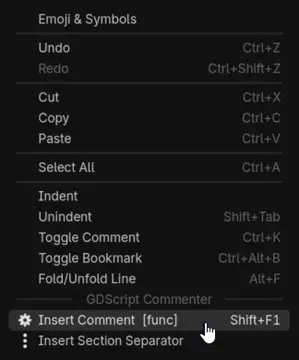
Place the cursor anywhere inside or on a declaration, right-click, and choose Insert Comment (or Update Comment if one already exists). The plugin detects the declaration type automatically and generates the correct ## docstring — including parameter names, types, return type, enum members, and class name — all in Godot BBCode format ready for the built-in documentation viewer.
✨ Features
- Keyboard shortcut — press Shift+F1 anywhere in the script editor to insert or update a comment instantly, without opening the context menu
- Single smart menu entry — one action covers all declaration types
- Auto-detection from cursor line — identifies
func,var/const/@export/@onready,enum, class header (@tool/class_name/extends), or falls back to a plain line comment - Multi-line block support — if the cursor is inside a
funcorenumbody, the plugin walks upward to find the opening keyword; multi-line signatures (parameters or braces spread across lines) are fully parsed - Insert or Update — the label shows
Insert CommentorUpdate Commentwith the detected type in brackets, so you always know what will happen before clicking - Smart merge on update — existing description texts are preserved; parameters are added, removed, or kept in sync with the current signature; the return description is kept only when the return type is unchanged; enum members follow the same rules
- Real class name — uses the
class_namedeclaration when present, falls back to the filename in PascalCase - Section separator — a second entry inserts a visual
# ---divider with a placeholder title - Godot BBCode — output uses
[param],[return],[br],[b],[code],[codeblock]for full compatibility with the Godot documentation viewer
📦 Installation
- Copy the
addons/gdscript_commenter/folder into your project'saddons/directory. - Open Project → Project Settings → Plugins.
- Enable GDScript Commenter.
🚀 Usage
- Open any
.gdfile in the script editor. - Place the cursor on the declaration line, or anywhere inside a
funcorenumbody. - Press Shift+F1 — or right-click and choose Insert Comment / Update Comment from the GDScript Commenter section.
The label in the context menu shows the detected type and the keyboard shortcut before you click:
─── GDScript Commenter ──────────────────────
  Insert Comment  [func]          Shift+F1
  Insert Section Separator
📝 Output examples
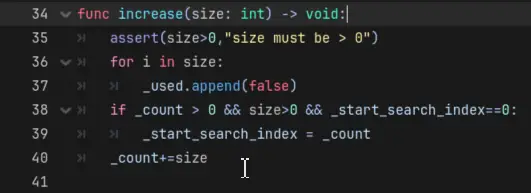
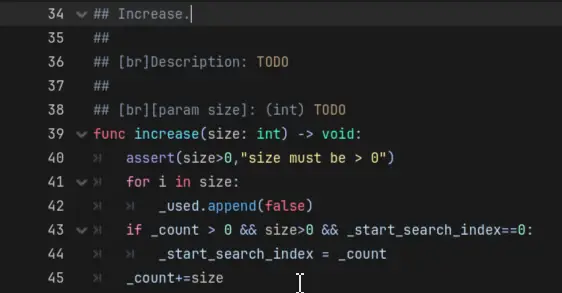
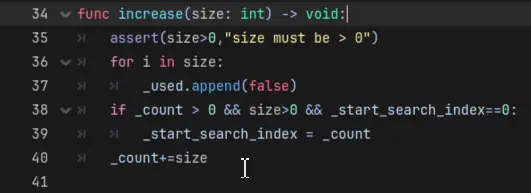
func
## calculate_damage.
##
## [br]Description: TODO
##
## [br][param attacker]: (Node) TODO
## [br][param weapon]: (Item) TODO
## [br][param multiplier]: (float) TODO
##
## [br][return] (int): TODO
func calculate_damage(attacker: Node, weapon: Item, multiplier: float = 1.0) -> int:
Multi-line signatures are fully supported:
func calculate_damage(
        attacker: Node,
        weapon: Item,
        multiplier: float = 1.0
) -> int:
var / const / @export / @onready
## speed_multiplier.
##
## [br]Exported variable — TODO: description.
## [br]Type: [float]
## [br]Default: [code]1.0[/code]
@export var speed_multiplier: float = 1.0
enum
## Toto.
##
## [br]Description: TODO
##
## [br]Members:
## [br]- [b]a[/b]: TODO
## [br]- [b]b[/b]: TODO
## [br]- [b]c[/b]: TODO
enum Toto { a, b, c }
Enum members follow the exact casing from the code. Multi-line enums and single-line enum Name { ... } are both handled.
class header
First insertion — the class name is read from class_name and injected automatically:
## PlayerController.
##
## [br]Description: TODO
##
## [br]Usage:
## [codeblock]
## var obj = PlayerController.new()
## [/codeblock]
@tool
class_name PlayerController
extends CharacterBody2D
After filling in the description and running Update Comment:
## PlayerController.
##
## [br]Description: Manages player movement, input, and health.
##
## [br]Usage:
## [codeblock]
## var obj = PlayerController.new()
## [/codeblock]
@tool
class_name PlayerController
extends CharacterBody2D
Filename fallback — when no class_name is declared, the filename is converted to PascalCase:
## AudioSpectrumViewer.
##
## [br]Description: TODO
##
## [br]Usage:
## [codeblock]
## var obj = AudioSpectrumViewer.new()
## [/codeblock]
# file: audio_spectrum_viewer.gd  (no class_name declaration)
extends Control
The comment is always inserted above the header block (@tool, class_name, extends). On update, the class name is resynchronised automatically — useful after renaming the class.
line comment (fallback)
# TODO: describe what this line does
some_unrecognised_line()
section separator
# ---------------------------------------------------------------------------
# SECTION NAME
# ---------------------------------------------------------------------------
🔍 Update / merge rules
When a docstring already exists above a declaration, the plugin rebuilds it from the current signature and re-injects the text you previously wrote:
| Element | Behaviour |
|---|---|
| Description | Existing text is always preserved |
[param] |
Kept with its description if the parameter still exists; dropped if removed; added as TODO if new |
[return] |
Description preserved only when the return type is unchanged; reset to TODO if the type changed |
| Enum members | Same rules as [param] — kept, dropped, or added as the enum body changes |
| Variable description | Existing text is preserved |
| Class name | Always updated to the current class_name or filename — useful after renaming |
| Line comment | If a comment already exists above the line, nothing is done |
⚙️ Compatibility
- Godot Engine 4.x (tested on 4.2+)
- GDScript files only
📄 Licence
MIT — free to use, modify and distribute.
This plugin allow you to inserts and updates GDScript documentation comment templates directly from the native script editor context menu.
You can support us from itch.io:
https://quanty-bandit.itch.io/gdscript-commenter-plugin
Reviews
Quick Information
GDScript Commenter
This plugin allow you to inserts and updates GDScript documentation comment templates directly from the native script editor context menu.You can support us from itch.io:https://quanty-bandit.itch.io/gdscript-commenter-plugin
Supported Engine Version
4.2
Version String
1.0.3
License Version
MIT
Support Level
community
Modified Date
7 hours ago
Git URL
Issue URL