DualCursor UI
An asset by abhik_h
Install Asset
Install via Godot
To maintain one source of truth, Godot Asset Library is just a mirror of the old asset library so you can download directly on Godot via the integrated asset library browser
Quick Information

DualCursor UI
DualCursor UI is a Godot 4.6+ addon for local multiplayer UI interaction over Control nodes.It adds independent controller-driven cursors for two local players, player-owned controls, shared controls, scroll support, and controller-navigation panels for menus where free cursormovement feels awkward.Version 0.3.0 adds Panel Builder, a generated two-player cursor runtime, private/shared/exclusive/simultaneous panel presets, responsive demo scenes, dynamic dialogue-choice workflows, and clearer in-editor setup guidance.
Supported Engine Version
4.6
Version String
0.3.0
License Version
MIT
Support Level
community
Modified Date
1 month ago
Git URL
Issue URL
DualCursor UI
DualCursor UI is a Godot 4.6+ addon for local multiplayer cursor interaction over Control-based interfaces.
It is designed for split-screen and co-op games where multiple local players need independent virtual cursors in the same UI layer. It does not replace Godot's native Control focus system. Instead, it provides a custom routing layer for hover, selection, denial feedback, shared controls, and scroll areas.
What You Can Build
- Two-player menus.
- Split-screen dialogue choice panels.
- Shared confirmation prompts.
- Dice, card, inventory, or map interfaces.
- Co-op UI where each player can point at a different
Controlat the same time.
Quick Start
- Copy
addons/dual_cursor_uiinto a Godot project. - Enable DualCursor UI in Project Settings > Plugins.
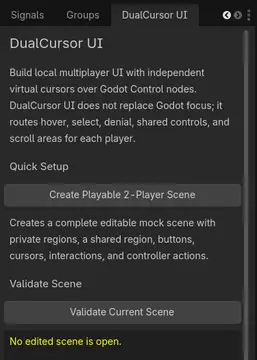
- Open the DualCursor UI dock.
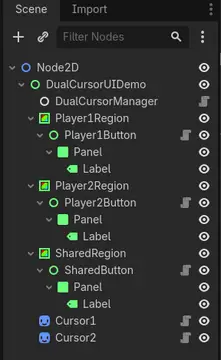
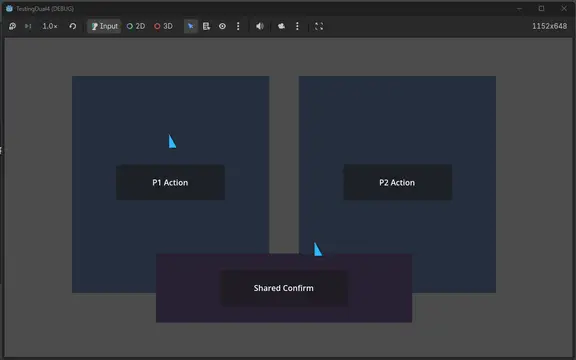
- Click Create Playable 2-Player Scene in a blank scene. This creates an editable mock scene with private regions, a shared region, buttons, cursors, interactions, and controller actions.
- Click Validate Current Scene.
- Press Play. Move player 1 with controller 1's left stick and player 2 with controller 2's left stick.
- Connect
DualCursorButton.pressed_by_player(player_id, cursor)to your game logic.
The fastest way to see the plugin working is to open:
res://addons/dual_cursor_ui/demos/two_player_menu_demo.tscn
For copyable programming examples, open the Use In Your Game section in the editor dock or read:
res://addons/dual_cursor_ui/docs/WALKTHROUGHS.md
Core Nodes
DualCursorManager: routes hover, interaction, hit priority, and scroll behavior.DualCursor: visible gamepad-controlled cursor.DualCursorInteractable: baseControltarget with ownership and shared policies.DualCursorButton: button-like interactable with hover/select/deny feedback.DualCursorScrollArea:ScrollContaineradapter for joystick scrolling.
Shared Policies
ALLOW_ANY: any player can activate the shared control.FIRST_PLAYER_LOCKS: first interacting player locks the control.REQUIRE_ALL_PLAYERS: all required players must confirm.DENY_IF_OWNED: denies interaction when the target is player-owned.
Editor Dock
The plugin adds a DualCursor UI dock to the editor. It can:
- Create a ready-to-edit playable two-player mock scene.
- Set up default controller actions as part of scene creation.
- Validate common scene setup mistakes.
- Explain the next integration step for a new user.
Common Signal
Most games start by connecting:
func _on_button_pressed_by_player(player_id: int, cursor: Node) -> void:
    print("Player %d pressed this control." % player_id)
Use owner_player_id = 0 for player 1, owner_player_id = 1 for player 2, and owner_player_id = -1 for shared controls.
More examples are available in docs/WALKTHROUGHS.md, including ownership setup and shared confirmation.
Movement Regions
Each DualCursor moves only inside its assigned Control regions:
region_node_path: the cursor's private home region.extra_region_node_paths: additional allowed regions, usually shared UI areas.
For a two-player setup, player 1 should use Player1Region plus SharedRegion, and player 2 should use Player2Region plus SharedRegion. Do not give both cursors one large play area unless both players are meant to reach every control in it.
Controller Actions
DualCursor uses Godot Input Map actions to know when each player selects a control. The setup dock creates:
interact_p1: controller 1, A/Cross.interact_p2: controller 2, A/Cross.
You can change these later in Project Settings > Input Map.
Limitations
DualCursor UI does not make every existing Godot Control automatically multifocus-aware. Complex widgets should use one of the addon nodes or an adapter script that forwards DualCursor signals into the widget's own behavior.
DualCursor UI is a Godot 4.6+ addon for local multiplayer UI interaction over Control nodes.
It adds independent controller-driven cursors for two local players, player-owned controls, shared controls, scroll support, and controller-navigation panels for menus where free cursor
movement feels awkward.
Version 0.3.0 adds Panel Builder, a generated two-player cursor runtime, private/shared/exclusive/simultaneous panel presets, responsive demo scenes, dynamic dialogue-choice workflows, and clearer in-editor setup guidance.
Reviews
Quick Information
DualCursor UI
DualCursor UI is a Godot 4.6+ addon for local multiplayer UI interaction over Control nodes.It adds independent controller-driven cursors for two local players, player-owned controls, shared controls, scroll support, and controller-navigation panels for menus where free cursormovement feels awkward.Version 0.3.0 adds Panel Builder, a generated two-player cursor runtime, private/shared/exclusive/simultaneous panel presets, responsive demo scenes, dynamic dialogue-choice workflows, and clearer in-editor setup guidance.
Supported Engine Version
4.6
Version String
0.3.0
License Version
MIT
Support Level
community
Modified Date
1 month ago
Git URL
Issue URL