Better Debug Logging
An asset by liack
Install Asset
Install via Godot
To maintain one source of truth, Godot Asset Library is just a mirror of the old asset library so you can download directly on Godot via the integrated asset library browser

Quick Information

Better Debug Logging
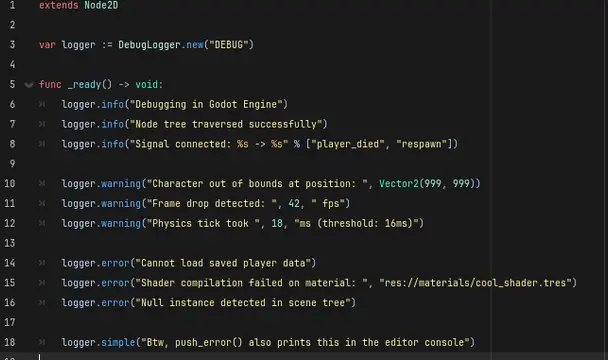
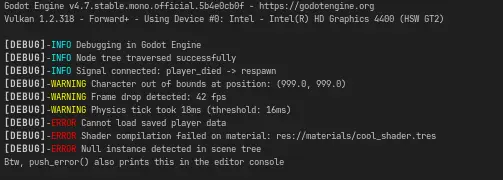
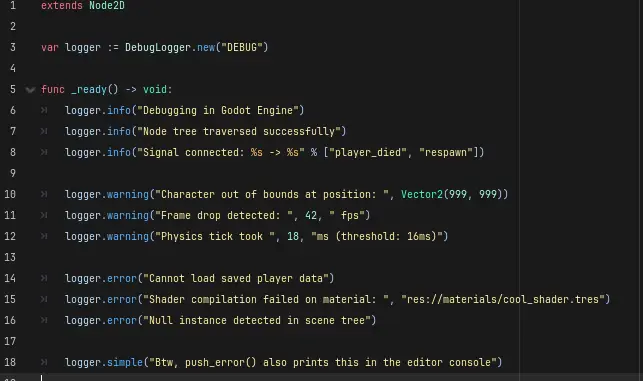
An add-on that enhances the debugging experience in the console by providing formatted, color-coded log messages. This tool displays messages in the following format: [MESSAGE SOURCE]-TYPE: message, assigning an identifying color based on the message type.
Supported Engine Version
4.5
Version String
1.0.1
License Version
MIT
Support Level
community
Modified Date
6 hours ago
Git URL
Issue URL
Better Debug Logging
Godot 4 plugin that extends the console debugging system with formatted messages, colors, and log levels.
Features
- Formatted messages with colors in the editor console (
print_rich) - Three log levels:
INFO,WARNING,ERROR WARNINGandERRORlevels also log viapush_warning()/push_error()- Channel system (independent loggers with custom prefixes)
- Global registry (
LoggerRegistry) available as an autoload singleton - Two implementations:
DebugLogger(RefCounted) andLogger(Node)
Installation
- Copy the
better_debug_loggingfolder into your project'sres://addons/. - Enable the plugin in Project > Project Settings > Plugins.
The plugin will automatically register the LoggerRegistry singleton.
Usage
LoggerRegistry (global autoload)
# Default logger with "DEBUG" prefix
LoggerRegistry.get_default().info("Game started")
LoggerRegistry.get_default().warning("Low memory available")
LoggerRegistry.get_default().error("Failed to load resource")

# Channels with custom prefix
var combat_logger = LoggerRegistry.channel("COMBAT")
combat_logger.info("Player attacks for 50 damage")
DebugLogger (direct instance)
var log = DebugLogger.new("MY_MODULE")
log.info("This is an informational message")
log.warning("This is a warning")
log.error("This is an error")

# Print a message without prefix or level
log.simple("Plain unformatted message")

# Hide the prefix
log.set_prefix_visible(false)
API
DebugLogger
| Method | Description |
|---|---|
info(...args) |
INFO level log (cyan) |
warning(...args) |
WARNING level log (yellow) + push_warning() |
error(...args) |
ERROR level log (red) + push_error() |
simple(...args) |
Plain unformatted message |
set_prefix_visible(enabled) |
Show/hide the prefix |
LoggerRegistry
| Method | Description |
|---|---|
get_default() |
Returns the default logger (DEBUG) |
channel(name) |
Gets or creates a logger with the given prefix |
Colors by level
- INFO → cyan
- WARNING → yellow
- ERROR → red
License
MIT - See LICENSE.
An add-on that enhances the debugging experience in the console by providing formatted, color-coded log messages. This tool displays messages in the following format: [MESSAGE SOURCE]-TYPE: message, assigning an identifying color based on the message type.
Reviews
Quick Information
Better Debug Logging
An add-on that enhances the debugging experience in the console by providing formatted, color-coded log messages. This tool displays messages in the following format: [MESSAGE SOURCE]-TYPE: message, assigning an identifying color based on the message type.
Supported Engine Version
4.5
Version String
1.0.1
License Version
MIT
Support Level
community
Modified Date
6 hours ago
Git URL
Issue URL