Any AudioManager
An asset by astreda
Install Asset
Install via Godot
To maintain one source of truth, Godot Asset Library is just a mirror of the old asset library so you can download directly on Godot via the integrated asset library browser
Quick Information

Any AudioManager
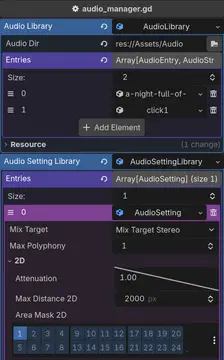
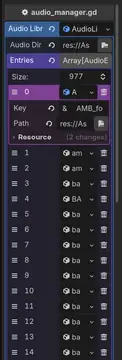
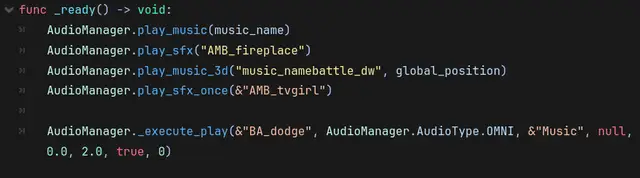
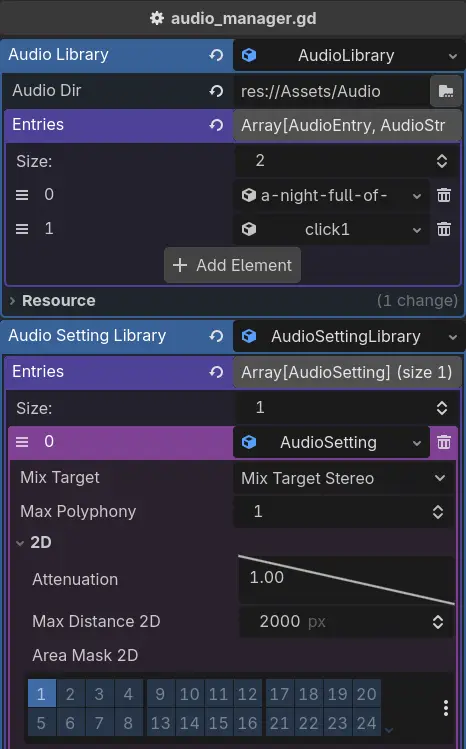
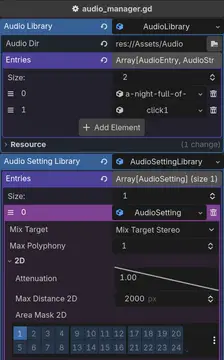
Any AudioManager is a global plugin for managing any audiotype(Omni, 2D, and 3D) efficiently in Godot. It automatically create dictionary and cache, and can be called with simple function. list of function to use: ```is_playing(key: StringName) -> boolplay_sfx_once(key: StringName, volume: float = 0.0, pitch: float = 1.0, audio_setting_index: int = -1) -> voidplay_sfx(key: StringName, volume: float = 0.0, pitch: float = 1.0, audio_setting_index: int = -1) -> voidplay_sfx_2d(key: StringName, pos: Vector2, volume: float = 0.0, pitch: float = 1.0, audio_setting_index: int = -1) -> voidplay_sfx_3d(key: StringName, pos: Vector3, volume: float = 0.0, pitch: float = 1.0, audio_setting_index: int = -1) -> voidplay_music(key: StringName, loop: bool = true, volume: float = 0.0, pitch: float = 1.0, audio_setting_index: int = -1) -> voidplay_music_2d(key: StringName, pos: Vector2, loop: bool = true, volume: float = 0.0, pitch: float = 1.0, audio_setting_index: int = -1) -> voidplay_music_3d(key: StringName, pos: Vector3, loop: bool = true, volume: float = 0.0, pitch: float = 1.0, audio_setting_index: int = -1) -> voidstop_music() -> voidstop_by_key(key: StringName) -> voidstop_all_active() -> void ```Or if you want to use audio setting or other things, you can modify the script, add wrapper function, and use the audio setting index :```_execute_play(key: StringName, type: AudioType, bus: StringName, pos: Variant, volume: float = 0.0, pitch: float = 1.0, loop: bool = false, audio_setting_index: int = -1) -> void ```License is CC0, credit is appreciated but not required.
Supported Engine Version
4.6
Version String
1.3
License Version
CC0
Support Level
community
Modified Date
2 months ago
Git URL
Issue URL
Any AudioManager is a global plugin for managing any audiotype(Omni, 2D, and 3D) efficiently in Godot. It automatically create dictionary and cache, and can be called with simple function.
list of function to use: is_playing(key: StringName) -> bool play_sfx_once(key: StringName) -> void play_sfx(key: StringName) -> void play_sfx_2d(key: StringName, pos: Vector2) -> void play_sfx_3d(key: StringName, pos: Vector3) -> void play_music(key: StringName, loop: bool = true) -> void play_music_2d(key: StringName, pos: Vector2, loop: bool = true) -> void stop_music() -> void stop_by_key(key: StringName) -> void stop_all_active() -> void
or if you want to use audio setting or other things, you can modify the script, add wrapper function, and use the audio setting index : _execute_play(key: StringName, type: AudioType, bus: StringName, pos: Variant, volume: float = 0.0, pitch: float = 1.0, loop: bool = false, audio_setting_index: int = -1) -> void
License is CC0, credit is appreciated but not required.
Any AudioManager is a global plugin for managing any audiotype(Omni, 2D, and 3D) efficiently in Godot. It automatically create dictionary and cache, and can be called with simple function.
list of function to use:
```
is_playing(key: StringName) -> bool
play_sfx_once(key: StringName, volume: float = 0.0, pitch: float = 1.0, audio_setting_index: int = -1) -> void
play_sfx(key: StringName, volume: float = 0.0, pitch: float = 1.0, audio_setting_index: int = -1) -> void
play_sfx_2d(key: StringName, pos: Vector2, volume: float = 0.0, pitch: float = 1.0, audio_setting_index: int = -1) -> void
play_sfx_3d(key: StringName, pos: Vector3, volume: float = 0.0, pitch: float = 1.0, audio_setting_index: int = -1) -> void
play_music(key: StringName, loop: bool = true, volume: float = 0.0, pitch: float = 1.0, audio_setting_index: int = -1) -> void
play_music_2d(key: StringName, pos: Vector2, loop: bool = true, volume: float = 0.0, pitch: float = 1.0, audio_setting_index: int = -1) -> void
play_music_3d(key: StringName, pos: Vector3, loop: bool = true, volume: float = 0.0, pitch: float = 1.0, audio_setting_index: int = -1) -> void
stop_music() -> void
stop_by_key(key: StringName) -> void
stop_all_active() -> void
```
Or if you want to use audio setting or other things, you can modify the script, add wrapper function, and use the audio setting index :
```
_execute_play(key: StringName, type: AudioType, bus: StringName, pos: Variant, volume: float = 0.0, pitch: float = 1.0, loop: bool = false, audio_setting_index: int = -1) -> void
```
License is CC0, credit is appreciated but not required.
Reviews
Quick Information
Any AudioManager
Any AudioManager is a global plugin for managing any audiotype(Omni, 2D, and 3D) efficiently in Godot. It automatically create dictionary and cache, and can be called with simple function. list of function to use: ```is_playing(key: StringName) -> boolplay_sfx_once(key: StringName, volume: float = 0.0, pitch: float = 1.0, audio_setting_index: int = -1) -> voidplay_sfx(key: StringName, volume: float = 0.0, pitch: float = 1.0, audio_setting_index: int = -1) -> voidplay_sfx_2d(key: StringName, pos: Vector2, volume: float = 0.0, pitch: float = 1.0, audio_setting_index: int = -1) -> voidplay_sfx_3d(key: StringName, pos: Vector3, volume: float = 0.0, pitch: float = 1.0, audio_setting_index: int = -1) -> voidplay_music(key: StringName, loop: bool = true, volume: float = 0.0, pitch: float = 1.0, audio_setting_index: int = -1) -> voidplay_music_2d(key: StringName, pos: Vector2, loop: bool = true, volume: float = 0.0, pitch: float = 1.0, audio_setting_index: int = -1) -> voidplay_music_3d(key: StringName, pos: Vector3, loop: bool = true, volume: float = 0.0, pitch: float = 1.0, audio_setting_index: int = -1) -> voidstop_music() -> voidstop_by_key(key: StringName) -> voidstop_all_active() -> void ```Or if you want to use audio setting or other things, you can modify the script, add wrapper function, and use the audio setting index :```_execute_play(key: StringName, type: AudioType, bus: StringName, pos: Variant, volume: float = 0.0, pitch: float = 1.0, loop: bool = false, audio_setting_index: int = -1) -> void ```License is CC0, credit is appreciated but not required.
Supported Engine Version
4.6
Version String
1.3
License Version
CC0
Support Level
community
Modified Date
2 months ago
Git URL
Issue URL