AssetPlus - Unified Asset Browser
An asset by moongdevstudio
Install Asset
Install via Godot
To maintain one source of truth, Godot Asset Library is just a mirror of the old asset library so you can download directly on Godot via the integrated asset library browser
Quick Information

AssetPlus - Unified Asset Browser
A unified asset browser and manager for Godot 4.x.Key features:• Browse and download from multiple sources (AssetLib, Godot Store Beta, Godot Shaders) in one interface• Selective file import - choose exactly which files to add, like Unity's package import• Track all installed addons with automatic source matching• Build your personal asset library with portable .godotpackage files• Global folder accessible from any project• Favorites sync across all your Godot projects• Auto-update notifications• Likes synced to a cloud with every plugin users• Added caching for images in installed and favourites tabDocumentation: https://moongdevstudio.github.io/AssetPlus/
Supported Engine Version
4.3
Version String
1.1.2
License Version
MIT
Support Level
community
Modified Date
5 months ago
Git URL
Issue URL

AssetPlus


A unified asset browser for Godot 4.x that brings together multiple asset sources into one powerful interface.

▶️ Watch the full demo video on YouTube
Features
| Feature | Description |
|---|---|
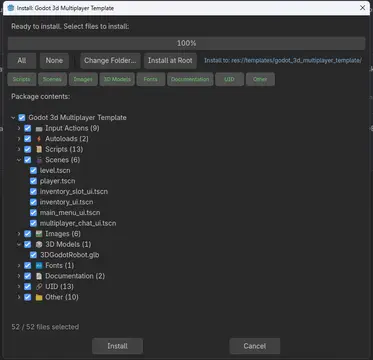
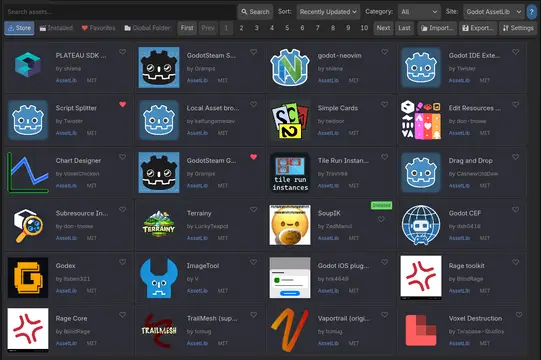
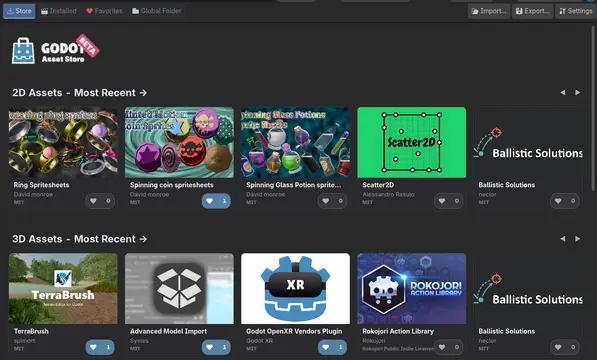
| Multi-Source Browser | Search Godot AssetLib, Godot Store Beta & Godot Shaders in one place |
| One-Click Install | Install addons, templates, or full demo projects with selective import |
| Installed Tracking | See all addons in your project with source matching |
| Global Library | Build a personal collection of reusable assets as .godotpackage files |
| Favorites Sync | Save favorites, synced across all projects |
| Auto-Update | Get notified of new versions automatically |
Browse Multiple Sources
- Godot AssetLib - Official Godot Asset Library
- Godot Store Beta - New Godot store (store-beta.godotengine.org)
- Godot Shaders - Community shaders from godotshaders.com (browse only, redirects to site)
Global Asset Library
Build your personal asset collection:
- Export any folder or addon as a
.godotpackagefile stored locally - Store packages in a central Global Folder
- Install your packages into any project
- Right-click export from FileSystem dock
Smart Installation
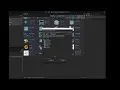
Similar to Unity's package import, you get full control when installing templates or demo projects:
- Choose which files/folders to import with a file tree view
- Filter by file type (Scripts, Scenes, Images, etc.)
- Optionally import input actions and autoloads
- Preview what will be added to your project

Auto-Update
AssetPlus checks for updates at startup and notifies you when a new version is available. Install updates with one click, or disable auto-update in Settings.
Installation
- Download the latest release
- Copy
addons/assetplusto your project'saddonsfolder - Enable in Project Settings > Plugins > AssetPlus
- Access from the top toolbar (next to 2D, 3D, Script)
Quick Start
- Browse - Search assets in the Store tab
- Install - Click any asset, then Install
- Export - Right-click a folder > "Export as .godotpackage"
- Settings - Configure your Global Folder for personal asset library
.godotpackage Format
A portable package format for sharing Godot assets:
package.godotpackage
├── manifest.json    # Metadata (name, version, author, etc.)
├── icon.png         # Optional icon
└── files/           # Package contents
Requirements
- Godot 4.3+
- Editor plugin only (not included in exports)
License
MIT License - See LICENSE
Links
Developed by MoongDevStudio
A unified asset browser and manager for Godot 4.x.
Key features:
• Browse and download from multiple sources (AssetLib, Godot Store Beta, Godot Shaders) in one interface
• Selective file import - choose exactly which files to add, like Unity's package import
• Track all installed addons with automatic source matching
• Build your personal asset library with portable .godotpackage files
• Global folder accessible from any project
• Favorites sync across all your Godot projects
• Auto-update notifications
• Likes synced to a cloud with every plugin users
• Added caching for images in installed and favourites tab
Documentation: https://moongdevstudio.github.io/AssetPlus/
Reviews
Quick Information
AssetPlus - Unified Asset Browser
A unified asset browser and manager for Godot 4.x.Key features:• Browse and download from multiple sources (AssetLib, Godot Store Beta, Godot Shaders) in one interface• Selective file import - choose exactly which files to add, like Unity's package import• Track all installed addons with automatic source matching• Build your personal asset library with portable .godotpackage files• Global folder accessible from any project• Favorites sync across all your Godot projects• Auto-update notifications• Likes synced to a cloud with every plugin users• Added caching for images in installed and favourites tabDocumentation: https://moongdevstudio.github.io/AssetPlus/
Supported Engine Version
4.3
Version String
1.1.2
License Version
MIT
Support Level
community
Modified Date
5 months ago
Git URL
Issue URL