Godot Advanced Logger (C#)
An asset by Shotix
Install Asset
Install via Godot
To maintain one source of truth, Godot Asset Library is just a mirror of the old asset library so you can download directly on Godot via the integrated asset library browser
Quick Information

Godot Advanced Logger (C#)
Elevate your Godot 4.x C# projects with a robust, high-performance, and structured logging framework. Moving beyond standard GD.Print console outputs, this plugin introduces an enterprise-grade logging architecture explicitly designed for the demands of game development.Whether you are debugging a complex combat system or monitoring a live multiplayer server, Godot Advanced Logger provides the clarity and performance you need.------Core Features include:- In-Game Debug Screen: A toggleable, right-aligned overlay to read logs directly inside your standalone game exports. Fully extensible via the IDebugPanel API to add your own custom developer tools.- Zero-Allocation Architecture: Built from the ground up to prevent garbage collector (GC) spikes, ensuring your game maintains stable frame rates even under heavy logging loads. - Structured Data Logging: Go beyond flat text. Log complex data structures and variables as JSON for precise debugging and parsing. - Real-Time Streaming: Seamlessly stream logs in real-time to external dashboards like Seq for advanced filtering, monitoring, and live analytics. - Multi-Channel Output: Route your logs to multiple destinations simultaneously. Console, local files, or remote servers. - Contextual Loggers: Create specialized logger instances (e.g., a CombatLogger) that automatically attach relevant contextual metadata to every log entry. - Zero-Cost Debugging: Debug() calls utilize C#'s [Conditional("DEBUG")] attribute. In your final Release builds, the compiler completely strips these calls, ensuring zero CPU overhead and memory allocation.- Production Safe: Automatically detects Release exports (OS.IsDebugBuild()) and hard-disables developer tools (like the UI and network writers) while intelligently throttling log verbosity based on separate Editor/Release settings.------The framework is highly modular, allowing you to plug in the exact output methods your project requires:- ConsoleWriter: Cleanly formatted, color-coded output directly within the Godot editor console. - FileWriter: Traditional plain-text logs for historical archiving and local debugging. - JsonFileWriter: Machine-readable log files perfect for automated crash analysis and parsing. - SeqHttpWriter: Professional remote logging via HTTP for centralized, live log management.- DebugScreenWriter: Directly writes any log messages into the In-Game Debug Screen.
Supported Engine Version
4.0
Version String
2.0.1
License Version
MIT
Support Level
community
Modified Date
2 months ago
Git URL
Issue URL
Godot Advanced Logger (C#)
Godot Advanced Logger is a robust, high-performance, and structured logging framework designed specifically for Godot 4.x C# projects.
Moving beyond standard GD.Print console outputs, this plugin introduces a standard logging architecture. It is built from the ground up to prevent garbage collector spikes (Zero-Allocation), support structured data (JSON), and stream logs in real-time to external dashboards like Seq.
Key Features
- Zero-Allocation Architecture: Uses
readonly record structand pre-evaluation checks (IsEnabled) to ensure disabled logs consume zero string formatting or memory allocation, preventing GC stutters. - Structured Logging: Stop parsing messy text strings. Send exact data points (e.g.,
attackDamage = 150) via C# Dictionaries, making your logs fully searchable and filterable in external tools like Seq. - Multi-Target Output: Write simultaneously to:
- Godot Console (with Rich Text BBCode colors)
- Text Files (
.txtfor quick reading) - JSON Lines Files (
.jsonlfor programmatic parsing) - Seq HTTP Server (Real-time dashboard streaming)
- Godot UI Integration: Toggle writers and configure API keys directly within Godot's Project Settings. No code changes required.
Installation
- Download the repository.
- Copy the
addons/godot_advanced_loggerdirectory into your project'saddons/folder. - Build your C# solution (
Project -> Tools -> C# -> Build). - Navigate to Project Settings -> Plugins and enable "Godot Advanced Logger".
- Test the plugin with the examples found in the
addons/godot_advanced_logger/examplesdirectory.
Note: This plugin requires a Godot project initialized with C# (.NET) support.
Configuration
Once enabled, you can configure the logger visually. Go to Project Settings -> General -> Addons -> Godot Advanced Logger. Here you can:
- Set the minimum Log Level (e.g., Info, Warning).
- Mute noisy channels.
- Enable/Disable specific Writers (Console, File, JSON, Seq).
- Set your Seq Server URL.
Usage Guide
Basic vs. Structured Logging
The traditional way of logging forces you to bake variables into a string. This is slow and hard to search later.
// BAD: Allocates memory even if Debug is disabled, hard to search later
LogManager.Debug($"Player {playerName} took {damage} damage from {enemy}.");
The Advanced Logger Way: Separate the message from the data.
// GOOD: Clean message, searchable data, zero allocations if Info is muted
LogManager.Info("Player Damaged", new Dictionary<string, object>
{
    { "PlayerName", playerName },
    { "Damage", damage },
    { "EnemyType", enemy }
});
Context Loggers (Best Practice)
For larger projects, create dedicated Loggers for your systems by inheriting from ContextLogger. This encapsulates logic and channels.
using Godot;
using System.Collections.Generic;
using GodotAdvancedLogger; // Adjust namespace to match your project

public class CombatLogger : ContextLogger
{
    // Tag all logs from this class with the "Combat" channel
    public CombatLogger() : base("Combat") { }

    public void LogAttack(string attacker, string target, int damage, bool isCritical)
    {
        // 1. Performance Gate: Abort immediately if this level is muted!
        LogLevel level = isCritical ? LogLevel.Warning : LogLevel.Info;
        if (!IsEnabled(level)) return;

        // 2. Build structured data
        var context = new Dictionary<string, object>
        {
            { "Attacker", attacker },
            { "Target", target },
            { "Damage", damage },
            { "IsCritical", isCritical }
        };

        // 3. Log
        if (isCritical) Warning("Critical Hit Executed", context);
        else Info("Attack Executed", context);
    }
}
Real-Time Analytics with Seq (Highly Recommended)
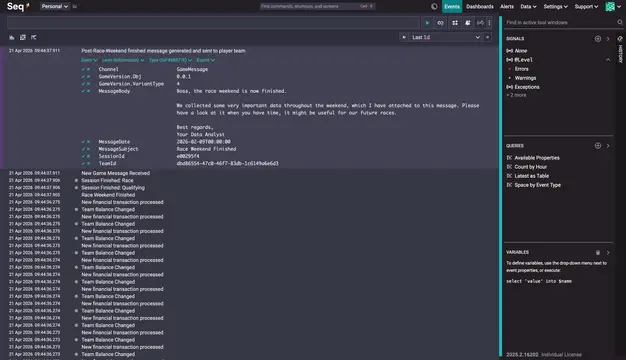
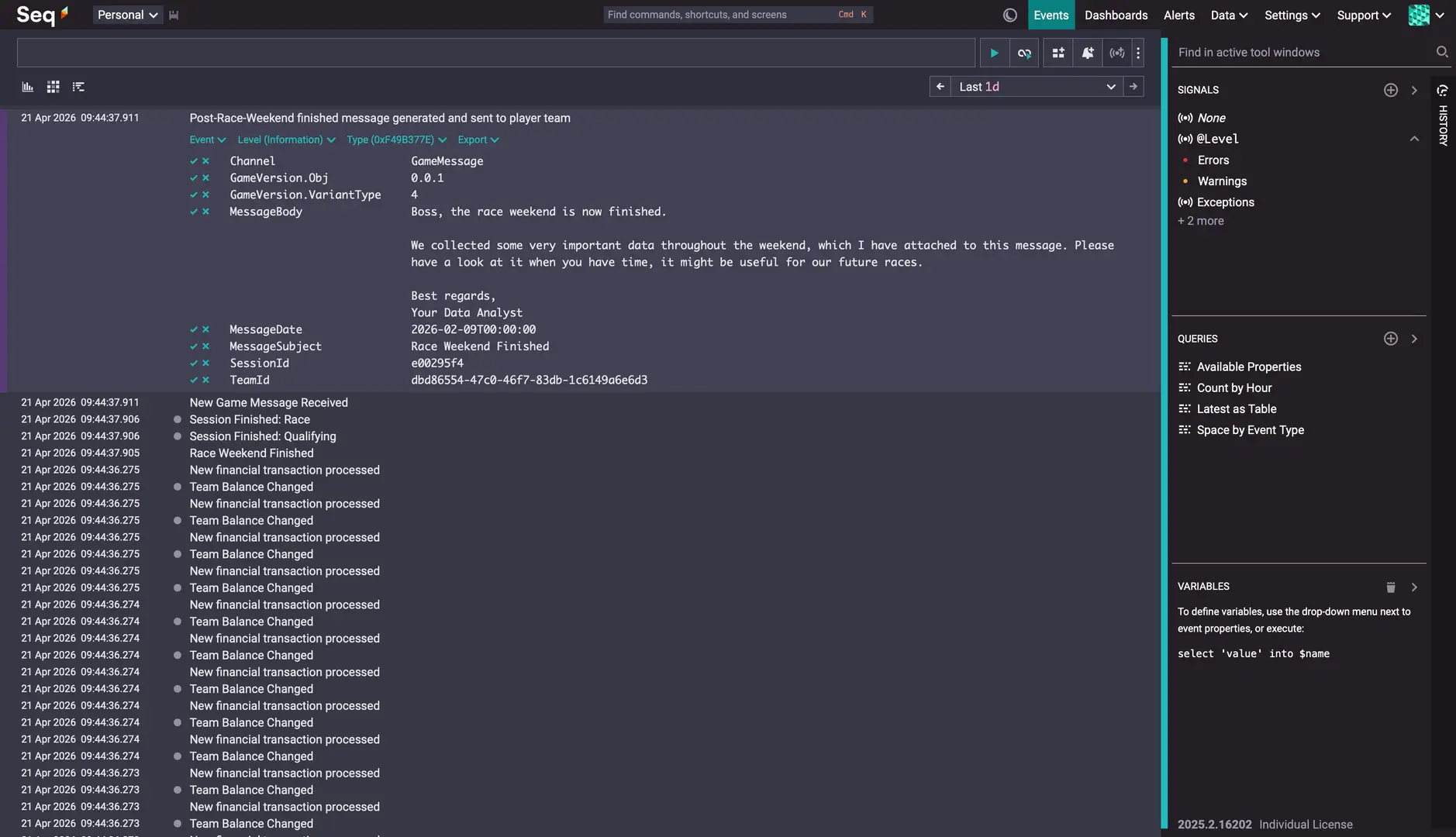
This plugin includes native support for Seq, a free, local log server that acts as a real-time database for your game.
- Start Seq locally via Docker:
docker run \
  --name seq \
  -d \
  --restart unless-stopped \
  -e ACCEPT_EULA=Y \
  -e SEQ_FIRSTRUN_ADMINPASSWORD=<password> \
  -v <local path to store data>:/data \
  -p 5341:80 \
  datalust/seq
- In Godot, go to Project Settings -> Addons -> Godot Advanced Logger and check Enable Seq.
- Run your game and open
http://localhost:5341in your browser. - Watch your logs stream in live. Use the search bar to query your game data instantly:
(e.g.,
Channel = 'Combat' and Damage > 50)
Note: Replace the placeholders <password> and <local path to store data> with your local settings.
License
This project is licensed under the MIT License.
Elevate your Godot 4.x C# projects with a robust, high-performance, and structured logging framework. Moving beyond standard GD.Print console outputs, this plugin introduces an enterprise-grade logging architecture explicitly designed for the demands of game development.
Whether you are debugging a complex combat system or monitoring a live multiplayer server, Godot Advanced Logger provides the clarity and performance you need.
------
Core Features include:
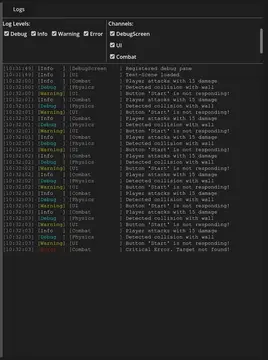
- In-Game Debug Screen: A toggleable, right-aligned overlay to read logs directly inside your standalone game exports. Fully extensible via the IDebugPanel API to add your own custom developer tools.
- Zero-Allocation Architecture: Built from the ground up to prevent garbage collector (GC) spikes, ensuring your game maintains stable frame rates even under heavy logging loads.
- Structured Data Logging: Go beyond flat text. Log complex data structures and variables as JSON for precise debugging and parsing.
- Real-Time Streaming: Seamlessly stream logs in real-time to external dashboards like Seq for advanced filtering, monitoring, and live analytics.
- Multi-Channel Output: Route your logs to multiple destinations simultaneously. Console, local files, or remote servers.
- Contextual Loggers: Create specialized logger instances (e.g., a CombatLogger) that automatically attach relevant contextual metadata to every log entry.
- Zero-Cost Debugging: Debug() calls utilize C#'s [Conditional("DEBUG")] attribute. In your final Release builds, the compiler completely strips these calls, ensuring zero CPU overhead and memory allocation.
- Production Safe: Automatically detects Release exports (OS.IsDebugBuild()) and hard-disables developer tools (like the UI and network writers) while intelligently throttling log verbosity based on separate Editor/Release settings.
------
The framework is highly modular, allowing you to plug in the exact output methods your project requires:
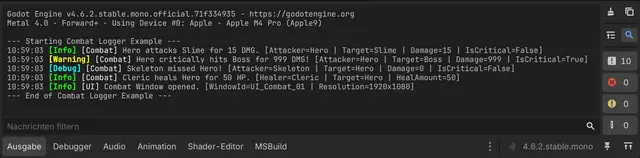
- ConsoleWriter: Cleanly formatted, color-coded output directly within the Godot editor console.
- FileWriter: Traditional plain-text logs for historical archiving and local debugging.
- JsonFileWriter: Machine-readable log files perfect for automated crash analysis and parsing.
- SeqHttpWriter: Professional remote logging via HTTP for centralized, live log management.
- DebugScreenWriter: Directly writes any log messages into the In-Game Debug Screen.
Reviews
Quick Information
Godot Advanced Logger (C#)
Elevate your Godot 4.x C# projects with a robust, high-performance, and structured logging framework. Moving beyond standard GD.Print console outputs, this plugin introduces an enterprise-grade logging architecture explicitly designed for the demands of game development.Whether you are debugging a complex combat system or monitoring a live multiplayer server, Godot Advanced Logger provides the clarity and performance you need.------Core Features include:- In-Game Debug Screen: A toggleable, right-aligned overlay to read logs directly inside your standalone game exports. Fully extensible via the IDebugPanel API to add your own custom developer tools.- Zero-Allocation Architecture: Built from the ground up to prevent garbage collector (GC) spikes, ensuring your game maintains stable frame rates even under heavy logging loads. - Structured Data Logging: Go beyond flat text. Log complex data structures and variables as JSON for precise debugging and parsing. - Real-Time Streaming: Seamlessly stream logs in real-time to external dashboards like Seq for advanced filtering, monitoring, and live analytics. - Multi-Channel Output: Route your logs to multiple destinations simultaneously. Console, local files, or remote servers. - Contextual Loggers: Create specialized logger instances (e.g., a CombatLogger) that automatically attach relevant contextual metadata to every log entry. - Zero-Cost Debugging: Debug() calls utilize C#'s [Conditional("DEBUG")] attribute. In your final Release builds, the compiler completely strips these calls, ensuring zero CPU overhead and memory allocation.- Production Safe: Automatically detects Release exports (OS.IsDebugBuild()) and hard-disables developer tools (like the UI and network writers) while intelligently throttling log verbosity based on separate Editor/Release settings.------The framework is highly modular, allowing you to plug in the exact output methods your project requires:- ConsoleWriter: Cleanly formatted, color-coded output directly within the Godot editor console. - FileWriter: Traditional plain-text logs for historical archiving and local debugging. - JsonFileWriter: Machine-readable log files perfect for automated crash analysis and parsing. - SeqHttpWriter: Professional remote logging via HTTP for centralized, live log management.- DebugScreenWriter: Directly writes any log messages into the In-Game Debug Screen.
Supported Engine Version
4.0
Version String
2.0.1
License Version
MIT
Support Level
community
Modified Date
2 months ago
Git URL
Issue URL