Godot Doctor
An asset by codevogel
Install Asset
Install via Godot
To maintain one source of truth, Godot Asset Library is just a mirror of the old asset library so you can download directly on Godot via the integrated asset library browser

Quick Information


Godot Doctor
A powerful validation plugin for Godot that catches errors before they reach runtime. Validate scenes, nodes, and resources using a declarative, test-driven approach. No @tool required!This version adds some bugfixes and some usage hints in the documentation.This plugin works with pure gdscript, but also supports C#.NOTE FOR GDSCRIPT-only USERS: You can safely uncheck importing the '/godot_doctor/core/c_sharp' and 'godot_doctor/examples/csharp' if you are not using the 'Mono' version of Godot.Key Features- No-code validations- No @tool required - keep gameplay code free of editor logic- Verify type of PackedScene - introduces type safety to PackedScene references- Automatic scene validation - errors appear instantly when saving scenes- Dedicated validation dock - click errors to jump directly to problem nodes- Supports Nodes and Resources - validate both scenes and data assets- Declarative, test-driven syntax - write validations like unit tests- Reusable & nested conditions - scale from simple checks to complex rules- Run on the CLI for integration with your CI/CD pipeline.- Pure gdscript and C# supported New in this version: https://github.com/codevogel/godot_doctor/releases/tag/2.1.3* Full documentation, examples, and setup guide available on GitHub (click the 'VIEW FILES' button)
Supported Engine Version
4.0
Version String
2.1.2
License Version
MIT
Support Level
community
Modified Date
1 month ago
Git URL
Issue URL
Godot Doctor 👨🏻⚕️🩺
A powerful validation plugin for Godot that catches errors before they reach
runtime. Validate scenes, nodes, and resources using a declarative, test-driven
approach. No @tool required!

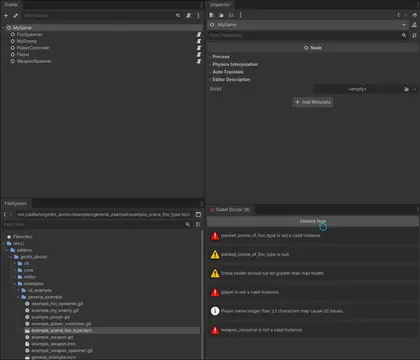
See Godot Doctor in action:

Quickstart 🚀
You can download Godot Doctor directly from the Editor through the Asset Library.
Or, by manual installation:
- Download the source code .zip from the latest release.
- Copy the
addons/godot_doctorfolder to your project'saddons/directory - Enable the plugin in Project Settings > Plugins
- (Optional:) Adjust the settings asset in
addons/godot_doctor/settings.
Table of Contents
- What is Godot Doctor?
- Why Use Godot Doctor?
- Syntax
- Running Godot Doctor on the CLI
- How It Works
- Examples
- Installation
- License
- Contributing, Bug Reports & Feature Requests
What is Godot Doctor?
Godot Doctor is a Godot plugin that validates your scenes and nodes using a declarative, test-driven approach. Instead of writing procedural warning code, you define validation conditions using callables that focus on validation logic first, with error messages as metadata.
Why Use Godot Doctor?
No-code default validations
Realistically, when you add any @export variables, you don't want them to stay
unassigned. Nor do you want to @export a string only for it to stay empty. But
we often forget to assign a value to these. So, new in Godot Doctor v1.1 are
default validation conditions:
Godot Doctor will validate any nodes that have scripts attached to them (and any
opened resource), scan it's @export properties, and automatically reports on
unassigned objects and empty strings, without even needing to write a single
line of validation code!
ℹ️ You can turn off default validations alltogether in the settings asset, or you can add scripts to the ignore list, which will only disable default validations for those specific scripts.
No @tool Required
Unlike
_get_configuration_warnings(),
Godot Doctor works without requiring the
@tool
annotation on your scripts. This means that you no longer have to worry about
your gameplay code being muddied by editor-specific logic.
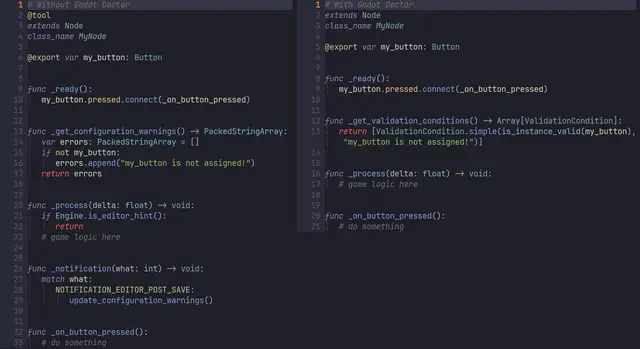
See the difference for yourself:

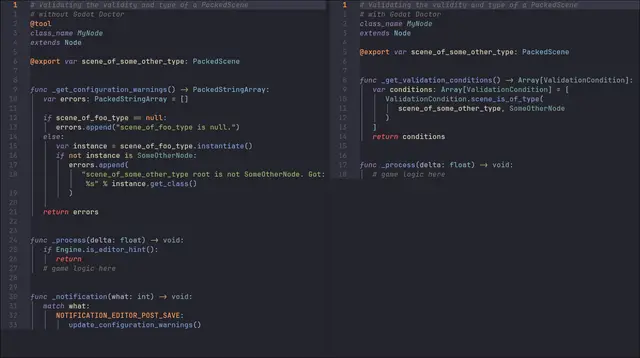
Or how about this:

Our gameplay code stays much more clean and focused!
Verify type of PackedScene
Godot has a problem with PackedScene type safety.
We can not strongly type PackedScenes.
This means that you may want to instantiate a scene that represents a Friend,
but accidentally assign an Enemy scene instead. Oops! Godot Doctor can
validate the type of a PackedScene, ensuring that the root of the scene that
you are instancing is of the expected type (e.g. has a script attached of that
type), before you even run the game.
## Example: A validation condition that checks whether the `PackedScene`
##          variable `scene_of_foo_type` is of type `Foo`.
ValidationCondition.is_scene_of_type(scene_of_foo_type, Foo)
Automatic Scene Validation
Validations run automatically when you save scenes, providing immediate feedback during development. Errors are displayed in a dedicated dock, and you can click on them to navigate directly to the problematic nodes.
Validate Nodes AND Resources
Godot Doctor can not only validate nodes in your scene, but Resource scripts
can define their own validation conditions as well. Very useful for validating
whether your resources have conflicting data (i.e. a value that is higher than
the maximum value), or missing references (i.e. an empty string, or a missing
texture).
Test-Driven Validation
Godot Doctor encourages you to write validation logic that resembles unit tests rather than write code that returns strings containing warnings. This encourages:
- Testable validation logic
- Organized code
- Better maintainability
- Human-readable validation conditions
- Separation of concerns between validation logic and error messages
Declarative Syntax
Where _get_configuration_warnings() makes you write code that generates
strings, Godot Doctor lets you design your validation logic separately from the
error messages, making it easier to read and maintain.
Syntax
ValidationCondition
The core of Godot Doctor is the ValidationCondition class, which takes a
callable and an error message:
# Basic validation condition
var condition = ValidationCondition.new(
    func(): return health > 0,
    "Health must be greater than 0"
)
Optionally, you can also pass one of three severity levels (INFO, WARNING,
ERROR) as a third argument, which will adjust at what level of severity the
error is reported in the Godot Doctor dock:
# Validation condition with severity level
var condition = ValidationCondition.new(
    func(): return health > 0,
    "Health must be greater than 0",
    ValidationCondition.Severity.ERROR
)
Simple validations
For basic boolean validations, use the convenience simple() method, allowing
you to skip the func() wrapper:
# Equivalent to the above, but more concise
var condition = ValidationCondition.simple(
    health > 0,
    "Health must be greater than 0"
)
Predefined Common Validation Conditions
There's also a bunch of often-used validation conditions available as static
methods on the ValidationCondition class, such as is_scene_of_type,
is_instance_valid, is_string_not_empty, and more, which saves you time
writing common validation logic.
You can find them all in
the ValidationCondition class
Reuse validation logic with Callables
Using Callables allows you to reuse common validation methods:
func _is_more_than_zero(value: int) -> bool:
  return value > 0

var condition = ValidationCondition.simple(
  _is_more_than_zero(health),
  "Health must be greater than 0"
)
Abstract Away Complex Logic
Or abstract away complex logic into separate methods:
var condition = ValidationCondition.new(
  complex_validation_logic,
  "Complex validation failed"
)

func complex_validation_logic() -> bool:
 # Complex logic here
Nested Validation Conditions
Making use of variatic typing, Validation conditions can return arrays of other validation conditions, allowing you to nest validation logic where needed:
ValidationCondition.new(
   func() -> Variant:
    if not is_instance_valid(my_resource):
     return false
    return my_resource.get_validation_conditions(),
   "my_resource must be assigned."
  )
Running Godot Doctor on the CLI
Godot Doctor can be run from the command line, allowing you to integrate it into your CI/CD pipeline or run it as a standalone validation tool. While using it in the editor provides real-time feedback, running it on the CLI can be useful for automated checks during development or before commits, ensuring your entire project adheres to your validation rules.
To run Godot Doctor on the CLI:
Create a
GodotDoctorValidationSuiteresource in your project. By default, it will generatively collect all scenes and resources in your project. You can also exclude specific scripts or directories in the suite asset from this collection process, or create multiple custom validation suites that only validate specific scenes or resources.ℹ️ There is an example that goes more in depth on how to set up validation suites.
Assign the suite resource to the
validation_suitesproperty of theGodotDoctorSettingsresource (addons/godot_doctor/settings/godot_doctor_settings.tres).run Godot Doctor on the CLI, use the following command:
godot --headless --editor --quit-after 30 -- --run-godot-doctorℹ️ The
--quit-after 30flag is used to ensure that Godot exits after 30 seconds, just in case there the plugin doesn't initialize properly. You can adjust this timer as needed.
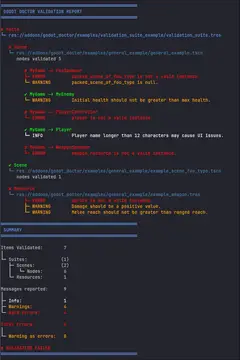
The output is presented in a tree structure, making it easy to identify which scenes and nodes have validation issues:

The CLI output exits with a non-zero status code if any validation conditions fail, making it easy to integrate into CI/CD pipelines.
Currently, there is no proper built-in way to have an EditorPlugin wait for the editor to finish initializing when running in headless mode. There is an open proposal to address this, but until then, timing the run of the CLI is a bit hacky.
So as a workaround, the plugin currently detects this through an internal editor hook (
_set_window_layout). However, this hook is not guaranteed to fire in all environments. For example, on some CI runners there is no saved editor layout, and the_set_window_layoutmay not be called. To handle this, Godot Doctor provides two fallback timer settings in theGodotDoctorSettingsresource (addons/godot_doctor/settings/godot_doctor_settings.tres).fallback_cli_delay_before_startdetermines how long to wait for the editor hook to fire before starting validation regardless of editor initialization, andfallback_cli_delay_before_quitdetermines how long to allow the validation run to execute before force-quitting with exit code1. This ensures that the CLI validation process doesn't hang indefinitely if something goes wrong. (Note that these timeouts are separate from the--quit-afterflag passed to Godot, which is used for when the plugin doesn't initialize at all.) You can adjust these timeouts as needed based on the expected initialization time of your project, to save on runner minutes.
CI/CD Integration
You can integrate Godot Doctor into your CI/CD pipeline (e.g., GitHub Actions, GitLab CI, Jenkins) to automatically validate your project on every push or pull request. This helps catch issues early and maintain code quality across your team.
An example GitHub Actions workflow may look like this:
name: "Godot Doctor"

on:
  # Allow the workflow to be triggered manually from the GitHub Actions tab
  workflow_dispatch:
  # Trigger the workflow on push to any branch
  push:
    branches: ["**"]
  # Trigger the workflow on pull request to any branch
  pull_request:
    branches: ["**"]

jobs:
  # This job runs the Godot Doctor CLI to analyze the project and (optionally) generate a report
  godot-doctor:
    name: "Run Godot Doctor CLI 🩺"
    runs-on: ubuntu-latest
    steps:
      # Checkout the repository to access the Godot project files
      - uses: "actions/[email protected]"
      # Install Godot
      - name: "Install Godot"
        run: |
          GODOT_VERSION="4.6.1"
          wget -q "https://github.com/godotengine/godot/releases/download/${GODOT_VERSION}-stable/Godot_v${GODOT_VERSION}-stable_linux.x86_64.zip"
          unzip -q "Godot_v${GODOT_VERSION}-stable_linux.x86_64.zip"
          mv "Godot_v${GODOT_VERSION}-stable_linux.x86_64" /usr/local/bin/godot
          chmod +x /usr/local/bin/godot
      # Import the project first to ensure that it is ready for analysis.
      - name: Import project
        # This quits as soon as the project is imported, which is sufficient
        # for preparing the project for analysis
        # We use `--quit-after 30` as a failsafe so the runner doesn't hang
        # indefinitely if something goes wrong during importing
        # You may want to adjust this timeout if you find that your project
        # takes longer than 30 seconds to import.
        run: godot --headless --editor --quit --quit-after 30
      - name: "Run Godot Doctor CLI"
        # Now we run Godot Doctor again, this time running Godot Doctor through the CLI.
        # Again, we use `--quit-after 30` as a failsafe to prevent hanging indefinitely.
        run: godot --headless --editor --quit-after 30 -- --run-godot-doctor
      # Optional: When using the `enable_xml_report` setting, you can upload
      # the generated XML report as an artifact for later analysis
      - name: "Upload Godot Doctor Report"
        # Run regardless of the success or failure of the previous step,
        # as we want to know the results of Godot Doctor even if
        # it finds issues in the project, and thus fails the previous step.
        if: always()
        uses: actions/upload-artifact@v7
        with:
          # The name of the artifact can be anything you like.
          # Here we use "godot-doctor-report" for clarity.
          name: godot-doctor-report
          # The path to the generated XML report.
          # This should match the path you configured in the settings resource.
          path: tests/reports/godot_doctor_report.xml
      # Optional: You can also summarise the report in the workflow logs for a quick overview.
      # (See the next section 'Generating a JUnit-like XML Report' for more details
      #  on the XML report and how to generate it.)
      - name: Summarise report
        if: always()
        # The contents of this script can be found in the `cli_example` example.
        run:
          python3 .github/workflows/scripts/godot_doctor_job_summary_reporter.py
Placing this file at .github/workflows/godot_doctor.yaml in your repository
will set up the workflow to run on every push and pull request, installing
Godot, importing the project, and executing Godot Doctor in headless mode. If
any validation conditions fail, the workflow will exit with a non-zero status,
causing the check to fail and alerting the developers to the issues that need to
be addressed.
You can setup GitHub to require this check to pass before allowing pull requests to be merged, ensuring that all code merged into your main branches adheres to your validation rules.
Generating a JUnit-like XML Report
In addition to the console output, you can configure Godot Doctor to generate a JUnit-like XML report of the validation results. This makes it easier to parse the results of the report in later stages of your CI/CD pipeline, such as generating a Job Summary that shows the validation results in a human-readable format directly in the GitHub Actions UI. (An example of such a script is found in the cli_example.)
To enable XML report generation, set the export_xml_report property to true
in the GodotDoctorSettings resource. Optionally, you can also specify the
output directory and filename for the XML report using the
xml_report_output_dir (default: res://tests/reports/) and
xml_report_filename (default: godot_doctor_report.xml). properties.
ℹ️ Don't forget to add the output directory to your
.gitignore, as you likely don't want to commit generated reports to your repository.
The XML report option will generate a report as such:
<?xml version="1.0" encoding="UTF-8"?>
<testsuites tests="7" messages="9" failures="8" harderrors="4" warnings="4" infos="1" timestamp="2026-03-21T12:21:11">
  <testsuite name="example_validation_suite.tres" path="res://addons/godot_doctor/examples/cli_example/example_validation_suite.tres" tests="7" messages="9" failures="8" harderrors="4" warnings="4" infos="1">
    <testcase name="general_example.tscn" path="res://addons/godot_doctor/examples/general_example/general_example.tscn" type="scene" tests="5" messages="6" failures="5" harderrors="3" warnings="2" infos="1">
      <node name="FooSpawner" path="MyGame/FooSpawner" messages="2" failures="2" harderrors="1" warnings="1" infos="0">
        <harderror>packed_scene_of_foo_type is not a valid instance.</harderror>
        <warning type="promoted_to_error">packed_scene_of_foo_type is null.</warning>
      </node>
      <node name="MyEnemy" path="MyGame/MyEnemy" messages="1" failures="1" harderrors="0" warnings="1" infos="0">
        <warning type="promoted_to_error">Initial health should not be greater than max health.</warning>
      </node>
      <node name="PlayerController" path="MyGame/PlayerController" messages="1" failures="1" harderrors="1" warnings="0" infos="0">
        <harderror>player is not a valid instance.</harderror>
      </node>
      <node name="Player" path="MyGame/Player" messages="1" failures="0" harderrors="0" warnings="0" infos="1">
        <info>Player name longer than 12 characters may cause UI issues.</info>
      </node>
      <node name="WeaponSpawner" path="MyGame/WeaponSpawner" messages="1" failures="1" harderrors="1" warnings="0" infos="0">
        <harderror>weapon_resource is not a valid instance.</harderror>
      </node>
    </testcase>
    <testcase name="example_scene_foo_type.tscn" path="res://addons/godot_doctor/examples/general_example/example_scene_foo_type.tscn" type="scene" tests="1" messages="0" failures="0" harderrors="0" warnings="0" infos="0">
    </testcase>
    <testcase name="example_weapon.tres" path="res://addons/godot_doctor/examples/general_example/example_weapon.tres" type="resource" tests="1" messages="3" failures="3" harderrors="1" warnings="2" infos="0">
      <resource name="example_weapon.tres" path="res://addons/godot_doctor/examples/general_example/example_weapon.tres" messages="3" failures="3" harderrors="1" warnings="2" infos="0">
        <harderror>sprite is not a valid instance.</harderror>
        <warning type="promoted_to_error">Damage should be a positive value.</warning>
        <warning type="promoted_to_error">Melee reach should not be greater than ranged reach.</warning>
      </resource>
    </testcase>
  </testsuite>
</testsuites>
The xml report is JUnit-like, meaning it follows a structure somewhat
similar to the XML reports generated by testing frameworks like JUnit. Godot
Doctor takes some liberties with the structure to better fit the validation
context, so here's a breakdown of the structure:
- The top-level element is
<testsuites>, which collects all the validation suites that were run. - Each
<testsuite>element represents aGodotDoctorValidationSuiteresource, tallying up the statistics for all the scenes and resources that were validated as part of that suite. Thenameattribute corresponds to the name of the suite resource, and thepathattribute indicates the file path to that resource. - Inside each
<testsuite>, there are<testcase>elements, which represent individual scenes or resources that were validated. Thenameattribute is the name of the scene or resource, thepathattribute is the file path to that scene or resource, and thetypeattribute indicates whether it's a scene or a resource. - Within each
<testcase>, there are either<node>elements or<resource>elements, depending on thetypeof the testcase.<node>elements represent individual nodes in a scene that had validation messages reported. Thenameattribute is the name of the node, and thepathattribute is the node's path within the scene.<resource>elements represent individual resources that had validation messages reported. Thenameattribute is the name of the resource, and thepathattribute is the file path to that resource.
- Inside each
<node>or<resource>, there are<harderror>,<warning>, and<info>elements, which represent the individual validation messages that were reported for that node or resource. The text content of these elements is the error message associated with the validation condition that failed. - Each
<testsuites>,<testsuite>,<testcase>,<node>, and<resource>element includes attributes that tally up the total number of tests, messages, failures, hard errors, warnings, and infos that were reported at that level of the hierarchy.
How It Works
- Automatic Discovery: When you save a scene, Godot Doctor scans all nodes
for
@exportproperties and a_get_validation_conditions()method - Instance Creation: For non-
@toolscripts, temporary instances are created to run validation logic - Condition Evaluation: Each validation condition's callable is executed
- Error Reporting: Failed conditions display their error messages in the Godot Doctor dock
- Navigation: Click on errors in the dock to navigate directly to the problematic nodes
Examples
There are many examples available that help you better understand how to use Godot Doctor in your project, and how to write validation conditions for different use cases. You can find them all in the examples README.
Installation
- Copy the
addons/godot_doctorfolder to your project'saddons/directory - Enable the plugin in Project Settings > Plugins
- The Godot Doctor dock will appear in the editor's left panel
use_default_validationsis on by default in the settings resource (addons/godot_doctor/settings/godot_doctor_settings.tres), so it will start reporting any of the default validations as soon as you save a scene.- Start adding custom validations by adding a
_get_validation_conditions()method to your scripts, then save your scenes to see validation results!
License
Godot Doctor is released under the MIT License. See the LICENSE file for details.
Attribution
If you end up using Godot Doctor in your project, a line in your credits would be very much appreciated! 🐦
Contributing, Bug Reports & Feature Requests
Godot Doctor is open-source and welcomes any contributions! Feel free to open issues or submit pull requests on GitHub.
A powerful validation plugin for Godot that catches errors before they reach runtime. Validate scenes, nodes, and resources using a declarative, test-driven approach.
No @tool required!
This version adds some bugfixes and some usage hints in the documentation.
This plugin works with pure gdscript, but also supports C#.
NOTE FOR GDSCRIPT-only USERS: You can safely uncheck importing the '/godot_doctor/core/c_sharp' and 'godot_doctor/examples/csharp' if you are not using the 'Mono' version of Godot.
Key Features
- No-code validations
- No @tool required - keep gameplay code free of editor logic
- Verify type of PackedScene - introduces type safety to PackedScene references
- Automatic scene validation - errors appear instantly when saving scenes
- Dedicated validation dock - click errors to jump directly to problem nodes
- Supports Nodes and Resources - validate both scenes and data assets
- Declarative, test-driven syntax - write validations like unit tests
- Reusable & nested conditions - scale from simple checks to complex rules
- Run on the CLI for integration with your CI/CD pipeline.
- Pure gdscript and C# supported
New in this version: https://github.com/codevogel/godot_doctor/releases/tag/2.1.3
* Full documentation, examples, and setup guide available on GitHub (click the 'VIEW FILES' button)
Reviews
Quick Information
Godot Doctor
A powerful validation plugin for Godot that catches errors before they reach runtime. Validate scenes, nodes, and resources using a declarative, test-driven approach. No @tool required!This version adds some bugfixes and some usage hints in the documentation.This plugin works with pure gdscript, but also supports C#.NOTE FOR GDSCRIPT-only USERS: You can safely uncheck importing the '/godot_doctor/core/c_sharp' and 'godot_doctor/examples/csharp' if you are not using the 'Mono' version of Godot.Key Features- No-code validations- No @tool required - keep gameplay code free of editor logic- Verify type of PackedScene - introduces type safety to PackedScene references- Automatic scene validation - errors appear instantly when saving scenes- Dedicated validation dock - click errors to jump directly to problem nodes- Supports Nodes and Resources - validate both scenes and data assets- Declarative, test-driven syntax - write validations like unit tests- Reusable & nested conditions - scale from simple checks to complex rules- Run on the CLI for integration with your CI/CD pipeline.- Pure gdscript and C# supported New in this version: https://github.com/codevogel/godot_doctor/releases/tag/2.1.3* Full documentation, examples, and setup guide available on GitHub (click the 'VIEW FILES' button)
Supported Engine Version
4.0
Version String
2.1.2
License Version
MIT
Support Level
community
Modified Date
1 month ago
Git URL
Issue URL