Procedural PBR Texture Generators
An asset by Whappens
Install Asset
Install via Godot
To maintain one source of truth, Godot Asset Library is just a mirror of the old asset library so you can download directly on Godot via the integrated asset library browser
Quick Information

Procedural PBR Texture Generators
Lightweight, zero-bloat CLI utilities written in Python that procedurally generate seamless, tileable PBR (Physically Based Rendering) texture maps for realistic stylized water and clouds.
Supported Engine Version
4.0
Version String
1.0
License Version
MIT
Support Level
community
Modified Date
8 hours ago
Git URL
Issue URL
Procedural PBR Texture Generators for Godot
Lightweight, zero-bloat CLI utilities written in Python that procedurally generate seamless, tileable PBR (Physically Based Rendering) texture maps for realistic stylized water and clouds. Designed to plug directly into the Godot Engine material pipeline.

🌊 Map Output Features
The suite consists of independent generator scripts that output essential map variants structured around standard modern game engine workflows:
1. Water Generator (generate_water_pbr.py)
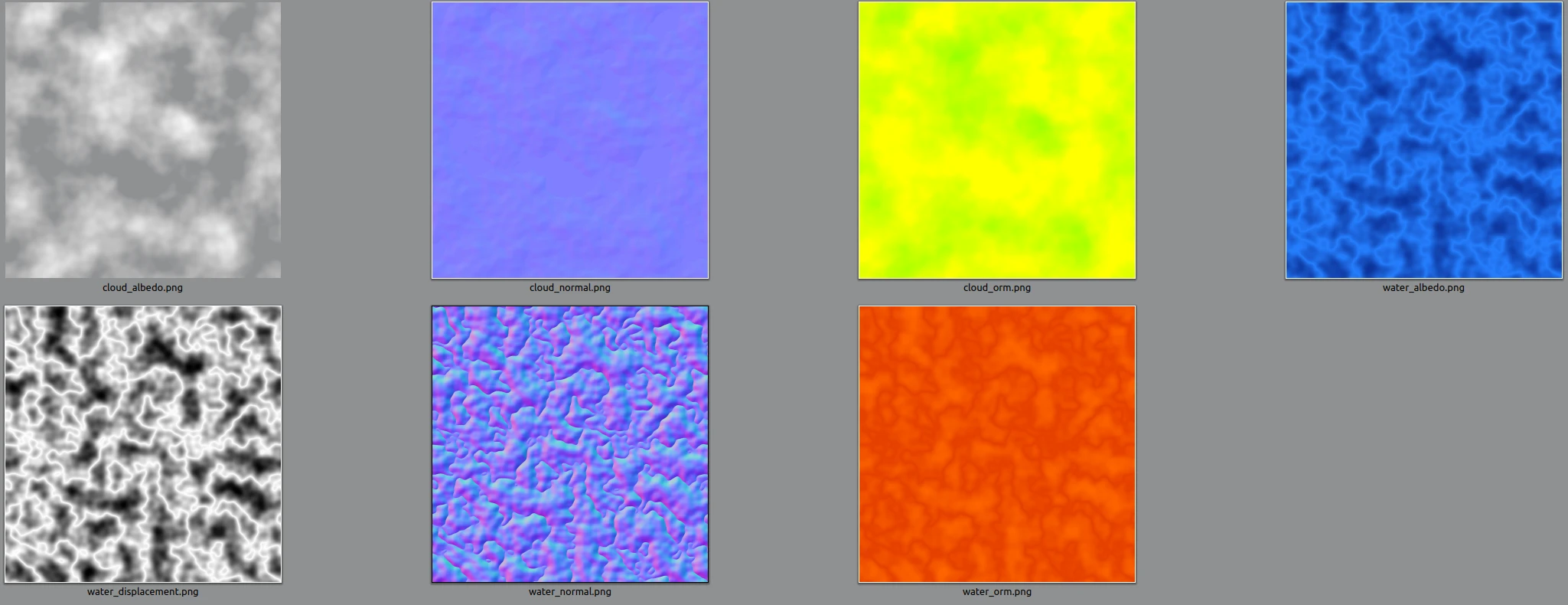
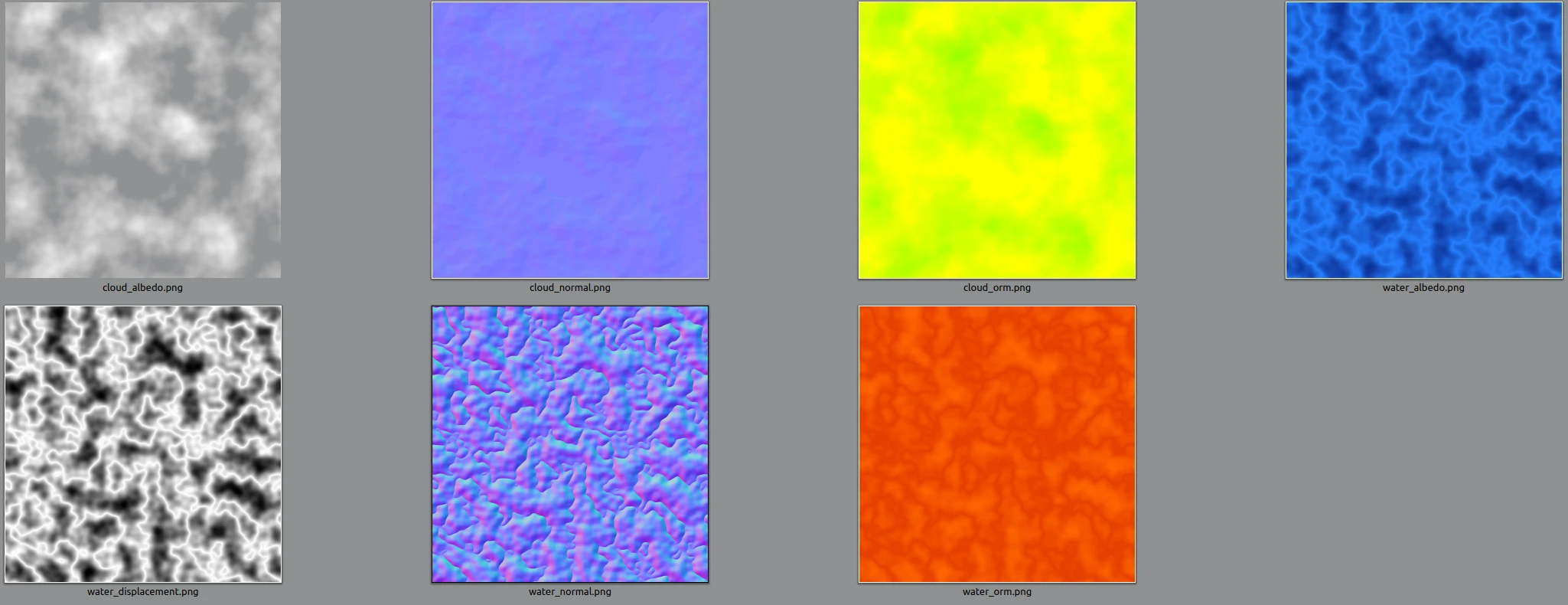
water_albedo.png: Deep liquid blue base layers with procedurally shaded wave crest accents.water_normal.png: High-frequency ripples calibrated specifically for Godot's OpenGL normal format (+Y up, +X right).water_orm.png: Channel-packed data (Red = AO, Green = Roughness, Blue = Metallic) optimized to keep assets highly performant.water_displacement.png: Sharp greyscale height values perfect for driving vertex displacement and wave vertex shaders.
2. Cloud Generator (generate_clouds_pbr.py)
cloud_albedo.png: A solid white base color map equipped with a custom Perlin-driven Alpha transparency channel.cloud_normal.png: Smooth gradient directional maps calculated for light-scattering edge shadows.cloud_orm.png: Channel-packed values specifying fully rough, completely non-metallic structures with baked soft ambient occlusion.
🛠️ Installation and Prerequisites
These tools require Python 3.x and rely on two common array and image processing libraries.
1. Install Dependencies
Open your terminal or command prompt and run:
pip install numpy pillow
2. Download the Generators
Save both Python scripts (generate_water_pbr.py and generate_clouds_pbr.py) into your local tools directory.
🚀 Execution Guide
Run the scripts directly via your command line interface. Both utilities support instant target size scaling using a positional parameter variable:
Generate Water Textures
# Default 2K (2048px)
python generate_water_pbr.py

# Low Res 1K (1024px)
python generate_water_pbr.py 1k

# High Res 4K (4096px)
python generate_water_pbr.py 4k
Generate Cloud Textures
# Default 2K (2048px)
python generate_clouds_pbr.py

# Low Res 1K (1024px)
python generate_clouds_pbr.py 1k

# High Res 4K (4096px)
python generate_clouds_pbr.py 4k
🎮 Setting Up in Godot Engine
- Drag and drop the generated
.pngassets straight into your Godot project file system. - Create a new StandardMaterial3D or ORMMaterial3D on your mesh surface.
- Assign the textures to their designated visual channels:
- Albedo: Assign
water_albedo.pngorcloud_albedo.png. (For clouds, ensure the texture import flags have transparency enabled). - ORM Map: If using an
ORMMaterial3D, assign the_orm.pngmap to the ORM slot. Ensure channel mapping settings match Red=AO, Green=Roughness, Blue=Metallic. - Normal Map: Enable the Normal property slot and assign the matching
_normal.pngfile.
- Albedo: Assign
- Optional: To make textures seamless across large fields, enable UV1/UV2 Triplanar Mapping in the material settings, or change the UV offset values via a script to continuously animate the surfaces over time.
📄 License
This generator tool suite is released under the MIT License. Feel free to use, modify, and distribute it across any personal, open-source, or commercial video game project pipelines.
Lightweight, zero-bloat CLI utilities written in Python that procedurally generate seamless, tileable PBR (Physically Based Rendering) texture maps for realistic stylized water and clouds.
Reviews
Quick Information
Procedural PBR Texture Generators
Lightweight, zero-bloat CLI utilities written in Python that procedurally generate seamless, tileable PBR (Physically Based Rendering) texture maps for realistic stylized water and clouds.
Supported Engine Version
4.0
Version String
1.0
License Version
MIT
Support Level
community
Modified Date
8 hours ago
Git URL
Issue URL