Blobsmith Autotile Wirer
An asset by blobsmith
Install Asset
Install via Godot
To maintain one source of truth, Godot Asset Library is just a mirror of the old asset library so you can download directly on Godot via the integrated asset library browser
Quick Information

Blobsmith Autotile Wirer
Turn a 47-blob autotile tilesheet into a fully wired Godot 4 TileSet in one click: terrain set configured (Match Corners and Sides), terrain peering bits set on all 47 tiles, optional full-square collision shapes (physics layer 0). Also supports 16-tile sides-only sheets (Match Sides).Usage: Project > Tools > Blobsmith Autotile Wirer... — pick your tilesheet PNG (tile size and mode are auto-detected from the image), click Generate. A ready-to-paint .tres appears next to the PNG: add a TileMapLayer, set its TileSet, and paint in the Terrains tab.Sheet layout: 8 columns, ascending canonical-mask order (full spec + example sheet in the repo). Need the sheet itself? Blobsmith (https://blobsmith.itch.io/blobsmith) draws the complete 47-tile sheet from 6 base tiles and exports this exact layout; there is a free in-browser version.Verified against Godot 4.7 stable with a headless test suite included in the repo (mask tables, TileSet structure, save/load round-trip, and real TileMapLayer terrain painting).
Supported Engine Version
4.7
Version String
1.0.0
License Version
MIT
Support Level
community
Modified Date
6 hours ago
Git URL
Issue URL
Blobsmith Autotile Wirer (Godot 4)
Turn a 47-blob autotile sheet into a fully wired Godot 4 TileSet in one click — terrain set created, peering bits set on all 47 tiles, optional collision shapes. No more clicking terrain bits by hand, tile by tile.
Works with Godot 4.x (verified against 4.7 stable by an automated headless test suite in this repo).

What it does
You give it a tilesheet PNG in the 47-blob layout (8 columns, ascending-mask order — the layout Blobsmith exports, spec below). It gives you a .tres TileSet where:
- terrain set 0 is configured (Match Corners and Sides, or Match Sides for 16-tile sheets)
- every tile has its terrain peering bits already set
- optionally every tile gets a full-square collision polygon (physics layer 0)
Add a TileMapLayer, set the TileSet, open the Terrains tab and paint. Done.
Install
- Copy
addons/blobsmith_wirer/into your project'saddons/folder (or install from the Godot Asset Library). - Enable it: Project → Project Settings → Plugins → Blobsmith Autotile Wirer.
Use
- Put your tilesheet PNG anywhere in the project.
- Project → Tools → Blobsmith Autotile Wirer…
- Pick the PNG — tile size and mode are auto-detected from the image dimensions.
- Click Generate TileSet → a
<name>_tileset.tresappears next to the PNG.
Sheet layout spec
- 47-blob: 8 columns × 6 rows. Tiles ordered by ascending canonical neighbor mask, where
N=1, NE=2, E=4, SE=8, S=16, SW=32, W=64, NW=128and a corner bit only counts when both adjacent side bits are present. Tile 0 (mask 0) is the "island" tile; the last tile (mask 255) is the full interior. - 16-tile sides-only: 8 columns × 2 rows, ascending mask over
N/E/S/W.
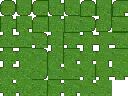
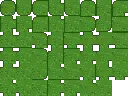
The included examples/grass_47blob_16px.png is a valid 47-blob sheet you can test with.

Don't have a 47-tile sheet?
That's the tedious part — drawing 47 tiles. Blobsmith generates the whole sheet from just 6 base tiles you draw (or import from an RPG Maker A2-style block), with a live autotile playground, and exports this exact layout — plus the wired .tres directly, and Tiled .tsx. There's a free in-browser version to try.
Verifying
The test suite runs the real engine headless:
godot --headless --path test-project --script verify_addon.gd
It asserts the mask tables, layout detection, TileSet structure, save/load round-trip, and that terrain painting on a TileMapLayer resolves interior/edge/island tiles correctly.
License
MIT — see LICENSE.
Turn a 47-blob autotile tilesheet into a fully wired Godot 4 TileSet in one click: terrain set configured (Match Corners and Sides), terrain peering bits set on all 47 tiles, optional full-square collision shapes (physics layer 0). Also supports 16-tile sides-only sheets (Match Sides).
Usage: Project > Tools > Blobsmith Autotile Wirer... — pick your tilesheet PNG (tile size and mode are auto-detected from the image), click Generate. A ready-to-paint .tres appears next to the PNG: add a TileMapLayer, set its TileSet, and paint in the Terrains tab.
Sheet layout: 8 columns, ascending canonical-mask order (full spec + example sheet in the repo). Need the sheet itself? Blobsmith (https://blobsmith.itch.io/blobsmith) draws the complete 47-tile sheet from 6 base tiles and exports this exact layout; there is a free in-browser version.
Verified against Godot 4.7 stable with a headless test suite included in the repo (mask tables, TileSet structure, save/load round-trip, and real TileMapLayer terrain painting).
Reviews
Quick Information
Blobsmith Autotile Wirer
Turn a 47-blob autotile tilesheet into a fully wired Godot 4 TileSet in one click: terrain set configured (Match Corners and Sides), terrain peering bits set on all 47 tiles, optional full-square collision shapes (physics layer 0). Also supports 16-tile sides-only sheets (Match Sides).Usage: Project > Tools > Blobsmith Autotile Wirer... — pick your tilesheet PNG (tile size and mode are auto-detected from the image), click Generate. A ready-to-paint .tres appears next to the PNG: add a TileMapLayer, set its TileSet, and paint in the Terrains tab.Sheet layout: 8 columns, ascending canonical-mask order (full spec + example sheet in the repo). Need the sheet itself? Blobsmith (https://blobsmith.itch.io/blobsmith) draws the complete 47-tile sheet from 6 base tiles and exports this exact layout; there is a free in-browser version.Verified against Godot 4.7 stable with a headless test suite included in the repo (mask tables, TileSet structure, save/load round-trip, and real TileMapLayer terrain painting).
Supported Engine Version
4.7
Version String
1.0.0
License Version
MIT
Support Level
community
Modified Date
6 hours ago
Git URL
Issue URL