Scene Paletter
An asset by Flopper
Install Asset
Install via Godot
To maintain one source of truth, Godot Asset Library is just a mirror of the old asset library so you can download directly on Godot via the integrated asset library browser
Quick Information

Scene Paletter
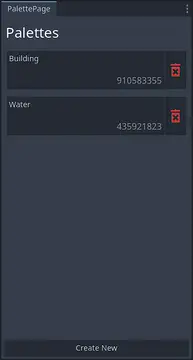
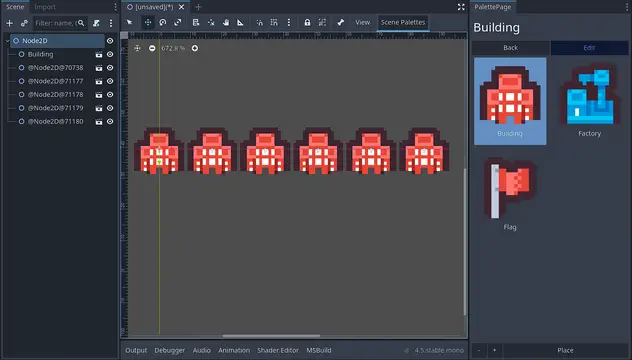
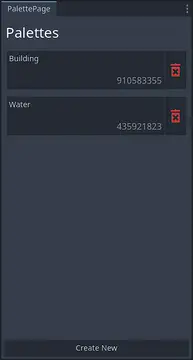
A Godot editor plugin that provides a palette-based workflow for rapidly placing frequently-used scenes into your levels. Select scenes from customizable palettes and place them with automatic position extrapolation - perfect for level design, prototyping, and repetitive scene placement tasks. It works with 2D and 3D.**Features:**- **Multiple Palettes:** Create and manage multiple scene collections for different workflows- **2D & 3D Support:** Works seamlessly with both Node2D and Node3D scenes- **Smart Placement:** Automatic position and rotation extrapolation based on previously placed nodes for predictable spacing- **Preview Generation:** Real-time preview images for all scenes in your palettes- **Flexible Layout:** Adjustable grid columns and scroll position preservation- **Comprehensive Error Handling:** Detailed logging and graceful failure recovery- **Easy Scene Management:** Add scenes via file dialog, edit palettes on the fly, batch delete selections**Perfect for:**- Level designers who repeatedly place the same scenes- Rapid prototyping workflows- Tileset-style placement of 3D assets- Any project requiring frequent scene instantiationFully documented codebase for easy extension and customization.
Supported Engine Version
4.7
Version String
0.1.3
License Version
MIT
Support Level
community
Modified Date
4 days ago
Git URL
Issue URL
Scene Paletter
A Godot 4.5 editor plugin for rapid scene placement using customizable palettes. Perfect for level design, prototyping, and any workflow requiring frequent scene instantiation.
 Quick scene placement with automatic position extrapolation
Note: Demo uses assets from Kenney Tiny Battle Pack (Creative Commons CC0).
Features
- 🎨 Multiple Palettes - Organize scenes into collections for different workflows
- 🔄 2D & 3D Support - Seamlessly handles both Node2D and Node3D scenes
- 📍 Smart Placement - Automatic position extrapolation based on previously placed nodes
- 👁️ Live Previews - Real-time preview generation for all palette scenes
- ⚡ Fast Workflow - Keyboard shortcuts and streamlined UI for rapid placement
- 🛠️ Easy Management - Add, remove, and organize scenes with intuitive controls
- 📝 Fully Documented - Complete XML documentation for all classes and methods
Installation
From Godot Asset Library (Recommended)
- Open Godot Editor
- Go to AssetLib tab
- Search for "Scene Paletter"
- Click Download → Install
- Enable the plugin in Project Settings → Plugins
Manual Installation
- Download the latest release from Releases
- Extract the
addons/scene_paletterfolder to your project'saddons/directory - Enable the plugin in Project Settings → Plugins
Quick Start
Creating Your First Palette
Open the Plugin
- After enabling, Scene Paletter appears as a dock in the editor
- Default location: Bottom panel or right dock area
Create a Palette
- Click the "Create Palette" button
- Give it a descriptive name (e.g., "Level Objects", "Enemies", "Props")
Add Scenes
- Click "Add Scenes" button
- Select
.tscnfiles from your project - Preview images generate automatically
Start Placing
- Select a scene from your palette
- Click "Place" to instantiate it in the editor
- Each placement automatically calculates the next position based on the previous two placements
Placement Behavior
First placement: Uses parent node's position
Second placement: Uses first node's position
Third+ placement: Extrapolates position using: position = 2 × last - previous
This creates predictable, evenly-spaced placement perfect for laying out level elements.
Usage
Managing Palettes
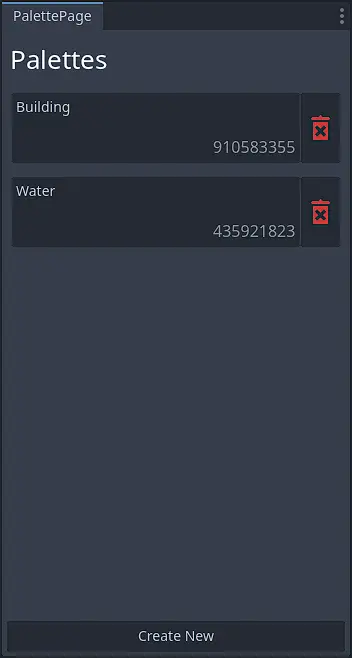
Create Palette
- Click "Create Palette" on the palette selection page
- Automatically assigns a unique ID
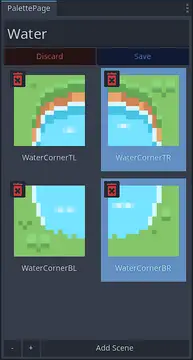
Edit Palette
- Select a palette → Click "Edit"
- Rename, add, or remove scenes
- Multi-select scenes for batch deletion
Delete Palette
- Click the delete button next to a palette
- Confirms before deletion
Placing Scenes
Basic Placement
- Select a palette
- Click a scene to select it
- Click "Place" button (or use keyboard shortcut)
- Scene instantiates at calculated position
Advanced Tips
- Select a parent node before placing to control hierarchy
- Place under 2D/3D scene roots for proper type handling
- Placed nodes automatically get proper owner assignment for scene saving
Customization
Grid Layout
- Use +/- buttons to adjust column count
- Configured in
plugin.cfg:
  [ui]
  min_columns = 1
  max_columns = 6
  columns = 2
Preview Settings
- Adjust preview resolution and transparency:
  [ui]
  preview_resolution_x = 256
  preview_resolution_y = 256
  preview_2d_transparent = true
  preview_3d_transparent = false
Configuration
Edit addons/scene_paletter/plugin.cfg to customize:
[file]
palette_path = "res://addons/scene_paletter/palettes/"
file_extension = ".json"
id_start = 10000
id_end = 99999

[page]
pages = {...}  # Internal page definitions
widgets = {...}  # Internal widget definitions

[ui]
min_columns = 1
max_columns = 6
columns = 2
preview_resolution_x = 256
preview_resolution_y = 256
preview_margin_x = 10.0
preview_margin_y = 10.0
preview_2d_transparent = true
preview_3d_transparent = false
Configuration Options
| Option | Description | Default |
|---|---|---|
palette_path |
Directory where palettes are saved | res://addons/scene_paletter/palettes/ |
file_extension |
Palette file extension | .json |
id_start / id_end |
Range for unique palette ID generation | 10000 - 99999 |
min_columns / max_columns |
Grid column constraints | 1 - 6 |
columns |
Default column count | 2 |
preview_resolution_x/y |
Preview image size | 256x256 |
preview_margin_x/y |
Camera margin multiplier for previews | 1.05 |
preview_2d/3d_transparent |
Transparent preview backgrounds | true / false |
Architecture
Built using a modular architecture with clear separation of concerns:
Scene Paletter/
├── Core/                   # Base classes and utilities
│   ├── Page<T>.cs              # Generic page base class
│   ├── PageDock.cs             # Page container management
│   └── ExceptionHandler.cs     # Centralized error handling
│
├── Management/             # System management
│   ├── ConfigLoader.cs         # Configuration loading
│   ├── DockManager.cs          # UI dock management
│   └── SceneLoader.cs          # Scene resource loading
│
├── Pages/                  # UI pages
│   ├── PalettePage.cs          # Palette selection
│   ├── PlacingPage.cs          # Scene placement
│   └── EditingPage.cs          # Palette editing
│
├── Widgets/                    # Reusable UI components
├── Tools/                      # Utility classes
└── Plugin.cs                   # Main plugin entry point
Key Design Patterns
- Generic Page System: Type-safe data passing between pages
- Centralized Error Handling: Non-throwing error logging via
ExceptionHandler - Resource Management: Proper disposal and lifecycle management
- Preview Caching: Asynchronous preview generation with caching
Extending the Plugin
Creating Custom Pages
using Addons.ScenePaletter.Core;

public struct MyPageData {
    public string someData;
}

[Tool]
public partial class MyPage : Page<MyPageData>
{
    public override void Initialize()
    {
        // Access data via this.data
        // Access plugin via this.plugin
        // Access dock via this.dock

        Title = "My Custom Page";
        // ... setup your UI
    }
}
Add to plugin.cfg:
[page]
pages = {
    "MyPage": "uid://your_scene_uid"
}
Adding Configuration Sections
- Add properties to
ConfigLoader.cs - Create a
LoadYourSection()method - Call it from
Init()inside theSafeExecuteblock - Add corresponding section to
plugin.cfg
See ConfigLoader.cs for examples.
Troubleshooting
Plugin doesn't appear after enabling
- Restart Godot Editor
- Check console for error messages
- Verify
plugin.cfgexists and is valid
Scenes don't place correctly
- Ensure you're placing under a Node2D or Node3D parent
- Check that selected scenes match the parent type (2D → 2D, 3D → 3D)
- Verify the edited scene root is valid
Previews not generating
- Check console for resource loading errors
- Verify scene paths in palette are valid UIDs
- Ensure preview resolution settings are reasonable (<1024px)
Palettes not saving
- Check write permissions for
palette_pathdirectory - Verify
file_extensionsetting in config - Look for serialization errors in console
Development
Built in 1 Month as a learning project and for building a template to easily build plugins.
Tech Stack
- Language: C# (Godot 4.5)
- Architecture: Modular, documented, extensible
- Error Handling: Comprehensive logging without exceptions
- Preview System: Async generation with caching
Building from Source
git clone https://github.com/Flopper907/Scene_Paletter.git
cd Scene_Paletter
# Copy addons/scene_paletter to your Godot project
Contributing
Contributions welcome! Please:
- Fork the repository
- Create a feature branch
- Follow existing code style and documentation patterns
- Test thoroughly in Godot 4.5
- Submit a pull request
License
MIT License - see LICENSE file for details.
Acknowledgments
- Built with Godot Engine
- Demo screenshots use Kenney Tiny Battle Pack (Creative Commons CC0)
- Inspired by palette-based workflows in level editors
Links
- Asset Library: Scene Paletter on Godot Asset Library (link after publishing)
- Issues: Report bugs or request features
- Discussions: Ask questions or share workflows
Made with ❤️ by Flopper907
---

## What You Need to Add:

1. **Screenshots/GIF** - Record a quick demo showing:
   - Creating a palette
   - Adding scenes
   - Placing them with position extrapolation
   - Save as `screenshots/demo.gif`

2. **LICENSE file** - Create a `LICENSE` file with MIT license text:
MIT License
Copyright (c) 2025 [Your Name]
Permission is hereby granted, free of charge, to any person obtaining a copy...
A Godot editor plugin that provides a palette-based workflow for rapidly placing frequently-used scenes into your levels. Select scenes from customizable palettes and place them with automatic position extrapolation - perfect for level design, prototyping, and repetitive scene placement tasks. It works with 2D and 3D.
**Features:**
- **Multiple Palettes:** Create and manage multiple scene collections for different workflows
- **2D & 3D Support:** Works seamlessly with both Node2D and Node3D scenes
- **Smart Placement:** Automatic position and rotation extrapolation based on previously placed nodes for predictable spacing
- **Preview Generation:** Real-time preview images for all scenes in your palettes
- **Flexible Layout:** Adjustable grid columns and scroll position preservation
- **Comprehensive Error Handling:** Detailed logging and graceful failure recovery
- **Easy Scene Management:** Add scenes via file dialog, edit palettes on the fly, batch delete selections
**Perfect for:**
- Level designers who repeatedly place the same scenes
- Rapid prototyping workflows
- Tileset-style placement of 3D assets
- Any project requiring frequent scene instantiation
Fully documented codebase for easy extension and customization.
Reviews
Quick Information
Scene Paletter
A Godot editor plugin that provides a palette-based workflow for rapidly placing frequently-used scenes into your levels. Select scenes from customizable palettes and place them with automatic position extrapolation - perfect for level design, prototyping, and repetitive scene placement tasks. It works with 2D and 3D.**Features:**- **Multiple Palettes:** Create and manage multiple scene collections for different workflows- **2D & 3D Support:** Works seamlessly with both Node2D and Node3D scenes- **Smart Placement:** Automatic position and rotation extrapolation based on previously placed nodes for predictable spacing- **Preview Generation:** Real-time preview images for all scenes in your palettes- **Flexible Layout:** Adjustable grid columns and scroll position preservation- **Comprehensive Error Handling:** Detailed logging and graceful failure recovery- **Easy Scene Management:** Add scenes via file dialog, edit palettes on the fly, batch delete selections**Perfect for:**- Level designers who repeatedly place the same scenes- Rapid prototyping workflows- Tileset-style placement of 3D assets- Any project requiring frequent scene instantiationFully documented codebase for easy extension and customization.
Supported Engine Version
4.7
Version String
0.1.3
License Version
MIT
Support Level
community
Modified Date
4 days ago
Git URL
Issue URL