Golem-AI
An asset by sancheznotdev
Install Asset
Install via Godot
To maintain one source of truth, Godot Asset Library is just a mirror of the old asset library so you can download directly on Godot via the integrated asset library browser
Quick Information

Golem-AI
Golem-AI is an AI-powered editor assistant for Godot 4. Chat with local or cloud models (Ollama, LM Studio, OpenAI, Anthropic, Gemini, Cursor) directly from an editor dock.Features:• Chat composer with bubble UI, thinking blocks, and agent step progress• Project context: open scene, selection, @file mentions, configurable depth• Editor tools: optional multi-step agent loop with tool calling• Skills system: Markdown skills (/skill, dropdown, @skill:id)• Cursor-style UX: @ autocomplete, / commands, searchable agent history• Session history: pin, archive, New Agent (Ctrl+N, Alt+click to replace)• Bilingual UI: English / SpanishInstall: copy to addons/ai_assistant_plugin, enable the plugin in Project Settings, configure a provider in Config, refresh models, and start chatting.Requires Godot 4.2+. At least one AI provider must be configured (e.g. Ollama for local use).MIT License · Author: sancheznotdevhttps://github.com/sancheznot/Godot-AI-Assistant
Supported Engine Version
4.2
Version String
1.3.0
License Version
MIT
Support Level
community
Modified Date
7 hours ago
Git URL
Issue URL
                           (((((((             (((((((
                        (((((((((((           (((((((((((
                        (((((((((((((       (((((((((((((
                        (((((((((((((((((((((((((((((((((
                        (((((((((((((((((((((((((((((((((
         (((((      (((((((((((((((((((((((((((((((((((((((((      (((((
       (((((((((((((((((((((((((((((((((((((((((((((((((((((((((((((((((((
     ((((((((((((((((((((((((((((((((((((((((((((((((((((((((((((((((((((((
    ((((((((((((((((((((((((((((((((((((((((((((((((((((((((((((((((((((((((
      (((((((((((((((((((((((((((((((((((((((((((((((((((((((((((((((((((((
        (((((((((((((((((((((((((((((((((((((((((((((((((((((((((((((((((
         (((((((((((@@@@@@@(((((((((((((((((((((((((((@@@@@@@(((((((((((
         (((((((((@@@@,,,,,@@@(((((((((((((((((((((@@@,,,,,@@@@(((((((((
         ((((((((@@@,,,,,,,,,@@(((((((@@@@@(((((((@@,,,,,,,,,@@@((((((((
         ((((((((@@@,,,,,,,,,@@(((((((@@@@@(((((((@@,,,,,,,,,@@@((((((((
         (((((((((@@@,,,,,,,@@((((((((@@@@@((((((((@@,,,,,,,@@@(((((((((
         ((((((((((((@@@@@@(((((((((((@@@@@(((((((((((@@@@@@((((((((((((
         (((((((((((((((((((((((((((((((((((((((((((((((((((((((((((((((
         (((((((((((((((((((((((((((((((((((((((((((((((((((((((((((((((
         @@@@@@@@@@@@@((((((((((((@@@@@@@@@@@@@((((((((((((@@@@@@@@@@@@@
         ((((((((( @@@(((((((((((@@(((((((((((@@(((((((((((@@@ (((((((((
         (((((((((( @@((((((((((@@@(((((((((((@@@((((((((((@@ ((((((((((
          (((((((((((@@@@@@@@@@@@@@(((((((((((@@@@@@@@@@@@@@(((((((((((
           (((((((((((((((((((((((((((((((((((((((((((((((((((((((((((
              (((((((((((((((((((((((((((((((((((((((((((((((((((((
                 (((((((((((((((((((((((((((((((((((((((((((((((
                        (((((((((((((((((((((((((((((((((
   ______      __                     ___    ____
  / ____/___  / /__  ____ ___        /   |  /  _/
 / / __/ __ \/ / _ \/ __ `__ \______/ /| |  / /
/ /_/ / /_/ / /  __/ / / / / /_____/ ___ |_/ /
\____/\____/_/\___/_/ /_/ /_/     /_/  |_/___/
Golem-AI — el golem de Godot con inteligencia artificial.
Golem-AI

AI-powered editor assistant for Godot 4 — chat with local or cloud models, edit scenes, run editor tools, attach files and images, and manage agent sessions from the dock.
Created by sancheznotdev · MIT License
Screenshots
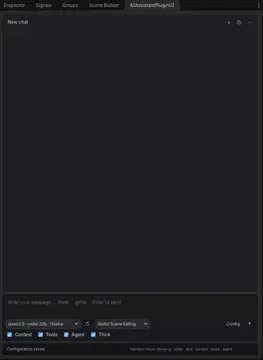
Editor dock — chat, model/skills toolbar, context/agent toggles, and vision/thinking options.

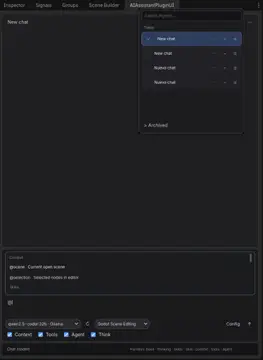
Agent history & @ context — searchable sessions, multi-select, pin/archive, and autocomplete for scenes, files, and skills.

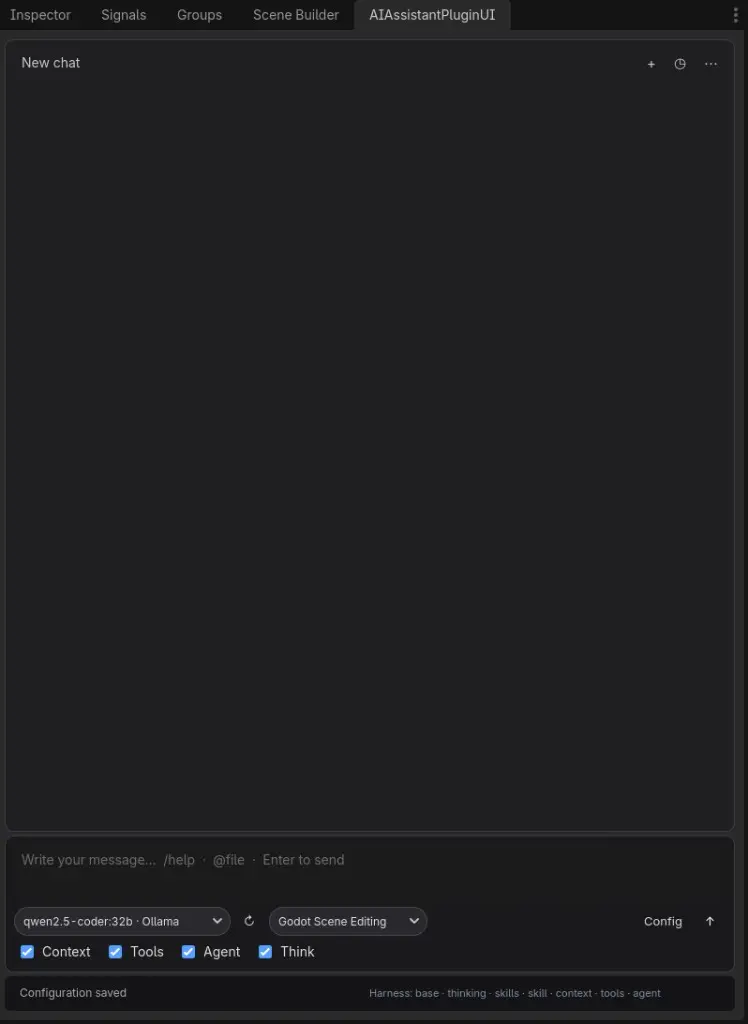
Models & providers — one dropdown with local and cloud models grouped by provider (Ollama, LM Studio, MiniMax, Cursor, OpenRouter, Kimi, OpenAI, Anthropic, Gemini).

Features
Chat & composer
- Bubble UI with collapsible thinking blocks, tool calls, tool results, and code blocks
- Copy button on assistant messages and collapsible code blocks
- Attachments: text files (
.gd,.tscn,.md, …) and images (PNG, JPG, WebP, …) @mentions and/commands with autocomplete- Vision and Think toggles — auto-enabled only when the selected model supports them (preferences persist between sessions)
Providers & models
| Provider | Notes |
|---|---|
| Ollama | Local models |
| LM Studio | Local server; reads capabilities.vision from native API |
| OpenRouter | Many cloud models, pay-as-you-go |
| Kimi | Moonshot AI |
| MiniMax | M3 = visión + thinking; M2.x = solo texto + thinking (sin imágenes) |
| OpenAI | Cloud API |
| Anthropic | Cloud API |
| Gemini | Google API |
| Cursor | Local OpenAI-compatible proxy or cloud agents |
- Model dropdown grouped by provider separators
- ↻ Refresh loads models from each enabled provider
- Capability detection (
model_capabilities.gd) + provider metadata (LM Studio / OpenRouter) to avoid invalid vision/thinking options
MiniMax models (official API)
Source: MiniMax models · Anthropic-compatible API
| Model | Vision (images) | Thinking |
|---|---|---|
| MiniMax-M3 | Yes (image + video) | Yes (toggle disabled / adaptive) |
| MiniMax-M2.7 / highspeed | No | Yes (always on at API) |
| MiniMax-M2.5 / highspeed | No | Yes (always on at API) |
| MiniMax-M2.1 / highspeed | No | Yes (always on at API) |
| MiniMax-M2 | No | Yes (always on at API) |
| M2-her | No | No (dialogue / roleplay) |
Only MiniMax-M3 accepts image_url / video_url in chat. All other MiniMax chat models are text + tools only.
Agent & tools
- Editor tools — optional tool-calling loop in the Godot editor
- Agent loop — multi-step verify & fix with compact tool results (faster, less redundant inspection)
- Skills system — Markdown skills (
/skill, dropdown,@skill:id) - Project context — open scene, selection,
@filementions, configurable depth
Session history
- Search, pin, archive, and New Agent (
Ctrl+N;Altreplaces current session) - Multi-select — checkboxes per chat, Select all, bulk Archive / Restore / Delete
- Delete confirmation — single chat or bulk; clears selection after archive/restore/delete
- More menu (⋮): clear messages, delete active chat, open config
Localization
- English / Spanish UI (Config → UI language:
auto,en,es)
Requirements
- Godot 4.2+ (tested on 4.6.x)
- At least one AI provider configured (e.g. Ollama or LM Studio for local use)
Installation
Manual
Copy this folder into your project:
your_project/addons/ai_assistant_plugin/Open Project → Project Settings → Plugins
Enable AI Assistant Plugin
Open the AI Assistant dock tab in the editor
From GitHub
git clone https://github.com/sancheznot/Godot-AI-Assistant.git addons/ai_assistant_plugin
Then enable the plugin in Project Settings.
Quick start
- Click Config in the dock toolbar
- Enable a provider (e.g. Ollama or LM Studio) and set endpoint + model
- Click ↻ to refresh the model list
- Choose Context, Tools, Agent, Think, and Vision as needed (greyed-out toggles = model does not support that feature)
- Type a message and press Enter
Attachments
| Control | Action |
|---|---|
| 📎 | Attach a text file (content injected into context) |
| 🖼 | Attach an image (requires Vision on + vision-capable model) |
You can send attachments without text; the plugin uses a default analysis prompt.
Composer shortcuts
| Input | Action |
|---|---|
@ |
Attach context (scene, files, skills) |
/ |
Commands (/help, /clear, /history, /skill, …) |
Enter |
Send message |
Shift+Enter |
New line |
Ctrl+N |
New agent (session) |
Alt+click + |
Replace current agent (clear messages) |
History panel
| Control | Action |
|---|---|
| Checkbox on row | Select chat for bulk actions |
| All | Select / deselect visible chats |
| Archive / Restore | Bulk archive or unarchive selection |
| Delete | Bulk delete with confirmation |
| ⋯ / 🗑 | Per-chat menu or delete |
Configuration
Copy the example config on first setup:
cp addons/ai_assistant_plugin/config/plugin_config.example.json \
   addons/ai_assistant_plugin/config/plugin_config.json
Settings (endpoints, models, toggles) are stored in config/plugin_config.json. API keys are never written there.
API keys & secrets
| Storage | Path / variable | Notes |
|---|---|---|
| Encrypted file | user://ai_assistant_plugin/secrets.enc |
Default. Keys from the Config UI are saved here via Godot's encrypted file API. |
| Passphrase | GOLEM_AI_SECRETS_PASSPHRASE |
Optional. Custom passphrase for secrets.enc. Default: machine id (per device). |
| Environment | GOLEM_AI_API_KEY_<PROVIDER> |
Optional override per provider, e.g. GOLEM_AI_API_KEY_OPENAI, GOLEM_AI_API_KEY_MINIMAX. Takes priority over the encrypted store. |
On first launch after updating, keys still present in an old plugin_config.json are migrated automatically to secrets.enc and removed from the JSON.
Do not commit API keys.
plugin_config.jsonis gitignored; useplugin_config.example.jsonas the template. If keys were ever pushed to git, rotate them in each provider's dashboard.
Key options in plugin_config.json:
- Providers — endpoints, API keys, default models
- Context depth —
basic/intermediate/full - Agent loop — multi-step verify & fix with editor tools
- enable_vision / enable_thinking — persisted preferences (respect model capabilities)
- Skills path — folder with
.mdskill files - UI language —
auto,en,es
Chat history is saved under user://ai_assistant_plugin/chat_history.json.
Project structure
ai_assistant_plugin/
├── icon.png
├── docs/                      # AssetLib previews
│   ├── preview_dock.jpg
│   ├── preview_autocomplete.jpg
│   └── preview_models.jpg
├── plugin.cfg
├── config/
├── harness/                   # System prompt layers
├── locales/                   # en.json, es.json
├── scenes/                    # Dock UI
├── scripts/
│   ├── ui_plugin.gd           # Chat UI, history, attachments
│   ├── ai_model_handler.gd    # Providers, multimodal, agent loop
│   ├── model_capabilities.gd  # Vision/thinking heuristics
│   ├── composer_attachments.gd
│   ├── model_catalog.gd
│   ├── chat_history.gd
│   └── …
└── skills/                    # Built-in skills (.md)
Contributing
Issues and PRs welcome on GitHub. Please keep changes focused and match existing code style.
License
MIT — see LICENSE.
Copyright (c) 2026 sancheznotdev
Author
sancheznotdev
GitHub: @sancheznot
If you use this plugin in a project or video, a mention or link is appreciated — not required by the license.
Español
Golem-AI — asistente de IA integrado en el editor de Godot 4.
Autor: sancheznotdev · Licencia MIT
Novedades recientes
- Adjuntos: archivos de texto e imágenes en el compositor (📎 / 🖼)
- Visión y Think: toggles inteligentes según capacidades del modelo (Gemma, Qwen 3.6, Composer, LM Studio, etc.)
- Proveedores: OpenRouter, Kimi, MiniMax (visión solo en MiniMax-M3)
- Historial: selección múltiple, archivar/restaurar/eliminar en lote, confirmación al borrar
- UI: bloques colapsables (thinking, tools, código) con botón copiar; modelos agrupados por proveedor
- Agente: respuestas más rápidas, menos inspección redundante, resultados de tools compactos
Instalación: copia la carpeta a addons/ai_assistant_plugin, activa el plugin en Ajustes del proyecto y configura un proveedor desde Config en el dock.
Capturas: ver sección Screenshots arriba (dock, historial con @, selector de modelos).
Golem-AI is an AI-powered editor assistant for Godot 4. Chat with local or cloud models (Ollama, LM Studio, OpenAI, Anthropic, Gemini, Cursor) directly from an editor dock.
Features:
• Chat composer with bubble UI, thinking blocks, and agent step progress
• Project context: open scene, selection, @file mentions, configurable depth
• Editor tools: optional multi-step agent loop with tool calling
• Skills system: Markdown skills (/skill, dropdown, @skill:id)
• Cursor-style UX: @ autocomplete, / commands, searchable agent history
• Session history: pin, archive, New Agent (Ctrl+N, Alt+click to replace)
• Bilingual UI: English / Spanish
Install: copy to addons/ai_assistant_plugin, enable the plugin in Project Settings, configure a provider in Config, refresh models, and start chatting.
Requires Godot 4.2+. At least one AI provider must be configured (e.g. Ollama for local use).
MIT License · Author: sancheznotdev
https://github.com/sancheznot/Godot-AI-Assistant
Reviews
Quick Information
Golem-AI
Golem-AI is an AI-powered editor assistant for Godot 4. Chat with local or cloud models (Ollama, LM Studio, OpenAI, Anthropic, Gemini, Cursor) directly from an editor dock.Features:• Chat composer with bubble UI, thinking blocks, and agent step progress• Project context: open scene, selection, @file mentions, configurable depth• Editor tools: optional multi-step agent loop with tool calling• Skills system: Markdown skills (/skill, dropdown, @skill:id)• Cursor-style UX: @ autocomplete, / commands, searchable agent history• Session history: pin, archive, New Agent (Ctrl+N, Alt+click to replace)• Bilingual UI: English / SpanishInstall: copy to addons/ai_assistant_plugin, enable the plugin in Project Settings, configure a provider in Config, refresh models, and start chatting.Requires Godot 4.2+. At least one AI provider must be configured (e.g. Ollama for local use).MIT License · Author: sancheznotdevhttps://github.com/sancheznot/Godot-AI-Assistant
Supported Engine Version
4.2
Version String
1.3.0
License Version
MIT
Support Level
community
Modified Date
7 hours ago
Git URL
Issue URL