Logitech G29 Wheel, Pedal and Shifter Addon
An asset by Nahid_Hasan
Install Asset
Install via Godot
To maintain one source of truth, Godot Asset Library is just a mirror of the old asset library so you can download directly on Godot via the integrated asset library browser

Quick Information

Logitech G29 Wheel, Pedal and Shifter Addon
This addon makes it easy to use the Logitech G29 wheel, pedals, and shifter in Godot 4.Instead of dealing with raw joypad IDs, you get clean signals like steering_changed, throttle_changed, and gear_1_pressed.It auto-detects the device, supports pedal remapping, and includes a priority mode to prevent D-Pad and shifter conflicts.I built this to save time and make racing projects simpler to set up.
Supported Engine Version
4.6
Version String
1.0.0
License Version
MIT
Support Level
community
Modified Date
4 months ago
Git URL
Issue URL
Logitech G29 Godot Addon (Beginner Guide)
Input nodes for Logitech G29 wheel + pedals + shifter in Godot 4.
This addon gives you ready-made nodes that emit clear signals like steering_changed, throttle_changed, and gear_1_pressed, so you do not need to manually map raw joypad button IDs.
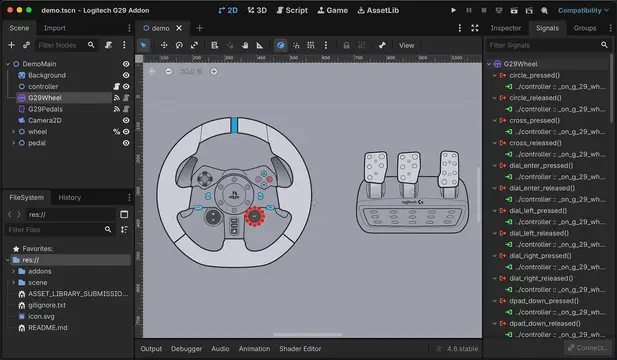
 The demo scene visualizes wheel and pedal input. Use it as your reference for a "known good" setup.
Overview
What this project provides
G29Wheel(addons/logitech_g29/scripts/G29Wheel.gd)G29Pedals(addons/logitech_g29/scripts/G29Pedals.gd)G29Shifter(addons/logitech_g29/scripts/G29Shifter.gd)G29WheelShifter(addons/logitech_g29/scripts/G29WheelShifterPriority.gd) for wheel+dpad/shifter overlap cases
How it works
- Each node auto-picks a joypad device (
prefer_logitech_g29+device_id). - Each node reads raw Godot joypad input every frame.
- Nodes emit clean signals for gameplay logic.
G29Pedalsalso supports runtime pedal-axis remapping.
Requirements
- Godot: 4.6 (detected from
project.godotfeatures). The scripts are written for Godot 4.x APIs. - Hardware: Logitech G29 wheel. Optional: Logitech Driving Force Shifter.
- Platform/driver: any platform where Godot sees the wheel as a joypad.
Installation
- Copy
addons/logitech_g29into your Godot project. - Open the project in Godot.
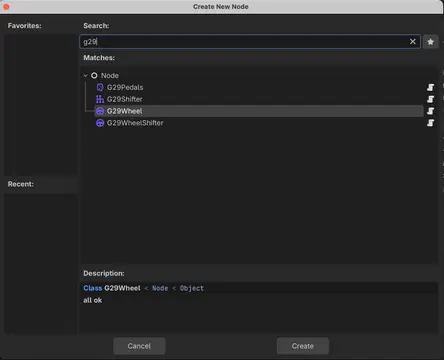
- In your scene, add nodes by searching for
G29in the Add Node dialog.
 Look for
 G29Wheel, G29Pedals, G29Shifter, and G29WheelShifter in the node search.
Quick Start (Fastest Way)
- Open
scene/demo.tscn. - Connect your G29 before pressing Play.
- Press Play.
- Turn the wheel and press buttons/pedals.
What you should see:
- Wheel rotation follows
steering_changed. - Wheel button sprites brighten when pressed.
- Pedal sprites darken/brighten based on pedal travel.
Step-by-Step Setup (Mirrors scene/demo.tscn + scene/controller.gd)
This section follows the same workflow as the included demo.
- Create a
Node2Dscene (demo root isNode3Dof typeNode2D). - Add child node
G29Wheel. - Add child node
G29Pedals. - Add child node
controller(typeNode2D) and attachscene/controller.gd(or your own script). - Add visual nodes (sprites) for wheel/pedal parts.
- In
controller.gd, cache nodes with@onreadyand unique names (the demo uses%Namelookups). - Connect signals from
G29WheelandG29Pedalstocontroller.gdmethods. - In callbacks:
steering_changed(degrees)-> rotate wheel visual (wheel.rotation_degrees = degrees).*_pressed/*_released-> change spritemodulate.throttle_changed/brake_changed/clutch_changed-> update pedal sprite brightness by value.
Demo-style minimal script pattern:
extends Node2D

@onready var wheel_visual: Node2D = %wheel

func _ready() -> void:
    $G29Wheel.steering_changed.connect(_on_steering_changed)
    $G29Wheel.cross_pressed.connect(_on_cross_pressed)
    $G29Wheel.cross_released.connect(_on_cross_released)

    $G29Pedals.throttle_changed.connect(_on_throttle_changed)

func _on_steering_changed(degrees: float) -> void:
    wheel_visual.rotation_degrees = degrees

func _on_cross_pressed() -> void:
    %X.modulate = Color(2.0, 2.0, 2.0)

func _on_cross_released() -> void:
    %X.modulate = Color(1.0, 1.0, 1.0)

func _on_throttle_changed(value: float) -> void:
    %Throttle.modulate = Color(1.0 * (1.0 - value), 1.0 * (1.0 - value), 1.0 * (1.0 - value))
Node Guide: Wheel (G29Wheel)
What it does
- Reads steering axis.
- Converts raw axis to wheel degrees (
wheel_range_degrees). - Emits press/release signals for wheel buttons, D-pad, paddles, and dial.
 This is the Wheel Inspector panel. Confirm device selection, steering axis, and debug options.
Add to scene
- Add node
G29Wheel. - Keep default settings first.
- Connect signals to your gameplay/controller script.
Inspector options
| Option | Type | Default | What it controls | Beginner tip |
|---|---|---|---|---|
prefer_logitech_g29 |
bool |
true |
Prefers devices with G29/Logitech in joypad name. |
Keep true unless you need manual device routing. |
device_id |
int |
-1 |
Selected Godot joypad device index. | Leave as -1; script auto-picks at runtime. |
wheel_range_degrees |
float |
900.0 |
Max wheel lock-to-lock range used for degree conversion. | Keep 900 for real G29 feel. |
steering_axis |
JoyAxis |
JOY_AXIS_LEFT_X |
Joy axis used for steering read. | Change only if your OS/driver maps differently. |
debug_print |
bool |
true |
Prints steering/button debug logs. | Turn off after setup to reduce console noise. |
debug_steering_threshold |
float |
0.5 |
Minimum degree change before printing steering logs. | Increase for less spam, lower for finer debugging. |
Signals
| Signal | Parameter type(s) | When it fires / use |
|---|---|---|
steering_changed(degrees) |
float |
Steering degree changed. Use for vehicle steering visuals/logic. |
steering_raw_changed(value) |
float |
Raw steering axis changed (-1..1). Use for custom filtering. |
cross_pressed |
none |
Cross button pressed. |
cross_released |
none |
Cross button released. |
circle_pressed |
none |
Circle button pressed. |
circle_released |
none |
Circle button released. |
square_pressed |
none |
Square button pressed. |
square_released |
none |
Square button released. |
triangle_pressed |
none |
Triangle button pressed. |
triangle_released |
none |
Triangle button released. |
dpad_up_pressed |
none |
D-pad up pressed. |
dpad_up_released |
none |
D-pad up released. |
dpad_down_pressed |
none |
D-pad down pressed. |
dpad_down_released |
none |
D-pad down released. |
dpad_left_pressed |
none |
D-pad left pressed. |
dpad_left_released |
none |
D-pad left released. |
dpad_right_pressed |
none |
D-pad right pressed. |
dpad_right_released |
none |
D-pad right released. |
l1_pressed |
none |
L1/left paddle pressed. |
l1_released |
none |
L1/left paddle released. |
r1_pressed |
none |
R1/right paddle pressed. |
r1_released |
none |
R1/right paddle released. |
l2_pressed |
none |
L2 pressed. |
l2_released |
none |
L2 released. |
r2_pressed |
none |
R2 pressed. |
r2_released |
none |
R2 released. |
l3_pressed |
none |
L3 pressed. |
l3_released |
none |
L3 released. |
r3_pressed |
none |
R3 pressed. |
r3_released |
none |
R3 released. |
share_pressed |
none |
Share pressed. |
share_released |
none |
Share released. |
options_pressed |
none |
Options pressed. |
options_released |
none |
Options released. |
ps_pressed |
none |
PS button pressed. |
ps_released |
none |
PS button released. |
plus_pressed |
none |
Plus button pressed. |
plus_released |
none |
Plus button released. |
minus_pressed |
none |
Minus button pressed. |
minus_released |
none |
Minus button released. |
dial_right_pressed |
none |
Red dial turned right. |
dial_right_released |
none |
Red dial right turn released. |
dial_left_pressed |
none |
Red dial turned left. |
dial_left_released |
none |
Red dial left turn released. |
dial_enter_pressed |
none |
Red dial button pressed. |
dial_enter_released |
none |
Red dial button released. |
Functions / API
G29Wheel is mostly signal-driven.
| Function | What it does | When to use | Short example |
|---|---|---|---|
| No public function required | Auto-connects and emits signals. | Standard usage. | Connect signals in _ready(). |
func _ready() -> void:
    $G29Wheel.steering_changed.connect(_on_steering_changed)

func _on_steering_changed(degrees: float) -> void:
    car_steer_target = degrees
Node Guide: Pedal (G29Pedals)
What it does
- Reads throttle, brake, clutch axes.
- Emits normalized values
0.0 -> 1.0. - Emits raw values
-1.0 -> 1.0. - Supports runtime remapping via
start_mapping_pedal().
 This is the Pedals Inspector panel. Check axis mapping and inversion if pedal direction looks wrong.
Add to scene
- Add node
G29Pedals. - Connect
throttle_changed,brake_changed,clutch_changed. - If values are reversed, use inversion toggles.
Inspector options
| Option | Type | Default | What it controls | Beginner tip |
|---|---|---|---|---|
prefer_logitech_g29 |
bool |
true |
Prefers Logitech/G29 device name when picking controller. | Keep enabled unless testing with unusual hardware IDs. |
device_id |
int |
-1 |
Selected joypad index. | Leave auto unless you need a specific index. |
throttle_axis |
JoyAxis |
JOY_AXIS_LEFT_Y |
Axis used for throttle. | Remap only if throttle reads wrong axis. |
brake_axis |
JoyAxis |
JOY_AXIS_RIGHT_X |
Axis used for brake. | Check this first if brake is always on/off. |
clutch_axis |
JoyAxis |
JOY_AXIS_RIGHT_Y |
Axis used for clutch. | Change if clutch does not respond. |
invert_throttle |
bool |
true |
Inverts normalized throttle output. | Usually correct for G29 defaults. |
invert_brake |
bool |
true |
Inverts normalized brake output. | Toggle if brake increases when released. |
invert_clutch |
bool |
true |
Inverts normalized clutch output. | Toggle if clutch feels backward. |
debug_print |
bool |
true |
Prints normalized/raw updates and mapping messages. | Turn off after calibration. |
debug_pedal_threshold |
float |
0.01 |
Min normalized delta before debug print. | Increase to 0.05/0.1 to reduce log spam. |
Signals
| Signal | Parameter type(s) | When it fires / use |
|---|---|---|
throttle_changed(value) |
float |
Normalized throttle changed (0..1). Use for acceleration input. |
brake_changed(value) |
float |
Normalized brake changed (0..1). Use for braking force. |
clutch_changed(value) |
float |
Normalized clutch changed (0..1). Use for clutch/gear logic. |
throttle_raw_changed(value) |
float |
Raw throttle axis changed (-1..1). |
brake_raw_changed(value) |
float |
Raw brake axis changed (-1..1). |
clutch_raw_changed(value) |
float |
Raw clutch axis changed (-1..1). |
mapping_complete(pedal_name, axis_index) |
String, int |
Runtime pedal remapping found an axis and updated it. |
Functions / API
| Function | What it does | When to use | Short example |
|---|---|---|---|
start_mapping_pedal(pedal_name: String) -> void |
Enters mapping mode and waits for a strong axis input (abs(value) > 0.5) to bind pedal axis. |
In keybind/settings menus. | g29_pedals.start_mapping_pedal("throttle") |
func _ready() -> void:
    $G29Pedals.throttle_changed.connect(_on_throttle_changed)
    $G29Pedals.mapping_complete.connect(_on_mapping_complete)

func _on_remap_throttle_button_pressed() -> void:
    $G29Pedals.start_mapping_pedal("throttle")

func _on_throttle_changed(value: float) -> void:
    engine_input = value

func _on_mapping_complete(pedal_name: String, axis_index: int) -> void:
    print("Mapped %s to axis %d" % [pedal_name, axis_index])
Node Guide: Shifter (G29Shifter)
What it does
- Emits gear slot pressed/released signals for 1-6 + reverse.
- Includes debug scanner (
print_debug_ids) to identify actual button IDs on your system.
 Use node search to add
 G29Shifter. Reverse behavior depends on driver/OS mapping.
Add to scene
- Add node
G29Shifter. - Connect gear signals you need.
- For reverse issues, enable
print_debug_idsand observe console IDs.
Inspector options
| Option | Type | Default | What it controls | Beginner tip |
|---|---|---|---|---|
prefer_logitech_g29 |
bool |
true |
Prefers Logitech/G29-named joypad. | Keep enabled in most setups. |
device_id |
int |
-1 |
Selected joypad index. | Leave auto first; override only if needed. |
print_debug_ids |
bool |
true |
Prints any changed button ID from 0-63 while shifting. | Great for diagnosing reverse/gear mismatch issues. |
Signals
| Signal | Parameter type(s) | When it fires / use |
|---|---|---|
gear_1_pressed |
none |
Entered 1st gear slot. |
gear_1_released |
none |
Left 1st gear slot. |
gear_2_pressed |
none |
Entered 2nd gear slot. |
gear_2_released |
none |
Left 2nd gear slot. |
gear_3_pressed |
none |
Entered 3rd gear slot. |
gear_3_released |
none |
Left 3rd gear slot. |
gear_4_pressed |
none |
Entered 4th gear slot. |
gear_4_released |
none |
Left 4th gear slot. |
gear_5_pressed |
none |
Entered 5th gear slot. |
gear_5_released |
none |
Left 5th gear slot. |
gear_6_pressed |
none |
Entered 6th gear slot. |
gear_6_released |
none |
Left 6th gear slot. |
gear_reverse_pressed |
none |
Entered reverse slot (push down + reverse gate). |
gear_reverse_released |
none |
Left reverse slot. |
Functions / API
G29Shifter is signal-driven.
| Function | What it does | When to use | Short example |
|---|---|---|---|
| No public function required | Auto-scans mapped gear button IDs and emits signals. | Standard gameplay logic. | Connect gear_* signals in _ready(). |
var current_gear: int = 0

func _ready() -> void:
    $G29Shifter.gear_1_pressed.connect(func(): current_gear = 1)
    $G29Shifter.gear_2_pressed.connect(func(): current_gear = 2)
    $G29Shifter.gear_reverse_pressed.connect(func(): current_gear = -1)
Optional Node: Wheel + Shifter Priority (G29WheelShifter)
Use this instead of G29Wheel when an external shifter causes D-pad overlap.
Extra inspector option (in addition to Wheel options):
| Option | Type | Default | What it controls | Beginner tip |
|---|---|---|---|---|
shifter_priority |
bool |
false |
Ignores overlapping D-pad IDs (Down/Left/Right) so shifter input wins. |
Turn this on when D-pad or gear signals fire together unexpectedly. |
The rest of the signals/options match G29Wheel.
Demo Breakdown
Scene wiring (scene/demo.tscn)
- Root:
Node2Dscene. - Input nodes:
G29WheelandG29Pedalsare direct children of root. - Controller node:
controller(script:scene/controller.gd). - Visual groups:
wheelNode2Dwith many button sprites.pedalNode2DwithBrake,Clutch,Throttlesprites.
- Signal connections:
- Most wheel button pressed/released signals -> matching controller methods.
steering_changed->_on_g_29_wheel_steering_changed.- Pedal normalized signals ->
_on_g_29_pedals_*_changed.
Script behavior (scene/controller.gd)
- Caches all visual sprites with
@onreadyand%UniqueName. - Wheel callbacks:
- Pressed:
modulate = Color(2,2,2). - Released:
modulate = Color(1,1,1). - Steering: rotates wheel visual in degrees.
- Pressed:
- Pedal callbacks:
- Uses
Color(1-value, 1-value, 1-value)so stronger pedal press darkens visual.
- Uses
This is a good “correct baseline” pattern: input node signals -> small callback methods -> update gameplay/visual state.
Troubleshooting / FAQ
The nodes do nothing when I press inputs
- Make sure the wheel is connected before running the scene.
- Check Inspector:
device_idshould not remain-1during play. - Keep
prefer_logitech_g29 = trueunless you intentionally want fallback behavior. - Enable
debug_printto see if values/signals are changing.
Steering works but pedals are backward
- Toggle
invert_throttle,invert_brake,invert_clutchinG29Pedals.
Pedals are mapped to the wrong axes
- Use
start_mapping_pedal("throttle" | "brake" | "clutch"). - Wait for
mapping_completesignal.
Shifter and D-pad conflict
- Replace
G29WheelwithG29WheelShifter. - Enable
shifter_priority.
Reverse does not trigger
- On physical shifter, press knob down while moving into reverse gate.
- Set
print_debug_ids = trueonG29Shifterand check console. - If ID differs on your system, this indicates a driver/OS mapping difference.
Example Use Cases
1) Basic car steering + pedals
extends Node3D

@onready var wheel: G29Wheel = $G29Wheel
@onready var pedals: G29Pedals = $G29Pedals

var steer_input: float = 0.0
var throttle_input: float = 0.0
var brake_input: float = 0.0

func _ready() -> void:
    wheel.steering_changed.connect(_on_steering_changed)
    pedals.throttle_changed.connect(func(v): throttle_input = v)
    pedals.brake_changed.connect(func(v): brake_input = v)

func _on_steering_changed(degrees: float) -> void:
    # Convert from wheel degrees to a smaller gameplay steer range.
    steer_input = clamp(degrees / 450.0, -1.0, 1.0)

func _physics_process(_delta: float) -> void:
    # Replace with your own vehicle API.
    apply_steer(steer_input)
    apply_throttle(throttle_input)
    apply_brake(brake_input)
2) Manual transmission with shifter + clutch
extends Node

@onready var shifter: G29Shifter = $G29Shifter
@onready var pedals: G29Pedals = $G29Pedals

var current_gear: int = 0
var clutch_value: float = 0.0

func _ready() -> void:
    pedals.clutch_changed.connect(func(v): clutch_value = v)

    shifter.gear_1_pressed.connect(func(): _try_set_gear(1))
    shifter.gear_2_pressed.connect(func(): _try_set_gear(2))
    shifter.gear_3_pressed.connect(func(): _try_set_gear(3))
    shifter.gear_4_pressed.connect(func(): _try_set_gear(4))
    shifter.gear_5_pressed.connect(func(): _try_set_gear(5))
    shifter.gear_6_pressed.connect(func(): _try_set_gear(6))
    shifter.gear_reverse_pressed.connect(func(): _try_set_gear(-1))

func _try_set_gear(target: int) -> void:
    if clutch_value > 0.8:
        current_gear = target
3) Runtime pedal remap UI action
extends Control

@onready var pedals: G29Pedals = $G29Pedals

func _ready() -> void:
    pedals.mapping_complete.connect(_on_mapping_complete)

func _on_map_brake_pressed() -> void:
    pedals.start_mapping_pedal("brake")

func _on_mapping_complete(pedal_name: String, axis_index: int) -> void:
    %StatusLabel.text = "Mapped %s to axis %d" % [pedal_name, axis_index]
Note: This addon was partially created using AI.
This addon makes it easy to use the Logitech G29 wheel, pedals, and shifter in Godot 4.
Instead of dealing with raw joypad IDs, you get clean signals like steering_changed, throttle_changed, and gear_1_pressed.
It auto-detects the device, supports pedal remapping, and includes a priority mode to prevent D-Pad and shifter conflicts.
I built this to save time and make racing projects simpler to set up.
Reviews
Quick Information
Logitech G29 Wheel, Pedal and Shifter Addon
This addon makes it easy to use the Logitech G29 wheel, pedals, and shifter in Godot 4.Instead of dealing with raw joypad IDs, you get clean signals like steering_changed, throttle_changed, and gear_1_pressed.It auto-detects the device, supports pedal remapping, and includes a priority mode to prevent D-Pad and shifter conflicts.I built this to save time and make racing projects simpler to set up.
Supported Engine Version
4.6
Version String
1.0.0
License Version
MIT
Support Level
community
Modified Date
4 months ago
Git URL
Issue URL