DataTablePlugin
An asset by pupil337
Install Asset
Install via Godot
To maintain one source of truth, Godot Asset Library is just a mirror of the old asset library so you can download directly on Godot via the integrated asset library browser
Quick Information

DataTablePlugin
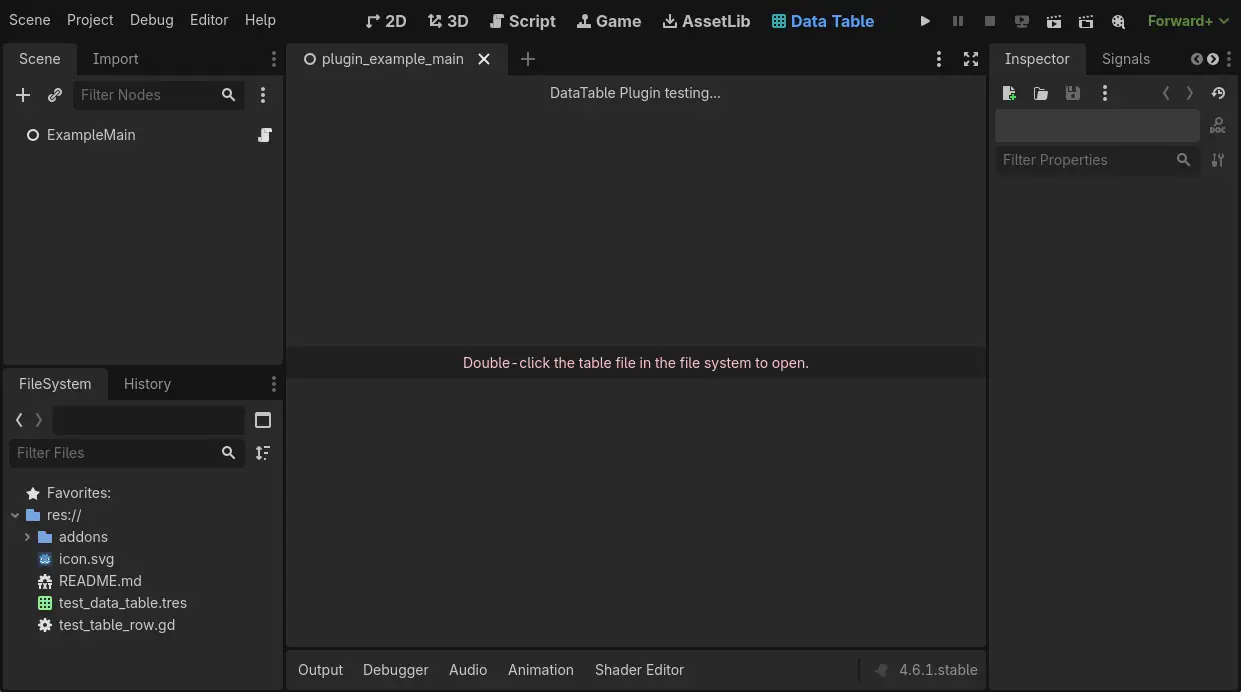
A data table plugin that allows you to create a Resource and edit it in godot main screen.You can double-click data_table.tres, and the select one row, and edit it data in the Inspector, when you edit property in inspector, plugin will save data to data_table.tres.Simple Usage:1. create DataTable-type Resource.2. create TableRowBase-type GDScript, and declare some @export (static type) in it.3. double-click [1]file, and set it TableRowScript property to[2], save it.
Supported Engine Version
4.6
Version String
1.0.2
License Version
MIT
Support Level
community
Modified Date
2 months ago
Git URL
Issue URL
godot-data_table_plugin
数据表格插件,可以创建一个Resource类型的表格类,然后在godot中编辑它。
特性
- 使用Resource作为表格,表格数据存储在Dictionary中,插件创建了UI使其可读性提高
- 固定表结构元素类型,但一个表结构就需要创建一个Script
- 使用检查器面板设置数据
用法
首先需要在项目设置中开启本插件:Menu->Project->Project Settings->Plugins-> Enabled DataTablePlugin
1. 在FileSystem中右键创建一个Resource,类型选择DataTable

2. 双击新创建的资源例如test_data_table.tres

3. 在FileSystem中再次右键创建一个Script,脚本类型继承自TableRowBase,例如test_table_row.gd

4. 打开test_data_table.tres,设置其属性TableRowScript为刚刚创建的test_table_row.gd,并且保存

 至此,已经创建了一个DataTable并且其表格数据结构是空的(因为还未定义类型)。
5. 打开test_table_row.gd,定义一些@export类型的变量,并且保存

6. 打开test_data_table.tres,会发现已经出现了表结构,并且可以点击"Add/Delete"按钮,也能编辑数据(编辑会实时保存到.tres文件中)

DataTable接口
func find_row(row_name: String, warn_if_row_missing: bool = true) -> TableRowBase
func foreach_row(callback: Callable) -> void
实现原理
DataTable: 一个Resource类型,在其中声明了一个Dictionary作为储存数据的变量
TableRowBase: 一个Object类型,需要被用户继承并且需要在子类中声明@export var
运作原理就是TableRowBase子类定义了表结构,DataTable引用它。
序列化:当在编辑器UI中增加一行Row的时候,会new一个TableRowBase子类对象,然后其实例放入到DataTable的data中,当ResourceSaver.save(DataTable)时候引擎会自动序列化这个data。
反序列化[到编辑器ui]:遍历data,同时new Object(用于检查器编辑) 和 new所需要的UI,并且用var_to_str将data的数据反序列化到UI中
反序列化[game运行时]:遍历data直接读取即可,只不过插件将原来的Variant类型转换成了TableRowBase子类
检查器面板: 直接调用EditorInterface.get_inspector().edit(Object)即可编辑某个Object
TODO
- 编辑器UI-拖动Row以调整其位置
- 编辑器UI-复制粘贴某行数据
- 编辑器UI-搜索文本内容
godot-data_table_plugin
A data table plugin that allows you to create a Resource and edit it in godot.
Features
- Use Resource as the table, with table data stored in a Dictionary. The plugin provides a UI to improve readability.
- Fixed table structure element types, but each table structure requires creating a Script.
- Use the inspector panel to set data.
Usage
First, you need to enable this plugin in the project settings: Menu -> Project -> Project Settings -> Plugins -> Enabled DataTablePlugin
1. Right-click in the FileSystem to create a new Resource, and select DataTable as the type.
2. Double-click the newly created resource, e.g., test_data_table.tres.
3. Right-click again in the FileSystem to create a new Script, with the script type inheriting from TableRowBase, e.g., test_table_row.gd.
4. Open test_data_table.tres, set its TableRowScript property to the newly created test_table_row.gd, and save.
At this point, you have created a DataTable with an empty table structure (since no fields have been defined yet).
5. Open test_table_row.gd, define some @export variables, and save.
6. Open test_data_table.tres again, and you will see the table structure has appeared. You can now click the "Add/Delete" buttons and edit the data (editing will be saved to the .tres file in real-time).
DataTable Interface
func find_row(row_name: String, warn_if_row_missing: bool = true) -> TableRowBase
func foreach_row(callback: Callable) -> void
Implementation principle
DataTable: A Resource type that declare a Dictionary as the variable for storing data.
TableRowBase: An Object type that needs to be inherited by the user, with @export var declared in the subclass.
The operating principle is that the TableRowBase subclass defines the table structure, and DataTable references it.
Serialization: When a row is added through the editor UI, a new TableRowBase subclass object is created and its instance is placed into the DataTable's data. When ResourceSaver.save(DataTable) is called, the engine automatically serializes this data.
Deserialization[to Editor UI]: Foreach the data to new Object(for inspector) and new UIRow, and use var_to_str to show value in main ui
Deserialization[in game]: Foreach data and direct read, the plugin only new a TableRowBase subclass for read
Inspector Panel: Directly call EditorInterface.get_inspector().edit(Object) to edit a specific Object.
TODO
- Editor UI - Drag a row to re-order it
- Editor UI - Copy and paste row data
- Editor UI - Search text content
A data table plugin that allows you to create a Resource and edit it in godot main screen.
You can double-click data_table.tres, and the select one row, and edit it data in the Inspector, when you edit property in inspector, plugin will save data to data_table.tres.
Simple Usage:
1. create DataTable-type Resource.
2. create TableRowBase-type GDScript, and declare some @export (static type) in it.
3. double-click [1]file, and set it TableRowScript property to[2], save it.
Reviews
Quick Information
DataTablePlugin
A data table plugin that allows you to create a Resource and edit it in godot main screen.You can double-click data_table.tres, and the select one row, and edit it data in the Inspector, when you edit property in inspector, plugin will save data to data_table.tres.Simple Usage:1. create DataTable-type Resource.2. create TableRowBase-type GDScript, and declare some @export (static type) in it.3. double-click [1]file, and set it TableRowScript property to[2], save it.
Supported Engine Version
4.6
Version String
1.0.2
License Version
MIT
Support Level
community
Modified Date
2 months ago
Git URL
Issue URL