Nexus Vertex Painter
An asset by movec
Install Asset
Install via Godot
To maintain one source of truth, Godot Asset Library is just a mirror of the old asset library so you can download directly on Godot via the integrated asset library browser
Quick Information

Nexus Vertex Painter
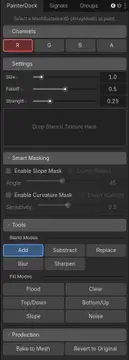
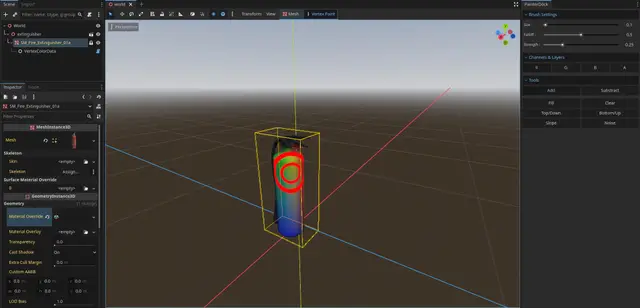
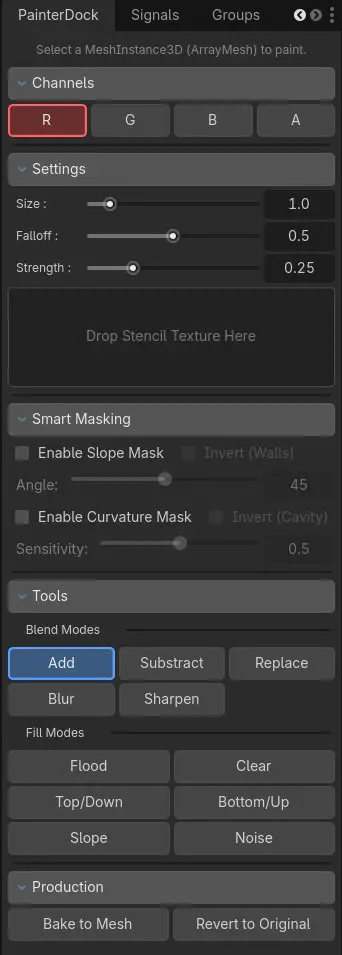
This is a powerful, artist-friendly tool to paint vertex color channels (RGBA) directly in the 3D editor. It is designed for Level Design, Texture Splatting, and Shader Masks, offering a workflow similar to industry-standard tools like Unreal Engine or Substance Painter.--- Key Features: ---Paint Modes: Add, Subtract, Set (absolute value), Blur/Smooth and Sharpen to blend colors organically.Brush Stencils (Alphas): Drag & drop textures to paint complex details like grunge, cracks, or leaves. Uses Triplanar Projection to wrap seamlessly around corners.Smart Masking: Automatically mask your painting by Slope (Angle). Perfect for painting grass only on flat terrain or moss only on steep walls.Procedural Generators: Apply global effects with one click: Noise, Top-Down (Snow/Dust), and Bottom-Up (Rising Water/Gradient).--- Production Workflow ---Non-Destructive: Painting creates a modifier node, keeping your original .glb or .tscn files untouched.Bake to Resource: When you are finished, click "Bake" to save a permanent, game-ready .res file for maximum performance.Revert: Changed your mind? Revert the mesh to its original import state with a single click.Safe: Full Undo/Redo support.--- Pro Controls ---Visual Feedback: The brush cursor projects physically onto the mesh, ensuring visibility even on transparent or unshaded materials. Includes a visual Strength Meter.Mouse Shortcuts:Ctrl + Right Click + Drag: Adjust Size & Strength.Shift + Right Click + Drag: Adjust Falloff (Hardness).Keyboard Shortcuts: X and Z/Y to toggle Blend Modes, 1-4 to toggle Channels.Ctrl + Z: UndoCtrl + Shift + Z: Redo--- Support ---Need help or want to share your work? Join the Discord:https://discord.gg/HMxbzqWCgQ
Supported Engine Version
4.2
Version String
2.2.0
License Version
MIT
Support Level
community
Modified Date
1 month ago
Git URL
Issue URL
Material examples (shaders only)
.tres files here reference only addon shaders. Assign your own albedo, normal, ORM, and displacement textures in the Inspector after creating a ShaderMaterial from the matching .gdshader in ../shaders/.
The addon does not ship demo texture assets.
This is a powerful, artist-friendly tool to paint vertex color channels (RGBA) directly in the 3D editor. It is designed for Level Design, Texture Splatting, and Shader Masks, offering a workflow similar to industry-standard tools like Unreal Engine or Substance Painter.
--- Key Features: ---
Paint Modes: Add, Subtract, Set (absolute value), Blur/Smooth and Sharpen to blend colors organically.
Brush Stencils (Alphas): Drag & drop textures to paint complex details like grunge, cracks, or leaves. Uses Triplanar Projection to wrap seamlessly around corners.
Smart Masking: Automatically mask your painting by Slope (Angle). Perfect for painting grass only on flat terrain or moss only on steep walls.
Procedural Generators: Apply global effects with one click: Noise, Top-Down (Snow/Dust), and Bottom-Up (Rising Water/Gradient).
--- Production Workflow ---
Non-Destructive: Painting creates a modifier node, keeping your original .glb or .tscn files untouched.
Bake to Resource: When you are finished, click "Bake" to save a permanent, game-ready .res file for maximum performance.
Revert: Changed your mind? Revert the mesh to its original import state with a single click.
Safe: Full Undo/Redo support.
--- Pro Controls ---
Visual Feedback: The brush cursor projects physically onto the mesh, ensuring visibility even on transparent or unshaded materials. Includes a visual Strength Meter.
Mouse Shortcuts:
Ctrl + Right Click + Drag: Adjust Size & Strength.
Shift + Right Click + Drag: Adjust Falloff (Hardness).
Keyboard Shortcuts: X and Z/Y to toggle Blend Modes, 1-4 to toggle Channels.
Ctrl + Z: Undo
Ctrl + Shift + Z: Redo
--- Support ---
Need help or want to share your work? Join the Discord:
https://discord.gg/HMxbzqWCgQ
Reviews
Quick Information
Nexus Vertex Painter
This is a powerful, artist-friendly tool to paint vertex color channels (RGBA) directly in the 3D editor. It is designed for Level Design, Texture Splatting, and Shader Masks, offering a workflow similar to industry-standard tools like Unreal Engine or Substance Painter.--- Key Features: ---Paint Modes: Add, Subtract, Set (absolute value), Blur/Smooth and Sharpen to blend colors organically.Brush Stencils (Alphas): Drag & drop textures to paint complex details like grunge, cracks, or leaves. Uses Triplanar Projection to wrap seamlessly around corners.Smart Masking: Automatically mask your painting by Slope (Angle). Perfect for painting grass only on flat terrain or moss only on steep walls.Procedural Generators: Apply global effects with one click: Noise, Top-Down (Snow/Dust), and Bottom-Up (Rising Water/Gradient).--- Production Workflow ---Non-Destructive: Painting creates a modifier node, keeping your original .glb or .tscn files untouched.Bake to Resource: When you are finished, click "Bake" to save a permanent, game-ready .res file for maximum performance.Revert: Changed your mind? Revert the mesh to its original import state with a single click.Safe: Full Undo/Redo support.--- Pro Controls ---Visual Feedback: The brush cursor projects physically onto the mesh, ensuring visibility even on transparent or unshaded materials. Includes a visual Strength Meter.Mouse Shortcuts:Ctrl + Right Click + Drag: Adjust Size & Strength.Shift + Right Click + Drag: Adjust Falloff (Hardness).Keyboard Shortcuts: X and Z/Y to toggle Blend Modes, 1-4 to toggle Channels.Ctrl + Z: UndoCtrl + Shift + Z: Redo--- Support ---Need help or want to share your work? Join the Discord:https://discord.gg/HMxbzqWCgQ
Supported Engine Version
4.2
Version String
2.2.0
License Version
MIT
Support Level
community
Modified Date
1 month ago
Git URL
Issue URL