ReactBridge — React/Next.js Bridge
An asset by zed
Install Asset
Install via Godot
To maintain one source of truth, Godot Asset Library is just a mirror of the old asset library so you can download directly on Godot via the integrated asset library browser
Quick Information

ReactBridge — React/Next.js Bridge
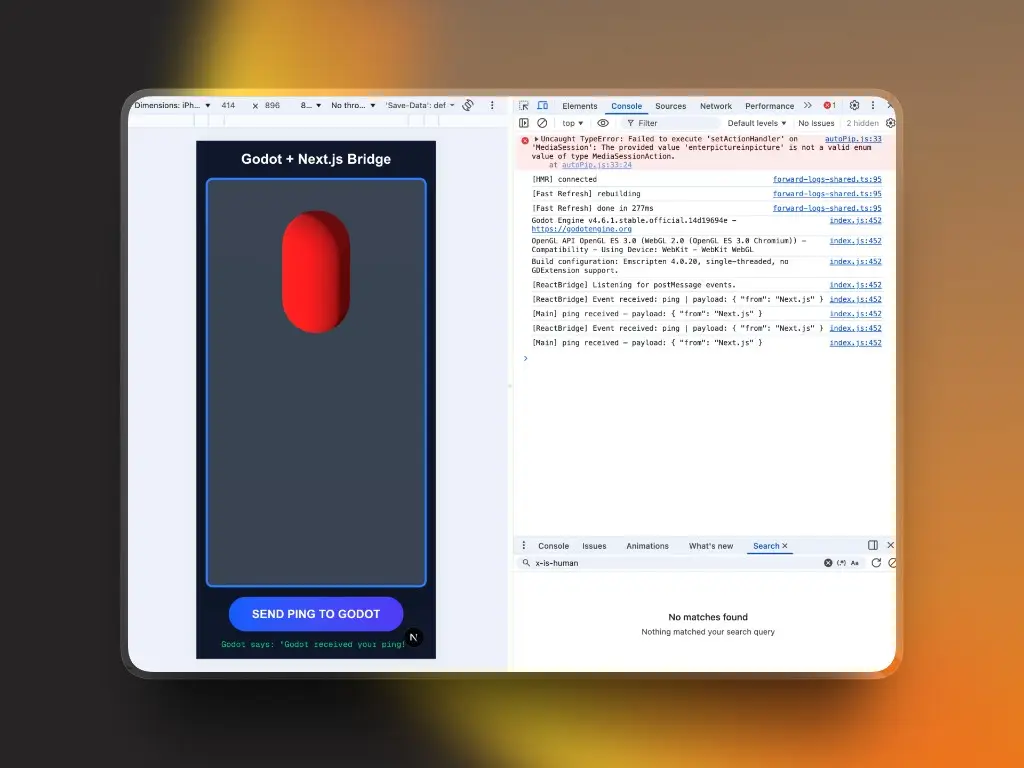
A GDScript Autoload singleton enabling bidirectional, event-driven communication between a Godot 4 WebAssembly game and a React / Next.js parent window via postMessage.Works alongside the react-godot-bridge npm package (npmjs.com/package/react-godot-bridge).USAGE:• Receive from React: ReactBridge.on_react_event.connect(_on_event)• Send to React: ReactBridge.emit_to_react("player_died", { "score": 1500 })FEATURES:- Bidirectional postMessage transport- JSON envelope protocol with secret key validation- Origin restriction for production security- Decoupled signal bus — scenes connect to signals, no browser awareness neededINSTALL:Enable the plugin in Project → Plugins, then add ReactBridge as an Autoload in Project Settings.
Supported Engine Version
4.0
Version String
1.0.1
License Version
MIT
Support Level
community
Modified Date
3 months ago
Git URL
Issue URL
react-godot-bridge




Bidirectional, event-driven bridge between a React / Next.js app and a Godot 4 WebAssembly game running inside an <iframe>.
Designed to feel like Socket.io — you just call emit("event") and on("event"). The library handles the iframe, postMessage, and JavaScriptBridge complexity underneath.

Repository Structure
react-godot-bridge/
  npm/              ← npm package source  (published as "react-godot-bridge")
  godot-plugin/     ← Godot 4 Autoload plugin  (copy into your project)
  example/          ← Next.js demo app
React / Next.js — npm package
npm install react-godot-bridge
import { GodotBridgeProvider, GodotFrame, useGodot } from 'react-godot-bridge';

// Wrap your layout
<GodotBridgeProvider appKey={process.env.NEXT_PUBLIC_BRIDGE_KEY ?? ''}>
  <GodotFrame src="/game/index.html" className="w-full h-screen" />
  <HUD />
</GodotBridgeProvider>

// Use anywhere inside the Provider
const { emit, on } = useGodot();
emit('jump', { height: 2 });
const unsub = on('player_died', (p) => setScore(p.score as number));
See npm/README.md for full API docs.
Godot — Plugin
Copy godot-plugin/addons/react_bridge/ into your Godot project, then add the autoload in Project Settings:
[autoload]
ReactBridge="*res://addons/react_bridge/ReactBridge.gd"
# Receive from React
func _ready():
    ReactBridge.on_react_event.connect(_on_event)

func _on_event(event: String, data: Dictionary):
    if event == "jump":
        $Player.position.y += data.get("height", 1.0)

# Send to React
ReactBridge.emit_to_react("player_died", { "score": 1500 })
See godot-plugin/README.md for full docs.
How It Works
React                              Godot (iframe)
──────                             ──────────────
emit("jump", { height: 2 })
  → postMessage(envelope)    →     ReactBridge._on_message()
                                     on_react_event.emit("jump", data)
                                       $Player.position.y += data.height
                                     ReactBridge.emit_to_react("pong", {...})
  on("pong", cb) ←           ←       window.parent.postMessage(envelope)
All messages use a standard JSON envelope:
{
  "event": "jump",
  "payload": { "height": 2 },
  "metadata": { "secret": "APP_KEY", "timestamp": 1711910000 }
}
Links
Publishing
cd npm
bun install
bun run build     # outputs to dist/
npm publish
A GDScript Autoload singleton enabling bidirectional, event-driven communication between a Godot 4 WebAssembly game and a React / Next.js parent window via postMessage.
Works alongside the react-godot-bridge npm package (npmjs.com/package/react-godot-bridge).
USAGE:
• Receive from React:
ReactBridge.on_react_event.connect(_on_event)
• Send to React:
ReactBridge.emit_to_react("player_died", { "score": 1500 })
FEATURES:
- Bidirectional postMessage transport
- JSON envelope protocol with secret key validation
- Origin restriction for production security
- Decoupled signal bus — scenes connect to signals, no browser awareness needed
INSTALL:
Enable the plugin in Project → Plugins, then add ReactBridge as an Autoload in Project Settings.
Reviews
Quick Information
ReactBridge — React/Next.js Bridge
A GDScript Autoload singleton enabling bidirectional, event-driven communication between a Godot 4 WebAssembly game and a React / Next.js parent window via postMessage.Works alongside the react-godot-bridge npm package (npmjs.com/package/react-godot-bridge).USAGE:• Receive from React: ReactBridge.on_react_event.connect(_on_event)• Send to React: ReactBridge.emit_to_react("player_died", { "score": 1500 })FEATURES:- Bidirectional postMessage transport- JSON envelope protocol with secret key validation- Origin restriction for production security- Decoupled signal bus — scenes connect to signals, no browser awareness neededINSTALL:Enable the plugin in Project → Plugins, then add ReactBridge as an Autoload in Project Settings.
Supported Engine Version
4.0
Version String
1.0.1
License Version
MIT
Support Level
community
Modified Date
3 months ago
Git URL
Issue URL