Simple Fetch Tool
An asset by amcaricola
Install Asset
Install via Godot
To maintain one source of truth, Godot Asset Library is just a mirror of the old asset library so you can download directly on Godot via the integrated asset library browser

Quick Information

Simple Fetch Tool
FETCH: A global Singleton for Godot 4.5 designed to handle asynchronous HTTP/S requests simply and reliably. It allows GET and POST calls using modern await syntax, ideal for integrating with web servers and external APIs while managing common network conflicts.
Supported Engine Version
4.5
Version String
1.1
License Version
MIT
Support Level
community
Modified Date
4 months ago
Git URL
Issue URL
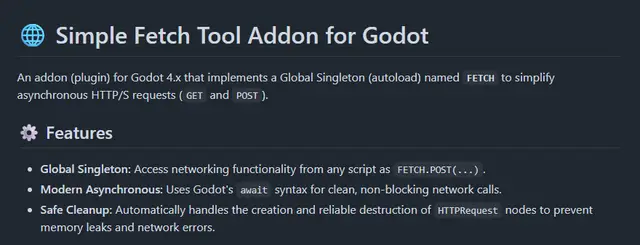
🌐 Simple Fetch Tool Addon for Godot
An addon (plugin) for Godot 4.x that implements a Global Singleton (autoload) named FETCH to simplify asynchronous HTTP/S requests (GET and POST).
⚙️ Features
- Global Singleton: Access networking functionality from any script as
FETCH.GET(...)orFETCH.POST(...). - Modern Asynchronous: Uses Godot's
awaitsyntax for clean, non-blocking network calls. - Safe Cleanup: Automatically handles the creation and reliable destruction of
HTTPRequestnodes to prevent memory leaks and network errors.
🚀 Installation and Usage
1. Installation
- Download the contents of the
addons/fetch_apifolder. - Copy the
fetch_apifolder into your Godot project'saddons/directory. - Go to Project > Project Settings > Plugins.
- Find "Simple Fetch Tool" and ensure it is Enabled.
The FETCH Singleton is now available globally.
2. Usage Examples
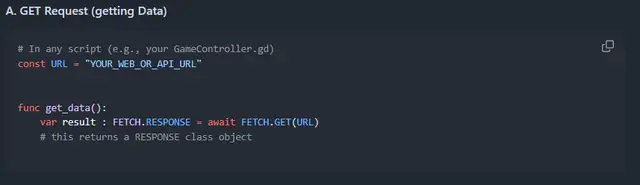
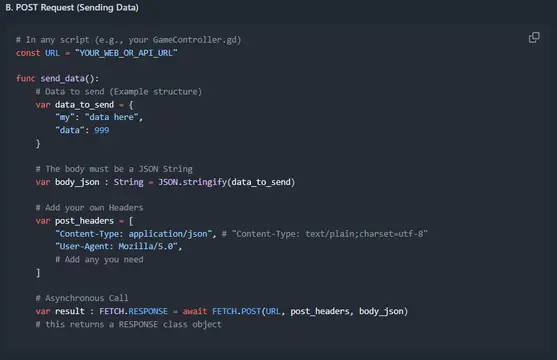
The FETCH Singleton returns a FETCH.RESPONSE object. All calls must be preceded by await and be placed inside a function marked as func _method():.
A. GET Request (getting Data)
# In any script (e.g., your GameController.gd)
const URL = "YOUR_WEB_OR_API_URL"


func get_data():
    var result : FETCH.RESPONSE = await FETCH.GET(URL)
    # this returns a RESPONSE class object
B. POST Request (Sending Data)
# In any script (e.g., your GameController.gd)
const URL = "YOUR_WEB_OR_API_URL"

func send_data():
    # Data to send (Example structure)
    var data_to_send = {
        "my": "data here",
        "data": 999
    }

    # The body must be a JSON String
    var body_json : String = JSON.stringify(data_to_send)

    # Add your own Headers
    var post_headers = [
        "Content-Type: application/json", # "Content-Type: text/plain;charset=utf-8"
        "User-Agent: Mozilla/5.0",
        # Add any you need
    ]

    # Asynchronous Call
    var result : FETCH.RESPONSE = await FETCH.POST(URL, post_headers, body_json)
    # this returns a RESPONSE class object
C. FETCH.RESPONSE (OBJECT)
class RESPONSE:
    var connection : int # HTTPRequest Result (Internal Godot Class)  RESULT_SUCCESS, RESULT_CONNECTION_ERROR
    var status : int # HTTP code response -> 200, 300, 302 ...
    var headers :  PackedStringArray # http common headers
    var response :  String # Server response (usually needs to be transformed into JSON)
FETCH: A global Singleton for Godot 4.5 designed to handle asynchronous HTTP/S requests simply and reliably. It allows GET and POST calls using modern await syntax, ideal for integrating with web servers and external APIs while managing common network conflicts.
Reviews
Quick Information
Simple Fetch Tool
FETCH: A global Singleton for Godot 4.5 designed to handle asynchronous HTTP/S requests simply and reliably. It allows GET and POST calls using modern await syntax, ideal for integrating with web servers and external APIs while managing common network conflicts.
Supported Engine Version
4.5
Version String
1.1
License Version
MIT
Support Level
community
Modified Date
4 months ago
Git URL
Issue URL