Godot MCP Native
An asset by yurineko73
Install Asset
Install via Godot
To maintain one source of truth, Godot Asset Library is just a mirror of the old asset library so you can download directly on Godot via the integrated asset library browser
Quick Information

Godot MCP Native
一款支持godot开源引擎的的mcp插件,支持常见godot引擎操作,使用Godot原生实现MCPServer,无需安装依赖,开箱即用,支持多种AI工具调用。An MCP plugin that supports the open-source Godot engine, enabling common Godot engine operations. It implements the MCP Server using Godot's native HTTP, requires no dependency installation, is ready to use out of the box, and supports invocation by various AI tools.
Supported Engine Version
4.6
Version String
1.0.7-pre1
License Version
MIT
Support Level
community
Modified Date
4 days ago
Git URL
Issue URL
Godot MCP Native (Model Context Protocol)


A powerful Godot Engine plugin that integrates AI assistants (Claude, etc.) via the Model Context Protocol (MCP). Enable AI to directly read and modify your Godot projects - scenes, scripts, nodes, and resources - all through natural language.
🚀 Features
- Full Project Access: AI assistants can read and modify scripts, scenes, nodes, and resources
- Native Implementation: No Node.js dependency required - runs entirely within Godot
- Real-time Editing: Apply AI suggestions directly in the editor
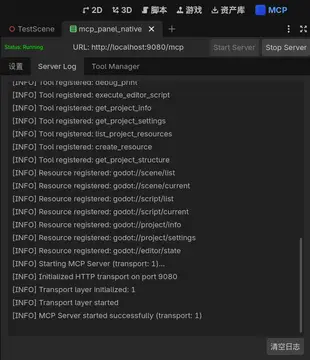
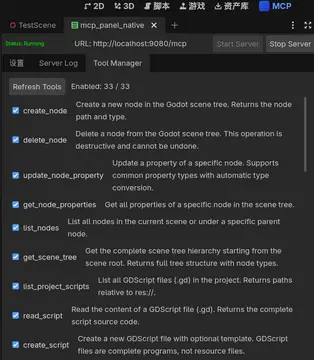
- Comprehensive Tool Set (33+ tools):
- Node Tools (6): Create, modify, and manage scene nodes
- Script Tools (6): Edit, analyze, and create GDScript files
- Scene Tools (6): Manipulate scene structure and save scenes
- Editor Tools (5): Control editor functionality and debug
- Debug Tools (5): Debugging and logging
- Project Tools (5): Access project settings and list resources
📦 Installation
Method 1: Asset Library (Recommended)
- Open your Godot project
- Go to AssetLib tab in the editor
- Search for "Godot MCP Native"
- Click Download and then Install
Method 2: Manual Installation
- Download or clone this repository
- Copy the
addons/godot_mcpfolder to your project'saddons/directory - Open your project in Godot
- Go to Project > Project Settings > Plugins
- Enable "Godot MCP Native" plugin
🔧 Usage
Enabling the Plugin
- Open Project > Project Settings > Plugins
- Locate "Godot MCP Native" in the list
- Set the status to Enable
Configuring MCP Server
The plugin provides two transport modes:
HTTP Mode (for remote access)
- Best for: Network-based AI integration
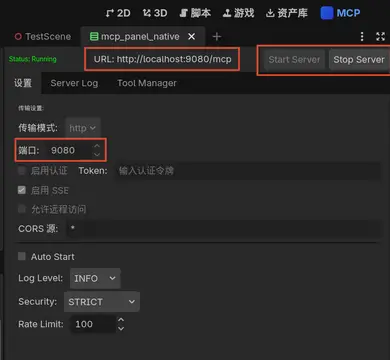
- Configuration: Set
transport_mode = "http"and configurehttp_port(default: 9080) - Optional: Enable
auth_enabledand setauth_tokenfor security
Connecting with Claude Desktop
HTTP Mode Configuration
{
  "mcpServers": {
    "godot-mcp": {
      "url": "http://localhost:9080/mcp"
    }
  }
}
With authentication:
{
  "mcpServers": {
    "godot-mcp": {
      "url": "http://localhost:9080/mcp",
      "headers": {
        "Authorization": "Bearer your-secret-token-here"
      }
    }
  }
}
💬 Example Prompts
Once connected, you can interact with your Godot project through Claude:
@mcp godot-mcp read godot://script/current

I need help optimizing my player movement code. Can you suggest improvements?
@mcp godot-mcp get-scene-tree

Add a cube in the middle of the scene and create a camera that looks at it.
Create a main menu with Play, Options, and Quit buttons
Implement a day/night cycle system with dynamic lighting
📚 Available Commands
Node Tools (6)
get-scene-tree- Get scene tree structureget-node-properties- Get properties of a specific nodecreate-node- Create a new nodedelete-node- Delete a nodeupdate-node-property- Update node propertieslist-nodes- List nodes under a parent
Script Tools (6)
list-project-scripts- List all scriptsread-script- Read a specific scriptmodify-script- Update script contentcreate-script- Create a new scriptanalyze-script- Analyze script structureget-current-script- Get currently editing script
Scene Tools (6)
list-project-scenes- List all scenesread-scene- Read scene structurecreate-scene- Create a new scenesave-scene- Save current sceneopen-scene- Open a sceneget-current-scene- Get current scene info
Project Tools (5)
get-project-info- Get project informationget-project-settings- Get project settingslist-project-resources- List project resourcescreate-resource- Create a new resourceget-project-structure- Get project directory structure
Editor Tools (5)
get-editor-state- Get current editor staterun-project- Run the projectstop-project- Stop the running projectget-selected-nodes- Get selected nodesset-editor-setting- Modify editor settings
Debug Tools (5)
get-editor-logs- Get editor/runtime logsexecute-script- Execute GDScript expressionget-performance-metrics- Get performance datadebug-print- Print debug infoexecute-editor-script- Execute GDScript script
🔒 Security Recommendations
- ✅ Production: Always enable authentication (
auth_enabled = true) - ✅ Token: Use a strong token (≥16 characters with letters, numbers, special characters)
- ✅ Storage: Don't commit tokens to version control
- ⚠️ Remote Access: Use HTTPS (TLS/SSL) for network access
📋 Requirements
- Godot Engine 4.x (recommended 4.5 or higher)
- No additional dependencies (native implementation)
📖 Documentation
For detailed documentation, see the docs/current/ folder:
🤝 Contributing
Contributions are welcome! Please feel free to submit a Pull Request.
📄 License
This project is licensed under the MIT License - see the LICENSE file for details.
👤 Author
yurineko73
🙏 Acknowledgments
- Godot Engine team for the amazing game engine
- Model Context Protocol (MCP) specification
- Claude AI by Anthropic for inspiring this integration
Note: This is a community plugin and is not officially affiliated with Godot Engine or Anthropic.
一款支持godot开源引擎的的mcp插件,支持常见godot引擎操作,使用Godot原生实现MCPServer,无需安装依赖,开箱即用,支持多种AI工具调用。An MCP plugin that supports the open-source Godot engine, enabling common Godot engine operations. It implements the MCP Server using Godot's native HTTP, requires no dependency installation, is ready to use out of the box, and supports invocation by various AI tools.
Reviews
Quick Information
Godot MCP Native
一款支持godot开源引擎的的mcp插件,支持常见godot引擎操作,使用Godot原生实现MCPServer,无需安装依赖,开箱即用,支持多种AI工具调用。An MCP plugin that supports the open-source Godot engine, enabling common Godot engine operations. It implements the MCP Server using Godot's native HTTP, requires no dependency installation, is ready to use out of the box, and supports invocation by various AI tools.
Supported Engine Version
4.6
Version String
1.0.7-pre1
License Version
MIT
Support Level
community
Modified Date
4 days ago
Git URL
Issue URL