GDScript refactoring plugin
An asset by quanty bandit
Install Asset
Install via Godot
To maintain one source of truth, Godot Asset Library is just a mirror of the old asset library so you can download directly on Godot via the integrated asset library browser
Quick Information

GDScript refactoring plugin
A scope-aware rename refactoring plugin for the Godot 4 script editor, powered by Godot's built-in GDScript Language Server (LSP) — the same engine that drives autocompletion and go-to-definition.Unlike naive find-and-replace, the rename understands GDScript semantics: renaming a member variable will not touch an unrelated local variable that happens to share the same name, and vice versa.You can support us on itch.io:https://quanty-bandit.itch.io/gdscript-refactoring-plugin
Supported Engine Version
4.2
Version String
1.0.2
License Version
MIT
Support Level
community
Modified Date
7 hours ago
Git URL
Issue URL
GDScript Refactoring — Godot 4 Plugin
A scope-aware rename refactoring plugin for the Godot 4 script editor, powered by Godot's built-in GDScript Language Server (LSP) — the same engine that drives autocompletion and go-to-definition.
Unlike naive find-and-replace, the rename understands GDScript semantics: renaming a member variable will not touch an unrelated local variable that happens to share the same name, and vice versa.
✨Features
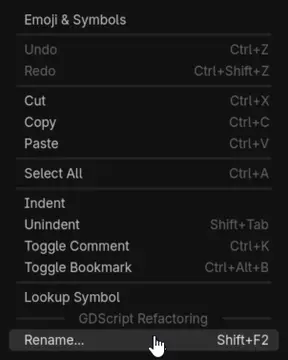
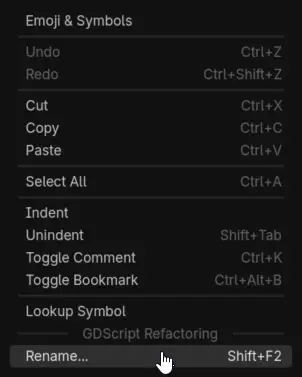
- Shift+F2 (or right-click → Rename...) directly in the script editor, on any user-defined symbol (variable, function, parameter, class, enum member…)
- Scope-aware: powered by
textDocument/renamefrom Godot's own language server — shadowed or unrelated symbols are left untouched - Project-wide: all
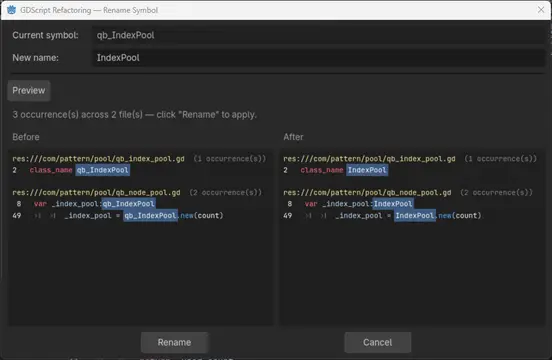
.gdfiles are analyzed and updated in one action - Preview before applying: every affected file, line number, and line content is listed (with the symbol highlighted) before anything is written
- Multi-file undo/redo: a single Ctrl+Z reverts the rename across all modified files; Ctrl+Shift+Z (or Ctrl+Y) re-applies it. Your own local edits are still undone first, like in any IDE
- Silent editor refresh: open script tabs reload automatically — no "files are newer on disk" popup, caret and scroll position preserved
- Smart context menu: the Rename... entry only appears when the cursor is on a renameable symbol — never on keywords, built-in types (
Vector2,String…), native engine classes (Node,Sprite2D…), numbers, strings, or comments
📦Installation
- Copy the
addons/gdscript_refactoring/folder into your project'saddons/directory. - Open Project → Project Settings → Plugins.
- Enable GDScript Refactoring.
Requirement: the GDScript language server must be running (it is enabled by default in the Godot editor, on port 6005 — see Editor Settings → Network → Language Server).
🚀Usage
- In the script editor, place the caret on the symbol you want to rename.
- Press Shift+F2 — or right-click → Rename.... The shortcut and the menu entry only activate on renameable symbols.
- Type the new name.
- Click Preview — all occurrences across the project are listed with file, line number, and highlighted line content.
- Click Rename to apply.
To revert: press Ctrl+Z in the script editor. All modified files are restored in one step. Ctrl+Shift+Z / Ctrl+Y re-applies the rename.
🔍How it works
| Step | Mechanism |
|---|---|
| Symbol detection | Word under caret + keyword / native-class / string / comment filtering |
| Occurrence search | textDocument/rename request to Godot's LSP (port 6005) |
| File sync to LSP | didClose + didOpen with monotonically increasing versions, drained socket buffers to avoid TCP deadlock |
| Applying edits | The LSP WorkspaceEdit (precise line/character ranges) is applied bottom-to-top to each file |
| Editor refresh | Temporary auto_reload_scripts_on_external_change + filesystem notification + simulated window-focus check (the same mechanism Godot uses to detect external file changes) |
| Undo / redo | Plugin-internal multi-file stack; Ctrl+Z is intercepted in the CodeEdit only when its local history is empty |
📂File structure
addons/gdscript_refactoring/
├── plugin.cfg               # Plugin manifest
├── qb_gdscript_rename.gd    # EditorPlugin — context menu, undo stack, shortcuts
├── qb_rename_dialog.gd      # Rename dialog — preview, apply, editor refresh
├── qb_lsp_client.gd         # Minimal LSP client (JSON-RPC 2.0 over TCP)
├── qb_file_scanner.gd       # Recursive .gd file collector
└── qb_symbol_replacer.gd    # Legacy regex engine (kept for reference)
⚙️Limitations
- GDScript only (not C#).
- The rename relies on Godot's language server: symbols it cannot resolve (e.g. purely dynamic access via strings,
get()/set()calls) will not be found. - References inside
.tscnscene files (connected signals, exported node paths) are not updated — use Godot's built-in tools for those.
Compatibility
- Godot 4.x (developed and tested on 4.6)
📄 Licence
MIT — free to use, modify and distribute.
A scope-aware rename refactoring plugin for the Godot 4 script editor, powered by Godot's built-in GDScript Language Server (LSP) — the same engine that drives autocompletion and go-to-definition.
Unlike naive find-and-replace, the rename understands GDScript semantics: renaming a member variable will not touch an unrelated local variable that happens to share the same name, and vice versa.
You can support us on itch.io:
https://quanty-bandit.itch.io/gdscript-refactoring-plugin
Reviews
Quick Information
GDScript refactoring plugin
A scope-aware rename refactoring plugin for the Godot 4 script editor, powered by Godot's built-in GDScript Language Server (LSP) — the same engine that drives autocompletion and go-to-definition.Unlike naive find-and-replace, the rename understands GDScript semantics: renaming a member variable will not touch an unrelated local variable that happens to share the same name, and vice versa.You can support us on itch.io:https://quanty-bandit.itch.io/gdscript-refactoring-plugin
Supported Engine Version
4.2
Version String
1.0.2
License Version
MIT
Support Level
community
Modified Date
7 hours ago
Git URL
Issue URL