Sprite Mesh Baker
An asset by koka99
Install Asset
Install via Godot
To maintain one source of truth, Godot Asset Library is just a mirror of the old asset library so you can download directly on Godot via the integrated asset library browser
Quick Information

Sprite Mesh Baker
Editor plugin that bakes Sprite3D hierarchies into a single MeshInstance3D (ArrayMesh). Select a Node3D root containing Sprite3D children, and the plugin merges them into optimized mesh surfaces — one per texture. Supports spritesheet frames (hframes/vframes), region rects, flip, offset, modulate color, and all three sprite axes. Includes undo/redo support, texture filter options (Nearest, Linear, with mipmaps), and the ability to disable or delete original sprites after baking. Ideal for reducing draw calls in 3D scenes that use many Sprite3D nodes.
Supported Engine Version
4.0
Version String
1.0
License Version
MIT
Support Level
community
Modified Date
4 months ago
Git URL
Issue URL
Sprite Mesh Baker
Bake Sprite3D hierarchies into a single MeshInstance3D ArrayMesh -- right from the Godot editor.
What It Does
Sprite Mesh Baker is a Godot 4.x editor plugin that takes a tree of Sprite3D nodes under a selected Node3D root and merges them into a single MeshInstance3D with an ArrayMesh. Each sprite is converted into a textured quad, transformed into the root's local space, and combined into as few draw surfaces as possible.
Why Use It
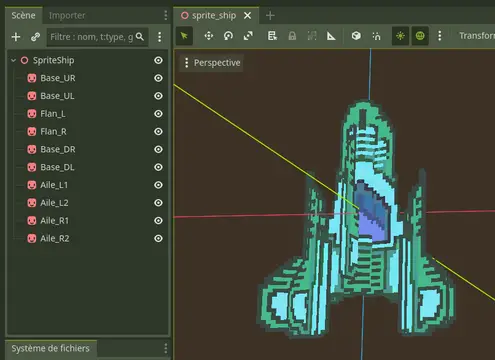
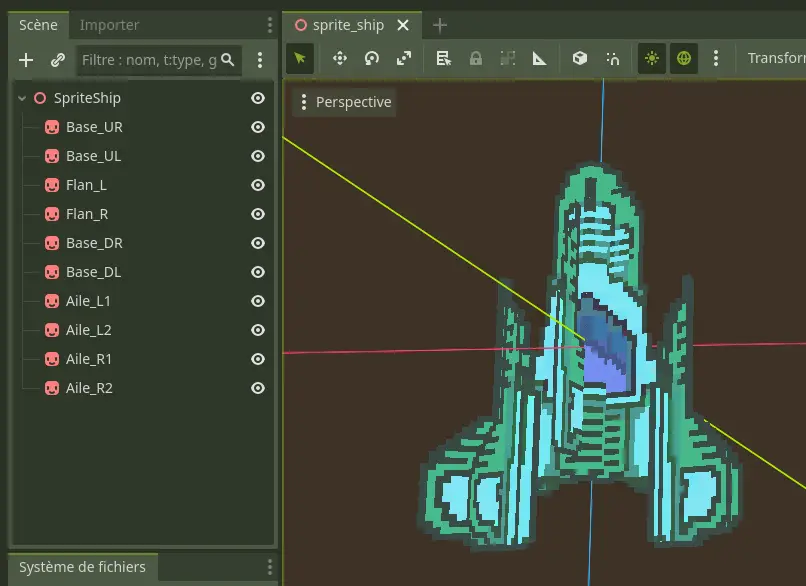
- Fewer draw calls. A ship built from 30 Sprite3D nodes becomes one MeshInstance3D with one surface per texture. The GPU renders it in a fraction of the time.
- Simpler scene trees. Replace dozens of Sprite3D children with a single baked mesh. The node tree stays clean and manageable.
- Non-destructive workflow. The bake operation is fully integrated with the editor's Undo/Redo system. You can also choose to keep, hide, or delete the original sprites after baking.
Features
- Recursively gathers all
Sprite3Ddescendants under a selected root node. - Respects
region_rect,hframes/vframes,frame,flip_h,flip_v,offset,centered,pixel_size,axis, andmodulateproperties. - Groups quads by texture, producing one
ArrayMeshsurface per unique texture (or a single surface when all sprites share the same texture). - Generates unshaded
StandardMaterial3Dwith alpha depth pre-pass, double-sided rendering, and vertex color support. - Configurable texture filtering: Nearest, Linear, Nearest with Mipmaps, Linear with Mipmaps.
- Configurable alpha threshold for transparency.
- Option to hide or delete original Sprite3D nodes after baking.
- Full Undo/Redo support via
EditorUndoRedoManager. - Skips billboard sprites gracefully with a clear warning in the results panel.
Installation
- Copy the
addons/sprite_mesh_baker/folder into your project'saddons/directory. - In the Godot editor, go to Project > Project Settings > Plugins.
- Find Sprite Mesh Baker in the list and set its status to Active.
Usage
- In the 3D scene tree, select the Node3D that serves as the parent of the Sprite3D nodes you want to bake.
- Open Project > Tools > Bake Sprite3D Group to MeshInstance3D... from the top menu bar.
- The plugin will scan for all
Sprite3Ddescendants under the selected node and report how many were found. - Adjust the bake options as needed (see below).
- Click Bake.
- A new
MeshInstance3Dnamed<RootName>_bakedis added as a child of the selected root node.
Options
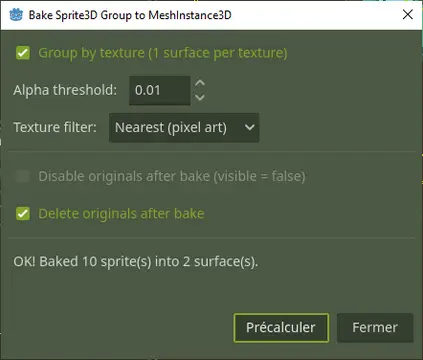
| Option | Default | Description |
|---|---|---|
| Group by texture | On | Creates one mesh surface per unique texture. When off and all sprites share a single texture, everything goes into one surface. If multiple textures are detected with this option off, the plugin automatically enables it. |
| Texture filter | Nearest (pixel art) | Sets the texture filtering mode on the generated material. Choices: Nearest, Linear, Nearest + Mipmaps, Linear + Mipmaps. |
| Alpha threshold | 0.01 | Controls the alpha cutoff value used by the depth pre-pass transparency mode on the generated material. |
| Disable originals after bake | Off | Sets visible = false on all baked Sprite3D nodes. Undoable. |
| Delete originals after bake | Off | Removes the original Sprite3D nodes from the scene tree entirely. Undoable. Enabling this option disables the "Disable originals" checkbox. |
Limitations and Notes
- Billboard sprites are skipped by design. Sprites with any billboard mode enabled cannot be meaningfully baked into a static mesh, so they are excluded. The results panel lists all skipped sprites.
- No MultiMesh output. The plugin produces a single
ArrayMesh, not aMultiMesh. This is intentional -- the goal is to merge heterogeneous sprite quads, not to instance identical geometry. region_rectwith zero size falls back to the full texture. If a sprite hasregion_enabledset totruebut itsregion_recthas a width or height of zero, the plugin uses the entire texture dimensions instead.- Sprites without a texture are skipped. Any
Sprite3Dwith anulltexture is silently excluded and reported in the results. - The baked mesh is unshaded. The generated material uses
SHADING_MODE_UNSHADEDwith vertex colors, matching the typical look of Sprite3D nodes. If you need lit materials, you can edit the material on the resulting MeshInstance3D after baking. - Transform fidelity. All sprite positions, rotations, and scales are correctly resolved through the full transform chain into the root node's local space.
Compatibility
- Godot 4.x (tested on Godot 4.5).
- Requires the editor (this is a
@toolEditorPlugin; it does not run at runtime).
License
MIT
Editor plugin that bakes Sprite3D hierarchies into a single MeshInstance3D (ArrayMesh). Select a Node3D root containing Sprite3D children, and the plugin merges them into optimized mesh surfaces — one per texture. Supports spritesheet frames (hframes/vframes), region rects, flip, offset, modulate color, and all three sprite axes. Includes undo/redo support, texture filter options (Nearest, Linear, with mipmaps), and the ability to disable or delete original sprites after baking. Ideal for reducing draw calls in 3D scenes that use many Sprite3D nodes.
Reviews
Quick Information
Sprite Mesh Baker
Editor plugin that bakes Sprite3D hierarchies into a single MeshInstance3D (ArrayMesh). Select a Node3D root containing Sprite3D children, and the plugin merges them into optimized mesh surfaces — one per texture. Supports spritesheet frames (hframes/vframes), region rects, flip, offset, modulate color, and all three sprite axes. Includes undo/redo support, texture filter options (Nearest, Linear, with mipmaps), and the ability to disable or delete original sprites after baking. Ideal for reducing draw calls in 3D scenes that use many Sprite3D nodes.
Supported Engine Version
4.0
Version String
1.0
License Version
MIT
Support Level
community
Modified Date
4 months ago
Git URL
Issue URL