UID Explorer Plugin
An asset by thejust
Install Asset
Install via Godot
To maintain one source of truth, Godot Asset Library is just a mirror of the old asset library so you can download directly on Godot via the integrated asset library browser



Quick Information


UID Explorer Plugin
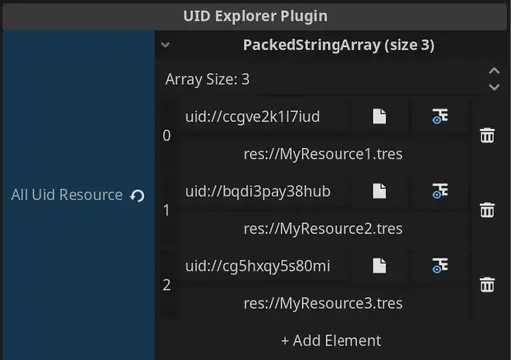
Adds a new property hint for string export properties. This property hint provides better navigation and viewing capabilities for resources and file selection. Adds the ability to select a file in the editor, navigate to it in the file system, and populate the property with the resource's UID. The resource can also be expanded by pressing the button with the converted path.
Supported Engine Version
4.3
Version String
1.3
License Version
MIT
Support Level
community
Modified Date
7 months ago
Git URL
Issue URL
UID Explorer Plugin
An inspector plugin for the Godot game engine.

Overview
Adds a new property hint for the [Export] annotation. This annotation adds the ability to select a file in the editor and populate the [Export] property with the resource's UID. Below the populated uid:// is a button that selects the corresponding resource in the Godot file system.
How to Use
- Variable must be a
string. - Use
[Export]annotation above variable. - Property hint must be
File. - Specify filter as
uid.
Ex:
[Export(PropertyHint.File, "uid")]
private string myResourcePath = "";

Resource myResource = ResourceLoader.Load(myResourcePath);
Installation
(Tested on Godot v4.3.stable.mono)
- Place base directory in the
addonsfolder of your project. - Make sure to press the build button to compile C# assemblies.
- Enable in the plugins tab.
What is this useful for?
Previous Godot versions have lacked a stable, battle-tested workflow regarding file system references. That's because references between resources would contain the file system path.
Why is that a problem?
Paths change! So when that occurred, things would often break. So, in comes UID. UIDs are a solution to referencing resources in one's project in a path agnostic way. So that means one can change the location of their file and stuff should break less often.
So UIDs are just better?
Not in every way. Unlike file paths, UIDs aren't human readable in the same way. For example, when you see a file path that says res://my_data/MyResource.tres you can figure out the location and what the resource is by just looking at it. You can't tell either with UIDs because they look like this: uid://1234567. Where is that file located? What resource is it referring to? Without cross referencing the UID in some code editor there's no easy way to know.
Until now! With this plugin, UIDs populated in the inspector will convert the file UID to its corresponding file path. It's based off the UID so it's just a utility to make UIDs a bit more human readable. On top of that, the button below will navigate the file system to the exact location of the resource the UID references, which is quite helpful when referencing file paths in general.
Although Godot's documentation isn't explicit about this, UIDs are often interchangeable with traditional file paths (res://). That means when using methods like GD.Load() or ResourceLoader.Load() either res:// or uid:// based paths work the same.
More support could be added in Godot with UIDs in general. For example, one cannot search for a file by its UID in the Godot FileSystem search bar! Such functionality I've added as a proposal, so give that a thumbs up.
Adds a new property hint for string export properties. This property hint provides better navigation and viewing capabilities for resources and file selection. Adds the ability to select a file in the editor, navigate to it in the file system, and populate the property with the resource's UID. The resource can also be expanded by pressing the button with the converted path.
Reviews
Quick Information
UID Explorer Plugin
Adds a new property hint for string export properties. This property hint provides better navigation and viewing capabilities for resources and file selection. Adds the ability to select a file in the editor, navigate to it in the file system, and populate the property with the resource's UID. The resource can also be expanded by pressing the button with the converted path.
Supported Engine Version
4.3
Version String
1.3
License Version
MIT
Support Level
community
Modified Date
7 months ago
Git URL
Issue URL