Primes
An asset by Primes Ltd
Install Asset
Install via Godot
To maintain one source of truth, Godot Asset Library is just a mirror of the old asset library so you can download directly on Godot via the integrated asset library browser
Quick Information

Primes
This is a companion editor plugin for one-click publishing of small Godot projects to the Primes mobile app. Android app:https://play.google.com/store/apps/details?id=com.olelukoie.primesiOS app is comingHow to use:1. Build with the Compatibility renderer2. Open Primes tab3. (Once) Log in, if not yet4. Click PublishAnd your project is live in the app.The plugin handles packaging, uploading, local device testing, and basic project management directly from the editor.See repo's README for more information:https://github.com/ole-luk-oie/primes-addon
Supported Engine Version
4.5
Version String
1.6.0
License Version
MIT
Support Level
community
Modified Date
4 months ago
Git URL
Issue URL
Primes Godot Plugin
This is a companion editor plugin for the Primes platform that allows easy publishing of small Godot projects directly from the editor.
Primes is focused on lightweight, expressive projects that can be browsed and played in a mobile app, TikTok-style.
Primes Android app:
https://play.google.com/store/apps/details?id=com.olelukoie.primes
(iOS app is coming)
How to use (assuming the plugin is installed and enabled)
- Develop your project using the Compatibility renderer
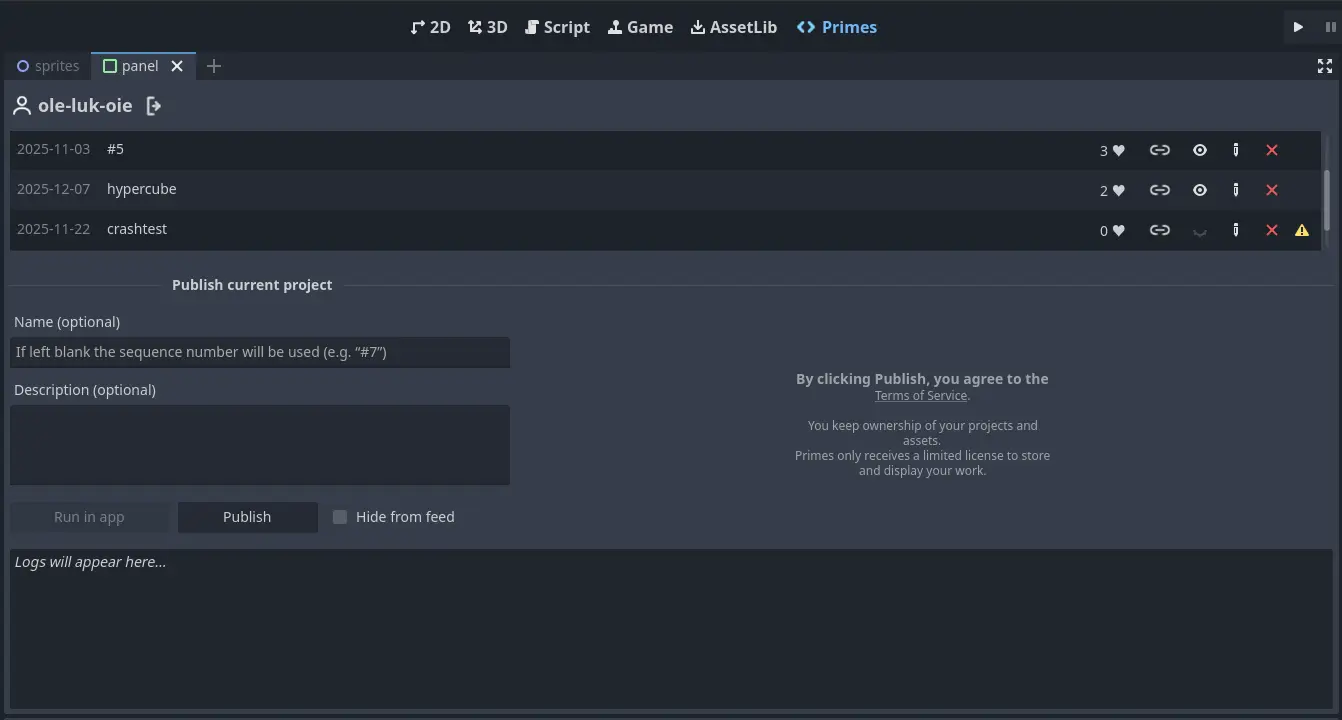
- Open the Primes tab in the editor (next to the AssetLib tab)
- Click Publish
That's it.
Uploaded projects remain the property of their authors. See the Terms of Service for details.
What else this plugin does
Using this plugin, you also can:
- Add a name and/or description to your project (both optional)
- Run your project in the app on a connected Android phone with one click
(no templates or presets needed, but requires adb to be installed and available in PATH) - See a list of your already published projects
- Edit metadata or delete published projects
- View crash flags and user reports, and submit appeals
Current limitations
Published projects (exported as a compiled ZIP) must be under 32 MB (this limit may change in the future)
The engine itself is not included; only packaged assets and project data count toward this limitProjects are currently executed in the app as Web exports, which means:
- Only the Compatibility renderer is supported
- Native mobile rendering is not yet available (work in progress)
Only an Android app is available at the moment
(iOS is in development)
Execution environment restrictions
To keep the platform safe and predictable, published projects run in a restricted environment.
Some engine APIs are not available (including networking, native extensions, and certain OS features).
The plugin checks projects for unsupported usage and will block publishing if such APIs are detected.
Only pure Godot projects using GDScript and built-in engine features are supported; C# projects are not supported.
Dev notes
The platform targets mobile portrait mode
- Landscape projects will show large black margins
- If you must use landscape keep the portrait in settings and clearly signal to the user to rotate their phone
The aspect ratio in the app is roughly 1:2
You can set the viewport size to something like 1000×2000 pixels for developmentWhen sizing things on screen, avoid absolute pixel values
Prefer ratios of viewport's width and height insteadRead this document to understand the limitations of web exports
With one simplification: you don't need to worry about supporting multiple browsers
How to approach Primes
A few words on how the platform is intended to be used. These aren't rules, these are biases.
There is no "right" kind of project here
Primes is a place for everything - weird experiments, interactive explainers, disturbing art, brainrot, and other things that don't fit anywhere else.
Get to the point quickly
Primes is dynamic by nature.
Menus, settings, and long intros are often just friction.
Start where the thing is.
Reuse freely
Assets, tools, ideas, whatever. Anything that is legal and helps you express yourself is fair game - just don't let it in the driver's seat. And if it starts feeling dishonest, it probably is.
Skip the juice
If you want. Juice doesn't make an idea better - unless it is the idea.
Expect rough edges. Feedback is welcome.
This is a companion editor plugin for one-click publishing of small Godot projects to the Primes mobile app.
Android app:
https://play.google.com/store/apps/details?id=com.olelukoie.primes
iOS app is coming
How to use:
1. Build with the Compatibility renderer
2. Open Primes tab
3. (Once) Log in, if not yet
4. Click Publish
And your project is live in the app.
The plugin handles packaging, uploading, local device testing, and basic project management directly from the editor.
See repo's README for more information:
https://github.com/ole-luk-oie/primes-addon
Reviews
Quick Information
Primes
This is a companion editor plugin for one-click publishing of small Godot projects to the Primes mobile app. Android app:https://play.google.com/store/apps/details?id=com.olelukoie.primesiOS app is comingHow to use:1. Build with the Compatibility renderer2. Open Primes tab3. (Once) Log in, if not yet4. Click PublishAnd your project is live in the app.The plugin handles packaging, uploading, local device testing, and basic project management directly from the editor.See repo's README for more information:https://github.com/ole-luk-oie/primes-addon
Supported Engine Version
4.5
Version String
1.6.0
License Version
MIT
Support Level
community
Modified Date
4 months ago
Git URL
Issue URL