Sprite2D Rect Editor
An asset by andrej88
Install Asset
Install via Godot
To maintain one source of truth, Godot Asset Library is just a mirror of the old asset library so you can download directly on Godot via the integrated asset library browser

Quick Information

Sprite2D Rect Editor
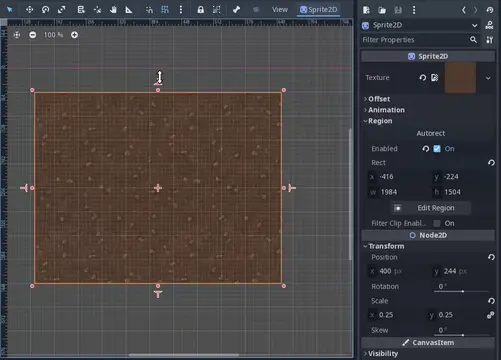
This addon allows easier editing of the `region_rect` property of Sprite2D nodes. The addon should be compatible with Godot 4.1 through 4.3. It may work for other 4.x releases but I haven't tested them.When a Sprite2D is selected in the editor and has `region_enabled` checked, additional handles will appear on each side of the Sprite2D. Dragging these handles will resize the region rect in the given direction while adjusting the node's position and the region's x/y/width/height properties such that the opposite edge stays put.Caveats:- The Sprite2D must have `global_rotation` set to a multiple of 2π (e.g. 0). I didn't want to have to figure out how to measure drag distance along any arbitrary axis, but pull requests are welcome.- The handles will always snap to 8px increments. Godot doesn't provide a way for addons to fetch the editor's configured snap settings (see: https://github.com/godotengine/godot/issues/11180). You can change the snap distance for your project's needs by changing the `grid_size` constant in `plugin.gd`.As a bonus, the plugin adds an "autorect" button to the Sprite2D inspector. When pressed, it sets `region_enabled` to true and sets the region rect to the size of the image. This is in contrast to the default behavior which just sets the rect's dimensions to 0 when you enable the region.
Supported Engine Version
4.1
Version String
1.0.1
License Version
MIT
Support Level
community
Modified Date
1 year ago
Git URL
Issue URL
This addon allows easier editing of the `region_rect` property of Sprite2D nodes. The addon should be compatible with Godot 4.1 through 4.3. It may work for other 4.x releases but I haven't tested them.
When a Sprite2D is selected in the editor and has `region_enabled` checked, additional handles will appear on each side of the Sprite2D. Dragging these handles will resize the region rect in the given direction while adjusting the node's position and the region's x/y/width/height properties such that the opposite edge stays put.
Caveats:
- The Sprite2D must have `global_rotation` set to a multiple of 2π (e.g. 0). I didn't want to have to figure out how to measure drag distance along any arbitrary axis, but pull requests are welcome.
- The handles will always snap to 8px increments. Godot doesn't provide a way for addons to fetch the editor's configured snap settings (see: https://github.com/godotengine/godot/issues/11180). You can change the snap distance for your project's needs by changing the `grid_size` constant in `plugin.gd`.
As a bonus, the plugin adds an "autorect" button to the Sprite2D inspector. When pressed, it sets `region_enabled` to true and sets the region rect to the size of the image. This is in contrast to the default behavior which just sets the rect's dimensions to 0 when you enable the region.
Reviews
Quick Information
Sprite2D Rect Editor
This addon allows easier editing of the `region_rect` property of Sprite2D nodes. The addon should be compatible with Godot 4.1 through 4.3. It may work for other 4.x releases but I haven't tested them.When a Sprite2D is selected in the editor and has `region_enabled` checked, additional handles will appear on each side of the Sprite2D. Dragging these handles will resize the region rect in the given direction while adjusting the node's position and the region's x/y/width/height properties such that the opposite edge stays put.Caveats:- The Sprite2D must have `global_rotation` set to a multiple of 2π (e.g. 0). I didn't want to have to figure out how to measure drag distance along any arbitrary axis, but pull requests are welcome.- The handles will always snap to 8px increments. Godot doesn't provide a way for addons to fetch the editor's configured snap settings (see: https://github.com/godotengine/godot/issues/11180). You can change the snap distance for your project's needs by changing the `grid_size` constant in `plugin.gd`.As a bonus, the plugin adds an "autorect" button to the Sprite2D inspector. When pressed, it sets `region_enabled` to true and sets the region rect to the size of the image. This is in contrast to the default behavior which just sets the rect's dimensions to 0 when you enable the region.
Supported Engine Version
4.1
Version String
1.0.1
License Version
MIT
Support Level
community
Modified Date
1 year ago
Git URL
Issue URL