ZigZagContainer
An asset by cronodia
Install Asset
Install via Godot
To maintain one source of truth, Godot Asset Library is just a mirror of the old asset library so you can download directly on Godot via the integrated asset library browser

Quick Information

ZigZagContainer
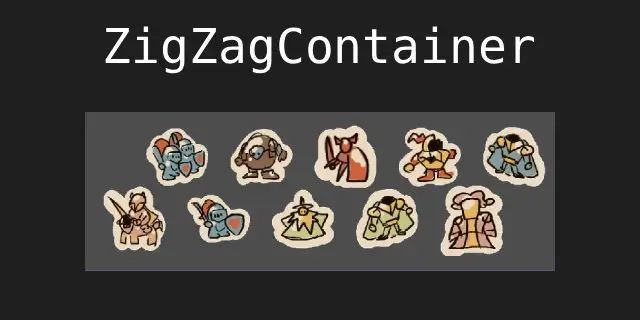
A custom Container suite for Godot 4.x that arranges children in an alternating "zig-zag" pattern. Two flavors: the base node and one with built-in procedural animation and mouse-proximity scaling.Features:- Dynamic Tweening: All layout changes (resizing, adding children, toggling directions) are smoothly animated- Proximity Interaction: The ZigZagContainerWithInteraction variant provides a "fisheye" (or bubble) effect, scaling elements organically as the mouse approaches.- Scaling Intelligence: scale_to_fit ensures your UI never overflows the container boundaries by dynamically downscaling children while maintaining their aspect ratio.- Two Layout Modes: -Horizontal: Alternates children above and below the center line. -Vertical: Alternates children left and right of the center line.
Supported Engine Version
4.5
Version String
0.5
License Version
MIT
Support Level
community
Modified Date
6 months ago
Git URL
Issue URL
ZigZag UI Containers for Godot 4.x
A custom Container suite for Godot 4.x that arranges children in an alternating "zig-zag" pattern.
Two flavors: the base node and one with built-in procedural animation and mouse-proximity scaling.

Features
- Dynamic Tweening: All layout changes (resizing, adding children, toggling directions) are smoothly animated using
Tween.TRANS_SINE. - Proximity Interaction: The
ZigZagContainerWithInteractionvariant provides a "fisheye" (or bubble) effect, scaling elements organically as the mouse approaches. - Scaling Intelligence:
scale_to_fitensures your UI never overflows the container boundaries by dynamically downscaling children while maintaining their aspect ratio. - Two Layout Modes:
- Horizontal: Alternates children above and below the center line.
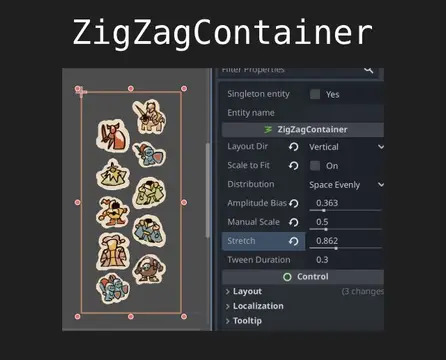
- Vertical: Alternates children left and right of the center line.
- Distribution Logic: Supports
SPACE_BETWEENfor edge-to-edge layouts andSPACE_EVENLYfor balanced spacing.
Installation
- Move the
zigzag_containerfolder into your project'sres://addons/directory. - Ensure your scripts are located in
res://addons/zigzag_container/custom_class/as per your plugin configuration. - Go to Project Settings > Plugins and enable the ZigZagContainer plugin.
- Use the Add Child Node menu (Ctrl+A) to find
ZigZagContainerorZigZagContainerWithInteraction.
Configuration
Base Container (ZigZagContainer)
| Property | Description |
|---|---|
Layout Dir |
Horizontal or Vertical orientation. |
Scale To Fit |
Automatically shrinks children to prevent container overflow. |
Distribution |
Space Between (edges) or Space Evenly (centered gaps). |
Amplitude Bias |
Multiplier (0.0 - 2.0) for the zig-zag "height" or displacement from center. |
Manual Scale Bias |
A base multiplier for the size of all children. |
Stretch |
Compresses or expands the total main-axis range (0.25 - 2.0). |
Tween Duration |
Speed of the layout transition in seconds. |
Interaction Variant (ZigZagContainerWithInteraction)
This variant adds additional functionality (interaction with mouse position)
| Property | Description |
|---|---|
Hover Scale |
The maximum scale multiplier reached when the mouse is directly over a child. |
Proximity Radius |
Distance (in pixels) where the scaling effect begins to take influence. |
Lerp Speed |
Smoothing factor for the hover transition. Higher values are snappier. |
Technical Implementation Notes
Important Requirement: Same-size Children
This container is designed for "Icon-style" layouts and expects all children to have the same (homogenous) size. The internal layout math uses the dimensions of the first child (children[0]) as the reference for the entire group. If you mix child nodes of significantly different sizes, the spacing and zig-zag offsets will not align correctly, and the scaling logic may produce overlapping or uneven results. For best performance, ensure all child nodes have the same custom_minimum_size.
The "Base Scale" Logic
The interaction variant is designed to be "layout aware." It pulls the current_base_scale from the parent class. If scale_to_fit is active and the container has shrunk your icons to 0.5, a Hover Scale of 1.4 will correctly scale the icon up to 0.7 ($0.5 \times 1.4$). This prevents the "popping" glitch where icons snap to their original size regardless of the container's constraints.
Pivot Point Management
The container automatically manages the pivot_offset of all children, setting it to the center of the child's minimum size. This ensures that both the layout tweens and the proximity scaling occur from the center of the icon rather than the top-left corner.
Usage Example: Runtime Instantiation
Because the container uses NOTIFICATION_SORT_CHILDREN, you do not need to call manual update functions when adding items at runtime.
func add_menu_item(icon_texture: Texture2D):
    var rect = TextureRect.new()
    rect.texture = icon_texture
    rect.custom_minimum_size = Vector2(80, 80)
    rect.expand_mode = TextureRect.EXPAND_IGNORE_SIZE
    rect.stretch_mode = TextureRect.STRETCH_KEEP_ASPECT_CENTERED

    # Adding the child triggers the Tween animation automatically
  $ZigZagContainer.add_child(rect)

func setup_dynamic_menu():
  # Example: Creating the interaction variant via code
  var menu = ZigZagContainerWithInteraction.new()
  menu.layout_dir = ZigZagContainer.LayoutDir.HORIZONTAL
  menu.amplitude_bias = 0.8
  menu.hover_scale = 1.5
  add_child(menu)

  # Populate menu
  for i in range(5):
    add_menu_item(load("res://icon.svg"))
A custom Container suite for Godot 4.x that arranges children in an alternating "zig-zag" pattern.
Two flavors: the base node and one with built-in procedural animation and mouse-proximity scaling.
Features:
- Dynamic Tweening: All layout changes (resizing, adding children, toggling directions) are smoothly animated
- Proximity Interaction: The ZigZagContainerWithInteraction variant provides a "fisheye" (or bubble) effect, scaling elements organically as the mouse approaches.
- Scaling Intelligence: scale_to_fit ensures your UI never overflows the container boundaries by dynamically downscaling children while maintaining their aspect ratio.
- Two Layout Modes:
-Horizontal: Alternates children above and below the center line.
-Vertical: Alternates children left and right of the center line.
Reviews
Quick Information
ZigZagContainer
A custom Container suite for Godot 4.x that arranges children in an alternating "zig-zag" pattern. Two flavors: the base node and one with built-in procedural animation and mouse-proximity scaling.Features:- Dynamic Tweening: All layout changes (resizing, adding children, toggling directions) are smoothly animated- Proximity Interaction: The ZigZagContainerWithInteraction variant provides a "fisheye" (or bubble) effect, scaling elements organically as the mouse approaches.- Scaling Intelligence: scale_to_fit ensures your UI never overflows the container boundaries by dynamically downscaling children while maintaining their aspect ratio.- Two Layout Modes: -Horizontal: Alternates children above and below the center line. -Vertical: Alternates children left and right of the center line.
Supported Engine Version
4.5
Version String
0.5
License Version
MIT
Support Level
community
Modified Date
6 months ago
Git URL
Issue URL