godotdev.nvim node copy
An asset by Mathijs
Install Asset
Install via Godot
To maintain one source of truth, Godot Asset Library is just a mirror of the old asset library so you can download directly on Godot via the integrated asset library browser
Quick Information

godotdev.nvim node copy
Use this shorter version:Small Godot editor addon for godotdev.nvim that copies node references and ready-to-insert GDScript or C# snippets for use in Neovim.Full Descriptiongodotdev.nvim-node-copy is a small Godot editor addon for users of godotdev.nvim: https://github.com/Mathijs-Bakker/godotdev.nvimIt adds actions for selected nodes so you can either copy useful references to the clipboard or, experimentally, insert them directly into the active Neovim buffer through Neovim's editor server.The default workflow is simple: select a node in Godot, copy the reference you want, then paste it into Neovim. The addon also includes an experimental direct-insert mode for already open Neovim buffers. This is not drag-and-drop.It inserts the generated snippet at the current Neovim cursor position and works best when the target script is already open in Neovim.Neovim remote insertion is supported on Linux and macOS through `nvr` and a Neovim `--listen` server address. Windows is intended to work through a named pipe server address as well, but that setup is still experimental and unverified in this repository.Features:- Copy node path relative to the current scene root - Copy a `$Node/Child` reference- Copy a `get_node("Node/Child")` expression- Copy a typed `@onready var` snippet for GDScript- Copy a typed `GetNode<T>()` expression for C#- Copy a C# property snippet- Scene Tree right-click menu support- 2D editor right-click menu support- `Project > Tools` menu support- Configurable GDScript and C# actions- Clipboard output by default- Optional experimental direct insertion into the active Neovim bufferThis addon is intended as a companion utility for users of godotdev.nvim who want a fast and explicit way to bring node references into scripts while working in Neovim.
Supported Engine Version
4.0
Version String
0.3.3
License Version
Apache-2.0
Support Level
community
Modified Date
2 months ago
Git URL
Issue URL






godotdev.nvim-node-copy
godotdev.nvim-node-copy is a small Godot editor addon for users of godotdev.nvim.
It adds copy actions for the currently selected node so you can paste useful references directly into Neovim without relying on drag-and-drop or custom IPC.


Features
- Copy the selected node path relative to the current scene root
- Copy a
$Node/Childreference - Copy a
get_node("Node/Child")expression - Copy a typed
@onready varsnippet - Copy a typed
GetNode<T>()C# expression - Copy a C# property snippet
- Works from the current editor selection
- Clipboard-only workflow; no Neovim-side receiver required
Install
Copy the addons/godotdev_nvim_node_copy folder into your Godot project:
res://addons/godotdev_nvim_node_copy
Then enable the plugin in:
Project > Project Settings > Plugins
Usage
Select a node in the Scene dock, then use either:
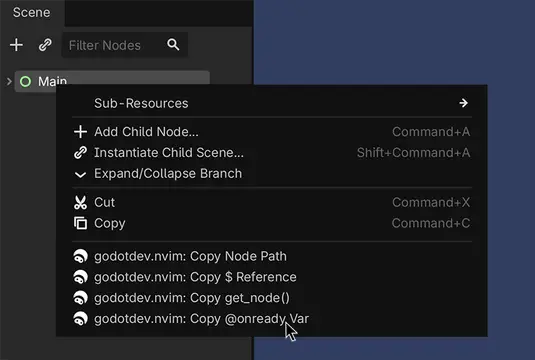
- the Scene Tree right-click menu
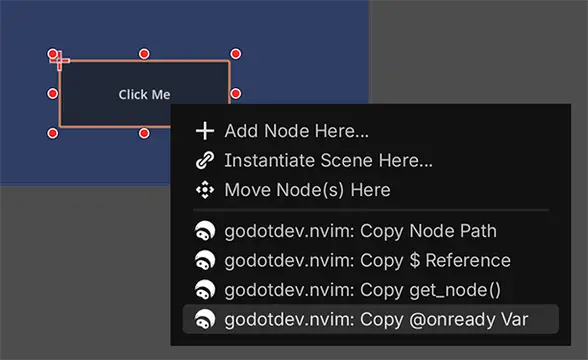
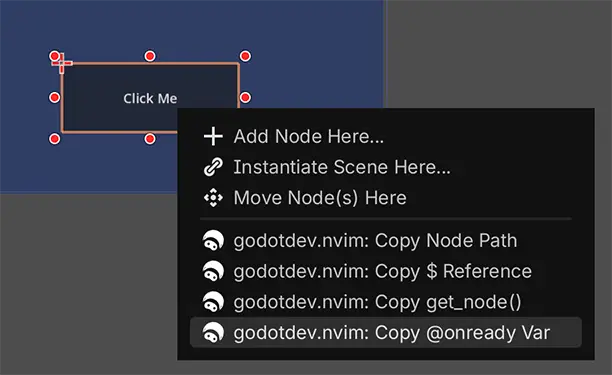
- the 2D editor right-click menu
- or the
Project > Toolsmenu
Available actions:
Project > Tools > godotdev.nvim: Copy Node PathProject > Tools > godotdev.nvim: Copy $ ReferenceProject > Tools > godotdev.nvim: Copy get_node()Project > Tools > godotdev.nvim: Copy @onready VarProject > Tools > godotdev.nvim: Copy C# GetNode<T>()Project > Tools > godotdev.nvim: Copy C# Property
The generated text is copied to your clipboard. Paste it in Neovim where you want it.
Example Output
For a selected Player node:
Player
$Player
get_node("Player")
@onready var player: CharacterBody2D = $Player
GetNode<CharacterBody2D>("Player")
private CharacterBody2D Player => GetNode<CharacterBody2D>("Player");
Notes
- The addon uses the selected node relative to the currently edited scene root.
- If the selected node is the scene root itself, the generated snippets use
selfwhere appropriate. - The addon supports both GDScript and C# snippet output.
Configuration
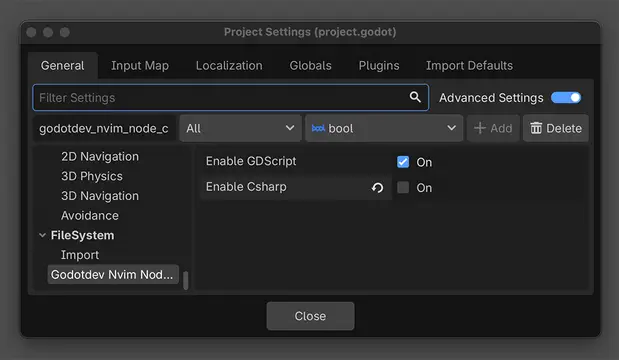
The addon can be configured in Project Settings with:
godotdev_nvim_node_copy/enable_gdscriptgodotdev_nvim_node_copy/enable_csharp

This controls which language-specific copy actions appear in:
Project > Tools- the Scene Tree right-click menu
- the 2D editor right-click menu
Copy Node Path remains available regardless of language selection.
Icon Import
- Commit the SVG
.importfile for the addon icon so users get consistent editor import settings. - The icon is intended to use
editor/scale_with_editor_scale=truefor proper HiDPI behavior. - The current icon import keeps fixed colors with
editor/convert_colors_with_editor_theme=false.
Roadmap
- Support
%UniqueNodewhen appropriate - Add C# snippet variants
- Let users choose snippet style in plugin settings
Use this shorter version:
Small Godot editor addon for godotdev.nvim that copies node references and ready-to-insert GDScript or C# snippets for use in Neovim.
Full Description
godotdev.nvim-node-copy is a small Godot editor addon for users of godotdev.nvim: https://github.com/Mathijs-Bakker/godotdev.nvim
It adds actions for selected nodes so you can either copy useful references to the clipboard or, experimentally, insert them directly into the active Neovim buffer through Neovim's editor server.
The default workflow is simple: select a node in Godot, copy the reference you want, then paste it into Neovim.
The addon also includes an experimental direct-insert mode for already open Neovim buffers. This is not drag-and-drop.
It inserts the generated snippet at the current Neovim cursor position and works best when the target script is already open in Neovim.
Neovim remote insertion is supported on Linux and macOS through `nvr` and a Neovim `--listen` server address. Windows is intended to work through a named pipe server address as well, but that setup is still experimental and unverified in this repository.
Features:
- Copy node path relative to the current scene root
- Copy a `$Node/Child` reference
- Copy a `get_node("Node/Child")` expression
- Copy a typed `@onready var` snippet for GDScript
- Copy a typed `GetNode
- Copy a C# property snippet
- Scene Tree right-click menu support
- 2D editor right-click menu support
- `Project > Tools` menu support
- Configurable GDScript and C# actions
- Clipboard output by default
- Optional experimental direct insertion into the active Neovim buffer
This addon is intended as a companion utility for users of godotdev.nvim who want a fast and explicit way to bring node references into scripts while working in Neovim.
Reviews
Quick Information
godotdev.nvim node copy
Use this shorter version:Small Godot editor addon for godotdev.nvim that copies node references and ready-to-insert GDScript or C# snippets for use in Neovim.Full Descriptiongodotdev.nvim-node-copy is a small Godot editor addon for users of godotdev.nvim: https://github.com/Mathijs-Bakker/godotdev.nvimIt adds actions for selected nodes so you can either copy useful references to the clipboard or, experimentally, insert them directly into the active Neovim buffer through Neovim's editor server.The default workflow is simple: select a node in Godot, copy the reference you want, then paste it into Neovim. The addon also includes an experimental direct-insert mode for already open Neovim buffers. This is not drag-and-drop.It inserts the generated snippet at the current Neovim cursor position and works best when the target script is already open in Neovim.Neovim remote insertion is supported on Linux and macOS through `nvr` and a Neovim `--listen` server address. Windows is intended to work through a named pipe server address as well, but that setup is still experimental and unverified in this repository.Features:- Copy node path relative to the current scene root - Copy a `$Node/Child` reference- Copy a `get_node("Node/Child")` expression- Copy a typed `@onready var` snippet for GDScript- Copy a typed `GetNode<T>()` expression for C#- Copy a C# property snippet- Scene Tree right-click menu support- 2D editor right-click menu support- `Project > Tools` menu support- Configurable GDScript and C# actions- Clipboard output by default- Optional experimental direct insertion into the active Neovim bufferThis addon is intended as a companion utility for users of godotdev.nvim who want a fast and explicit way to bring node references into scripts while working in Neovim.
Supported Engine Version
4.0
Version String
0.3.3
License Version
Apache-2.0
Support Level
community
Modified Date
2 months ago
Git URL
Issue URL