ProCam2D
An asset by Artom_Studios
Install Asset
Install via Godot
To maintain one source of truth, Godot Asset Library is just a mirror of the old asset library so you can download directly on Godot via the integrated asset library browser
Quick Information

ProCam2D
ProCam2D is a versatile and feature-rich custom 2D camera node for the Godot Engine, designed to provide industry-quality camera controls for any type of 2D game. This plugin offers extensive customization, including multiple follow modes, smooth transitions, and support for cinematic sequences. With a robust addon system, developers can easily extend its functionality with custom behaviors. Some inbuilt addons include shake effects, grid snapping, and more. ProCam2D is controlled via an autoload, making it accessible from any script in your project. Ideal for developers seeking precise and professional camera behavior, ProCam2D enhances game immersion and player experience.
Supported Engine Version
4.5
Version String
1.0
License Version
MIT
Support Level
community
Modified Date
6 months ago
Git URL
Issue URL
ProCam2D Examples
This directory contains example projects demonstrating various uses of ProCam2D.
Available Examples
Platformer
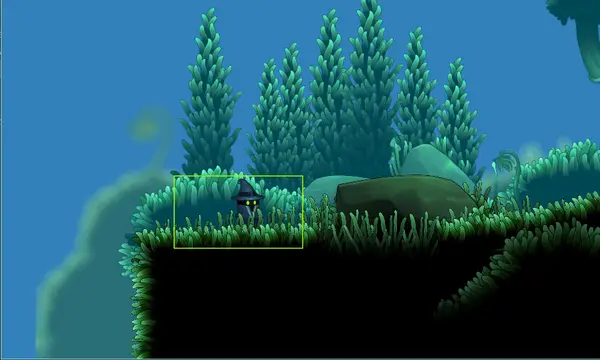
An atmospheric 2D platformer with parallax backgrounds:
- Character controller with smooth acceleration and jumping
- ProCam2D following the player with smooth camera movement
- Large explorable level with atmospheric design
- Parallax background layers for depth
Perfect for: Learning the basics of ProCam2D integration and camera following
Mouse Follow
A top-down aiming demo showcasing dynamic camera movement:
- Player that rotates to face the mouse cursor
- ProCam2D with PCamMouseFollow addon configured
- Camera shifts toward cursor for better visibility
- Training arena with targets and obstacles
Perfect for: Understanding mouse follow addon for aiming games, twin-stick shooters, and top-down games
Cinematic Demo
A showcase of cinematic camera sequences:
- Uses
PCamCinematicnodes to define camera points - Smooth transitions with rotation and zoom changes
- Simple API usage (
start_cinematic()) - Press SPACE to trigger the sequence
Perfect for: Cutscenes, intros, and scripted events
Multi-Target Demo
Demonstrates the camera's ability to keep multiple targets in view:
- 4 moving targets (1 player + 3 AI)
- Auto-zoom automatically fits all targets on screen
- Priority System: Press TAB to switch focus between targets
- Shows how
radiusaffects auto-zoom padding
Perfect for: Multiplayer games, squad-based games, and RTS
Screen Shake Demo
An interactive playground for the PCamShake addon:
- Test 8 built-in shake presets (Gunshot, Earthquake, etc.)
- Adjust intensity and see visual feedback
- Shows how to use the addon via code
Perfect for: Testing game feel and impact effects
💡 Quick Start: Screen Shake in Code
Here is how to easily add screen shake to your game using GDScript:
extends Node2D

@onready var camera = $ProCam2D

# 1. Create separate instances for different shake layers
var handheld_shake = PCamShake.new()
var impact_shake = PCamShake.new()

func _ready():
    # 2. Add them to the camera
    camera.add_addon(handheld_shake)
    camera.add_addon(impact_shake)

    # Start the ambient "handheld" shake (runs forever)
    handheld_shake.apply_preset(PCamShake.Preset.HANDHELD)
    handheld_shake.shake()

func _on_player_shoot():
    # 3. Trigger the impact shake independently
    # This layers on top of the handheld shake!
    impact_shake.apply_preset(PCamShake.Preset.GUNSHOT)
    impact_shake.shake()
Camera Priority Demo
Demonstrates how to switch between multiple cameras in the same viewport:
- Two cameras covering different zones (Blue/Red)
- Buttons to toggle which camera is active
- Uses
camera.priorityproperty to control switching - Higher priority = Active camera
Perfect for: Security camera systems, tactical views, and cutscene transitions
Split-Screen Game
A competitive 4-player coin collection game:
- 4 independent ProCam2D instances sharing one world
- Each camera tracks a different player
- Full game loop with scoring and timer
- Controls: P1(WASD), P2(Arrows), P3(TFGH), P4(IJKL)
Perfect for: Local multiplayer games and split-screen setups
Running the Examples
- Make sure the ProCam2D plugin is enabled in your project settings
- Open any example scene in the Godot editor
- Run the scene (F6) or set it as the main scene
Creating Your Own Examples
If you've created an example using ProCam2D and would like to contribute it:
- Create a new folder in the
examples/directory - Include all necessary files (scenes, scripts, assets)
- Add a README.md explaining the example
- Submit a pull request
See CONTRIBUTING.md for more details.
ProCam2D is a versatile and feature-rich custom 2D camera node for the Godot Engine, designed to provide industry-quality camera controls for any type of 2D game. This plugin offers extensive customization, including multiple follow modes, smooth transitions, and support for cinematic sequences. With a robust addon system, developers can easily extend its functionality with custom behaviors. Some inbuilt addons include shake effects, grid snapping, and more. ProCam2D is controlled via an autoload, making it accessible from any script in your project. Ideal for developers seeking precise and professional camera behavior, ProCam2D enhances game immersion and player experience.
Reviews
Quick Information
ProCam2D
ProCam2D is a versatile and feature-rich custom 2D camera node for the Godot Engine, designed to provide industry-quality camera controls for any type of 2D game. This plugin offers extensive customization, including multiple follow modes, smooth transitions, and support for cinematic sequences. With a robust addon system, developers can easily extend its functionality with custom behaviors. Some inbuilt addons include shake effects, grid snapping, and more. ProCam2D is controlled via an autoload, making it accessible from any script in your project. Ideal for developers seeking precise and professional camera behavior, ProCam2D enhances game immersion and player experience.
Supported Engine Version
4.5
Version String
1.0
License Version
MIT
Support Level
community
Modified Date
6 months ago
Git URL
Issue URL