Copy All Errors
An asset by SmartMita
Install Asset
Install via Godot
To maintain one source of truth, Godot Asset Library is just a mirror of the old asset library so you can download directly on Godot via the integrated asset library browser

Quick Information

Copy All Errors
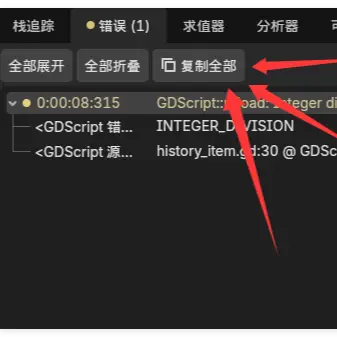
Adds a "Copy All" button to the Debugger's Errors panel, allowing you to copy all errors and warnings to the clipboard with one click. Supports both English and Chinese editor locales.
Supported Engine Version
4.0
Version String
1.0.0
License Version
MIT
Support Level
community
Modified Date
4 months ago
Git URL
Issue URL
Copy All Errors — Godot Editor Plugin
A simple Godot 4.x editor plugin that adds a "Copy All" button to the Debugger's Errors panel, allowing you to copy all errors and warnings to the clipboard with one click.


Features
- Injects a Copy All (复制全部) button into the built-in Errors panel toolbar
- Copies all errors and warnings in a clean, formatted text
- Distinguishes between E (error) and W (warning) entries
- Includes child details (stack trace, error codes, etc.)
- Button shows a brief "Copied N items!" flash feedback
- Works with both English and Chinese editor locales
Installation
From GitHub
- Download or clone this repository.
- Copy the
addons/copy_all_errorsfolder into your project'saddons/directory. - In Godot, go to Project → Project Settings → Plugins and enable Copy All Errors.
From Godot Asset Library
(Coming soon)
Usage
- Run your project and trigger some errors / warnings.
- Open the Debugger → Errors panel at the bottom of the editor.
- Click the 复制全部 (Copy All) button next to "Collapse All".
- Paste the copied content anywhere — issue trackers, chat, AI assistants, etc.
Example Output
E 0:00:02:145   MyScript.gd:42 — Attempted to call function 'foo' on a null instance.
  <Error> Method not found
  res://scripts/MyScript.gd:42

W 0:00:03:012   AnotherScript.gd:10 — UNUSED_VARIABLE
  <GDScript Warning> The local variable 'bar' is declared but never used.
  res://scripts/AnotherScript.gd:10
Compatibility
- Godot 4.0+ (tested on 4.5 / 4.6.1)
- Works on Windows, macOS, and Linux
License
Adds a "Copy All" button to the Debugger's Errors panel, allowing you to copy all errors and warnings to the clipboard with one click. Supports both English and Chinese editor locales.
Reviews
Quick Information
Copy All Errors
Adds a "Copy All" button to the Debugger's Errors panel, allowing you to copy all errors and warnings to the clipboard with one click. Supports both English and Chinese editor locales.
Supported Engine Version
4.0
Version String
1.0.0
License Version
MIT
Support Level
community
Modified Date
4 months ago
Git URL
Issue URL