Distance Measure Tool
An asset by Osaid_Ali
Install Asset
Install via Godot
To maintain one source of truth, Godot Asset Library is just a mirror of the old asset library so you can download directly on Godot via the integrated asset library browser
Quick Information

Distance Measure Tool
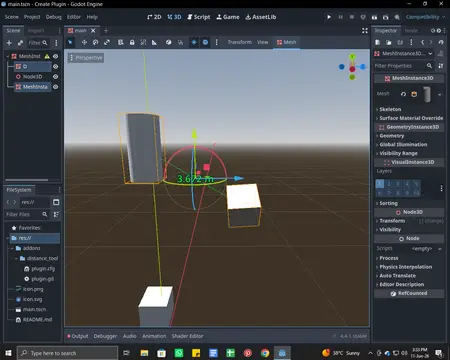
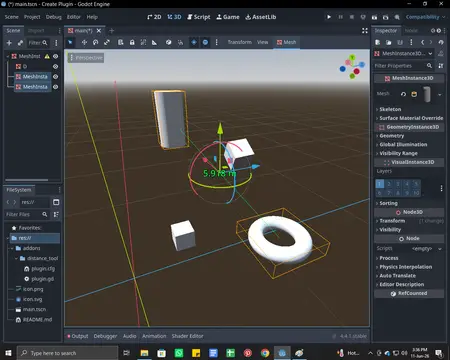
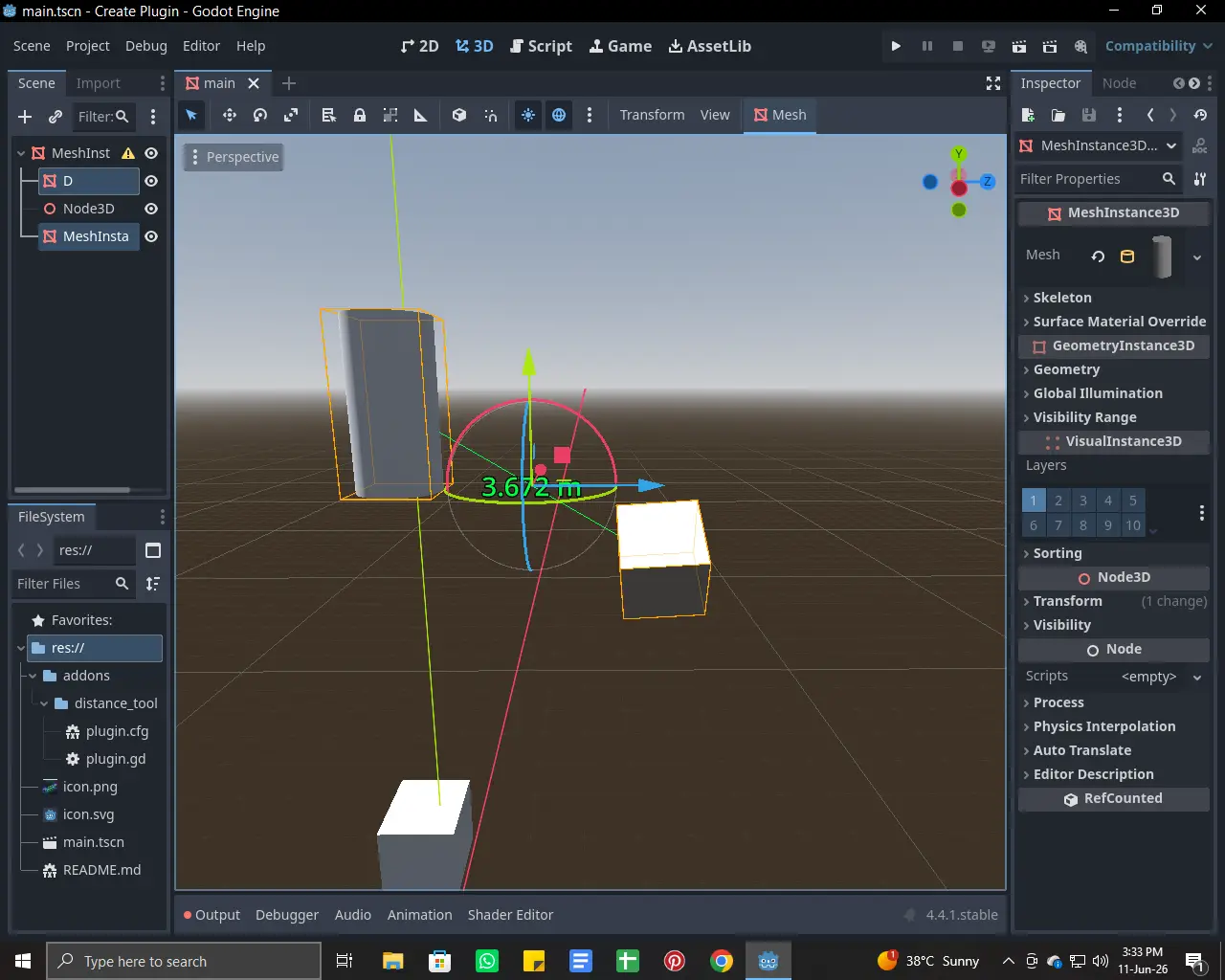
A simple Godot 4 editor plugin that measures the distance between two selected Node3D objects directly in the editor.Features:• Measure distance between any two Node3D objects• Real-time distance visualization• Distance label displayed in the 3D viewport• Easy-to-use editor integration• Supports Godot 4.xUseful for level design, environment creation, and object placement.
Supported Engine Version
4.4
Version String
1.0.0
License Version
MIT
Support Level
community
Modified Date
1 day ago
Git URL
Issue URL

Distance Measure Plugin for Godot 4
A lightweight and easy-to-use Godot 4 editor plugin that lets you measure the distance between two selected 3D objects directly inside the editor.
✨ Features
- 📐 Measure distance between two Node3D objects
- 🎯 Visual distance line in the 3D viewport
- 🏷️ Distance displayed as a 3D label
- ⚡ Works directly inside the Godot Editor
- 🛠️ Useful for level design and object placement
- 🎮 Designed for Godot 4.x
📋 Requirements
- Godot 4.x
📦 Installation
- Download or clone this repository.
- Copy the plugin folder into your project's
addonsdirectory.
addons/
└── distance_measure/
- Open your Godot project.
- Navigate to:
Project → Project Settings → Plugins
- Enable Distance Measure Plugin.
🚀 How to Use
- Enable the plugin.
- Select two
Node3Dobjects in your scene. - The plugin automatically calculates the distance between them.
- A measurement line and distance label will appear in the 3D viewport.
🎯 Use Cases
- 🏗️ Level Design
- 🌍 Environment Creation
- 🏠 Architectural Visualization
- 📍 Precise Object Placement
- 🔍 Scene Inspection & Debugging
📸 Screenshots
Add screenshots or GIFs here:
📸 Screenshots


🤝 Contributing
Contributions, bug reports, and feature requests are welcome!
📄 License
Released under the MIT License.
👨💻 Author
M.Osaid Aliy
Made with ❤️ for the Godot community.
A simple Godot 4 editor plugin that measures the distance between two selected Node3D objects directly in the editor.
Features:
• Measure distance between any two Node3D objects
• Real-time distance visualization
• Distance label displayed in the 3D viewport
• Easy-to-use editor integration
• Supports Godot 4.x
Useful for level design, environment creation, and object placement.
Reviews
Quick Information
Distance Measure Tool
A simple Godot 4 editor plugin that measures the distance between two selected Node3D objects directly in the editor.Features:• Measure distance between any two Node3D objects• Real-time distance visualization• Distance label displayed in the 3D viewport• Easy-to-use editor integration• Supports Godot 4.xUseful for level design, environment creation, and object placement.
Supported Engine Version
4.4
Version String
1.0.0
License Version
MIT
Support Level
community
Modified Date
1 day ago
Git URL
Issue URL