Settings Manager
An asset by seimaaku
Install Asset
Install via Godot
To maintain one source of truth, Godot Asset Library is just a mirror of the old asset library so you can download directly on Godot via the integrated asset library browser
Quick Information

Settings Manager
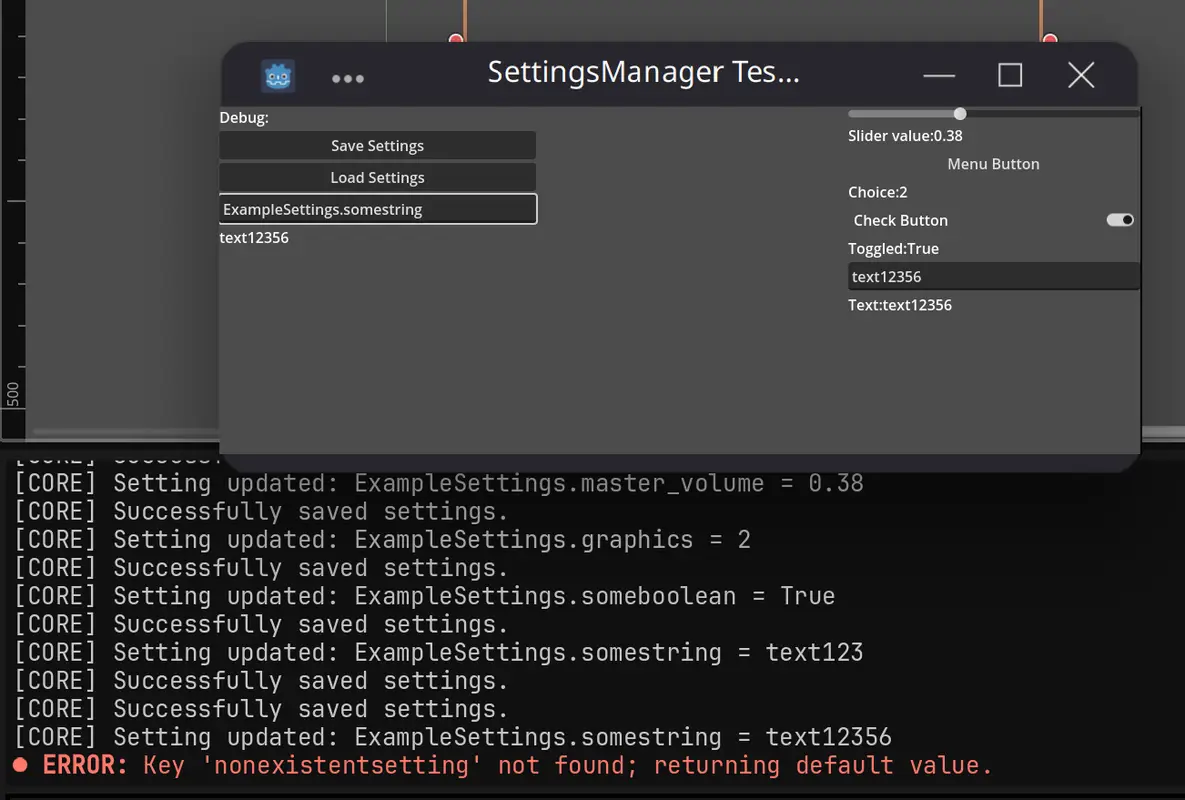
[Experimental] A robust and extensible C# plugin for Godot 4.x that simplifies the management and persistence of user settings. It includes hierarchical settings with categories, encryption, automatic saving/loading, and default value fallbacks.Key Features:- Expandable default settings dictionary for easy customization- Hierarchical structure with support for categories and subcategories- JSON-based encrypted storage with automatic serialization/deserialization- Default value fallback for missing or corrupted settings- Autosaves settings automatically on game exit
Supported Engine Version
4.0
Version String
1.0
License Version
MIT
Support Level
community
Modified Date
1 year ago
Git URL
Issue URL
GodotSettingsManager [Experimental]
A robust and extensible C# plugin for Godot 4.x that simplifies the management and persistence of user settings. It includes hierarchical settings with categories, encryption, automatic saving/loading, and default value fallbacks.
Key Features:
- Expandable default settings dictionary for easy customization
- Hierarchical structure with support for categories and subcategories
- JSON-based encrypted storage with automatic serialization/deserialization
- Default value fallback for missing or corrupted settings
- Autosaves settings automatically on game exit
Installation
This plugin requires a .NET/Mono version of Godot to work. Make sure you have it installed before proceeding.
- Copy
addons/seimaaku.settingsmanagerto your Godot project or install it from the Asset Library, - Before enabling the plugin, go to your Project Settings > Plugins,
- Find "Settings Manager" by "Sei Maaku" and click on the pencil icon next to it to open the plugin configuration window,
- Find the "Language:" section, change it from GDScript to C# and click on "Update",
- Build the project using Alt+B or by clicking the hammer icon on top right corner,
- Now enable the plugin and you should be good to go.
Basic Usage
// Getting settings
float volume = (float)SettingsManager.Instance.GetSetting("ExampleSettings.master_volume", 0.5f);
string graphicsQuality = (string)SettingsManager.Instance.GetSetting("ExampleSettings.graphics", "medium");
bool someSetting = (bool)SettingsManager.Instance.GetSetting("ExampleSettings.someboolean", false);
// Arguments: string path, object Default = null
// If the setting isn't found, it returns the fallback value. In this case, it's the second argument (if provided)

// Setting values
await SettingsManager.Instance.SetSetting("ExampleSettings.master_volume", 0.8f);
await SettingsManager.Instance.SetSetting("ExampleSettings.graphics", "ultra");
await SettingsManager.Instance.SetSetting("ExampleSettings.someboolean", true);
// Arguments: string path, object value

// Creating new categories (It is recommended to extend the DefaultSettings dictionary in SettingsManager.cs
// to define default values for new settings. This ensures that all settings have a fallback value
// DefaultSettings["GameProgress.level"] = 1;
// DefaultSettings["GameProgress.score"] = 0;
// DefaultSettings["GameProgress.achievements.first_win"] = false;
// )
// This will automatically create the "GameProgress" category if it doesn't exist
await SettingsManager.Instance.SetSetting("GameProgress.level", 5);
await SettingsManager.Instance.SetSetting("GameProgress.score", 10000);
await SettingsManager.Instance.SetSetting("GameProgress.achievements.first_win", true);
Example
using Godot;
using System;

public partial class GameManager : Node
{
    public override void _Ready()
    {
        // Load player preferences
        float musicVolume = (float)SettingsManager.Instance.GetSetting("Audio.music_volume", 0.8f);
        float sfxVolume = (float)SettingsManager.Instance.GetSetting("Audio.sfx_volume", 1.0f);

        // Apply settings
        AudioServer.SetBusVolumeDb(
            AudioServer.GetBusIndex("Music"),
            Mathf.LinearToDb(musicVolume)
        );

        AudioServer.SetBusVolumeDb(
            AudioServer.GetBusIndex("SFX"),
            Mathf.LinearToDb(sfxVolume)
        );
    }

    public async void SaveAudioSettings(float musicVol, float sfxVol)
    {
        await SettingsManager.Instance.SetSetting("Audio.music_volume", musicVol);
        await SettingsManager.Instance.SetSetting("Audio.sfx_volume", sfxVol);
        GD.Print("Settings saved successfully");
    }
}
[Experimental] A robust and extensible C# plugin for Godot 4.x that simplifies the management and persistence of user settings. It includes hierarchical settings with categories, encryption, automatic saving/loading, and default value fallbacks.
Key Features:
- Expandable default settings dictionary for easy customization
- Hierarchical structure with support for categories and subcategories
- JSON-based encrypted storage with automatic serialization/deserialization
- Default value fallback for missing or corrupted settings
- Autosaves settings automatically on game exit
Reviews
Quick Information
Settings Manager
[Experimental] A robust and extensible C# plugin for Godot 4.x that simplifies the management and persistence of user settings. It includes hierarchical settings with categories, encryption, automatic saving/loading, and default value fallbacks.Key Features:- Expandable default settings dictionary for easy customization- Hierarchical structure with support for categories and subcategories- JSON-based encrypted storage with automatic serialization/deserialization- Default value fallback for missing or corrupted settings- Autosaves settings automatically on game exit
Supported Engine Version
4.0
Version String
1.0
License Version
MIT
Support Level
community
Modified Date
1 year ago
Git URL
Issue URL