GDT Terrain Generator
An asset by wonderkid
Install Asset
Install via Godot
To maintain one source of truth, Godot Asset Library is just a mirror of the old asset library so you can download directly on Godot via the integrated asset library browser
Quick Information

GDT Terrain Generator
Procedural terrain generator for Godot 4.6, packaged as an editor addon with a GdtTerrain3D custom node. It generates chunked terrain from noise, supports high-resolution final builds, and includes procedural terrain materials, distance LOD, culling, and game-ready collision bake presets.# Changelog## v1.1.0 - 2026-05-23### Added- Added a Terrain3D-inspired editor UI that appears when selecting a `GdtTerrain3D` node.- Added a left tool palette for select, material paint, scatter add, and scatter erase.- Added a bottom contextual settings bar for paint and scatter brush controls.- Added a `GDT Terrain` editor menu for generation, collision, scatter, preset, and utility actions.- Added material painting for lowland, ground, upper, rocky, cliff, and snow layers.- Added performance summary tooling for quick terrain diagnostics.- Added helper action to create/setup a texture focus camera for clean texture-distance transitions.### Experimental - WIP- Added scatter add/erase brush workflow using existing scatter resources.### Changed- Moved generation and utility actions out of inspector buttons and into the editor UI/menu.- Cleaned up the inspector so it focuses on settings rather than one-off actions.- Simplified performance controls around Quality, Balanced, and Performance presets.- Made Active Camera the default texture focus behavior to reduce runtime texture flicker.- Improved close, medium, and far texture tiling transitions.- Updated addon defaults for a lighter first-run setup.- Improved material layer toggles so procedural layers update correctly.- Improved material painting so painted layers ignore procedural remapping and paint the chosen layer directly.- Improved paint strength, softness, and clear painted mask behavior.- Improved runtime LOD stability, collision refresh behavior, and cached terrain resources.- Updated the example scene and addon version to `1.1.0`.### Fixed- Fixed console errors caused by loading `.png.import` files as textures.- Fixed snow painting stacking or leaking into adjacent material layers.- Fixed procedural material layer toggles not visually updating after brush changes.- Fixed texture focus behavior in runtime scenes and fresh plugin test projects.- Fixed large text-scene warnings by keeping generated binary terrain data external.### Packaging- Added Asset Library `.gitattributes` export rules so downloads include the addon folder without the full repository.- Kept the main README short and focused on installation, usage, materials, presets, and the example scene.
Supported Engine Version
4.6
Version String
1.1.0
License Version
MIT
Support Level
community
Modified Date
1 month ago
Git URL
Issue URL
GDT Terrain Generator
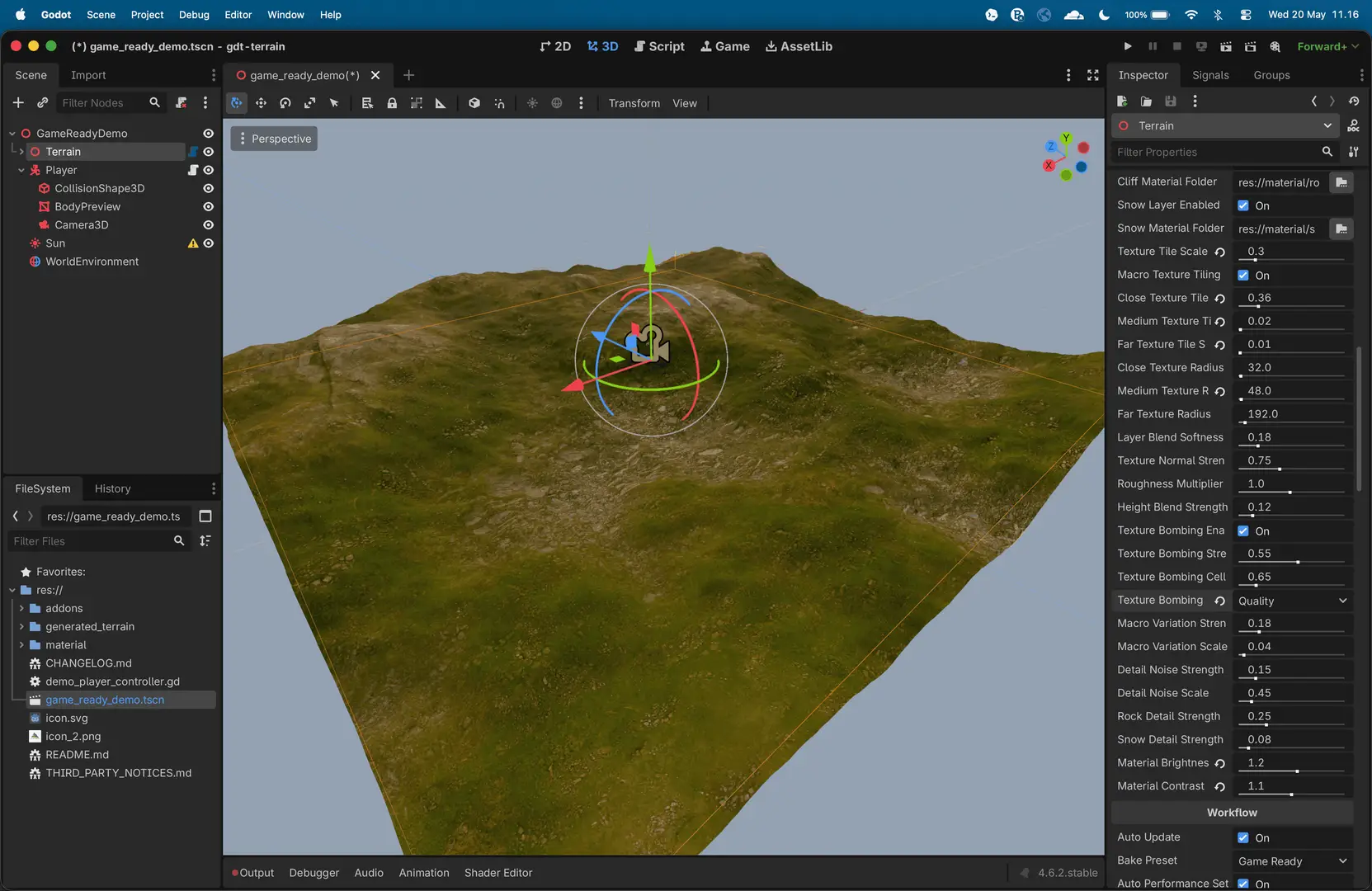
Procedural terrain generator for Godot 4.6, packaged as an editor addon with a GdtTerrain3D custom node. It generates chunked terrain from noise, supports high-resolution final builds, and includes procedural terrain materials, distance LOD, culling, and game-ready collision bake presets.
Features
- Chunked static terrain generation with configurable terrain size, per-chunk resolution, and chunk count.
- Fast preview mode and progressive final generation to keep the editor responsive.
- Noise controls for seed, terrain scale, frequency, octaves, lacunarity, gain, and height scale.
- Shared heightfield pipeline with noise or imported 16-bit PNG heightmaps.
- Native Godot
.tresterrain presets for saving and loading styles/settings. - Heightmap export to grayscale PNG.
- Visual material modes for basic generated colors or imported PBR texture layers.
- Configurable texture layers for sand, forest ground, upper grass/rock, rocky terrain, cliff faces, and snow.
- Shader-based stochastic texture bombing to reduce obvious tiling on large terrain surfaces.
- Terrain performance presets for quality, balanced, or performance rendering budgets.
- High-view LOD bias, visible LOD counters, and estimated visible triangle counts for all-visible terrain profiling.
- Distance-based material quality so far terrain uses cheaper shader paths.
- Optional baked far-material color cache for final terrain, giving a lightweight virtual-texture-like far view without runtime page streaming.
- Editable grass, lowland, rock, and optional snow colors without rebuilding terrain when using the basic color mode.
- Legacy vertex-color fallback for older generated V4 chunks.
- External binary
.resmesh saving so large final terrain does not bloat the text scene. - Saved mesh LODs for final terrain:
- LOD 0: full resolution
- LOD 1: half resolution
- LOD 2: quarter resolution
- LOD 3: eighth resolution
- Automatic camera or target-driven LOD focus.
- Distance culling and LOD profile presets for viewport performance.
- Terrain shadow casting policy so Balanced/Performance can disable terrain self-shadowing while keeping lighting.
- Bake presets for visual-only output, game-ready all-terrain collision, and high-accuracy collision.
- Progressive collision generation with coverage and quality controls.
- Preview lighting helper for quick terrain inspection in the editor.
Requirements
- Godot 4.6 or newer.
- Jolt Physics is enabled in
project.godot.
Quick Start
- Copy
addons/gdt_terrain/into a Godot 4.6 project. - Enable
GDT Terrain Generatorin Project Settings > Plugins. - Add a
GdtTerrain3Dnode, or instanceres://addons/gdt_terrain/scenes/gdt_terrain_3d.tscn. - Tune terrain settings in the Inspector.
- Pick a
Bake Preset. - Use
Generate Previewwhile shaping the terrain. - Use
Generate Finalwhen you want to lock and save the generated terrain.
This repository also includes game_ready_demo.tscn, which is the default run scene and a clean playable proof scene for collision baking.
The default terrain settings are chosen for a good first result:
| Setting | Default |
|---|---|
| Terrain Size | 64 |
| Chunk Resolution | 256 |
| Chunks Per Side | 1 |
| Height Scale | 5 |
| Seed | 1345 |
| Terrain Scale | 1 |
| Noise Frequency | 0.032 |
| Octaves | 7 |
| Lacunarity | 2.1 |
| Gain | 0.42 |
For a 4096 x 4096 total terrain grid, use:
chunk_resolution = 256chunks_per_side = 16
This is intentionally expensive. Use preview mode while tuning, then generate final terrain deliberately.
Workflow
Preview
Generate Preview builds a lower-detail terrain for fast iteration. With Auto Performance Settings enabled, the preview resolution is chosen automatically. Preview chunks are editor-transient and are not saved into the edited scene, which keeps scene files small. Starting a final bake clears the active preview first.
Bake Presets
Bake Preset controls the normal final-output intent before the lower-level collision controls:
Visual Only: baked meshes, LODs, and materials without collision.Game Ready: baked visuals plus collision on every chunk at half resolution. This is the default playable terrain bake.High Accuracy: baked visuals plus collision on every chunk at full resolution.Custom: appears when advanced collision controls no longer match one of the presets.
Bake State reports whether the current workflow is preview-only, visual-only, game-ready, or testing-only.
Final
Generate Final builds the full configured terrain progressively. When it finishes:
final_terrain_lockedbecomestrue.- Generated chunk nodes are saved with the scene.
- Mesh, material, shader, and generated noise resources are saved to
generated_terrain/. - Collision shape resources are saved when the active bake preset or collision settings include collision.
- Terrain will not regenerate from preview settings until
Clear Generated Terrainis used.
Terrain Source
Source Mode chooses the height source:
Noiseuses the procedural noise controls.Heightmapimports a PNG heightmap and resamples it to the active terrain grid.
Heightmap import replaces procedural noise shape data. Height Scale still controls the vertical amplitude, and imported values are mapped into the terrain height range. Flip and invert controls help match heightmaps from third-party terrain tools.
Terrain Pattern
Terrain Scale zooms the procedural noise pattern without changing the physical terrain size. Larger values make broader continents and wider mountain systems; smaller values reveal tighter local detail. Noise Frequency remains available as the lower-level noise density control.
Rendering Performance
Terrain Performance Preset is the high-level control for rendering cost:
Quality: keeps visual detail farther out and leaves terrain shadow casting available.Balanced: the default target for high close-up quality with much cheaper all-visible terrain views.Performance: pushes distant terrain to lower LODs sooner and caps costly shader features more aggressively.
High View LOD Bias adds extra visual LOD when the camera or LOD target rises high enough to see most of the terrain. This only changes rendered meshes; baked collision remains unchanged. The LOD counters show how many visible chunks are using LOD 0/1/2/3, and Estimated Visible Triangles helps confirm that all-visible views are actually dropping primitive count.
In texture layer mode, far pixels avoid expensive normal, roughness, height blend, and texture bombing work. When Far Material Cache Enabled is on, final bake also saves a low-resolution whole-terrain color cache to generated_terrain/ and far terrain can sample that cache instead of recomputing all six PBR layers. This is a static Godot-friendly cache, not Unreal-style virtual texturing.
Presets
Save Preset writes generator, terrain source, environment, material, viewport, and collision settings to a native Godot .tres resource. Presets do not include generated chunks or mesh resources.
Load Preset applies the saved settings. If final terrain is locked, only non-geometry visual/environment settings are applied; clear the terrain before loading shape/source changes.
Preset actions live beside Preset Path in the Inspector so file workflow stays separate from terrain generation.
Heightmap I/O
Export Heightmap writes the current active heightfield to Export Heightmap Path as a grayscale PNG.
The main terrain actions are grouped under Terrain Actions: generate a preview, generate a locked final terrain, cancel a running build, or clear generated terrain. Less common maintenance commands use Selected Utility plus Run Selected Utility under the advanced controls. Reveal All Chunks disables viewport culling when a full bake is complete but only nearby chunks are visible.
Editing Environment After Final
Newly generated V5 terrain stores material masks in vertex colors and uses the terrain shader for either basic colors or layered PBR textures. Snow, rock, and visual material changes update shader parameters without rebuilding chunks or rewriting mesh resources.
Older V4 terrain chunks remain visible through the legacy vertex-color material path. Regenerate terrain once to get the full V5 mask-based material workflow.
Visual Material
Procedural Material Enabled is on by default. Material Mode chooses how the terrain is shaded:
Basic Colors: the dry procedural color shader, useful as a lightweight fallback.Texture Layers: the default PBR texture workflow using user-assigned folders. This development project includes optional Poly Haven CC0 texture examples underres://material/.
The default texture layer folders are:
sand_03: lowland and beach-like terrain.forest_ground: main ground.aerial_grass_rock: upper broken grass and exposed ground.rocky_terrain: rocky slope transitions.rock_face: steep cliff faces.snow: snow layer.
Each layer uses diffuse/albedo, Normal GL, roughness, and optional displacement/height textures when present. Terrain generation itself is unchanged; displacement textures are only used for material blend breakup in this pass.
Each texture source also has an Enabled checkbox. The enabled sources collapse into the terrain layer stack in order, so the first enabled source becomes the base layer. For example, disabling Lowland makes Ground use the lowland/base height role, Upper use the ground role, Rocky use the upper role, and so on.
Useful controls:
Texture Tile Scalefor world-space texture density.Macro Texture Tiling Enabledplus close, medium, and far tile scales/radii for camera-aware texture density. Close ranges use smaller, sharper texture tiles; far ranges blend into larger broad tiling.Texture Bombing Enabled,Texture Bombing Strength,Texture Bombing Cell Scale, andTexture Bombing Samplesfor reducing visible texture repetition.Texture Normal Strength,Roughness Multiplier, andHeight Blend Strengthfor PBR tuning.Macro Variation StrengthandMacro Variation Scalefor broad natural color breakup.Detail Noise StrengthandDetail Noise Scalefor fine surface variation.Rock Detail StrengthandSnow Detail Strengthfor material-specific contrast.Snow Enabledto turn snow blending off without changing the stored snow color or height.Material BrightnessandMaterial Contrastfor final look tuning.
Texture Layers is best inspected with Mesh Preview or Final generation. Shader Preview remains a lightweight shape/material-mask preview path for fast slider tuning.
Use Setup Preview Lighting to add a simple editor light and environment for inspecting the terrain material.
Viewport LOD
Final terrain stores four mesh LODs per chunk. The viewport swaps between them based on distance from the LOD focus point.
LOD focus priority:
LOD Target Path, if assigned to aNode3D.- Active
Camera3D, if available. - Manual
Culling Center, when automatic focus cannot find a target or camera.
LOD controls:
Automatic LOD Focus: follows the target or camera automatically.LOD Target Path: optional Node3D focus target.LOD Focus Update Distance: minimum movement before LOD refreshes.LOD Profile: controls how aggressively lower LODs are used.Viewport Quality: caps the best visual LOD.Visible Radius: hides chunks outside the inspection area.Visible Chunks: status count showing how many generated chunks are currently visible after viewport culling.
If Generated Chunks equals Total Chunks but the viewport only shows part of the terrain, viewport culling is hiding the rest. Disable Viewport Culling Enabled, increase Visible Radius, move Culling Center, or run the Reveal All Chunks utility.
Profile behavior:
Quality: keeps high detail farther away.Balanced: default middle ground.Performance: switches to lower detail sooner.
Collision
Collision is separate from visual LOD. For game-ready output, use the Game Ready bake preset, which sets Collision Mode to Final Only, Collision Coverage to All Chunks, and Collision Quality to Half.
Collision controls:
Collision ModeDisabledFinal OnlyAll Builds
Collision CoverageNear CenterVisible ChunksAll Chunks
Collision QualityFullHalfQuarterEighth
Collision RadiusCollision Chunks Per FrameCollision Visuals Visible
Use Generate Collision after generating final terrain if you want to rebuild physics without rebuilding the terrain. Near Center and Visible Chunks are useful editor/testing coverage modes, but they are not safe final playable-terrain defaults because a player can leave the generated collision area.
Game-Ready Demo
game_ready_demo.tscn is a clean test scene with a GdtTerrain3D terrain node, a basic CharacterBody3D, camera, and light. It does not commit generated terrain binaries. To test a playable bake:
- Open
game_ready_demo.tscn. - Select
Terrain. - Keep
Bake Presetset toGame Ready. - Click
Generate Final. - Press Play and walk the character across chunk boundaries.
License
MIT. See LICENSE.
Procedural terrain generator for Godot 4.6, packaged as an editor addon with a GdtTerrain3D custom node. It generates chunked terrain from noise, supports high-resolution final builds, and includes procedural terrain materials, distance LOD, culling, and game-ready collision bake presets.
# Changelog
## v1.1.0 - 2026-05-23
### Added
- Added a Terrain3D-inspired editor UI that appears when selecting a `GdtTerrain3D` node.
- Added a left tool palette for select, material paint, scatter add, and scatter erase.
- Added a bottom contextual settings bar for paint and scatter brush controls.
- Added a `GDT Terrain` editor menu for generation, collision, scatter, preset, and utility actions.
- Added material painting for lowland, ground, upper, rocky, cliff, and snow layers.
- Added performance summary tooling for quick terrain diagnostics.
- Added helper action to create/setup a texture focus camera for clean texture-distance transitions.
### Experimental - WIP
- Added scatter add/erase brush workflow using existing scatter resources.
### Changed
- Moved generation and utility actions out of inspector buttons and into the editor UI/menu.
- Cleaned up the inspector so it focuses on settings rather than one-off actions.
- Simplified performance controls around Quality, Balanced, and Performance presets.
- Made Active Camera the default texture focus behavior to reduce runtime texture flicker.
- Improved close, medium, and far texture tiling transitions.
- Updated addon defaults for a lighter first-run setup.
- Improved material layer toggles so procedural layers update correctly.
- Improved material painting so painted layers ignore procedural remapping and paint the chosen layer directly.
- Improved paint strength, softness, and clear painted mask behavior.
- Improved runtime LOD stability, collision refresh behavior, and cached terrain resources.
- Updated the example scene and addon version to `1.1.0`.
### Fixed
- Fixed console errors caused by loading `.png.import` files as textures.
- Fixed snow painting stacking or leaking into adjacent material layers.
- Fixed procedural material layer toggles not visually updating after brush changes.
- Fixed texture focus behavior in runtime scenes and fresh plugin test projects.
- Fixed large text-scene warnings by keeping generated binary terrain data external.
### Packaging
- Added Asset Library `.gitattributes` export rules so downloads include the addon folder without the full repository.
- Kept the main README short and focused on installation, usage, materials, presets, and the example scene.
Reviews
Quick Information
GDT Terrain Generator
Procedural terrain generator for Godot 4.6, packaged as an editor addon with a GdtTerrain3D custom node. It generates chunked terrain from noise, supports high-resolution final builds, and includes procedural terrain materials, distance LOD, culling, and game-ready collision bake presets.# Changelog## v1.1.0 - 2026-05-23### Added- Added a Terrain3D-inspired editor UI that appears when selecting a `GdtTerrain3D` node.- Added a left tool palette for select, material paint, scatter add, and scatter erase.- Added a bottom contextual settings bar for paint and scatter brush controls.- Added a `GDT Terrain` editor menu for generation, collision, scatter, preset, and utility actions.- Added material painting for lowland, ground, upper, rocky, cliff, and snow layers.- Added performance summary tooling for quick terrain diagnostics.- Added helper action to create/setup a texture focus camera for clean texture-distance transitions.### Experimental - WIP- Added scatter add/erase brush workflow using existing scatter resources.### Changed- Moved generation and utility actions out of inspector buttons and into the editor UI/menu.- Cleaned up the inspector so it focuses on settings rather than one-off actions.- Simplified performance controls around Quality, Balanced, and Performance presets.- Made Active Camera the default texture focus behavior to reduce runtime texture flicker.- Improved close, medium, and far texture tiling transitions.- Updated addon defaults for a lighter first-run setup.- Improved material layer toggles so procedural layers update correctly.- Improved material painting so painted layers ignore procedural remapping and paint the chosen layer directly.- Improved paint strength, softness, and clear painted mask behavior.- Improved runtime LOD stability, collision refresh behavior, and cached terrain resources.- Updated the example scene and addon version to `1.1.0`.### Fixed- Fixed console errors caused by loading `.png.import` files as textures.- Fixed snow painting stacking or leaking into adjacent material layers.- Fixed procedural material layer toggles not visually updating after brush changes.- Fixed texture focus behavior in runtime scenes and fresh plugin test projects.- Fixed large text-scene warnings by keeping generated binary terrain data external.### Packaging- Added Asset Library `.gitattributes` export rules so downloads include the addon folder without the full repository.- Kept the main README short and focused on installation, usage, materials, presets, and the example scene.
Supported Engine Version
4.6
Version String
1.1.0
License Version
MIT
Support Level
community
Modified Date
1 month ago
Git URL
Issue URL