ProProfiler
An asset by Glorek
Install Asset
Install via Godot
To maintain one source of truth, Godot Asset Library is just a mirror of the old asset library so you can download directly on Godot via the integrated asset library browser
Quick Information

ProProfiler
Lightweight Godot addon that centralizes logs, inspects disk usage, and provides simple runtime profiling tools for development.
Supported Engine Version
4.5
Version String
0.5.3
License Version
MIT
Support Level
community
Modified Date
6 months ago
Git URL
Issue URL

ProProfiler
Lightweight Godot addon that centralizes logs, inspects disk usage, and provides simple runtime profiling tools for development.
Requirements
Godot 4.5 or newer.
The Logs tab relies on engine support introduced in: https://github.com/godotengine/godot/pull/91006.
Quick install
- Place the
proprofilerfolder under your project'saddons/folder. - Enable the plugin: Project -> Project Settings -> Plugins -> enable
ProProfiler.
Overview (Tabs)
Logs
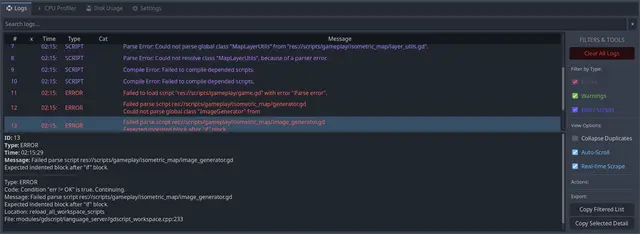
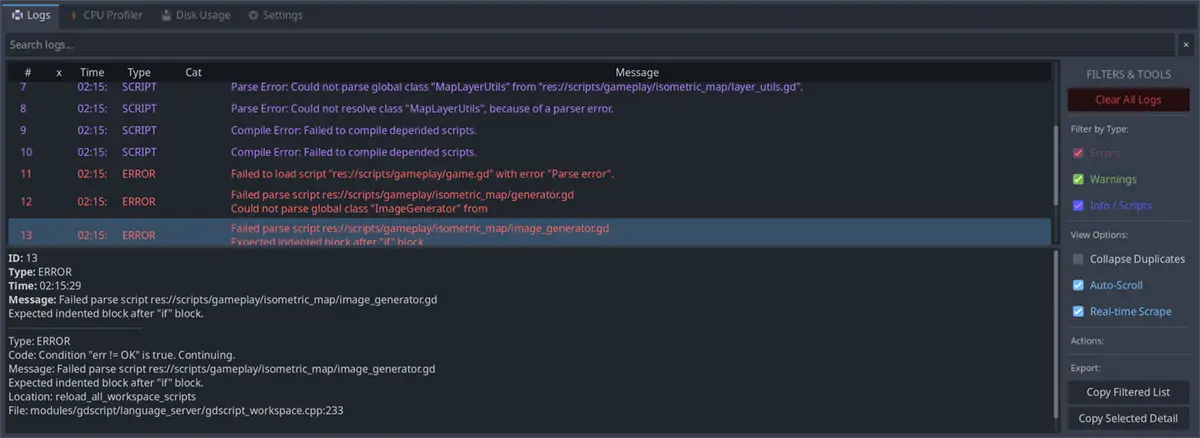
- Centralizes editor and runtime logs in one place so you can search, filter, copy and inspect messages without switching windows.
- Categories: use short square-bracket tags in your logs like
[NETWORK],[SAVE],[AI],[UI]— feature/area - Log Inspector features:
- Text search, severity & category filters, and time range selection.
- Click a log to see the full stack/backtrace and related metadata.
- Capture runtime logs from connected game instances (requires runtime logger enabled).
CPU Profiler
The CPU Profiler tab is currently not functional due to Godot's addon API limitations.
- WIP
Disk Usage
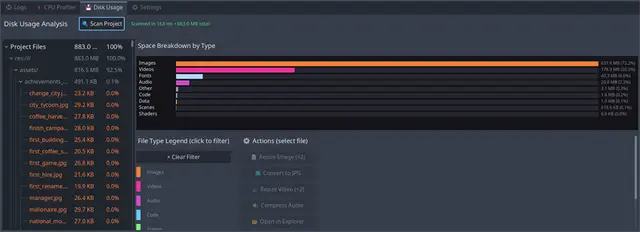
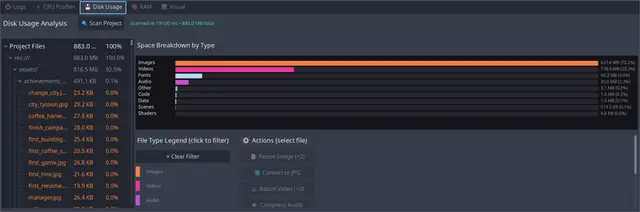
- Scans project folders to produce a breakdown by file type and folder. Useful to quickly find oversized assets (textures, audio, video).
- Features include file-type filters, per-file actions (resize/convert suggestions), and a treemap/table view for drill-down.
Example — Disk Usage
 Disk Usage scan results (project breakdown by file type and sizes).
Usage
- Enable the plugin and open the addon's UI from the Editor, or use the in-game controls for runtime captures.
- Use
Logsto gather recent runtime messages. UseDisk Usageto scan project folders and identify large assets.
Contributing
- Contributions welcome. Follow the project's style.
- Keep PRs focused, include tests or manual verification steps, and document behavioral changes in the PR description.
License
- See the repository
LICENSEfile: LICENSE
Support
- Open issues and PRs on the repository; include Godot version and reproduction steps when relevant.
Notes
This addon is targeted at development workflows. Keep it disabled in release exports.
Lightweight Godot addon that centralizes logs, inspects disk usage, and provides simple runtime profiling tools for development.
Reviews
Quick Information
ProProfiler
Lightweight Godot addon that centralizes logs, inspects disk usage, and provides simple runtime profiling tools for development.
Supported Engine Version
4.5
Version String
0.5.3
License Version
MIT
Support Level
community
Modified Date
6 months ago
Git URL
Issue URL