oggd
An asset by xandwr
Install Asset
Install via Godot
To maintain one source of truth, Godot Asset Library is just a mirror of the old asset library so you can download directly on Godot via the integrated asset library browser
Quick Information

oggd
Godot 4.6 addon to easily convert any audio file into .ogg using ffmpeg.
Supported Engine Version
4.6
Version String
1.0.0
License Version
MIT
Support Level
community
Modified Date
3 months ago
Git URL
Issue URL
oggd

A Godot 4 editor plugin that adds right-click conversion of audio files to OGG Vorbis directly from the FileSystem dock.
Requirements
- Godot 4+
- ffmpeg installed on your system
Installation
- Copy the
oggdfolder intores://addons/in your Godot project - Enable oggd in Project > Project Settings > Plugins
The plugin will warn you on startup if ffmpeg cannot be found.
Usage
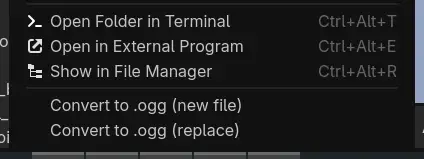
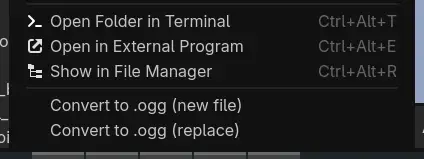
Right-click any supported audio file in the FileSystem dock and choose:
- Convert to OGG: creates a new
.oggfile alongside the original - Replace with OGG: converts and replaces the original file
Supported input formats:
- MP3
- WAV
- FLAC
- AAC
- M4A
- AIFF
- Opus
- WMA
- OGG
- OGX
You can select multiple files and convert them all at once.
Configuration
Adjust Vorbis quality (0–10) under Editor > Editor Settings > Oggd > Vorbis Quality. Higher values mean better quality and larger files. Default is 6.

License
MIT.
Godot 4.6 addon to easily convert any audio file into .ogg using ffmpeg.
Reviews
Quick Information
oggd
Godot 4.6 addon to easily convert any audio file into .ogg using ffmpeg.
Supported Engine Version
4.6
Version String
1.0.0
License Version
MIT
Support Level
community
Modified Date
3 months ago
Git URL
Issue URL