Terminal Emulator
An asset by andrea-calligaris
Install Asset
Install via Godot
To maintain one source of truth, Godot Asset Library is just a mirror of the old asset library so you can download directly on Godot via the integrated asset library browser
Quick Information

Terminal Emulator
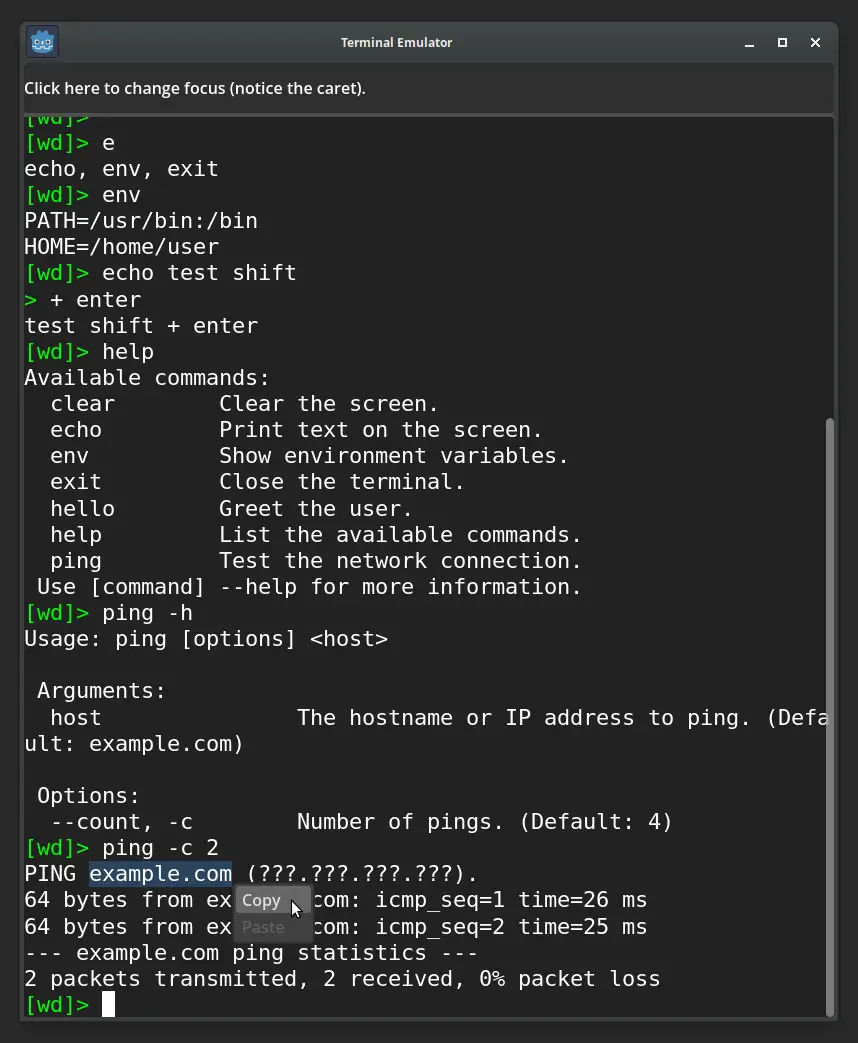
A starting point to create your own terminal emulator in a Godot game, for example, to implement hacking-style gameplay.Features:• Editable prompt, colors, monospaced font, and fully functional caret.• Internal environment variables.• Command history.• Autocompletion with Tab.• Command argument parsing: typed options (value, integer, flag), short and long names, positional arguments (required or optional with defaults), bundled short flags, and error reporting.• Auto-generated help: running any command with --help or -h prints usage, arguments, and options derived from its schema.• Wrapped lines that adjust automatically when the window is resized.• Text selection with the mouse, with copy and paste support (both via shortcuts and the popup menu).• Commands can run for extended periods (e.g. simulating ping) without freezing the UI.• Multi-line paste executes commands sequentially without freezing the UI.• Automatic and manual scrolling.• Popup menu for copy, paste, and potential future features.• Multi-line command input using Shift + Enter.• Word-based cursor navigation using Ctrl + arrows or Alt + arrows.• Can gain and lose focus, allowing integration with other windows or panels.
Supported Engine Version
4.6
Version String
1.0.0
License Version
MIT
Support Level
community
Modified Date
1 day ago
Git URL
Issue URL
Terminal Emulator for Godot
This is a starting point to create your own terminal emulator in a Godot game, for example, to implement hacking-style gameplay.

Creating a terminal emulator is a complex task. You cannot simply use a RichTextLabel, as it comes with numerous limitations. The proper approach is to draw each character manually.
The code runs efficiently, but if desired, you can convert it to C# for maximum performance.
Features
- Editable prompt, colors, monospaced font, and fully functional caret.
- Internal environment variables.
- Command history.
- Autocompletion with
Tab. - Command argument parsing: typed options (value, integer, flag), short and long names, positional arguments (required or optional with defaults), bundled short flags, and error reporting.
- Auto-generated help: running any command with
--helpor-hprints usage, arguments, and options derived from its schema. - Wrapped lines that adjust automatically when the window is resized.
- Text selection with the mouse, with copy and paste support (both via shortcuts and the popup menu).
- Commands can run for extended periods (e.g. simulating
ping) without freezing the UI. - Multi-line paste executes commands sequentially without freezing the UI.
- Automatic and manual scrolling.
- Popup menu for copy, paste, and potential future features.
- Multi-line command input using
Shift + Enter. - Word-based cursor navigation using
Ctrl + arrowsorAlt + arrows. - Can gain and lose focus, allowing integration with other windows or panels.
Supported Shortcuts
Ctrl + Shift + CorShift + Insert→ Copy selection to clipboard.Ctrl + Shift + V→ Paste from clipboard.
Optional behaviors you may want to add
Depending on how realistic or feature-complete you want the terminal to be, and the purpose it serves in your game, you may choose to implement the following behaviors too:
- Middle mouse button: paste from the primary selection (the currently selected text in the OS); mainly useful for hacking-style gameplay.
Ctrl + C→ SIGINT.Ctrl + Z→ SIGTSTP: suspend the process and move it to the background.Ctrl + K→ Kill to End: delete from the cursor to the end of the line.
A starting point to create your own terminal emulator in a Godot game, for example, to implement hacking-style gameplay.
Features:
• Editable prompt, colors, monospaced font, and fully functional caret.
• Internal environment variables.
• Command history.
• Autocompletion with Tab.
• Command argument parsing: typed options (value, integer, flag), short and long names, positional arguments (required or optional with defaults), bundled short flags, and error reporting.
• Auto-generated help: running any command with --help or -h prints usage, arguments, and options derived from its schema.
• Wrapped lines that adjust automatically when the window is resized.
• Text selection with the mouse, with copy and paste support (both via shortcuts and the popup menu).
• Commands can run for extended periods (e.g. simulating ping) without freezing the UI.
• Multi-line paste executes commands sequentially without freezing the UI.
• Automatic and manual scrolling.
• Popup menu for copy, paste, and potential future features.
• Multi-line command input using Shift + Enter.
• Word-based cursor navigation using Ctrl + arrows or Alt + arrows.
• Can gain and lose focus, allowing integration with other windows or panels.
Reviews
Quick Information
Terminal Emulator
A starting point to create your own terminal emulator in a Godot game, for example, to implement hacking-style gameplay.Features:• Editable prompt, colors, monospaced font, and fully functional caret.• Internal environment variables.• Command history.• Autocompletion with Tab.• Command argument parsing: typed options (value, integer, flag), short and long names, positional arguments (required or optional with defaults), bundled short flags, and error reporting.• Auto-generated help: running any command with --help or -h prints usage, arguments, and options derived from its schema.• Wrapped lines that adjust automatically when the window is resized.• Text selection with the mouse, with copy and paste support (both via shortcuts and the popup menu).• Commands can run for extended periods (e.g. simulating ping) without freezing the UI.• Multi-line paste executes commands sequentially without freezing the UI.• Automatic and manual scrolling.• Popup menu for copy, paste, and potential future features.• Multi-line command input using Shift + Enter.• Word-based cursor navigation using Ctrl + arrows or Alt + arrows.• Can gain and lose focus, allowing integration with other windows or panels.
Supported Engine Version
4.6
Version String
1.0.0
License Version
MIT
Support Level
community
Modified Date
1 day ago
Git URL
Issue URL