Event Graph for Godot
An asset by kudo
Install Asset
Install via Godot
To maintain one source of truth, Godot Asset Library is just a mirror of the old asset library so you can download directly on Godot via the integrated asset library browser
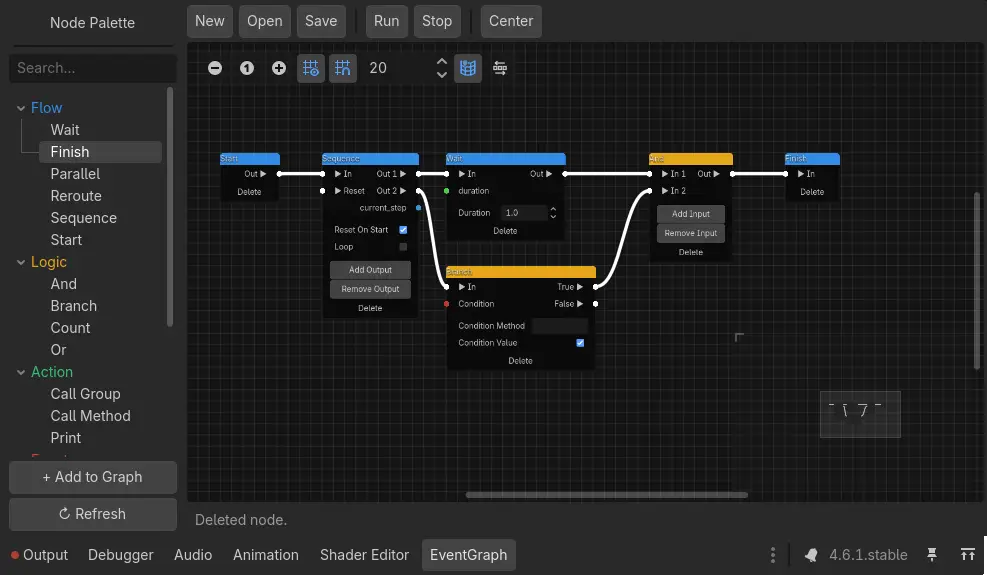
Quick Information

Event Graph for Godot
https://github.com/Mathmagical314/Event-Graph-for-Godot-4
Supported Engine Version
4.4
Version String
1.0.0
License Version
MIT
Support Level
community
Modified Date
9 hours ago
Git URL
Issue URL
🌊 EventGraph for Godot 4

EventGraph is a robust, resource-driven visual scripting system for Godot 4. Inspired by Unreal Engine's Blueprints and modular flow-based logic, it provides a powerful way to decouple game logic from code, making it perfect for dialogue systems, quest logic, and complex state machines.
✨ Key Features
- Resource-Based Architecture: Graphs are stored as
.tresor.resfiles. This ensures your logic is data-driven, easily versionable, and cleanly separated from your UI and scene tree. - Trigger & Variable Separation: Distinct port types for execution flow (Triggers) and data flow (Variables) prevent spaghetti logic and ensure strict type safety.
- Hybrid "Pure/Stateful" Node Evaluation: Supports recursive, pull-based variable evaluation for data-only nodes.
- Fully Extensible API: Creating new custom nodes is as simple as extending the
EventNodeResourceclass and defining its ports and execution logic. - Integrated Editor: A custom, highly polished GraphEdit-based editor that lives in your Godot bottom panel, complete with a node palette, search functionality, and dynamic properties.
- Runtime Execution: The
EventGraphPlayernode allows you to execute graphs at runtime, handle Godot signals natively, and interface seamlessly with your scene tree.
📦 Built-In Node Types
EventGraph comes packed with a variety of nodes to handle complex logic right out of the box:
- Action: Nodes that perform specific tasks or side effects.
- Data: Pure data nodes (Strings, Integers, Booleans, Object References) with recursive evaluation.
- Event: Entry points that start the execution flow.
- Flow: Control flow nodes including Branch, Sequence, and Reroute.
- Logic: Boolean and comparative operations like AND, OR, NOT.
- Utility: Conversion and debugging nodes (e.g., Print, Type Casts).
🚀 Getting Started
Installation
- Copy the
addons/event_graphfolder into your Godot project'saddons/directory. - Go to Project Settings > Plugins and enable EventGraph.
- You will see a new EventGraph tab appear in the bottom panel of the editor.
Basic Usage
- Create a Graph: In the FileSystem dock, right-click and select Create New Resource, then choose
EventGraphResource. - Edit Logic: Double-click the newly created resource to open it in the EventGraph editor. Add nodes (Right-click to open the Palette) and connect them.
- Run in Scene:
- Add an
EventGraphPlayernode to your scene. - Assign your Graph Resource to the
Graphproperty. - Call
player.play()from a script or enable theAuto Playoption in the inspector.
- Add an
4. Creating Custom Nodes
To add a new node, create a script inheriting from EventNodeResource in the appropriate directory (e.g., addons/event_graph/core/nodes/action/). The EventNodeRegistry will automatically recognize it.
Action Node Template (Stateful/Impure)
@tool
class_name EventNodeEmitSignal
extends EventNodeResource

func _init() -> void:
    ensure_node_id()
    node_name   = "CustomNode"
    title       = "Custom Node"
    category    = "Event"
    description = "Description of what this node does."
    properties  = { "Custom Property": "" }


func get_trigger_inputs() -> Array[String]:
    return ["In"]

func get_trigger_outputs() -> Array[String]:
    return ["Out"]

func get_variable_inputs() -> Array[Dictionary]:
    return []

func get_variable_outputs() -> Array[Dictionary]:
    return []


func _execute(_port_name: String) -> void:
    trigger_output("Out")

---

## 🤝 Contributing

Contributions, issues, and feature requests are welcome! Feel free to check the [issues page](https://github.com/your-username/event_graph/issues).

## 📜 License

This project is licensed under the MIT License - see the [LICENSE](LICENSE) file for details.

---
<p align="center"><i>Built with ❤️ for the Godot Community.</i></p>
https://github.com/Mathmagical314/Event-Graph-for-Godot-4
Reviews
Quick Information
Event Graph for Godot
https://github.com/Mathmagical314/Event-Graph-for-Godot-4
Supported Engine Version
4.4
Version String
1.0.0
License Version
MIT
Support Level
community
Modified Date
9 hours ago
Git URL
Issue URL