Double Shift Global Search
An asset by andries-wbg
Install Asset
Install via Godot
To maintain one source of truth, Godot Asset Library is just a mirror of the old asset library so you can download directly on Godot via the integrated asset library browser
Quick Information

Double Shift Global Search
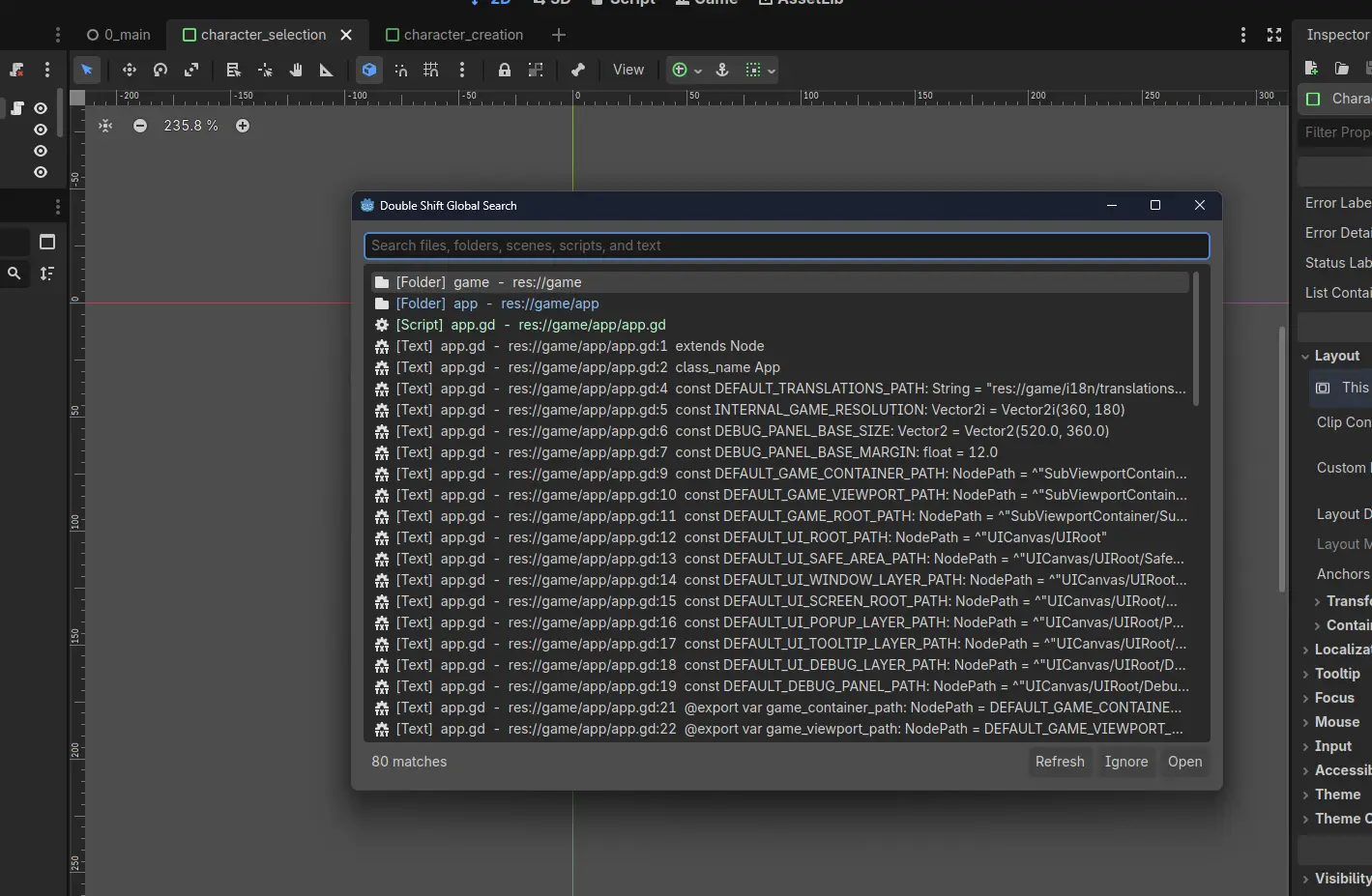
Double Shift Global Search is a Godot editor plugin that provided the Godot editor with an IntelliJ-style project search popup when Shift is double pressed. It searches files, folders, scenes, scripts, and indexed text lines across the current project.
Supported Engine Version
4.4
Version String
1.0
License Version
MIT
Support Level
community
Modified Date
5 hours ago
Git URL
Issue URL
Double Shift Global Search
Double Shift Global Search is a Godot editor plugin that provided the Godot editor with an IntelliJ-style project search popup when Shift is double pressed. It searches files, folders, scenes, scripts, and indexed text lines across the current project.
Features
- Double Shift shortcut from anywhere in the editor.
- Tools menu fallback: Tools > Global Search (Double Shift).
- Ranked search with exact, prefix, substring, token, and lightweight fuzzy subsequence matching.
- Distinct result types for folders, files, scripts, scenes, and text hits.
- Opens scripts, scenes, and resources through Godot's editor APIs.
- Switches to the relevant mode (Script, 2D, or 3D mode) when the opened result has an obvious editor context.
- Selects opened files in the FileSystem dock so the tree expands to the target.
- Creates a visible
res://doubleshiftignore.txtignore file on plugin startup. - Lets users add noisy results to the ignore file from the search popup.
Installation
- Copy
addons/doubleshiftglobalsearch/into your Godot project. - In Godot, open Project > Project Settings > Plugins.
- Enable Double Shift Global Search.
- Press Shift twice quickly to open the search popup.
Usage
- Type to filter results.
- Press Up or Down to move through the result list.
- Press Enter or double-click a result to open it.
- Press Escape to close the popup.
- Use Refresh after large file moves or generated-file changes.
- Select a result and click Ignore to append it to
res://doubleshiftignore.txt.
Ignoring Files
The plugin always ignores res://doubleshiftignore.txt,
res://.doubleshiftignore, and its own addon folder internally. User-specific
ignore patterns belong in res://doubleshiftignore.txt.
The ignore file accepts one file, folder, or glob per line:
res://game/_generated/
res://addons/vendor/
*.tmp
The file is created automatically when the plugin starts. If it is already open inside Godot, Ignore button writes also update the open editor tab so the buffer does not fall behind the on-disk file.
Compatibility
- Godot 4.4 and newer.
- Editor plugin only. It does not add runtime autoloads or exported game code.
License
MIT. See LICENSE.md.
Double Shift Global Search is a Godot editor plugin that provided the Godot editor with an IntelliJ-style project search popup when Shift is double pressed. It searches files, folders, scenes, scripts, and indexed text lines across the current project.
Reviews
Quick Information
Double Shift Global Search
Double Shift Global Search is a Godot editor plugin that provided the Godot editor with an IntelliJ-style project search popup when Shift is double pressed. It searches files, folders, scenes, scripts, and indexed text lines across the current project.
Supported Engine Version
4.4
Version String
1.0
License Version
MIT
Support Level
community
Modified Date
5 hours ago
Git URL
Issue URL