Godot AI Assistant tools MCP
An asset by tomyud
Install Asset
Install via Godot
To maintain one source of truth, Godot Asset Library is just a mirror of the old asset library so you can download directly on Godot via the integrated asset library browser
Quick Information

Godot AI Assistant tools MCP
Connect your Godot editor to AI assistants (Claude, Cursor, or any MCP client). Gives AI direct access to 32 tools: create and edit scenes, write and validate GDScript, read project settings, inspect errors, generate 2D assets, and explore your project with an interactive visualizer. No copy-pasting — AI works inside your editor.
Supported Engine Version
4.1
Version String
0.21
License Version
MIT
Support Level
community
Modified Date
1 day ago
Git URL
Issue URL
Godot MCP
Give your AI assistant full access to the Godot editor.
Build games faster with Claude, Cursor, or any MCP-compatible AI — no copy-pasting, no context switching. AI reads, writes, and manipulates your scenes, scripts, nodes, and project settings directly.
Godot 4.x · 32 tools · Interactive project visualizer · MIT license
Quick Start
1. Add the MCP server to your AI client
The server is hosted on npm — no cloning or building required.
Claude Desktop — edit ~/Library/Application Support/Claude/claude_desktop_config.json:
{
  "mcpServers": {
    "godot": {
      "command": "npx",
      "args": ["-y", "godot-mcp-server"]
    }
  }
}
Cursor — add to MCP settings (Settings → MCP → Add Server):
{
  "mcpServers": {
    "godot": {
      "command": "npx",
      "args": ["-y", "godot-mcp-server"]
    }
  }
}
Works with any MCP-compatible client.
2. Install the Godot plugin
Copy the godot-plugin/addons/godot_mcp/ folder into your Godot project's addons/ directory. Then enable it: Project → Project Settings → Plugins → Godot MCP → Enable.
3. Restart Godot
Check the top-right corner of the editor. You should see MCP Connected in green. You're ready to go — start talking to your AI about your game.
What Can It Do?
32 Tools Across 6 Categories
| Category | Tools | Examples |
|---|---|---|
| File Operations | 4 | Browse directories, read files, search project, create scripts |
| Scene Operations | 11 | Create scenes, add/remove/move nodes, set properties, attach scripts, assign collision shapes and textures |
| Script Operations | 6 | Apply code edits, validate syntax, rename/move files with reference updates |
| Project Tools | 9 | Read project settings, input map, collision layers, console errors, scene tree dumps |
| Asset Generation | 4 | Generate 2D sprites from SVG, ComfyUI node search, RunningHub workflow execution |
| Visualization | 1 | Interactive browser-based project map |
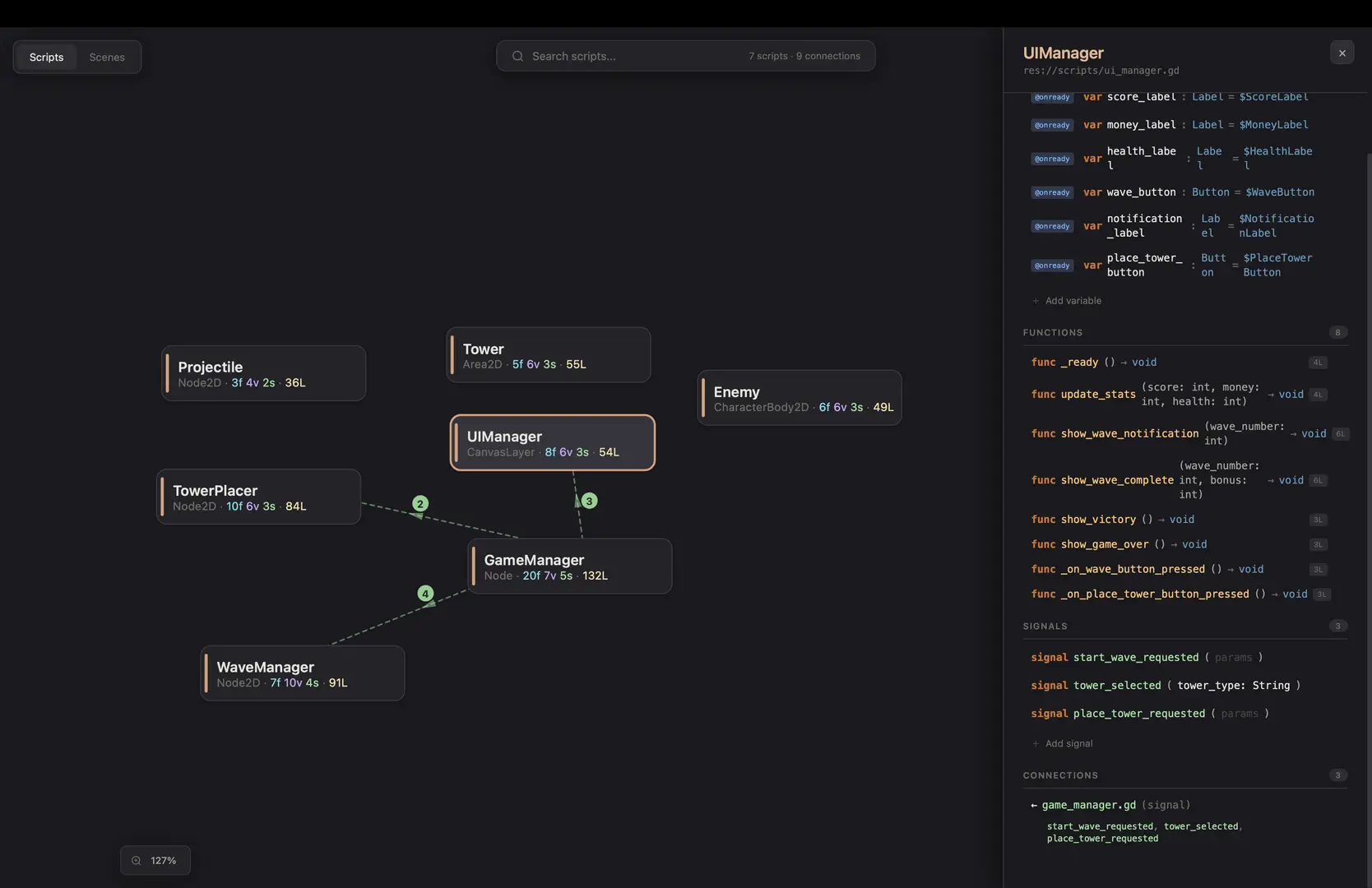
Interactive Visualizer
Run map_project and get a browser-based explorer at localhost:6510:
- Force-directed graph of all scripts and their relationships
- Click any script to see variables, functions, signals, and connections
- Edit code directly in the visualizer — changes sync to Godot in real time
- Scene view with node property editing
- Find usages before refactoring
What Developers Are Saying AI + Godot Is Missing
| Problem | Godot MCP |
|---|---|
| AI can't see my project — constant copy-pasting | Solved — AI reads/writes directly |
.tscn files are unreadable to AI |
Solved — structured scene tools |
| "What properties does this node have?" | Solved — full property discovery |
| Debugging is slow — digging through console | Solved — AI reads errors and dumps scene tree |
| Can't see the big picture of my project | Solved — interactive visualizer |
| Need placeholder art to prototype | Solved — SVG generation + AI art pipelines |
| Refactoring breaks things | Partially solved — rename with references + find usages |
| AI hallucinates wrong Godot APIs | Partially solved — AI sees your actual project context |
Architecture
┌─────────────┐    MCP (stdio)    ┌─────────────┐   WebSocket    ┌──────────────┐
│  AI Client   │◄────────────────►│  MCP Server  │◄─────────────►│ Godot Editor │
│  (Claude,    │                  │  (Node.js)   │   port 6505   │  (Plugin)    │
│   Cursor)    │                  │              │               │              │
└─────────────┘                  │  Visualizer  │               │  32 tool     │
                                 │  HTTP :6510  │               │  handlers    │
                                 └──────┬───────┘               └──────────────┘
                                        │
                                 ┌──────▼───────┐
                                 │   Browser     │
                                 │  Visualizer   │
                                 └──────────────┘
Current Limitations
- Local only — runs on localhost, no remote connections
- Single connection — one Godot instance at a time
- Editor only — works in the editor, not in exported games
- No undo — changes save directly (use version control)
- No runtime control — can't press play or simulate input
- AI is still limited in Godot knowledge — it can't create 100% of the game alone, but it can help debug, write scripts, and tag along for the journey
Full Documentation
See SUMMARY.md for the complete tool reference, feature list, and detailed pain point analysis.
Development
To build from source instead of using npm:
cd mcp-server
npm install
npm run build
Then point your AI client at mcp-server/dist/index.js instead of using npx.
License
MIT
Connect your Godot editor to AI assistants (Claude, Cursor, or any MCP client). Gives AI direct access to 32 tools: create and edit scenes, write and validate GDScript, read project settings, inspect errors, generate 2D assets, and explore your project with an interactive visualizer. No copy-pasting — AI works inside your editor.
Reviews
Quick Information
Godot AI Assistant tools MCP
Connect your Godot editor to AI assistants (Claude, Cursor, or any MCP client). Gives AI direct access to 32 tools: create and edit scenes, write and validate GDScript, read project settings, inspect errors, generate 2D assets, and explore your project with an interactive visualizer. No copy-pasting — AI works inside your editor.
Supported Engine Version
4.1
Version String
0.21
License Version
MIT
Support Level
community
Modified Date
1 day ago
Git URL
Issue URL