Object State Machine
An asset by lowlevel.1989
Install Asset
Install via Godot
To maintain one source of truth, Godot Asset Library is just a mirror of the old asset library so you can download directly on Godot via the integrated asset library browser


Quick Information

Object State Machine
Full documentation available in the repository:https://github.com/lowlevel-1989/object_state_machineA hybrid state machine solution for Godot- Single node in scene tree - Add just one NodeStateMachine node to your scene- No node-based states - States are pure GDScript objects (not scene nodes)- Optimized performance - Avoids scene tree overhead for state transitions- Clean architecture - Keep your scene tree simple while managing complex behaviorsHow It Works- Add a single node to your scene (NodeStateMachine)- Define states as scripts (extending StateAbstract)- Manage transitions through lightweight objects- Keep your scene tree clean - no nested state nodesWhere to Use This? (Great for Complex Behaviors!)- Player behaviors: Idle, Run, Jump, Attack, Crouch- Enemy AI: Patrol, Chase, Attack, Flee- UI Systems: Main menu, Pause screen, Inventory- Game Flow: Level loading, Cutscenes, Dialogue- Complex object states: Treasure chest (locked, unlocking, open, empty), Security system (armed, disarmed, triggered)- Building mechanics: Placement, Rotation, Connection, Demolition modesIncludes examples, documentation, and a clean architecture for handling transitions and input in pure script-based states.
Supported Engine Version
4.0
Version String
1.0.0
License Version
MIT
Support Level
community
Modified Date
10 months ago
Git URL
Issue URL

Object State Machine 1.0.0


A hybrid state machine solution for Godot:
- Single node in scene tree - Add just one
NodeStateMachinenode to your scene - No node-based states - States are pure GDScript objects (not scene nodes)
- Optimized performance - Avoids scene tree overhead for state transitions
- Clean architecture - Keep your scene tree simple while managing complex behaviors

How It Works
- Add a single node to your scene (
NodeStateMachine) - Define states as scripts (extending
StateAbstract) - Manage transitions through lightweight objects
- Keep your scene tree clean - no nested state nodes
Where to Use This? (Great for Complex Behaviors!)
Create state machines to control:
- Player behaviors: Idle, Run, Jump, Attack, Crouch
- Enemy AI: Patrol, Chase, Attack, Flee
- UI Systems: Main menu, Pause screen, Inventory
- Game Flow: Level loading, Cutscenes, Dialogue
- Complex object states: Treasure chest (locked, unlocking, open, empty), Security system (armed, disarmed, triggered)
- Building mechanics: Placement, Rotation, Connection, Demolition modes
Installation
- Asset Library: Install directly from Godot Asset Library
or - Manual:
- Download repository
- Copy
addons/object_state_machineto your project - Enable in Project Settings → Plugins
Getting Started in 3 Steps
1. Add NodeStateMachine to your scene
# player.gd
extends CharacterBody2D

@export var CLASS_STATE_IDLE : Script
@export var CLASS_STATE_WALK : Script
@export var CLASS_STATE_AIR  : Script
@export var CLASS_STATE_JUMP : Script
@export var CLASS_STATE_FALL : Script

var state_idle : StateAbstract
var state_walk : StateAbstract
var state_air  : StateAbstract
var state_jump : StateAbstract
var state_fall : StateAbstract

func _ready():
    state_machine = $NodeStateMachine.get_stage_machine()

    # Create new state machine for movements
    state_machine.create("PlayerSM")

    state_idle = CLASS_STATE_IDLE.new()
    state_walk = CLASS_STATE_WALK.new()
    state_air  = CLASS_STATE_AIR. new()
    state_jump = CLASS_STATE_JUMP.new()
    state_fall = CLASS_STATE_FALL.new()

    # Assign owner and state machine to the state
    state_idle.create(self, state_machine)
    state_walk.create(self, state_machine)
    state_air. create(self, state_machine)
    state_jump.create(self, state_machine)
    state_fall.create(self, state_machine)

    # Assign initial state
    state_machine.set_init_state(state_idle)

func _physics_process(delta : float) -> void:
    state_machine.physics_process(delta)

func free() -> void:
    state_machine.free()
    state_idle.free()
    state_walk.free()
    state_air. free()
    state_jump.free()
    state_fall.free()
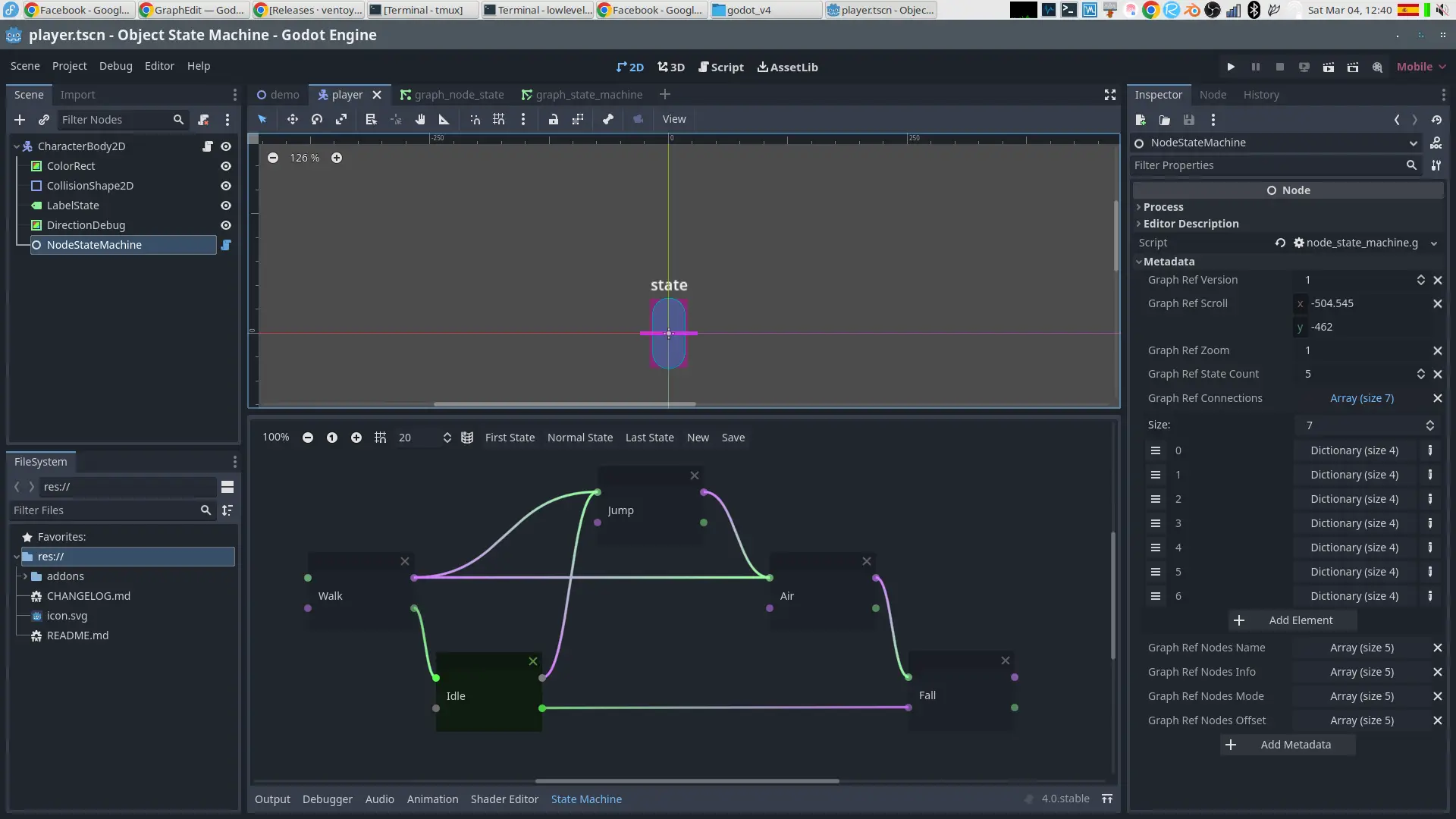
2. Design your state flow
# Add this documentation block at the top of your script
"""
DOC: Player Movement State Machine

States:
- IDLE *
- WALK
- JUMP
- AIR
- FALL

Transitions:
- IDLE  -> WALK  : When moving
- WALK  -> IDLE  : When stopping
- IDLE  -> JUMP  : When jumping
- WALK  -> JUMP  : When jumping
- JUMP  -> AIR   : When ascending
- AIR   -> FALL  : When descending
- FALL  -> IDLE  : When landing
"""
3. Create state classes
# state_idle.gd (extends StateAbstract, not Node)
extends StateAbstract

var player : CharacterBody2D

func _enter() -> void:
    self.player = self.get_owner()

func _set_name() -> void:
    self._state_name = "Idle"

func _confirm_transition() -> void:
    if not self.player.is_on_floor():
        self.transition_to(self.player.state_air)
        return

    if Input.get_axis("ui_left", "ui_right"):
        self.transition_to(self.player.state_walk)
        return
NodeStateMachine
- To create a state machine add the NodeStateMachine to the desired object as shown in the demo.
Class StateAbstract, abstract class that allows to define the different states
to define a new state you must create a class from the StateAbstract class and define its behavior.
Public methods
- void StateAbstract::create(owner : Node, state_machine : StateMachine)
- Node StateAbstract::get_owner()
- void StateAbstract::transition_to(state : StateAbstract)
- String StateAbstract::get_name()
- bool StateAbstract::is_class_state_machine()
- bool StateAbstract::is_class_state()
virtual methods
- void StateAbstract::_enter()
- void StateAbstract::_exit()
- void StateAbstract::_input(event : InputEvent)
- void StateAbstract::_process(delta : float)
- void StateAbstract::_physics_process(delta : float)
- void StateAbstract::_integrate_forces(state : Object)
- void StateAbstract::_confirm_transition()
private methods
- void StateAbstract::_set_name()
Class StateMachine
in charge of administering the states.
signals
- transitioned(current : StateAbstract, next : StateAbstract)
Public methods
- void StateMachine::create(name : String)
- void StateMachine::set_init_state(state : StateAbstract)
- void StateMachine::transition_debug_enable()
- void StateMachine::transition_debug_disable()
- StateAbstract StateMachine::get_current_state()
- StateAbstract StateMachine::get_prev_state()
- void StateMachine::transition_to(state : StateAbstract)
- void StateMachine::input(event : InputEvent)
- void StateMachine::process(delta : float)
- void StateMachine::physics_process(delta : float)
- void StateMachine::integrate_forces(state : Object)
- bool StateMachine::is_class_state_machine()
- bool StateMachine::is_class_state()
Thanks
Full documentation available in the repository:
https://github.com/lowlevel-1989/object_state_machine
A hybrid state machine solution for Godot
- Single node in scene tree - Add just one NodeStateMachine node to your scene
- No node-based states - States are pure GDScript objects (not scene nodes)
- Optimized performance - Avoids scene tree overhead for state transitions
- Clean architecture - Keep your scene tree simple while managing complex behaviors
How It Works
- Add a single node to your scene (NodeStateMachine)
- Define states as scripts (extending StateAbstract)
- Manage transitions through lightweight objects
- Keep your scene tree clean - no nested state nodes
Where to Use This? (Great for Complex Behaviors!)
- Player behaviors: Idle, Run, Jump, Attack, Crouch
- Enemy AI: Patrol, Chase, Attack, Flee
- UI Systems: Main menu, Pause screen, Inventory
- Game Flow: Level loading, Cutscenes, Dialogue
- Complex object states: Treasure chest (locked, unlocking, open, empty), Security system (armed, disarmed, triggered)
- Building mechanics: Placement, Rotation, Connection, Demolition modes
Includes examples, documentation, and a clean architecture for handling transitions and input in pure script-based states.
Reviews
Quick Information
Object State Machine
Full documentation available in the repository:https://github.com/lowlevel-1989/object_state_machineA hybrid state machine solution for Godot- Single node in scene tree - Add just one NodeStateMachine node to your scene- No node-based states - States are pure GDScript objects (not scene nodes)- Optimized performance - Avoids scene tree overhead for state transitions- Clean architecture - Keep your scene tree simple while managing complex behaviorsHow It Works- Add a single node to your scene (NodeStateMachine)- Define states as scripts (extending StateAbstract)- Manage transitions through lightweight objects- Keep your scene tree clean - no nested state nodesWhere to Use This? (Great for Complex Behaviors!)- Player behaviors: Idle, Run, Jump, Attack, Crouch- Enemy AI: Patrol, Chase, Attack, Flee- UI Systems: Main menu, Pause screen, Inventory- Game Flow: Level loading, Cutscenes, Dialogue- Complex object states: Treasure chest (locked, unlocking, open, empty), Security system (armed, disarmed, triggered)- Building mechanics: Placement, Rotation, Connection, Demolition modesIncludes examples, documentation, and a clean architecture for handling transitions and input in pure script-based states.
Supported Engine Version
4.0
Version String
1.0.0
License Version
MIT
Support Level
community
Modified Date
10 months ago
Git URL
Issue URL