

Replicate Operating System key presses and release into Godot.Useful if there is a need to listen key press/release when Godot window is not focus. Examples:- Overlays (like Steam and Discord show overlays)- Streaming software (like OBS Studio use to change scenes)- VTuber software (change character state)Compatibility with Linux (X11) and Windows.
StairsCharacter3D
An asset by mrjshzk
Quick Information

StairsCharacter3D
A simple class based on Godot's default CharacterBody3D with very simple stair stepping ability. Just call "move_and_stair_step()" instead of "move_and_slide()".Written in C++Only tested with cylinder colliders. Works best with "0.01" collider margin.There are a couple signals you can connect to: on_stair_step (any step, up or down) on_stair_step_down on_stair_step_up
Supported Engine Version
4.4
Version String
1.0.0
Support Level
community
Modified Date
1 year ago
Git URL
Issue URL
Stairs Character 3D
A simple class based on Godot's default CharacterBody3D with very simple stair stepping ability. Just call "move_and_stair_step()" instead of "move_and_slide()".
Only tested with cylinder colliders. Works best with "0.01" collider margin.
There are a couple signals you can connect to:
- on_stair_step (any step, up or down)
- on_stair_step_down
- on_stair_step_up
Example usage:
extends StairsCharacter3D


const SPEED = 5.0
const JUMP_VELOCITY = 4.5

# Get the gravity from the project settings to be synced with RigidBody nodes.
var gravity: float = ProjectSettings.get_setting("physics/3d/default_gravity")


func _physics_process(delta: float) -> void:
    # Add the gravity.
    if not is_on_floor():
        velocity.y -= gravity * delta

    # Handle jump.
    if Input.is_action_just_pressed("ui_accept") and is_on_floor():
        velocity.y = JUMP_VELOCITY

    # Get the input direction and handle the movement/deceleration.
    # As good practice, you should replace UI actions with custom gameplay actions.
    var input_dir := Input.get_vector("ui_left", "ui_right", "ui_up", "ui_down")
    var direction := (transform.basis * Vector3(input_dir.x, 0, input_dir.y)).normalized()
    if direction:
        velocity.x = direction.x * SPEED
        velocity.z = direction.z * SPEED
    else:
        velocity.x = move_toward(velocity.x, 0, SPEED)
        velocity.z = move_toward(velocity.z, 0, SPEED)

    # call move_and_stair_step instead of default move_and_slide
    move_and_stair_step()
Note
This plugin is basically just Andricraft's GDScript Stairs Character translated into C++. I made it as a learning exercise for GDExtension.
A simple class based on Godot's default CharacterBody3D with very simple stair stepping ability. Just call "move_and_stair_step()" instead of "move_and_slide()". Written in C++ Only tested with cylinder colliders. Works best with "0.01" collider margin. There are a couple signals you can connect to: on_stair_step (any step, up or down) on_stair_step_down on_stair_step_up
Reviews
0 total reviews
Quick Information
StairsCharacter3D
A simple class based on Godot's default CharacterBody3D with very simple stair stepping ability. Just call "move_and_stair_step()" instead of "move_and_slide()".Written in C++Only tested with cylinder colliders. Works best with "0.01" collider margin.There are a couple signals you can connect to: on_stair_step (any step, up or down) on_stair_step_down on_stair_step_up
Supported Engine Version
4.4
Version String
1.0.0
Support Level
community
Modified Date
1 year ago
Git URL
Issue URL
Related Assets
More in Scripts

JavaScript Signals for Godot! Vue, Solid.js, Qwik like syntax in Godot.Make your code reactive!


Godot PostgreSQL Client is a GDscript script / class that allows you to connect to a Postgres backend and run SQL commands there. It is able to send data and receive it from the backend. Useful for managing player user data on a multiplayer game, by saving a large amount of data on a dedicated Postgres server from GDscript.The class is written in pure GDScript which allows it not to depend on GDExtention. This makes it ultra portable for many platforms.Detailed documentation: https://github.com/Marzin-bot/PostgreSQLClient/wiki/Documentation
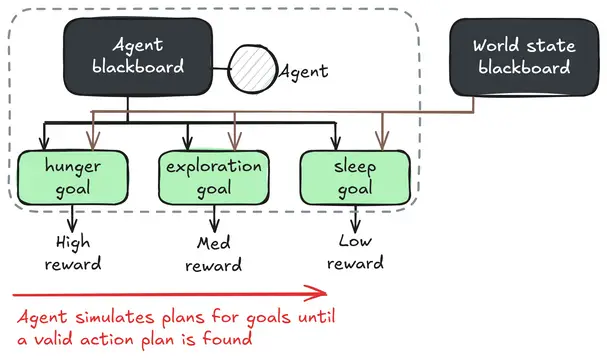

An advanced game AI framework, based on Goal Oriented Action Planning (GOAP), and implemented in Godot.**NOTE: The Godot Asset Library tries to import this addon at the top folder of your project because I have set it up to be better as a git submodule. If installing through the asset library, make sure to click *Change Install Folder* and put the addon in `addons/GdPlanningAI`.**