Physics Collision Import Generator
An asset by pixelmount
Install Asset
Install via Godot
To maintain one source of truth, Godot Asset Library is just a mirror of the old asset library so you can download directly on Godot via the integrated asset library browser
Quick Information

Physics Collision Import Generator
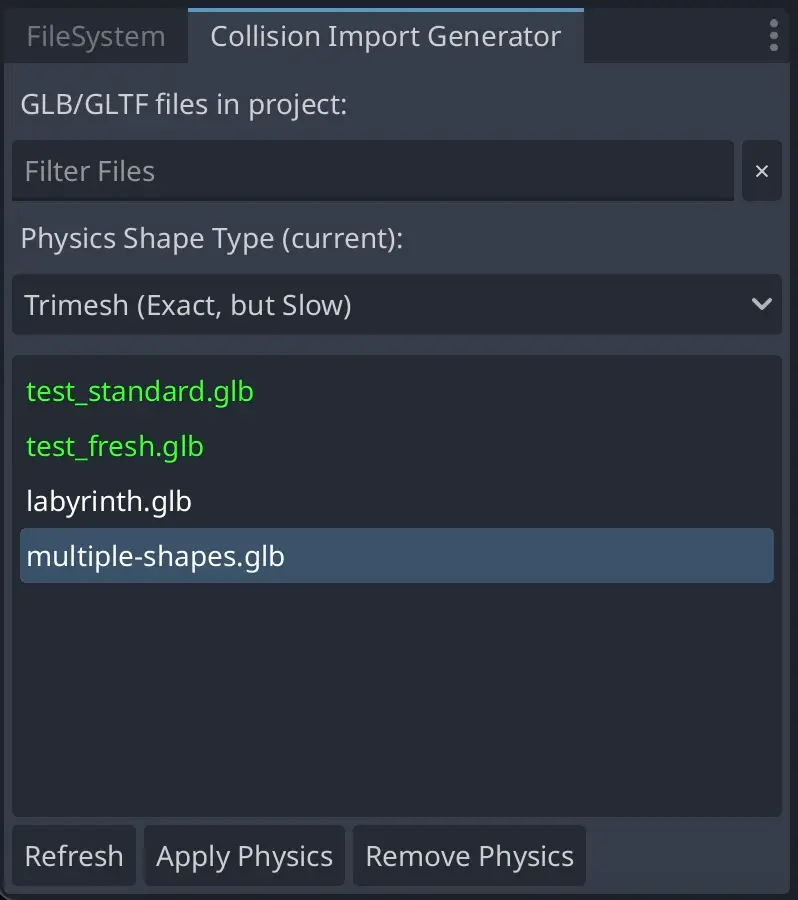
Automatically generate physics bodies and collision shapes for 3D scenes from GLB/GLTF files. Select files in the Collision Import Generator dock, choose a shape type, and apply the changes. The plugin sets up import scripts that automatically add physics on each reimport.This captures both the user action (applying via the dock) and the persistent behavior (the import script runs on future reimports).After enabling the plugin (Project → Project Settings → Plugins), a new dock panel named "Collision Import Generator" will appear beside the FileSystem dock.
Supported Engine Version
4.3
Version String
1.1.1
License Version
MIT
Support Level
community
Modified Date
2 hours ago
Git URL
Issue URL
Physics Collision Import Generator
This Godot plugin automatically generates physics bodies and collision shapes during the import of 3D scenes from GLB/GLTF files, with potential support for more formats in the future.
Installation
- Copy the
physics_collision_import_generatorfolder to your project'saddons/directory - Go to Project Settings → Plugins
- Enable the "Physics Collision Import Generator" plugin
Usage
- Import GLB or GLTF files into your project
- Open the "Collision Import Generator" dock panel (near the FileSystem dock)
- Select one or more files from the list
- Choose a physics shape type from the dropdown
- Click "Apply Physics" to add physics, or "Remove Physics" to remove it
- Files with physics applied are shown in green
- Use the search filter to find specific files
Features
- Automatically creates StaticBody3D nodes with CollisionShape3D for all MeshInstance3D nodes
- Multiple physics shape types supported
- Preserves existing scene structure
- Uses Godot's import script system to automatically process scenes during import
Shape Types
- Trimesh: Exact mesh shape (best for static geometry)
- Convex: Convex hull approximation (good performance/accuracy balance)
- Box: Simple box shape based on mesh bounds
- Sphere: Simple sphere shape based on mesh bounds
- Capsule: Simple capsule shape based on mesh bounds
Notes
- Physics bodies are created as StaticBody3D by default
- Existing StaticBody3D nodes are reused when possible
- The plugin sets the Import Script Path in the file's
.importconfiguration to automatically process scenes during import
Automatically generate physics bodies and collision shapes for 3D scenes from GLB/GLTF files. Select files in the Collision Import Generator dock, choose a shape type, and apply the changes. The plugin sets up import scripts that automatically add physics on each reimport.
This captures both the user action (applying via the dock) and the persistent behavior (the import script runs on future reimports).
After enabling the plugin (Project → Project Settings → Plugins), a new dock panel named "Collision Import Generator" will appear beside the FileSystem dock.
Reviews
Quick Information
Physics Collision Import Generator
Automatically generate physics bodies and collision shapes for 3D scenes from GLB/GLTF files. Select files in the Collision Import Generator dock, choose a shape type, and apply the changes. The plugin sets up import scripts that automatically add physics on each reimport.This captures both the user action (applying via the dock) and the persistent behavior (the import script runs on future reimports).After enabling the plugin (Project → Project Settings → Plugins), a new dock panel named "Collision Import Generator" will appear beside the FileSystem dock.
Supported Engine Version
4.3
Version String
1.1.1
License Version
MIT
Support Level
community
Modified Date
2 hours ago
Git URL
Issue URL