TinyTest
An asset by Galan Montgomery
Install Asset
Install via Godot
To maintain one source of truth, Godot Asset Library is just a mirror of the old asset library so you can download directly on Godot via the integrated asset library browser
Quick Information

TinyTest
A super-teeny unit testing script for Godot.TinyTest is a very small script (~200 lines) for running uniting tests.It's designed for clear output, with an absolutely minimal set of features.Check the repository for usage details: https://codeberg.org/galanm/tiny_test
Supported Engine Version
4.5
Version String
1.0.1
License Version
MIT
Support Level
community
Modified Date
1 day ago
Git URL
Issue URL
TinyTest
A super-teeny unit testing script for Godot.

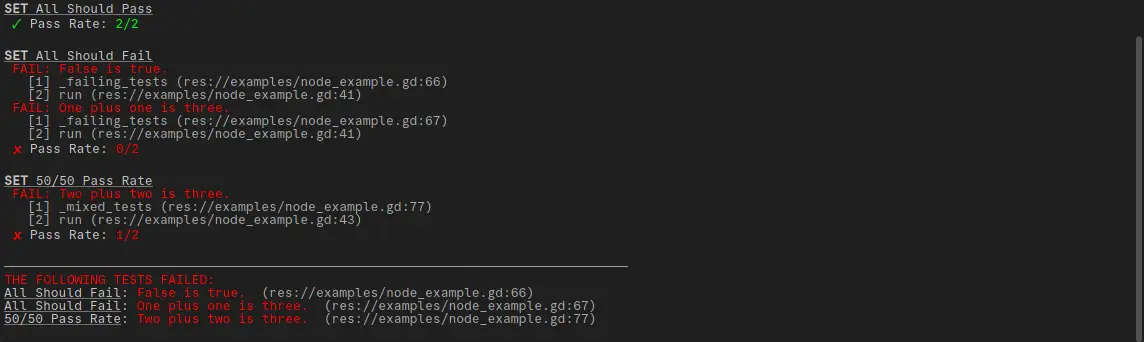
TinyTest is a very small script (~200 lines) for running uniting tests in Godot. It's designed for clear output, with an absolutely minimal set of features.
This isn't meant to replace full-featured unit testing addons like GdUnit or Gut, but you may find TinyTest more useful to your needs if:
- You're new to unit testing, and find those tools overwhelming.
- You're making a small game or addon, and don't want to use an addon that's bigger than your whole project.
- You just don't have complex unit testing needs.
Getting Started
Installing
To start, you'll need to download the addon from the Godot Asset Library, or directly from the repo. In either case, the only file you need to download is "addons/tiny_test/tiny_test.gd". You can place this file anywere in your project directory, but I recommend keeping it in the "addons/tiny_test/" directory.
Creating a test script
Once the file is in your project, there are two main ways to start writing tests,
either as an in-editor @tool script,
or as a command-line script.
I've incuded in-depth examples of both approaches in the "examples/" directory,
and I highly recommend using one as a starting point for building your own tests.
If you choose to write your testing scripts from scratch, you'll need start by importing the script:
const TinyTest = preload("res://addons/tiny_test/tiny_test.gd") # correct the file path as needed
You could also choose to add a class_name to the TinyTest script, but I don't recommended it,
since you're unlikely to need it outside of your test script(s).
Building tests sets
To organize the output, tests are grouped into "sets", which can be skipped if desired (more below). A test set looks like this:
TinyTest.start_test_set("my_test_set")

TinyTest.assert_true(true, "True is true.")
TinyTest.assert_true(1 + 1 == 2, "One plus one is two.")

TinyTest.end_test_set()
TinyTest.start_test_set("my_test_set") tells TinyTest that the following tests belong to a
set named "my_test_set",
and will immediately print to the console that we're starting a set with that name.
Tests themselves are run using TinyTest.assert_true(test, test_description).
If the first argument evaluates to true, that test will be considered 'passed',
while false evaluations will treat it as 'failed'.
The results of each test will be printed to the console, and saved for later.
Finally, TinyTest.end_test_set() closes out the current test set,
and prints out it's pass rate.
Summarizing results
Once you've completed all test sets, you can print out a summary of the tests in all sets using:
TinyTest.finalize()
In addition, if you're running the tests from a command-line script, you'll want to close Godot when you're finished, so you can instead use:
var exit_code = TinyTest.finalize()
quit(exit_code)
…which will quit out Godot with and exit code of 0 (all tests passed)
or 1 (one or more tests failed).
Modifying output
TinyTest provides several options for modifying its output.
only: if this list isn't empty, then TinyTest will skip any sets not named in the list (as assigned instart_test_set()).skip: any sets named in this list will be skipped, even if they are in theonlylist.show_all: By default, TinyTests displays the pass rate of each test set, but only prints out descriptions of tests that fail. Enabling this will also print out the descriptions of passing tests, which can be handy when writing new tests.
These can be set in @tool scripts — before calling starting any test sets — by calling:
TinyTest.initialize(show_all: bool, only: PackedStringArray, skip: PackedStringArray)
…or from the command-line:
godot --headless -s my_tests.gd -- [--only test_one test_two] [--skip test_one test_two] [--all/-a]
Contributing
I'm currently considering TinyTest feature-complete. That said, please report any bugs you may find using the issue tracker.
Since the main goal of TinyTest is too be as small as possible, new features are unlikely. They may be considered, howeve, if 1) they take very few lines of code to implement, and 2) they are high-impact. If you have an idea that you think qualifies, feel free to open an issue to discuss it.
A super-teeny unit testing script for Godot.
TinyTest is a very small script (~200 lines) for running uniting tests.
It's designed for clear output, with an absolutely minimal set of features.
Check the repository for usage details: https://codeberg.org/galanm/tiny_test
Reviews
Quick Information
TinyTest
A super-teeny unit testing script for Godot.TinyTest is a very small script (~200 lines) for running uniting tests.It's designed for clear output, with an absolutely minimal set of features.Check the repository for usage details: https://codeberg.org/galanm/tiny_test
Supported Engine Version
4.5
Version String
1.0.1
License Version
MIT
Support Level
community
Modified Date
1 day ago
Git URL
Issue URL