Expose Me
An asset by TCamacho
Install Asset
Install via Godot
To maintain one source of truth, Godot Asset Library is just a mirror of the old asset library so you can download directly on Godot via the integrated asset library browser
Quick Information

Expose Me
ExposeMe is a Godot 4 C# editor plugin that shows selected child-node properties directly in a parent node inspector.It is useful when your scene is split into components and you want to edit important child values from one place, without selecting each child manually.
Supported Engine Version
4.7
Version String
0.1.0
License Version
MIT
Support Level
community
Modified Date
9 hours ago
Git URL
Issue URL
ExposeMe
ExposeMe is a Godot 4 C# editor plugin that shows selected child-node properties directly in a parent node inspector.
No need for a lot of extra code. Just use [ExposerNode] and [Expose] and you are done.
It is useful when your scene is split into components and you want to edit important child values from one place, without selecting each child manually.
What It Does
- Scans children (and deeper descendants) of a selected parent node.
- Finds members marked with
[Expose]. - Renders custom editor controls in the parent inspector.
- Supports style customization for section headers with
[ExposeStyle]. - Only activates on parent scripts marked with
[ExposerNode].
How To Use
- Enable the plugin in Godot.
- Open Project -> Project Settings -> Plugins.
- Enable ExposeMe.
- Mark the parent class where you want to expose child properties with
[ExposerNode]. - Mark child members you want to show with
[Expose]. - (Optional) You can customize the child section header with
[ExposeStyle].
Basic Example
Parent script:
using Godot;

[ExposerNode]
public partial class ParentNode : Node2D
{
}
Child script:
using Godot;

// Optional
[ExposeStyle(
    BackgroundColorHex = "#67659b",
    FontColorHex = "#cdf5f5",
    FontSize = 13,
    Label = "Stats"
)]
//Optional


public partial class ChildNode : Sprite2D
{
    [Export] [Expose] public int MaxHealth { get; set; } = 100;
    //OR
    [Export, Expose] public int Speed { get; set; } = 300;
}
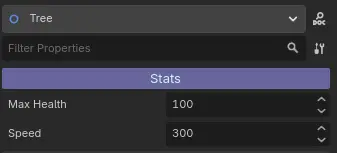
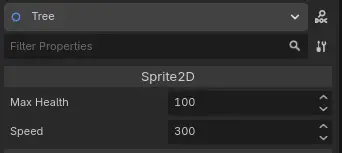
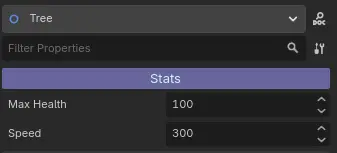
When you select the parent node (ParentNode), the exposed values from ChildNode appear in the parent inspector.
You can also add some style to the child section header by using [ExposeStyle] on the child script.
Right now you can:
BackgroundColorHexto change the background color.FontColorHexto change the font color.FontSizeto change the font size.Labelto change the label text.
The following example would look like this in the parent inspector:
[ExposeStyle(BackgroundColorHex = "#393939", FontColorHex = "#DCDCDC", FontSize = 13, Label = "Stats")]

Example prints:
Child node editor:

Parent node editor:

Supported Types
ExposeMe currently supports:
boolint,longfloat,doublestringVector2Vector3Texture2D- (Experimental not active)
Texture2D[] - (Experimental not active)
Godot.Collections.Array<Texture2D>
You can uncomment the code in ExposeInspector.cs to enable support for Texture2D[] and Array<Texture2D>. Be aware some actions will crash the editor, like drag and drop, buttons... So use it with caution. If you really need this feature let me know and I will try to implement it properly.
Attributes Reference
[ExposerNode]
Apply to the parent script class. ExposeMe only runs for selected nodes with this attribute.
[Expose]
Apply to public fields or properties in child scripts. Only marked members are shown.
[ExposeStyle]
Apply to child script class to customize the group header in the parent inspector.
Available optional properties:
BackgroundColorHexexample:"#c43939"FontColorHexexample:"#DCDCDC"FontSizeexample:10Labelexample:"Options"
License
This plugin is available under the MIT License. See the LICENSE file for more details.
FAQ
Will this work if the node that has the properties is not a direct child of the node that exposes them?
Yes. The plugin scans descendants recursively, not only direct children.
Do exposed members need [Export]?
No for visibility in the ExposeMe panel. Yes if you want value persistence in scenes/resources through Godot serialization.
Why do I not see anything in the parent inspector?
Check all of the following:
- The plugin is enabled.
- The selected parent class has
[ExposerNode]. - The child member is public and marked with
[Expose]. - The parent and child scripts are compiled successfully.
- You rebuilt the project in Godot after changes.
Can I use this in runtime/game UI?
No. This plugin is editor tooling. It is intended for inspector editing in the Godot editor.
Can I expose unsupported types?
Not yet. You can add support by implementing a new EditorProperty and wiring that type in the plugin inspector factory.
Notes
If you want to contribute, please check the src/ExposeMe/Editor/Properties folder for existing property implementations. You can add your own property type by creating a new class that inherits from EditorProperty and implementing the necessary logic to display and edit the property in the inspector.
I will be adding fixes and new features in the future, when I see that I also need them for my own projects. If you have any suggestions or feature requests, please open an issue and I will consider adding it.
Also if you want me to add support for a specific type, please open an issue and I will consider adding it. I would be happy to help you with that.
Thank you for using ExposeMe!
ExposeMe is a Godot 4 C# editor plugin that shows selected child-node properties directly in a parent node inspector.
It is useful when your scene is split into components and you want to edit important child values from one place, without selecting each child manually.
Reviews
Quick Information
Expose Me
ExposeMe is a Godot 4 C# editor plugin that shows selected child-node properties directly in a parent node inspector.It is useful when your scene is split into components and you want to edit important child values from one place, without selecting each child manually.
Supported Engine Version
4.7
Version String
0.1.0
License Version
MIT
Support Level
community
Modified Date
9 hours ago
Git URL
Issue URL