This simple tool will automatically open .gd and .cs files in the editor when they are created by right-clicking in the filesystem browser and selecting create new -> script. Currently creating the file and opening it in the editor are two separate actions.Please upvote the proposal here if you think this should be default Godot behavior:https://github.com/godotengine/godot-proposals/discussions/11428Then I can remove this silly addon.Source code available here:https://gitlab.com/pahool_gamedev/godot_file_autoopen_addon

Designer-friendly Finite State Machine implemented in "Godotic" wayThis version is only compatible with Godot 4.x, check out godot3(https://github.com/imjp94/gd-YAFSM/tree/godot3) branch for older version- Design StateMachine in a flowchart-like editor- Visualize flow of StateMachine & inspect parameters in realtime- Visualize game/UI state from flowchart- Similar workflow as using AnimationTree, and not required to inherit any custom class, just plug and play- Nested Finite State Machine workflow supported to create complex state machine with ease- As a Resource, StateMachine can be used repeatedly in different scenarios(StateMachinePlayer) and provide different outcome based on the input.- Compact data structure for StateMachine resource filev0.6.2:Fixes StateMachineEditor is_instance_valid check on reconnection Fix StateDirectory.get_current_end() doesn't work as expectedFix FlowChartGrid draw_multiline_colors errorFix StateDirectory.get_current_end() and StateMachinePlayer.path_end_dir(Remove some super._init() for godot 4.1.3v0.6.1:Fix _on_update params error, flowchart grid and popup menusv0.6.0:Port to Godot 4.0v0.5.2:Support sorting transitions.Fix "entered" signal is not emitted and trigger is flushed when StateMachinePlayer started.v0.5.1:Fix condition label in graph not removed as deleted from inspector.Fix output flooded with null exception, when stopping scene in remote debug and when switching between local/remote StateMachinePlayer node.v0.5.0:Support remote debug, simply select any StateMachinePlayer node in remote scene tree to view flow of StateMachine in realtime.Fix StateMachinePlayer's nested triggers are not flushed and some UI bugs.v0.4.1:Fix possible to connect to self when reconnecting, validate StateMachine Resource everytime loaded in editor, and minor improve on UI.v0.4.0:gd-YAFSM now support nested FSM workflow in 0.4.0 & fixed various annoying UI bugsCheck out CHANGELOG(https://github.com/imjp94/gd-YAFSM/blob/master/CHANGELOG.md) for more details*Always backup project files before update
A Godot Engine plugin that enables publishing your game to wavedash.comSDK features include:LeaderboardsLobbiesAchievements and StatsP2P MultiplayerCloud SavesUser Generated ContentSupports Godot 4.0+, but we recommend Godot 4.2+ for best P2P networking performance.https://docs.wavedash.com
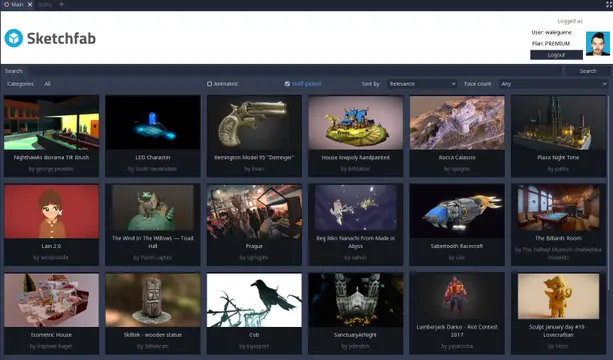
Import models from Sketchfab to Godot (Godot 4 beta 2+)
Testing Framework for GDScript in Godot 4 Game EngineFeatures: - Supports creation of custom user-defined tests. - Provides an editor dock to display all tests and their results. - Offers a Testing singleton with methods for easy assertions in non-test code.Please see the Github repo for more more information and the latest version of the plugin!https://github.com/accmltr/simple-testing-godot
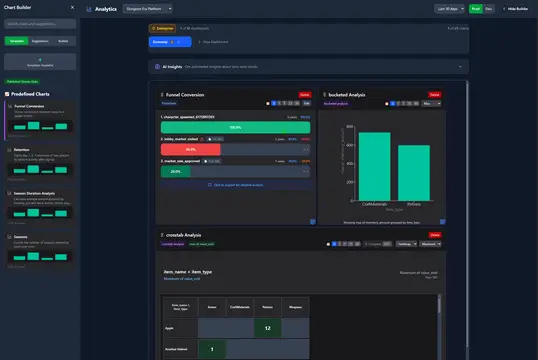
Imagine having a crystal ball that shows exactly how players experience your game, what excites them, what frustrates them, and what keeps them coming back for more. Tokebi Metrics gives Godot developers that power. With just a few clicks, you gain deep, actionable insights into player behavior and game performance. No guesswork, no blind spots.Unlock the secrets behind your players’ journeys and turn raw data into smart decisions that level up your game’s fun and success. All while keeping your players’ privacy front and center. If you want to build games players love and grow your community, Tokebi is your secret weapon.Learn more: https://tokebimetrics.comDocumentation: https://tokebimetrics.com/documentation-guide/godot-plugin-guide
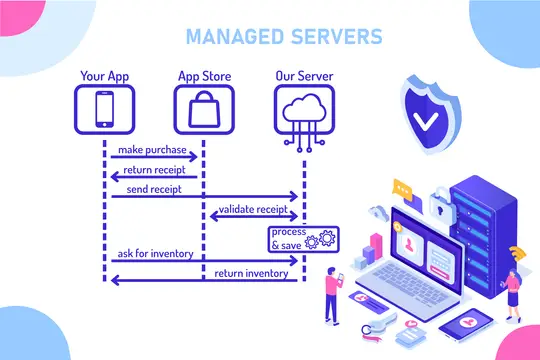
A sample project for the Godot game engine, that contains fully working in-app purchase implementations including server-side receipt validation for the Apple App Store and Google Play.The Receipt Validator Service is a fully hosted solution, so you do not have to manage your own server or keep track of transactions and App Store API changes. The service offers a FREE plan to get started. https://flobuk.com/validator
An integration for ink, a powerful narrative scripting language. GodotInk is mainly aimed at C# games, but is completely interoperable from GDScript. - Project home page: https://github.com/paulloz/godot-ink/- Installation: https://github.com/paulloz/godot-ink/wiki#%EF%B8%8F-installation- Quick start guide: https://github.com/paulloz/godot-ink/wiki#-quick-start-guide
Create and manage your game patches from Godot Engine to Game Launcher CloudGame Launcher Cloud is a platform to create your own custom game launcher for any engine and any game. White label solution.It includes automatic updates, player login, in-launcher purchases, analytics, hosting, AI-powered news generation, and support for private servers — all in one place.➤ Website:https://gamelauncher.cloud/➤ Documentation:https://help.gamelauncher.cloud/➤ Discord (Community and Support):https://discord.com/invite/FpWvUQ2CJP◆ [email protected]▽ Features ▽Connect to your Game Launcher Cloud account to● BUILD, COMPRESS AND UPLOAD PATCHESBuild your game and upload it directly to Game Launcher Cloud.The manager handles everything for you.● TIPSReceive smart tips to improve patch quality.
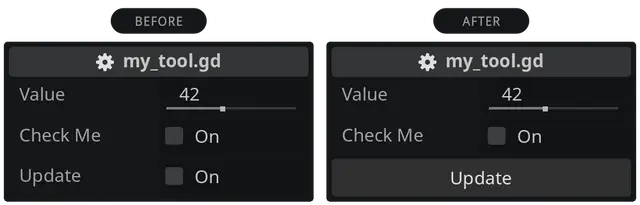
A lightweight Godot addon that turns your bool button-like checkboxes into real buttons. Just in place. Without changing the code logic or having dependencies. It's easier than you might think.Just download the addon and enable it in your project settings. Prefix your bool exports with btn_ and enjoy your buttons. Reload the scene (Scene > Reload Saved Scene) if you see no buttons.For more info see https://github.com/domske/godot-addon-simple-tool-button
───── LOGGIE ───────────────────• [Github]: https://github.com/Shiva-Shadowsong/loggieNow with new user guides and extended features!• [Discord]: https://discord.gg/XPdxpMqmcsSupport, feature requests and development discussion.───────────────────────────────Loggie is a Godot logger and string composer for those who need improvements and more control over how console and logfile output is styled and handled. ───────────────────────────────[ HIGHLIGHTED FEATURES ]:• Easy message composition and customizability.• Style Messages - (Bold, Italic, Color, Box, Separator, etc.)• Automatically ignore and omit styles in release builds.• Make templates for messages and styles and reuse them.• Timestamps• Domains - (Toggleable message categories)• Channels - Choose where your messages get logged: (Terminal, Discord, Slack, Custom...)• See all on features on GitHub...───────────────────────────────If you need something simple but effective, Loggie is your guy.
AI Assistant plugin for Godot 4, powered by Claude (Anthropic).- Chat with AI directly inside the Godot editor- Generate and run EditorScripts to create scenes and nodes automatically- Share your open script as context for Claude- Paste errors from Output panel for instant fixes- Snippet Library to save useful code blocks- Persistent chat history between sessionsRequires a free Anthropic API Key (console.anthropic.com)Developed by xStrix