A minification tool for Godot 4.3+ that automatically compresses files in your web buildSpeeds up your game loading even if your server does not support gzip compression.DISCLAIMER!1. The compression ratio of a .pck file depends heavily on the set of assets in your project.2. Loading speed depends on server settings.3. On average, loading speed when using a plugin can be from 10% to 100% faster.See comparison calculations here: https://github.com/markushevpro/godot-minimize-html-build/blob/master/COMPARE.mdSupported host platforms (where your editor runs): Windows x64 and Linux x64Recent updates:- Added 4.6 template support- Disabled redundant compression (if any file is larger than the original, the original file is included in the build)- Linux support added- All PCK and WASM files in export folder now compressing automatically- Threads support & PWA supportRecent fixes:- Fixed broken standalone PCK/ZIP export- Fixed a bug with double decompression of additional files- Fixed a bug in handling paths with spaces- Fixed Linux permissions issue- Fixed aside WASMs error- Fixed a bug that caused the plugin to run when exporting a non-web templateHow it worksThe add-on resaves large files (.pck, .wasm) with gzip compression and adds the ability to load gzip-compressed assets in the browser using pako. Nothing else will be changed in your files.Usage- Install the addon from AssetLib- Enable the plugin in your Project Settings.- Export your project to Web.More information at GitHub: https://github.com/markushevpro/godot-minimize-html-build
This plugin aims to help in writing dialogue. It makes use of a syntax heavily inspired by {{mustache}} templates, specifically like handlebars.js. It lets you make use of functions and data in your script and have AraVox generate a Resource which you can then parse in whichever way you want.It is highly recommended to check out its wiki to fully grasp how to utilize AraVox:https://github.com/aravikusu/AraVox/wiki
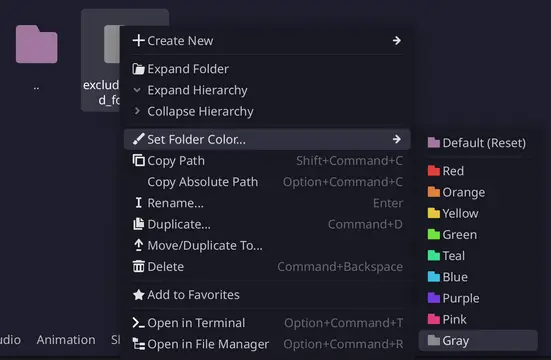
Excluding folders with specific color markers during exportFor more information, please check [readme](https://github.com/univeous/Exclude-Colored-Folders).
GoLogger is a lightweight framework that enables you to create log entries to store game events and data into external .log files, making it easier to identify issues. GoLogger is a versatile tool aimed at making the debugging and maintaining process easier, and provide deeper insights into your game's behavior. By storing .log files externally, players can also share logs when they encounter issues, helping you resolve critical problems in released products.Simply define your log entries with "Log.entry("My log entry.")" and adding data the same way you would concatenating strings.The latest version, setup and more can be found in the Github repository and the wiki.https://github.com/Burloe/GoLogger/wiki/
A framework designed to help writing a shared code base that works in more than one engine at the same time.Currently in very early prototype stage, it supports selected subsets of Godot 4.3 and Unity 6000.0Working prototypes can be found at the following repositories:https://gitlab.com/engine-agnostic-code-project/user-projects-godot/-/tree/iteration-01https://gitlab.com/engine-agnostic-code-project/user-projects-unity/-/tree/iteration-01
Embed free AI assistants in Godot with the ability to read and write code in Godot's Code Editor.Key Features- Assistants can write code or documentation directly in Godot's Code Editor.- Assistants can read the code you highlight for quick interactions.- Save reusable prompts to ask your assistant to act with a single button.- Create your own assistant types and quick prompts without coding.- Have multiple chat sessions with different types of assistants simultaneously.- Edit the conversation history in case your assistant gets confused by some of your prompts.- Call LLMs locally or remotely.This plugin requires Ollama installed on your machine (which is simple and free), please see the videos to learn more.Thanks to contributors, additionally to Ollama, the following APIs are already supported:- Google Gemini- Ollama Turbo- OpenRouter- Jan- OpenWebUI- xAIYou can learn more about what has changed in the latest version in https://github.com/FlamxGames/godot-ai-assistant-hub/blob/main/versions.md
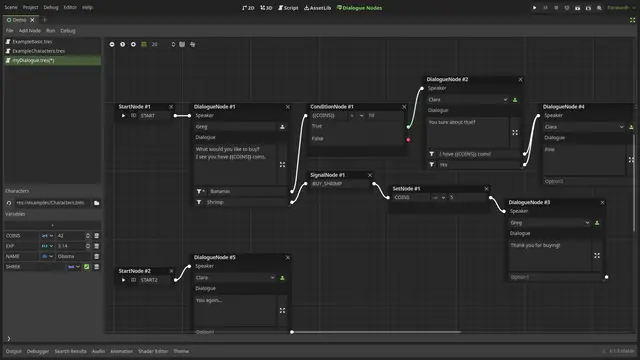
A plugin for creating and exporting dialogue trees, Dialogue Nodes extends your Godot editor to allow for creating, testing and incorporating branching dialogues in your game.Features:- Fully featured dialogue editor using graphs to visualize branching dialogues.- In-editor dialogue preview pop-up to test your dialogue without running the game.- Easy to use DialogueBox & DialogueBubble nodes to add to your project and run the dialgues in-game.- Additional features such as bbcodes, variables, character portraits, and more.NOTE: for users upgrading from DN v1.0.3, please go through the release notes to learn how to update your old dialogue files here: https://github.com/nagidev/DialogueNodes/releases/tag/v1.1
Godot plugin that adds support to rich haptics on Android devices.Check the repository for usage info and a demo project. Check the official Android documentation for how and why you might use rich haptics for your apps and games: https://developer.android.com/develop/ui/views/haptics
A simple add-on that copies some of the functionality of FMOD inside of Godot. Sound Effects (SFX). Meant for game jams, prototypes, and small projects. Read more on GitHub: https://github.com/kpids/bmod
Gmap is a map bundler to help your community make maps with the full power of the godot engine.GitHub: https://github.com/Kaifungamedev/GMap
Deprecated: Please use Icon Explorer instead.https://godotengine.org/asset-library/asset/2511If you use Material Design icons from [Pictogrammers](https://pictogrammers.com/library/mdi/), they come without any fill color, automatically rendered black. This is not a convenient color as it makes it impossible to modulate the color. The icon patcher provides a utility to automatically patch the icons to white color.Set the icon directory in the Project Settings under the menu `Plugins` -> `Icons Patcher`.Then use `Project` -> `Tools` -> `Icons Patcher` to patch the icons.For more see https://kenyoni-software.github.io/godot-addons/addons/icons_patcher/.
# Mono Plugin (https://github.com/tensai-suraimu/godot-plugin-mono-plugin)## Usage:1. Download this plugin into your project and enable it.2. Create a `.mono_repo` directory under your plugin directory.3. Use `Project > Tools > Export Plugins` to exports them.## Project structure reference::```# res://addons/| ...|| mono_plugin/| | ...|| your_plugin/| | .mono_repo/ # <- Exported files are stored here.| | * .git/| | * addons/| | * * your_plugin/| | * * * ...folders/| | * * * .gitignore| | * * * plugin.cfg| | * * * ...files| | * docs/| | * ReadMe.md| | * ...documents.md| || | docs/| | ...folders/| | .gitignore| | plugin.cfg| | ReadMe.md| | ...documents.md| | ...files|| your_plugin/| | .mono_repo/| | * ...| | ......```## TODO List- [ ] Git integration.