Godot AI
An asset by dlight
Install Asset
Install via Godot
To maintain one source of truth, Godot Asset Library is just a mirror of the old asset library so you can download directly on Godot via the integrated asset library browser
Quick Information

Godot AI
Godot AI connects MCP-compatible AI assistants (Claude Code, Codex, Antigravity, Cursor, etc.) to a live Godot editor. Build scenes, write and attach scripts, design UI, animate, create materials and particle effects, run tests, and read editor data — all from chat.From the creators of MCP for Unity — the most widely used gamedev MCP, with 9,200+ GitHub stars and hundreds of thousands of users — built from the ground up for Godot. Robustness and deep QA are core to our approach, shaped by over a year of development and community feedback on MCP for Unity.Good Setup / Demo Video: https://youtu.be/9qCt7gxPJkY?si=nP1-gZ0l3hkC-FTy&t=51Discord: https://discord.com/invite/FDZ5fr2QkPDemo project shown below: dynamic, interactive UI panels drawn 100% procedurally with Godot AI — no textures, sprites or shaders. About 2 hours of work: https://github.com/hi-godot/cyberpunk-hud-demoFull docs and repo: https://github.com/hi-godot/godot-aiFeatures:- 150+ operations spanning scenes, nodes, scripts, animations, UI, themes, materials, particles, audio, cameras, input mapping, and project settings- One-click setup for 19 MCP clients — Claude Code, Claude Desktop, Codex, Antigravity, Cursor, Windsurf, VS Code, VS Code Insiders, Zed, Gemini CLI, Cline, Kilo Code, Roo Code, Kiro, Trae, Cherry Studio, OpenCode, Qwen Code, Kimi Code- Build entire UI hierarchies from a single prompt- Materials (StandardMaterial3D, ORMMaterial3D, ShaderMaterial) and particles (GPU + CPU, 2D + 3D) with one-call presets — fire, smoke, sparks, magic, rain, explosion, lightning- AnimationPlayer authoring with fade/slide/shake/pulse presets- Inline or .tres resource authoring (meshes, shapes, curves, gradients, styleboxes)- Smart screenshots (editor viewport, in-game framebuffer, or cinematic camera) so AI agents can see your scene- Multi-instance support across multiple Godot editorsRequirements: Godot 4.3+ (4.4+ recommended) and an MCP client.Quick Start:Install uv (one-time):macOS/Linux: curl -LsSf https://astral.sh/uv/install.sh | shWindows (PowerShell): irm https://astral.sh/uv/install.ps1 | iexInstall the addon from the Asset Library (or drop plugin/addons/godot_ai into your project's addons/ folder).In Godot: Project > Project Settings > Plugins — enable "Godot AI".Open the Godot AI dock and click your MCP client to configure it in one click.Open your MCP client and start prompting.Coming next: Physics, Shaders, Terrain, Custom ToolsPrivacy: Godot AI uses limited, anonymous telemetry to improve reliability. It does not collect file paths, project names, scene or source contents, or other user-identifying data. Telemetry can be fully disabled with GODOT_AI_DISABLE_TELEMETRY=true or DISABLE_TELEMETRY=true (no traffic, no UUID generated). More here: https://github.com/hi-godot/godot-ai/blob/main/docs/TELEMETRY.md
Supported Engine Version
4.3
Version String
2.5.9
License Version
MIT
Support Level
community
Modified Date
4 days ago
Git URL
Issue URL
Godot AI
Connect AI assistants to a live Godot editor via the Model Context Protocol (MCP).
Godot AI bridges Claude Code, Codex, Antigravity, and other MCP clients with your editor — inspect scenes, create nodes, modify properties, run tests, search project files, and more, all from a prompt.
Quick Start
- Copy
addons/godot_ai/into your project'saddons/folder - Enable the plugin: Project > Project Settings > Plugins > Godot AI
- Pick your MCP client in the Godot AI dock and press Configure
The plugin auto-starts the MCP server and connects over WebSocket. No manual configuration required.
Requirements
Godot 4.3+ (4.4+ recommended)
uv (used to install the Python server)
Install uv
macOS / Linux:
curl -LsSf https://astral.sh/uv/install.sh | shWindows (PowerShell):
powershell -ExecutionPolicy ByPass -c "irm https://astral.sh/uv/install.ps1 | iex"Homebrew (macOS / Linux):
brew install uvpipx:
pipx install uvSee the uv install docs for more options.
An MCP client (Claude Code | Codex | Antigravity)
Documentation
Full documentation, contributing guide, and source code: github.com/hi-godot/godot-ai
License
Godot AI connects MCP-compatible AI assistants (Claude Code, Codex, Antigravity, Cursor, etc.) to a live Godot editor. Build scenes, write and attach scripts, design UI, animate, create materials and particle effects, run tests, and read editor data — all from chat.
From the creators of MCP for Unity — the most widely used gamedev MCP, with 9,200+ GitHub stars and hundreds of thousands of users — built from the ground up for Godot. Robustness and deep QA are core to our approach, shaped by over a year of development and community feedback on MCP for Unity.
Good Setup / Demo Video: https://youtu.be/9qCt7gxPJkY?si=nP1-gZ0l3hkC-FTy&t=51
Discord: https://discord.com/invite/FDZ5fr2QkP
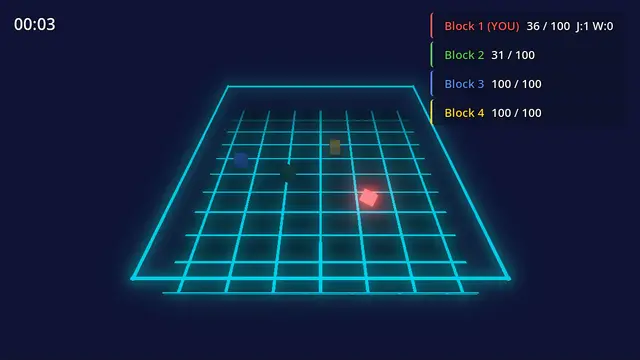
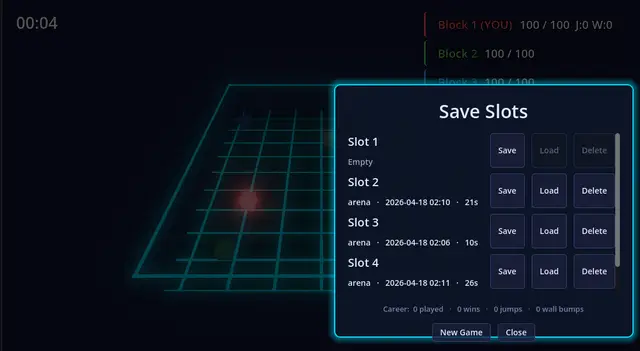
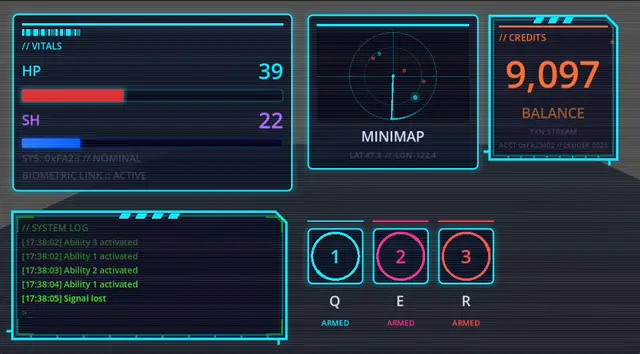
Demo project shown below: dynamic, interactive UI panels drawn 100% procedurally with Godot AI — no textures, sprites or shaders. About 2 hours of work: https://github.com/hi-godot/cyberpunk-hud-demo
Full docs and repo: https://github.com/hi-godot/godot-ai
Features:
- 150+ operations spanning scenes, nodes, scripts, animations, UI, themes, materials, particles, audio, cameras, input mapping, and project settings
- One-click setup for 19 MCP clients — Claude Code, Claude Desktop, Codex, Antigravity, Cursor, Windsurf, VS Code, VS Code Insiders, Zed, Gemini CLI, Cline, Kilo Code, Roo Code, Kiro, Trae, Cherry Studio, OpenCode, Qwen Code, Kimi Code
- Build entire UI hierarchies from a single prompt
- Materials (StandardMaterial3D, ORMMaterial3D, ShaderMaterial) and particles (GPU + CPU, 2D + 3D) with one-call presets — fire, smoke, sparks, magic, rain, explosion, lightning
- AnimationPlayer authoring with fade/slide/shake/pulse presets
- Inline or .tres resource authoring (meshes, shapes, curves, gradients, styleboxes)
- Smart screenshots (editor viewport, in-game framebuffer, or cinematic camera) so AI agents can see your scene
- Multi-instance support across multiple Godot editors
Requirements: Godot 4.3+ (4.4+ recommended) and an MCP client.
Quick Start:
Install uv (one-time):
macOS/Linux: curl -LsSf https://astral.sh/uv/install.sh | sh
Windows (PowerShell): irm https://astral.sh/uv/install.ps1 | iex
Install the addon from the Asset Library (or drop plugin/addons/godot_ai into your project's addons/ folder).
In Godot: Project > Project Settings > Plugins — enable "Godot AI".
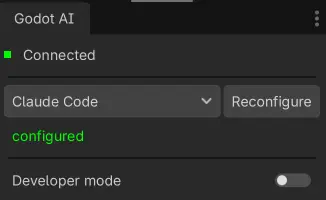
Open the Godot AI dock and click your MCP client to configure it in one click.
Open your MCP client and start prompting.
Coming next: Physics, Shaders, Terrain, Custom Tools
Privacy: Godot AI uses limited, anonymous telemetry to improve reliability. It does not collect file paths, project names, scene or source contents, or other user-identifying data. Telemetry can be fully disabled with GODOT_AI_DISABLE_TELEMETRY=true or DISABLE_TELEMETRY=true (no traffic, no UUID generated). More here: https://github.com/hi-godot/godot-ai/blob/main/docs/TELEMETRY.md
Reviews
Quick Information
Godot AI
Godot AI connects MCP-compatible AI assistants (Claude Code, Codex, Antigravity, Cursor, etc.) to a live Godot editor. Build scenes, write and attach scripts, design UI, animate, create materials and particle effects, run tests, and read editor data — all from chat.From the creators of MCP for Unity — the most widely used gamedev MCP, with 9,200+ GitHub stars and hundreds of thousands of users — built from the ground up for Godot. Robustness and deep QA are core to our approach, shaped by over a year of development and community feedback on MCP for Unity.Good Setup / Demo Video: https://youtu.be/9qCt7gxPJkY?si=nP1-gZ0l3hkC-FTy&t=51Discord: https://discord.com/invite/FDZ5fr2QkPDemo project shown below: dynamic, interactive UI panels drawn 100% procedurally with Godot AI — no textures, sprites or shaders. About 2 hours of work: https://github.com/hi-godot/cyberpunk-hud-demoFull docs and repo: https://github.com/hi-godot/godot-aiFeatures:- 150+ operations spanning scenes, nodes, scripts, animations, UI, themes, materials, particles, audio, cameras, input mapping, and project settings- One-click setup for 19 MCP clients — Claude Code, Claude Desktop, Codex, Antigravity, Cursor, Windsurf, VS Code, VS Code Insiders, Zed, Gemini CLI, Cline, Kilo Code, Roo Code, Kiro, Trae, Cherry Studio, OpenCode, Qwen Code, Kimi Code- Build entire UI hierarchies from a single prompt- Materials (StandardMaterial3D, ORMMaterial3D, ShaderMaterial) and particles (GPU + CPU, 2D + 3D) with one-call presets — fire, smoke, sparks, magic, rain, explosion, lightning- AnimationPlayer authoring with fade/slide/shake/pulse presets- Inline or .tres resource authoring (meshes, shapes, curves, gradients, styleboxes)- Smart screenshots (editor viewport, in-game framebuffer, or cinematic camera) so AI agents can see your scene- Multi-instance support across multiple Godot editorsRequirements: Godot 4.3+ (4.4+ recommended) and an MCP client.Quick Start:Install uv (one-time):macOS/Linux: curl -LsSf https://astral.sh/uv/install.sh | shWindows (PowerShell): irm https://astral.sh/uv/install.ps1 | iexInstall the addon from the Asset Library (or drop plugin/addons/godot_ai into your project's addons/ folder).In Godot: Project > Project Settings > Plugins — enable "Godot AI".Open the Godot AI dock and click your MCP client to configure it in one click.Open your MCP client and start prompting.Coming next: Physics, Shaders, Terrain, Custom ToolsPrivacy: Godot AI uses limited, anonymous telemetry to improve reliability. It does not collect file paths, project names, scene or source contents, or other user-identifying data. Telemetry can be fully disabled with GODOT_AI_DISABLE_TELEMETRY=true or DISABLE_TELEMETRY=true (no traffic, no UUID generated). More here: https://github.com/hi-godot/godot-ai/blob/main/docs/TELEMETRY.md
Supported Engine Version
4.3
Version String
2.5.9
License Version
MIT
Support Level
community
Modified Date
4 days ago
Git URL
Issue URL