Godot MCP - Cursor and Claude Integration
An asset by vberai
Install Asset
Install via Godot
To maintain one source of truth, Godot Asset Library is just a mirror of the old asset library so you can download directly on Godot via the integrated asset library browser

Quick Information

Godot MCP - Cursor and Claude Integration
A lightweight, secure Server-Sent Events (SSE) server written in pure GDScript to bridge Cursor, Claude Desktop, and Windsurf directly into your Godot Engine 4.x Scene Tree.Unlike other node-based MCP servers, this is 100% Native GDScript — No Node.js, TypeScript compilation, or external JS installation required!### Core Features:- Zero Configuration: Just drag and drop to your project addons folder, and it works instantly.- Deep Editor Control: Enable LLMs to read scene files, modify resources, generate scripts, and arrange nodes.- 100% Secure: Runs purely locally via local HTTP endpoints.### Quick Configuration in Cursor:1. Install this plugin and enable it in your Project Settings -> Plugins.2. In Cursor -> Settings -> Features -> MCP, click "+ Add New MCP Server": - Name: godot-mcp - Type: sse - URL: http://127.0.0.1:3000/mcp---### Looking for Unity, Cocos Creator or Figma-to-Engine Flow?This open-source plugin is maintained by the VberAI team. If you are developing games on other engines or require fully automated asset pipelines, try our flagship commercial production tools:- Visit Official Portal: https://vberai.com- Join Discussion Group: https://t.me/+8618827755984
Supported Engine Version
4.0
Version String
1.0.0
License Version
MIT
Support Level
community
Modified Date
8 hours ago
Git URL
Issue URL
Godot MCP Server
English | 中文
一个为 Godot 引擎设计的 Model Context Protocol (MCP) 服务器插件,让 AI 助手能够直接与 Godot 编辑器交互,实现 AI 驱动的游戏开发。
功能特性
核心功能
- 场景管理 - 创建、打开、保存场景,查看场景树结构
- 节点操作 - 添加、删除、移动节点,修改节点属性
- 脚本编辑 - 创建、读取、修改 GDScript 脚本
- 资源管理 - 加载、创建、修改游戏资源
- 文件系统 - 浏览项目文件,读写文件内容
- 编辑器控制 - 控制编辑器界面,管理选中对象、撤销重做
- 调试工具 - 查看日志,获取运行时信息
- 动画工具 - 创建和编辑动画,状态机管理
视觉效果
- 材质工具 - 创建和配置材质
- 着色器工具 - 管理着色器参数
- 灯光工具 - 配置场景灯光
- 粒子工具 - 创建粒子效果
2D 开发
- 瓦片地图工具 - TileMap 编辑和配置
- 几何体工具 - 2D 几何图形创建
游戏玩法
- 物理工具 - 物理体和碰撞配置
- 导航工具 - 导航网格和寻路
- 音频工具 - 音频播放和配置
实用工具
- UI 工具 - 用户界面组件
- 信号工具 - 信号连接管理
- 分组工具 - 节点分组管理
多语言支持
插件界面支持 9 种语言,自动检测系统语言:
- English (英语)
- 简体中文
- 繁體中文
- 日本語 (日语)
- Русский (俄语)
- Français (法语)
- Português (葡萄牙语)
- Español (西班牙语)
- Deutsch (德语)
支持的 AI 客户端
IDE 编辑器(一键配置)
- Trae CN - AI 编辑器中文版
- Cursor - AI 代码编辑器
- Windsurf - Codeium 的 AI 编辑器
CLI 命令行工具(命令复制)
- Claude CLI - Anthropic Claude 命令行工具
- Codex CLI - OpenAI Codex 命令行工具
- Gemini CLI - Google Gemini 命令行工具
系统要求
- Godot Engine 4.x
- 支持的操作系统:Windows、macOS、Linux
安装步骤
下载或克隆本仓库:
git clone https://github.com/DaxianLee/godot-mcp.git将
addons/godot_mcp文件夹复制到你的 Godot 项目的addons目录下:your_project/ ├── addons/ │ └── godot_mcp/ │ ├── plugin.cfg │ ├── plugin.gd │ ├── mcp_server.gd │ ├── i18n/ │ └── tools/ └── ...在 Godot 编辑器中,打开
项目 -> 项目设置 -> 插件找到 Godot MCP Server 并启用它
使用教程
1. 启动 MCP 服务器
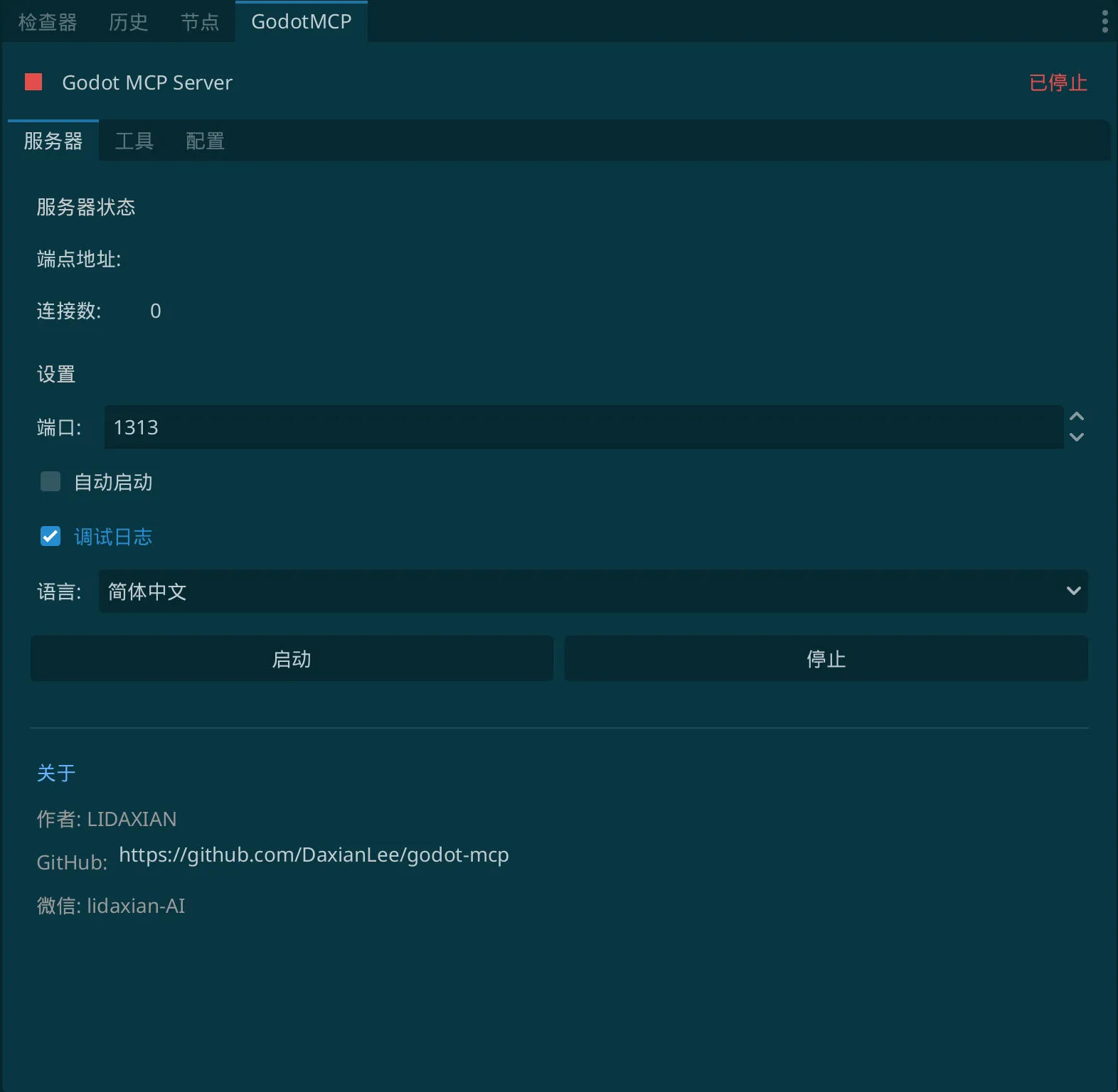
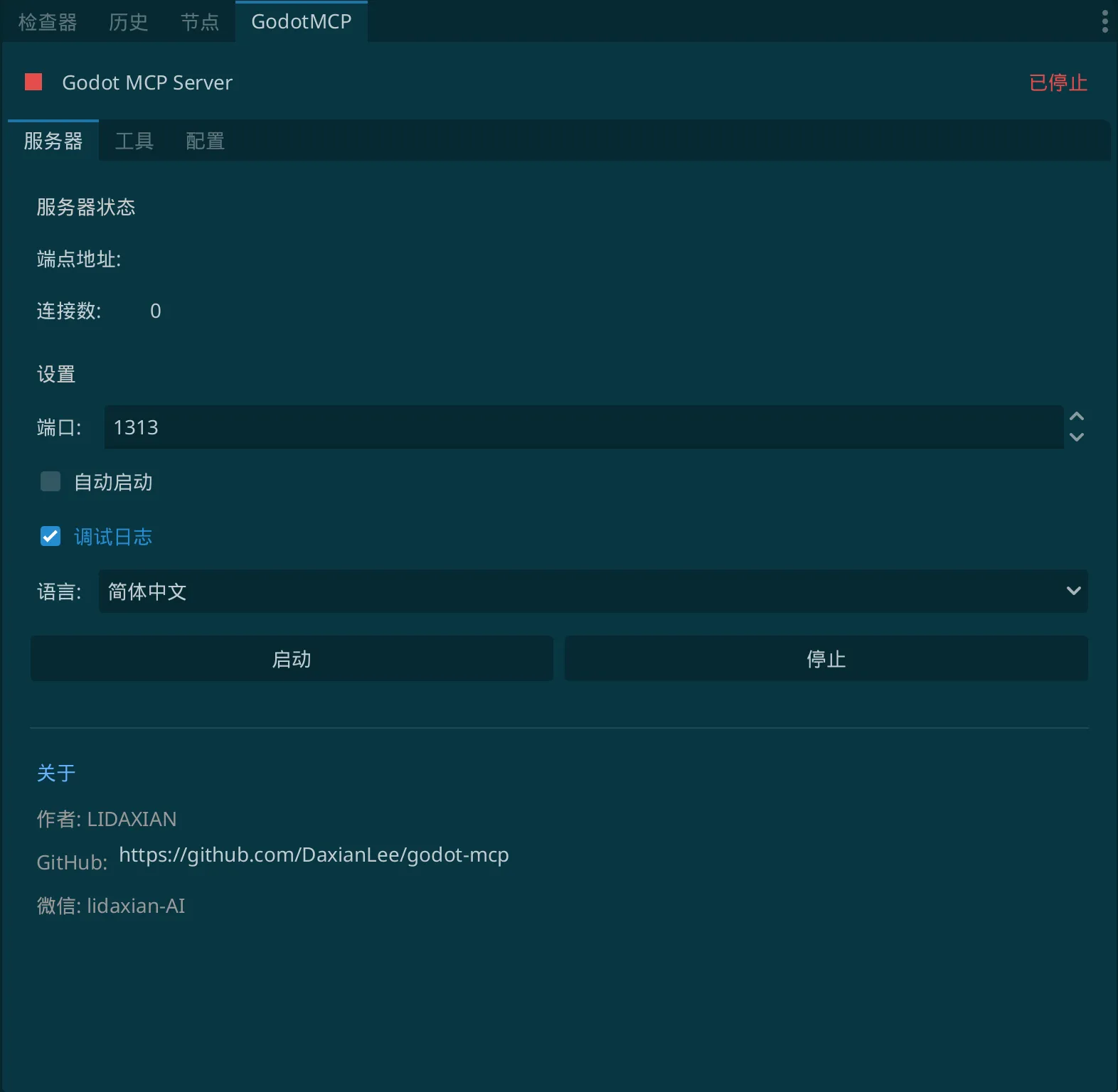
插件启用后,你会在编辑器右侧看到 GodotMCP 面板:
- 服务器 - 显示服务器运行状态、端点地址、作者信息
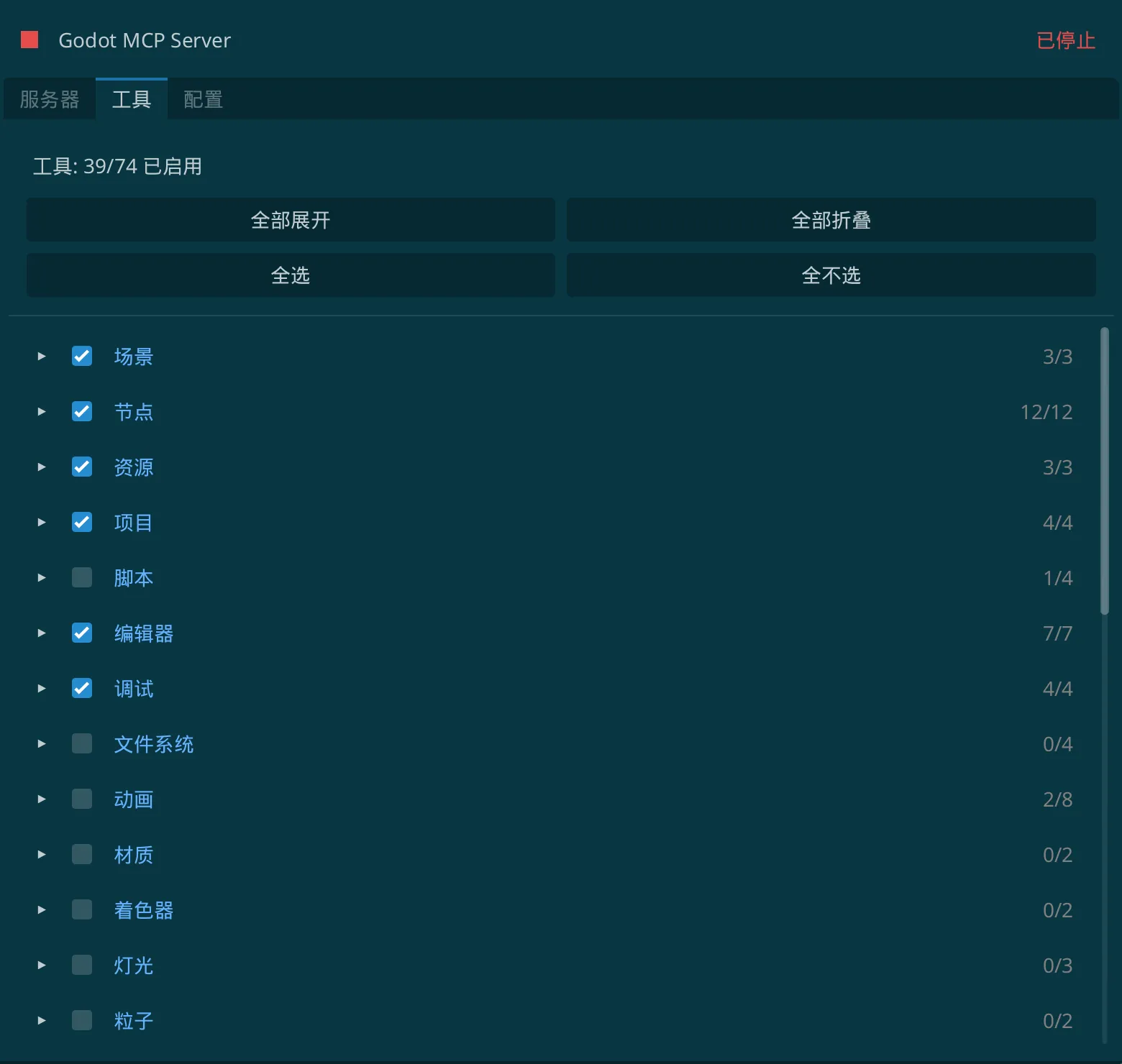
- 工具 - 管理可用的 MCP 工具(按分类显示)
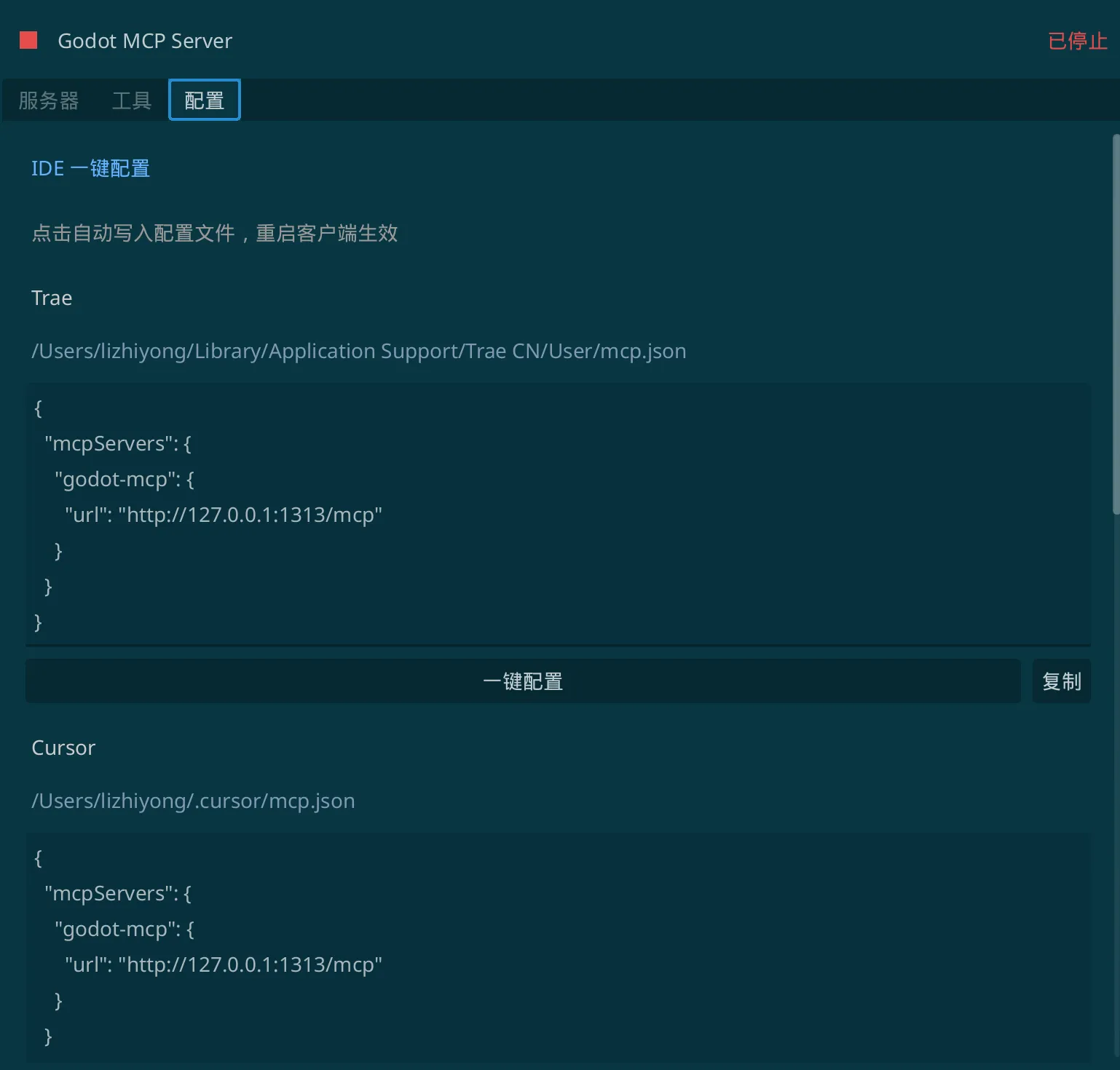
- 配置 - IDE 一键配置和 CLI 命令复制
默认配置:
- 端口:
3000 - 地址:
http://127.0.0.1:3000/mcp - 自动启动:开启
2. 配置 AI 客户端
IDE 编辑器 - 一键配置
在 GodotMCP 面板中切换到「配置」标签,可以看到支持的 IDE 客户端。
Trae CN
- 点击 Trae CN 下的「一键配置」按钮
- 重启 Trae CN
配置文件位置:
- macOS:
~/Library/Application Support/Trae CN/User/mcp.json - Windows:
%APPDATA%\Trae CN\User\mcp.json - Linux:
~/.config/Trae CN/User/mcp.json
Cursor
- 点击 Cursor 下的「一键配置」按钮
- 重启 Cursor
配置文件位置:~/.cursor/mcp.json
Windsurf
- 点击 Windsurf 下的「一键配置」按钮
- 重启 Windsurf
配置文件位置:~/.codeium/windsurf/mcp_config.json
CLI 命令行工具 - 复制命令
CLI 工具需要在终端中执行命令进行配置。在「配置」标签中:
使用「配置范围」下拉框选择 scope:
- 用户级 - 全局生效,所有项目都可使用
- 项目级 - 仅当前项目生效
复制对应工具的命令到终端执行
Claude CLI (Claude Code)
claude mcp add --scope <user|project> --transport http godot-mcp http://127.0.0.1:3000/mcp
Codex CLI
codex mcp add --scope <user|project> --transport http godot-mcp http://127.0.0.1:3000/mcp
Gemini CLI
gemini mcp add --scope <user|project> --transport http godot-mcp http://127.0.0.1:3000/mcp
3. 开始使用
配置完成后,在 AI 客户端中你可以直接操作 Godot 项目:
用户:帮我创建一个新场景,添加一个 Sprite2D 节点

AI:好的,我来为你创建场景...
    [调用 scene_create 创建场景]
    [调用 node_add 添加 Sprite2D 节点]
    完成!已创建包含 Sprite2D 节点的新场景。
工具列表
核心工具
场景工具 (Scene)
| 工具名 | 描述 |
|---|---|
scene_create |
创建新场景 |
scene_open |
打开指定场景 |
scene_save |
保存当前场景 |
scene_get_tree |
获取场景树结构 |
scene_get_current |
获取当前场景信息 |
节点工具 (Node)
| 工具名 | 描述 |
|---|---|
node_add |
添加新节点 |
node_delete |
删除节点 |
node_get |
获取节点信息 |
node_set_property |
设置节点属性 |
node_get_property |
获取节点属性 |
node_move |
移动节点位置 |
node_rename |
重命名节点 |
node_duplicate |
复制节点 |
node_find |
查找节点 |
脚本工具 (Script)
| 工具名 | 描述 |
|---|---|
script_create |
创建新脚本 |
script_read |
读取脚本内容 |
script_write |
写入脚本内容 |
script_attach |
附加脚本到节点 |
资源工具 (Resource)
| 工具名 | 描述 |
|---|---|
resource_load |
加载资源 |
resource_create |
创建资源 |
resource_save |
保存资源 |
文件系统工具 (Filesystem)
| 工具名 | 描述 |
|---|---|
filesystem_list |
列出目录内容 |
filesystem_read |
读取文件 |
filesystem_write |
写入文件 |
filesystem_delete |
删除文件 |
项目工具 (Project)
| 工具名 | 描述 |
|---|---|
project_get_info |
获取项目信息 |
project_get_settings |
获取项目设置 |
编辑器工具 (Editor)
| 工具名 | 描述 |
|---|---|
editor_get_selection |
获取当前选中 |
editor_select_node |
选中指定节点 |
editor_undo_redo |
撤销/重做操作 |
调试工具 (Debug)
| 工具名 | 描述 |
|---|---|
debug_get_logs |
获取调试日志 |
动画工具 (Animation)
| 工具名 | 描述 |
|---|---|
animation |
创建和编辑动画 |
animation_state_machine |
状态机管理 |
视觉工具
材质工具 (Material)
| 工具名 | 描述 |
|---|---|
material |
创建和配置材质 |
着色器工具 (Shader)
| 工具名 | 描述 |
|---|---|
shader |
着色器参数管理 |
灯光工具 (Lighting)
| 工具名 | 描述 |
|---|---|
lighting |
场景灯光配置 |
粒子工具 (Particle)
| 工具名 | 描述 |
|---|---|
particle |
粒子效果创建 |
2D 工具
瓦片地图工具 (TileMap)
| 工具名 | 描述 |
|---|---|
tilemap |
TileMap 编辑 |
几何体工具 (Geometry)
| 工具名 | 描述 |
|---|---|
geometry |
2D 几何图形 |
游戏玩法工具
物理工具 (Physics)
| 工具名 | 描述 |
|---|---|
physics |
物理体和碰撞配置 |
导航工具 (Navigation)
| 工具名 | 描述 |
|---|---|
navigation |
导航网格和寻路 |
音频工具 (Audio)
| 工具名 | 描述 |
|---|---|
audio |
音频播放和配置 |
实用工具
UI 工具
| 工具名 | 描述 |
|---|---|
ui |
用户界面组件 |
信号工具 (Signal)
| 工具名 | 描述 |
|---|---|
signal |
信号连接管理 |
分组工具 (Group)
| 工具名 | 描述 |
|---|---|
group |
节点分组管理 |
常见问题
Q: 服务器无法启动?
A: 请检查端口是否被占用,尝试更换端口后重启。
Q: AI 客户端无法连接?
A:
- 确保 MCP 服务器正在运行(状态显示为绿色)
- 检查配置文件中的端口号是否正确
- 重启 AI 客户端
Q: 修改了端口后需要做什么?
A: 需要同时更新 AI 客户端的配置文件中的端口号,然后重启客户端。
Q: 如何切换界面语言?
A: 在「服务器」标签的设置区域,使用「语言」下拉框选择你需要的语言。
许可证
本项目采用 非商业使用许可证。
允许:
- 个人学习和研究使用
- 非商业性质的开源项目使用
- 教育和教学目的使用
禁止:
- 商业用途(包括但不限于销售、集成到商业产品中)
- 未经授权的再分发
如需商业使用授权,请联系作者。
作者
LIDAXIAN
- GitHub: https://github.com/DaxianLee/godot-mcp
- 微信:
lidaxian-AI
贡献
欢迎提交 Issue 和 Pull Request!
- Fork 本仓库
- 创建你的功能分支 (
git checkout -b feature/AmazingFeature) - 提交你的更改 (
git commit -m 'Add some AmazingFeature') - 推送到分支 (
git push origin feature/AmazingFeature) - 开启一个 Pull Request
致谢
- Godot Engine - 开源游戏引擎
- Model Context Protocol - AI 交互协议规范
如果这个项目对你有帮助,请给一个 Star!
A lightweight, secure Server-Sent Events (SSE) server written in pure GDScript to bridge Cursor, Claude Desktop, and Windsurf directly into your Godot Engine 4.x Scene Tree.
Unlike other node-based MCP servers, this is 100% Native GDScript — No Node.js, TypeScript compilation, or external JS installation required!
### Core Features:
- Zero Configuration: Just drag and drop to your project addons folder, and it works instantly.
- Deep Editor Control: Enable LLMs to read scene files, modify resources, generate scripts, and arrange nodes.
- 100% Secure: Runs purely locally via local HTTP endpoints.
### Quick Configuration in Cursor:
1. Install this plugin and enable it in your Project Settings -> Plugins.
2. In Cursor -> Settings -> Features -> MCP, click "+ Add New MCP Server":
- Name: godot-mcp
- Type: sse
- URL: http://127.0.0.1:3000/mcp
---
### Looking for Unity, Cocos Creator or Figma-to-Engine Flow?
This open-source plugin is maintained by the VberAI team. If you are developing games on other engines or require fully automated asset pipelines, try our flagship commercial production tools:
- Visit Official Portal: https://vberai.com
- Join Discussion Group: https://t.me/+8618827755984
Reviews
Quick Information
Godot MCP - Cursor and Claude Integration
A lightweight, secure Server-Sent Events (SSE) server written in pure GDScript to bridge Cursor, Claude Desktop, and Windsurf directly into your Godot Engine 4.x Scene Tree.Unlike other node-based MCP servers, this is 100% Native GDScript — No Node.js, TypeScript compilation, or external JS installation required!### Core Features:- Zero Configuration: Just drag and drop to your project addons folder, and it works instantly.- Deep Editor Control: Enable LLMs to read scene files, modify resources, generate scripts, and arrange nodes.- 100% Secure: Runs purely locally via local HTTP endpoints.### Quick Configuration in Cursor:1. Install this plugin and enable it in your Project Settings -> Plugins.2. In Cursor -> Settings -> Features -> MCP, click "+ Add New MCP Server": - Name: godot-mcp - Type: sse - URL: http://127.0.0.1:3000/mcp---### Looking for Unity, Cocos Creator or Figma-to-Engine Flow?This open-source plugin is maintained by the VberAI team. If you are developing games on other engines or require fully automated asset pipelines, try our flagship commercial production tools:- Visit Official Portal: https://vberai.com- Join Discussion Group: https://t.me/+8618827755984
Supported Engine Version
4.0
Version String
1.0.0
License Version
MIT
Support Level
community
Modified Date
8 hours ago
Git URL
Issue URL