Golem-AI
An asset by sancheznotdev
Install Asset
Install via Godot
To maintain one source of truth, Godot Asset Library is just a mirror of the old asset library so you can download directly on Godot via the integrated asset library browser
Quick Information

Golem-AI
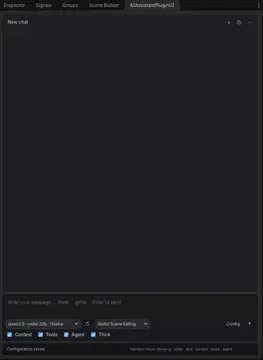
Golem-AI is an AI-powered editor assistant for Godot 4. Chat with local or cloud models (Ollama, LM Studio, OpenAI, Anthropic, Gemini, Cursor) directly from an editor dock.Features:• Chat composer with bubble UI, thinking blocks, and agent step progress• Project context: open scene, selection, @file mentions, configurable depth• Editor tools: optional multi-step agent loop with tool calling• Skills system: Markdown skills (/skill, dropdown, @skill:id)• Cursor-style UX: @ autocomplete, / commands, searchable agent history• Session history: pin, archive, New Agent (Ctrl+N, Alt+click to replace)• Bilingual UI: English / SpanishInstall: copy to addons/ai_assistant_plugin, enable the plugin in Project Settings, configure a provider in Config, refresh models, and start chatting.Requires Godot 4.2+. At least one AI provider must be configured (e.g. Ollama for local use).MIT License · Author: sancheznotdevhttps://github.com/sancheznot/Godot-AI-Assistant
Supported Engine Version
4.2
Version String
1.3.0
License Version
MIT
Support Level
community
Modified Date
12 hours ago
Git URL
Issue URL
                           (((((((             (((((((
                        (((((((((((           (((((((((((
                        (((((((((((((       (((((((((((((
                        (((((((((((((((((((((((((((((((((
                        (((((((((((((((((((((((((((((((((
         (((((      (((((((((((((((((((((((((((((((((((((((((      (((((
       (((((((((((((((((((((((((((((((((((((((((((((((((((((((((((((((((((
     ((((((((((((((((((((((((((((((((((((((((((((((((((((((((((((((((((((((
    ((((((((((((((((((((((((((((((((((((((((((((((((((((((((((((((((((((((((
      (((((((((((((((((((((((((((((((((((((((((((((((((((((((((((((((((((((
        (((((((((((((((((((((((((((((((((((((((((((((((((((((((((((((((((
         (((((((((((@@@@@@@(((((((((((((((((((((((((((@@@@@@@(((((((((((
         (((((((((@@@@,,,,,@@@(((((((((((((((((((((@@@,,,,,@@@@(((((((((
         ((((((((@@@,,,,,,,,,@@(((((((@@@@@(((((((@@,,,,,,,,,@@@((((((((
         ((((((((@@@,,,,,,,,,@@(((((((@@@@@(((((((@@,,,,,,,,,@@@((((((((
         (((((((((@@@,,,,,,,@@((((((((@@@@@((((((((@@,,,,,,,@@@(((((((((
         ((((((((((((@@@@@@(((((((((((@@@@@(((((((((((@@@@@@((((((((((((
         (((((((((((((((((((((((((((((((((((((((((((((((((((((((((((((((
         (((((((((((((((((((((((((((((((((((((((((((((((((((((((((((((((
         @@@@@@@@@@@@@((((((((((((@@@@@@@@@@@@@((((((((((((@@@@@@@@@@@@@
         ((((((((( @@@(((((((((((@@(((((((((((@@(((((((((((@@@ (((((((((
         (((((((((( @@((((((((((@@@(((((((((((@@@((((((((((@@ ((((((((((
          (((((((((((@@@@@@@@@@@@@@(((((((((((@@@@@@@@@@@@@@(((((((((((
           (((((((((((((((((((((((((((((((((((((((((((((((((((((((((((
              (((((((((((((((((((((((((((((((((((((((((((((((((((((
                 (((((((((((((((((((((((((((((((((((((((((((((((
                        (((((((((((((((((((((((((((((((((
   ______      __                     ___    ____
  / ____/___  / /__  ____ ___        /   |  /  _/
 / / __/ __ \/ / _ \/ __ `__ \______/ /| |  / /
/ /_/ / /_/ / /  __/ / / / / /_____/ ___ |_/ /
\____/\____/_/\___/_/ /_/ /_/     /_/  |_/___/
Golem-AI — el golem de Godot con inteligencia artificial.
Golem-AI

AI-powered editor assistant for Godot 4 — chat with local or cloud models, edit scenes, run editor tools, attach files and images, and manage agent sessions from the dock.
Created by sancheznotdev · MIT License
Screenshots
Editor dock — chat, model/skills toolbar, context/agent toggles, and vision/thinking options.

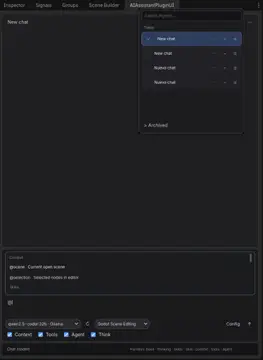
Agent history & @ context — searchable sessions, multi-select, pin/archive, and autocomplete for scenes, files, and skills.

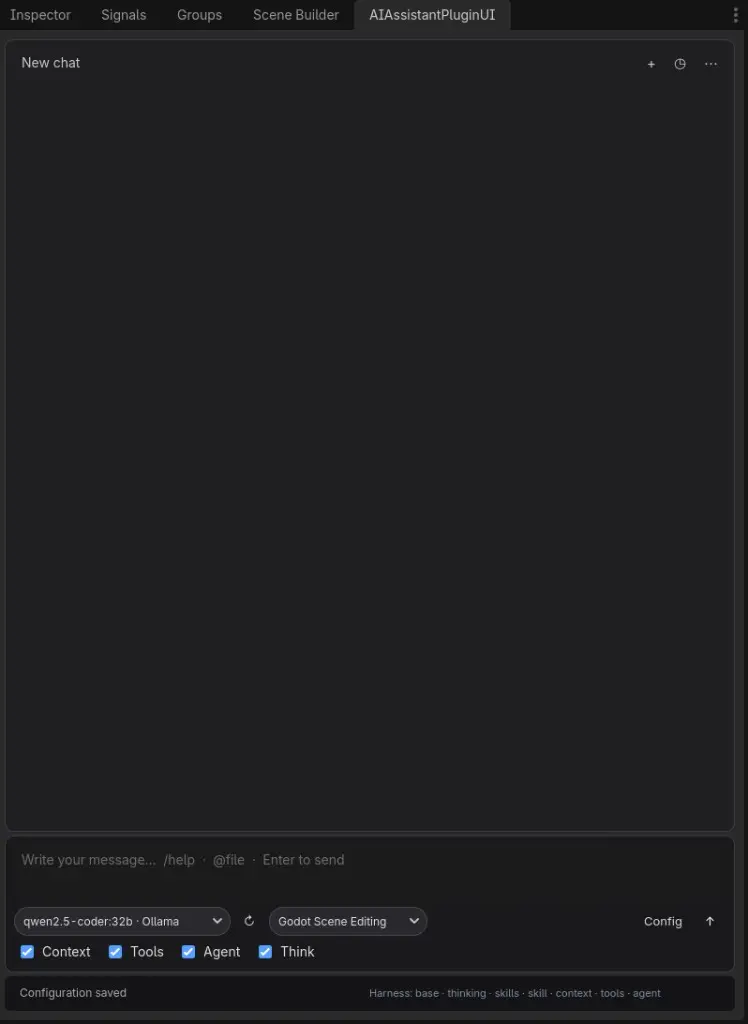
Models & providers — one dropdown with local and cloud models grouped by provider (Ollama, LM Studio, MiniMax, Cursor, OpenRouter, Kimi, OpenAI, Anthropic, Gemini).

Features
Chat & composer
- Bubble UI with collapsible thinking blocks, tool calls, tool results, and code blocks
- Copy button on assistant messages and collapsible code blocks
- Attachments: text files (
.gd,.tscn,.md, …) and images (PNG, JPG, WebP, …) @mentions and/commands with autocomplete- Vision and Think toggles — auto-enabled only when the selected model supports them (preferences persist between sessions)
Providers & models
| Provider | Notes |
|---|---|
| Ollama | Local models |
| LM Studio | Local server; reads capabilities.vision from native API |
| OpenRouter | Many cloud models, pay-as-you-go |
| Kimi | Moonshot AI |
| MiniMax | M3 = visión + thinking; M2.x = solo texto + thinking (sin imágenes) |
| OpenAI | Cloud API |
| Anthropic | Cloud API |
| Gemini | Google API |
| Cursor | Local OpenAI-compatible proxy or cloud agents |
- Model dropdown grouped by provider separators
- ↻ Refresh loads models from each enabled provider
- Capability detection (
model_capabilities.gd) + provider metadata (LM Studio / OpenRouter) to avoid invalid vision/thinking options
MiniMax models (official API)
Source: MiniMax models · Anthropic-compatible API
| Model | Vision (images) | Thinking |
|---|---|---|
| MiniMax-M3 | Yes (image + video) | Yes (toggle disabled / adaptive) |
| MiniMax-M2.7 / highspeed | No | Yes (always on at API) |
| MiniMax-M2.5 / highspeed | No | Yes (always on at API) |
| MiniMax-M2.1 / highspeed | No | Yes (always on at API) |
| MiniMax-M2 | No | Yes (always on at API) |
| M2-her | No | No (dialogue / roleplay) |
Only MiniMax-M3 accepts image_url / video_url in chat. All other MiniMax chat models are text + tools only.
Agent & tools
- Editor tools — optional tool-calling loop in the Godot editor
- Agent loop — multi-step verify & fix with compact tool results (faster, less redundant inspection)
- Skills system — Markdown skills (
/skill, dropdown,@skill:id) - Project context — open scene, selection,
@filementions, configurable depth
Session history
- Search, pin, archive, and New Agent (
Ctrl+N;Altreplaces current session) - Multi-select — checkboxes per chat, Select all, bulk Archive / Restore / Delete
- Delete confirmation — single chat or bulk; clears selection after archive/restore/delete
- More menu (⋮): clear messages, delete active chat, open config
Localization
- English / Spanish UI (Config → UI language:
auto,en,es)
Requirements
- Godot 4.2+ (tested on 4.6.x)
- At least one AI provider configured (e.g. Ollama or LM Studio for local use)
Installation
Manual
Copy this folder into your project:
your_project/addons/ai_assistant_plugin/Open Project → Project Settings → Plugins
Enable AI Assistant Plugin
Open the AI Assistant dock tab in the editor
From GitHub
git clone https://github.com/sancheznot/Godot-AI-Assistant.git addons/ai_assistant_plugin
Then enable the plugin in Project Settings.
Quick start
- Click Config in the dock toolbar
- Enable a provider (e.g. Ollama or LM Studio) and set endpoint + model
- Click ↻ to refresh the model list
- Choose Context, Tools, Agent, Think, and Vision as needed (greyed-out toggles = model does not support that feature)
- Type a message and press Enter
Attachments
| Control | Action |
|---|---|
| 📎 | Attach a text file (content injected into context) |
| 🖼 | Attach an image (requires Vision on + vision-capable model) |
You can send attachments without text; the plugin uses a default analysis prompt.
Composer shortcuts
| Input | Action |
|---|---|
@ |
Attach context (scene, files, skills) |
/ |
Commands (/help, /clear, /history, /skill, …) |
Enter |
Send message |
Shift+Enter |
New line |
Ctrl+N |
New agent (session) |
Alt+click + |
Replace current agent (clear messages) |
History panel
| Control | Action |
|---|---|
| Checkbox on row | Select chat for bulk actions |
| All | Select / deselect visible chats |
| Archive / Restore | Bulk archive or unarchive selection |
| Delete | Bulk delete with confirmation |
| ⋯ / 🗑 | Per-chat menu or delete |
Configuration
Copy the example config on first setup:
cp addons/ai_assistant_plugin/config/plugin_config.example.json \
   addons/ai_assistant_plugin/config/plugin_config.json
Settings (endpoints, models, toggles) are stored in config/plugin_config.json. API keys are never written there.
API keys & secrets
| Storage | Path / variable | Notes |
|---|---|---|
| Encrypted file | user://ai_assistant_plugin/secrets.enc |
Default. Keys from the Config UI are saved here via Godot's encrypted file API. |
| Passphrase | GOLEM_AI_SECRETS_PASSPHRASE |
Optional. Custom passphrase for secrets.enc. Default: machine id (per device). |
| Environment | GOLEM_AI_API_KEY_<PROVIDER> |
Optional override per provider, e.g. GOLEM_AI_API_KEY_OPENAI, GOLEM_AI_API_KEY_MINIMAX. Takes priority over the encrypted store. |
On first launch after updating, keys still present in an old plugin_config.json are migrated automatically to secrets.enc and removed from the JSON.
Do not commit API keys.
plugin_config.jsonis gitignored; useplugin_config.example.jsonas the template. If keys were ever pushed to git, rotate them in each provider's dashboard.
Key options in plugin_config.json:
- Providers — endpoints, API keys, default models
- Context depth —
basic/intermediate/full - Agent loop — multi-step verify & fix with editor tools
- enable_vision / enable_thinking — persisted preferences (respect model capabilities)
- Skills path — folder with
.mdskill files - UI language —
auto,en,es
Chat history is saved under user://ai_assistant_plugin/chat_history.json.
Project structure
ai_assistant_plugin/
├── icon.png
├── docs/                      # AssetLib previews
│   ├── preview_dock.jpg
│   ├── preview_autocomplete.jpg
│   └── preview_models.jpg
├── plugin.cfg
├── config/
├── harness/                   # System prompt layers
├── locales/                   # en.json, es.json
├── scenes/                    # Dock UI
├── scripts/
│   ├── ui_plugin.gd           # Chat UI, history, attachments
│   ├── ai_model_handler.gd    # Providers, multimodal, agent loop
│   ├── model_capabilities.gd  # Vision/thinking heuristics
│   ├── composer_attachments.gd
│   ├── model_catalog.gd
│   ├── chat_history.gd
│   └── …
└── skills/                    # Built-in skills (.md)
Contributing
Issues and PRs welcome on GitHub. Please keep changes focused and match existing code style.
License
MIT — see LICENSE.
Copyright (c) 2026 sancheznotdev
Author
sancheznotdev
GitHub: @sancheznot
If you use this plugin in a project or video, a mention or link is appreciated — not required by the license.
Español
Golem-AI — asistente de IA integrado en el editor de Godot 4.
Autor: sancheznotdev · Licencia MIT
Novedades recientes
- Adjuntos: archivos de texto e imágenes en el compositor (📎 / 🖼)
- Visión y Think: toggles inteligentes según capacidades del modelo (Gemma, Qwen 3.6, Composer, LM Studio, etc.)
- Proveedores: OpenRouter, Kimi, MiniMax (visión solo en MiniMax-M3)
- Historial: selección múltiple, archivar/restaurar/eliminar en lote, confirmación al borrar
- UI: bloques colapsables (thinking, tools, código) con botón copiar; modelos agrupados por proveedor
- Agente: respuestas más rápidas, menos inspección redundante, resultados de tools compactos
Instalación: copia la carpeta a addons/ai_assistant_plugin, activa el plugin en Ajustes del proyecto y configura un proveedor desde Config en el dock.
Capturas: ver sección Screenshots arriba (dock, historial con @, selector de modelos).
Golem-AI is an AI-powered editor assistant for Godot 4. Chat with local or cloud models (Ollama, LM Studio, OpenAI, Anthropic, Gemini, Cursor) directly from an editor dock.
Features:
• Chat composer with bubble UI, thinking blocks, and agent step progress
• Project context: open scene, selection, @file mentions, configurable depth
• Editor tools: optional multi-step agent loop with tool calling
• Skills system: Markdown skills (/skill, dropdown, @skill:id)
• Cursor-style UX: @ autocomplete, / commands, searchable agent history
• Session history: pin, archive, New Agent (Ctrl+N, Alt+click to replace)
• Bilingual UI: English / Spanish
Install: copy to addons/ai_assistant_plugin, enable the plugin in Project Settings, configure a provider in Config, refresh models, and start chatting.
Requires Godot 4.2+. At least one AI provider must be configured (e.g. Ollama for local use).
MIT License · Author: sancheznotdev
https://github.com/sancheznot/Godot-AI-Assistant
Reviews
Quick Information
Golem-AI
Golem-AI is an AI-powered editor assistant for Godot 4. Chat with local or cloud models (Ollama, LM Studio, OpenAI, Anthropic, Gemini, Cursor) directly from an editor dock.Features:• Chat composer with bubble UI, thinking blocks, and agent step progress• Project context: open scene, selection, @file mentions, configurable depth• Editor tools: optional multi-step agent loop with tool calling• Skills system: Markdown skills (/skill, dropdown, @skill:id)• Cursor-style UX: @ autocomplete, / commands, searchable agent history• Session history: pin, archive, New Agent (Ctrl+N, Alt+click to replace)• Bilingual UI: English / SpanishInstall: copy to addons/ai_assistant_plugin, enable the plugin in Project Settings, configure a provider in Config, refresh models, and start chatting.Requires Godot 4.2+. At least one AI provider must be configured (e.g. Ollama for local use).MIT License · Author: sancheznotdevhttps://github.com/sancheznot/Godot-AI-Assistant
Supported Engine Version
4.2
Version String
1.3.0
License Version
MIT
Support Level
community
Modified Date
12 hours ago
Git URL
Issue URL