Modular Inventory
An asset by alvlp
Install Asset
Install via Godot
To maintain one source of truth, Godot Asset Library is just a mirror of the old asset library so you can download directly on Godot via the integrated asset library browser
Quick Information

Modular Inventory
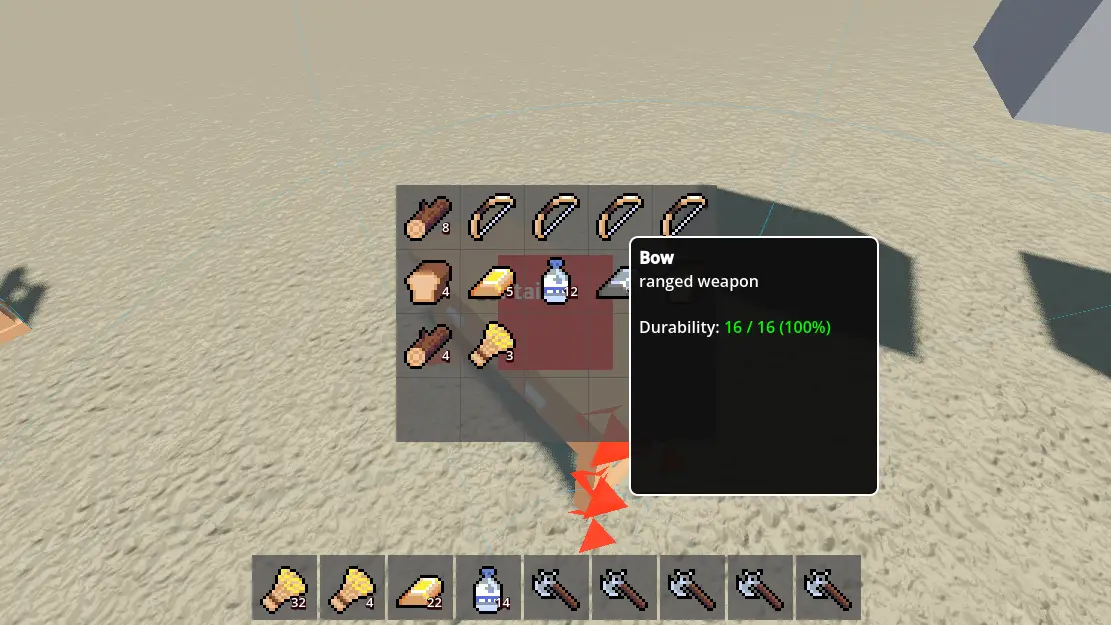
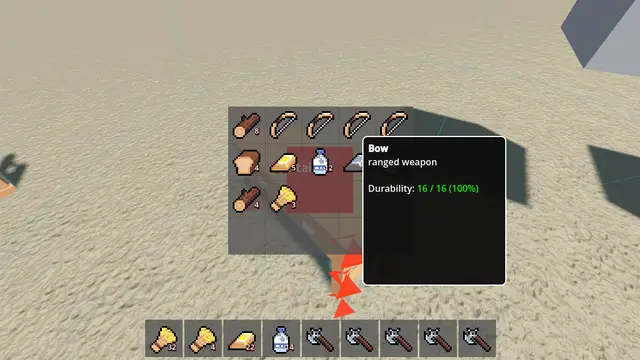
A modular, data-driven inventory system built for Godot 4.6. Features drag-and-drop functionality, hotbars, item logic scripting.
Supported Engine Version
4.6
Version String
1.0.0
License Version
MIT
Support Level
community
Modified Date
3 hours ago
Git URL
Issue URL
 Modular Inventory System for Godot 4.6


A modular, data-driven inventory system built for Godot 4.6. Features drag-and-drop functionality, hotbars, item logic scripting, slot validation rules, and seamless 3D world integration.

Table of Contents
Click to expand
▌ Features
▸ Inventory Management
- Dynamic slot capacity with per-slot definition support
- Stackable items with configurable max stack sizes
- Durability system with break-on-zero option
- Slot validation rules for equipment types and custom constraints
▸ User Interface
- Drag-and-drop with visual preview and amount selection
- Modular hotbar with scroll navigation and quick-use support
- Contextual item tooltips with BBCode formatting
- Split-screen UI coordination for container interactions
▸ Item Logic System
- Scriptable item behaviors via ItemLogic base class
- Built-in logic templates: ConsumableLogic, PlacementLogic, RangedLogic
- Signal-based lifecycle: use_started, use_ended, use_finished
▸ World Integration
- Dropped items as physics-enabled 3D scenes
- Container interaction with automatic UI positioning
- Raycast-based interaction system with priority handling
▸ Architecture
- Resource-based data definitions for items and slot rules
- Signal-driven communication between components
- Editor-friendly with @tool scripts for live preview
▌ Requirements
Godot Engine    4.6
GDScript        Required
.NET Support    Not Required
▌ Installation
Via Git
git clone https://codeberg.org/alvlp/modular-inventory
Manual Installation
- Download the repository as a ZIP archive
- Extract the contents into
res://addons/modular_inventory_system/ - Enable the plugin in Project Settings > Plugins > Modular Inventory System
Project Configuration
Ensure the following autoloads are registered (handled automatically by the plugin):
[autoload]
DragDropSystem  = "res://addons/modular_inventory_system/core/drag_drop_system.gd"
InputMode       = "res://addons/modular_inventory_system/components/InputMode.gd"
UICoordinator   = "res://addons/modular_inventory_system/ui/UICoordinator.gd"
▌ Quick Start
1. Add InventoryComponent
var inventory_component = preload("res://addons/modular_inventory_system/core/inventory_component.gd").new()
add_child(inventory_component)
inventory_component.capacity = 20
2. Create an Item Definition
# In Editor: Right-click filesystem -> Create New -> Resource -> ItemDefinition
# Or via code:
var item = ItemDefinition.new()
item.id = "iron_sword"
item.display_name = "Iron Sword"
item.max_stack_size = 1
3. Add Items to Inventory
func _ready():
    var inv = inventory_component.get_inventory()
    var sword = load("res://items/sword.tres") as ItemDefinition
    inv.add_item(sword, 1)
4. Setup UI
# Attach ModularInventoryPanel to a CanvasLayer
# In Inspector:
# - grid_container: reference to your GridContainer node
# - tooltip: reference to ItemTooltip node
# - source_component: reference to InventoryComponent
▌ Core Concepts
Inventory
The Inventory resource manages a fixed-capacity array of SlotData entries. It emits signals for changes and handles item addition/removal with stacking logic.
SlotData
class SlotData:
    item: ItemDefinition          # Reference to item definition
    count: int                    # Current stack quantity
    current_durability: int       # Remaining durability value
ItemDefinition
Resource defining item properties:
| Category | Properties |
|---|---|
| Identity | id, display_name, description, icon |
| Stacking | max_stack_size, weight |
| Durability | has_durability, max_durability, break_on_zero |
| Visuals | model_scene, placement_scene |
| Metadata | tags, equipment_type, custom_metadata |
SlotDefinition and SlotRule
Define per-slot constraints using a rule-based system:
# Example: Only accept items with "weapon" tag
class_name WeaponSlotRule extends SlotRule

func can_accept_item(item: ItemDefinition, slot_index: int, inventory: Inventory) -> bool:
    return item.has_tag("weapon")
ItemLogic
Attach custom behaviors to items by extending ItemLogic:
class_name HealingLogic extends ItemLogic

@export var health_restore: int = 25

func on_primary_use(slot_index: int) -> void:
    var player = _player
    if player.has_method("modify_health"):
        player.modify_health(health_restore)
    _consume_item_durability(slot_index)
    use_finished.emit(_item, true)
▌ Usage Guide
Adding Items Programmatically
var inventory: Inventory = inventory_component.get_inventory()

# Add single item
inventory.add_item(item_def, 1)

# Add with overflow handling
var remaining = inventory.add_item(item_def, 10)
if remaining > 0:
    print("Could not add all items: %d remaining" % remaining)
Removing Items
# Remove specific count
inventory.remove_item(item_def, 2)

# Remove entire stack
inventory.remove_item(item_def, item_def.max_stack_size)
Checking Slot Validity
var slot_def = inventory.get_slot_definition(slot_index)
if slot_def and not slot_def.can_accept_item(new_item, slot_index, inventory):
    print("Item cannot be placed in this slot")
Using Item Logic
# In your input handler
if event.is_action_pressed("use_item") and hotbar.has_selected_item():
    var slot_index = hotbar.get_selected_global_index()
    var logic = item_def.get_logic() as ItemLogic
    if logic and logic.can_use():
        logic.setup(item_def, player)
        logic.on_primary_use(slot_index)
▌ API Reference
Inventory
# ── Signals ──────────────────────────────
signal inventory_changed()
signal slot_changed(slot_index: int)
signal item_added(item: ItemDefinition, count: int)
signal item_removed(item: ItemDefinition, count: int)

# ── Methods ──────────────────────────────
func add_item(item: ItemDefinition, amount: int) -> int
# Returns remaining amount that could not be added

func remove_item(item: ItemDefinition, amount: int) -> bool
# Returns true if removal succeeded

func get_slot(index: int) -> SlotData
func can_accept_at_slot(item: ItemDefinition, slot_index: int) -> bool
func consume_durability(item: ItemDefinition, slot_index: int, amount: int) -> bool
InventoryComponent
# ── Signals ──────────────────────────────
signal inventory_ready(inv: Inventory)

# ── Properties ───────────────────────────
@export var inventory: Inventory
@export var capacity: int
@export var slot_definitions: Array[SlotDefinition]
@export var create_if_missing: bool

# ── Methods ──────────────────────────────
func get_inventory() -> Inventory
func _ensure_inventory()  # Called internally on _ready()
DragDropSystem (Autoload)
# ── Signals ──────────────────────────────
signal drag_started(inv: Inventory, data: SlotData, source_idx: int)
signal drag_ended()
signal dropped(target_inv: Inventory, target_idx: int, amount: int)

# ── Methods ──────────────────────────────
func start_drag(inv: Inventory, data: SlotData, idx: int, button: MouseButton, is_right_click: bool)
func end_drag()
func set_drop_target(target_inv: Inventory, target_idx: int)
static func is_dragging() -> bool
ModularHotbar
# ── Signals ──────────────────────────────
signal quick_used(slot_index: int, item: ItemDefinition)

# ── Properties ───────────────────────────
@export var hotbar_size: int = 9
@export var start_index: int = 0
@export var enable_scroll_navigation: bool = true
@export var selected_index: int

# ── Methods ──────────────────────────────
func select_slot(index: int)
func get_selected_global_index() -> int
func refresh_slots()
▌ Demo Scene
The included demo scene (_Demo_ModularInventory/demo.tscn) showcases:
- Player movement and interaction using the Real Controller addon
- Multiple container objects with independent inventories
- Drag-and-drop between player inventory and containers
- Hotbar with number-key selection and scroll navigation
- Item tooltips with durability and tag display
- Dropped items appearing as physics objects in the 3D world
Demo Controls
| Input | Action |
|---|---|
WASD |
Movement |
Mouse |
Look around |
Left Click |
Interact / Use item |
Right Click |
Secondary use / Drag half-stack |
E |
Toggle inventory |
Scroll Wheel |
Navigate hotbar |
1-9 |
Select hotbar slot |
▌ Extending the System
Creating Custom Slot Rules
class_name LevelRequirementRule extends SlotRule

@export var min_level: int = 10

func can_accept_item(item: ItemDefinition, slot_index: int, inventory: Inventory) -> bool:
    var player_level = inventory.get_meta_value("player_level", 1)
    return player_level >= min_level

func get_rejection_reason(item: ItemDefinition, slot_index: int) -> String:
    return "Requires level %d" % min_level
Adding New Item Logic Types
class_name ThrowableLogic extends ItemLogic

@export var throw_force: float = 15.0
@export var projectile_scene: PackedScene

func on_primary_use(slot_index: int) -> void:
    var projectile = projectile_scene.instantiate()
    projectile.global_transform = _player.global_transform
    _player.get_tree().root.add_child(projectile)
    projectile.apply_central_impulse(-_player.global_transform.basis.z * throw_force)
    _consume_item_durability(slot_index)
    use_finished.emit(_item, true)
▌ Credits
Demo Dependencies

- Real Controller by fdemir: https://github.com/fdemir/real-controller
- Used for player movement, camera controls, and animation blending in the demo scene
- Not required for using the inventory system in your own projects
Assets
| Asset | Source | License |
|---|---|---|
| 16x16 RPG Item Pack 2 | Alex's Assets | CC0 |
| Ground Texture | Poly Pizza | CC0 |
| Furniture Models | Poly Pizza | CC0 |
▌ License
MIT License

Copyright (c) 2024 alvlp

Permission is hereby granted, free of charge, to any person obtaining a copy
of this software and associated documentation files (the "Software"), to deal
in the Software without restriction, including without limitation the rights
to use, copy, modify, merge, publish, distribute, sublicense, and/or sell
copies of the Software, and to permit persons to whom the Software is
furnished to do so, subject to the following conditions:

The above copyright notice and this permission notice shall be included in all
copies or substantial portions of the Software.

THE SOFTWARE IS PROVIDED "AS IS", WITHOUT WARRANTY OF ANY KIND, EXPRESS OR
IMPLIED, INCLUDING BUT NOT LIMITED TO THE WARRANTIES OF MERCHANTABILITY,
FITNESS FOR A PARTICULAR PURPOSE AND NONINFRINGEMENT. IN NO EVENT SHALL THE
AUTHORS OR COPYRIGHT HOLDERS BE LIABLE FOR ANY CLAIM, DAMAGES OR OTHER
LIABILITY, WHETHER IN AN ACTION OF CONTRACT, TORT OR OTHERWISE, ARISING FROM,
OUT OF OR IN CONNECTION WITH THE SOFTWARE OR THE USE OR OTHER DEALINGS IN THE
SOFTWARE.

▌ 🤝 Contribution
┌─────────────────────────────────────────┐
│  Contributions, issues and feature      │
│  requests are welcome!                  │
└─────────────────────────────────────────┘
Built with Godot 4.6

A modular, data-driven inventory system built for Godot 4.6. Features drag-and-drop functionality, hotbars, item logic scripting.
Reviews
Quick Information
Modular Inventory
A modular, data-driven inventory system built for Godot 4.6. Features drag-and-drop functionality, hotbars, item logic scripting.
Supported Engine Version
4.6
Version String
1.0.0
License Version
MIT
Support Level
community
Modified Date
3 hours ago
Git URL
Issue URL