MixaBridge
An asset by uzairdeveloper223
Install Asset
Install via Godot
To maintain one source of truth, Godot Asset Library is just a mirror of the old asset library so you can download directly on Godot via the integrated asset library browser
Quick Information

MixaBridge
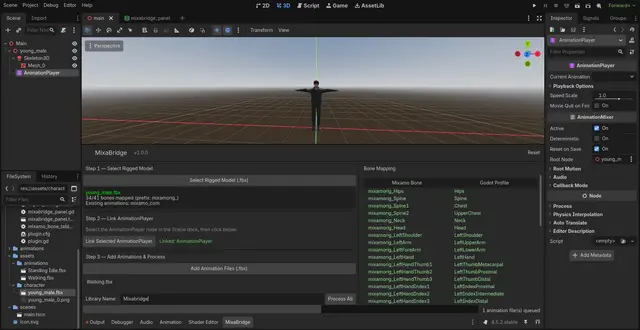
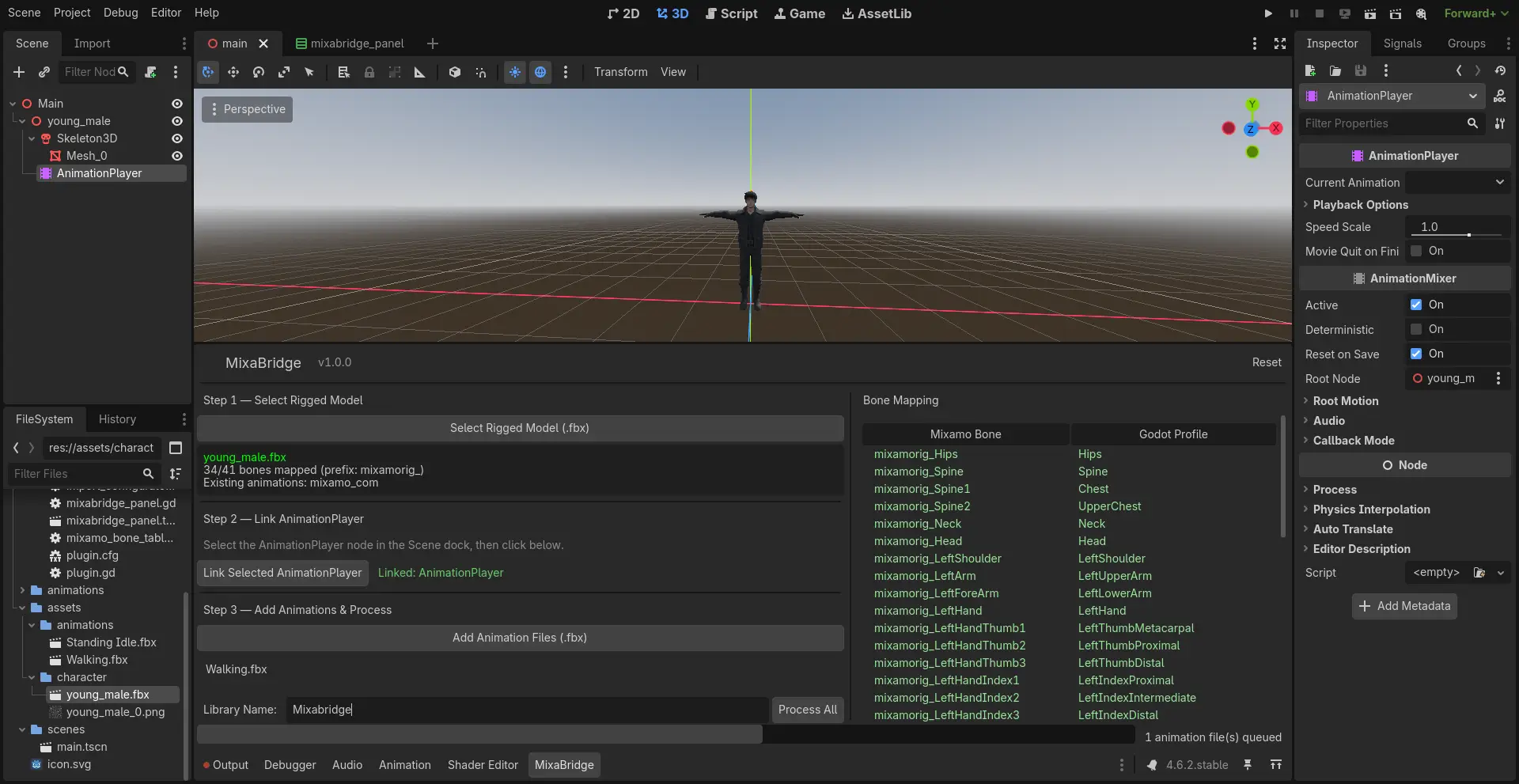
Automates Mixamo animation retargeting and AnimationLibrary construction for Godot 4.4+.Select your model, link your AnimationPlayer, add animation FBX files, hit Process.MixaBridge auto-maps 80+ Mixamo bones to SkeletonProfileHumanoid, configures retargetsettings, reimports through Godot's own pipeline, and builds the AnimationLibrary for you.Features:- Auto bone mapping (mixamorig: and mixamorig_ prefixes)- Rename and remove animations before processing- Add to existing libraries or create new ones- Re-process without resetting- Loop an animation- Remove RootMotion from an animationRequirements: Godot 4.4+, Mixamo FBX model, animation FBX files exported without skin.Docs: http://uzair.gt.tc/mixabridge/index.htmlMIT license. Not affiliated with Adobe Inc. or Mixamo.
Supported Engine Version
4.4
Version String
1.0.2
License Version
MIT
Support Level
community
Modified Date
1 month ago
Git URL
Issue URL
MixaBridge
Godot 4.6 editor addon that automates Mixamo animation retargeting and library construction.
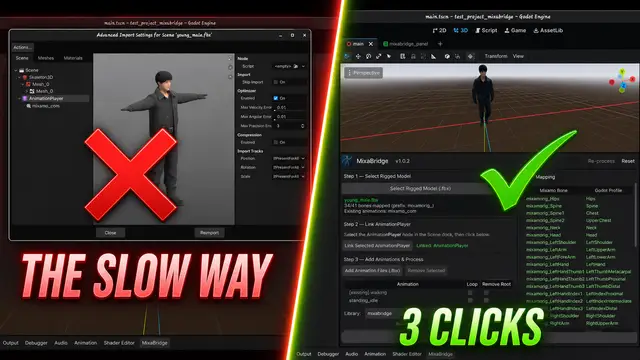
Importing Mixamo animations into Godot means opening Advanced Import Settings for every file, creating BoneMaps, assigning SkeletonProfileHumanoid, configuring retarget options, reimporting, then manually building AnimationLibraries. MixaBridge does all of that in three clicks.
Why
If you've ever imported Mixamo animations into Godot, you know the pain. The manual workflow looks like this:
- Open your model's Advanced Import Settings
- Find the Skeleton3D, create a BoneMap, set the profile to SkeletonProfileHumanoid
- Map the bones (or auto-map and hope it gets them right)
- Save the BoneMap as a
.tresfile - For every single animation file: open its Advanced Import Settings, assign the same BoneMap, configure retarget settings, save
- Wait for reimport
- Open your model's AnimationPlayer, create a new AnimationLibrary
- Manually add each extracted
.resanimation to the library
For a game with 5 animations, that's annoying. For a game with 50+, that's an entire afternoon wasted on clicking through import dialogs. And if you change your model or re-export from Mixamo, you get to do it all over again.
MixaBridge replaces steps 1 through 8 with: select model, link AnimationPlayer, add animation files, click Process.
How it works
- Loads your model's
.fbx, finds the Skeleton3D, reads bone names - Matches each
mixamorig:-prefixed bone to Godot's SkeletonProfileHumanoid using a static lookup table - Creates a BoneMap
.tresresource and injects it into the.importfile's[params]section - Calls
EditorFileSystem.reimport_files()to trigger Godot's import pipeline with retarget settings - After reimport, extracts Animation resources from each file and assembles them into an AnimationLibrary attached to your AnimationPlayer
No custom import plugins. No editor hacks. It works with Godot's existing pipeline.
Usage
- Drag your Mixamo model
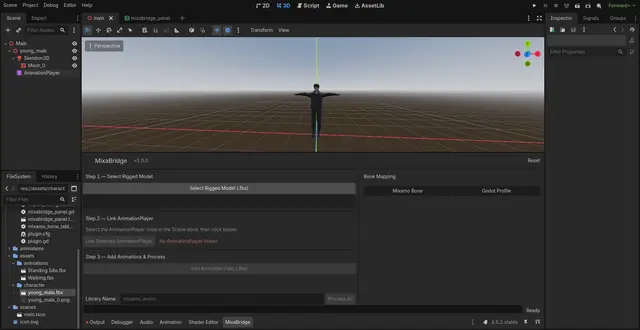
.fbxinto the scene, right-click, Make Local - Open the MixaBridge tab in the bottom panel
- Select Rigged Model — pick your
.fbx, bones auto-map - Link AnimationPlayer — click the AnimationPlayer in the Scene dock, then click "Link Selected AnimationPlayer"
- Add Animation Files — select your animation
.fbxfiles (exported without skin from Mixamo) - Rename — double-click any animation in the list to rename it before processing
- Remove — select an animation and click "Remove Selected" to drop it from the queue
- Pick a library — choose an existing AnimationLibrary on the player, or create a new one with a custom name
- Process All — the library gets built and attached to your AnimationPlayer
- Re-process — changed your mind? Edit the list and hit Re-process without resetting
Full guide with screenshots: uzair.ct.ws/mixabridge
Install
Copy addons/mixabridge/ into your project's addons/ directory. Enable in Project Settings > Plugins.
Project structure
addons/mixabridge/
  plugin.cfg              config
  plugin.gd               entry point
  icon.svg                addon icon
  mixamo_bone_table.gd    Mixamo-to-Humanoid bone name map
  bone_mapper.gd          skeleton analysis + BoneMap creation
  import_configurator.gd  .import file manipulation + reimport
  animation_extractor.gd  animation extraction + library building
  mixabridge_panel.tscn   bottom panel UI layout
  mixabridge_panel.gd     panel controller + workflow orchestration
  generated/              auto-generated BoneMap .tres files
  docs/                   documentation + screenshots
Limitations
- Mixamo rigs only — the bone name table is built for Mixamo's
mixamorig:naming convention - Godot 4.6+ — uses APIs that may not exist in earlier versions
- FBX/GLB/GLTF only — other 3D formats aren't tested
.importfile editing — writes to.importfiles directly, may break if Godot changes the format- Blocking reimport —
reimport_files()freezes the editor momentarily for large batches
License
MIT License. See LICENSE.
Disclaimer
MixaBridge is an independent, community-built tool. It is not affiliated with, endorsed by, or sponsored by Adobe Inc. or Mixamo. "Mixamo" is a trademark of Adobe Inc. This project interacts with files exported from Mixamo but has no connection to Adobe or its services.
Author
Uzair Mughal
Automates Mixamo animation retargeting and AnimationLibrary construction for Godot 4.4+.
Select your model, link your AnimationPlayer, add animation FBX files, hit Process.
MixaBridge auto-maps 80+ Mixamo bones to SkeletonProfileHumanoid, configures retarget
settings, reimports through Godot's own pipeline, and builds the AnimationLibrary for you.
Features:
- Auto bone mapping (mixamorig: and mixamorig_ prefixes)
- Rename and remove animations before processing
- Add to existing libraries or create new ones
- Re-process without resetting
- Loop an animation
- Remove RootMotion from an animation
Requirements: Godot 4.4+, Mixamo FBX model, animation FBX files exported without skin.
Docs: http://uzair.gt.tc/mixabridge/index.html
MIT license. Not affiliated with Adobe Inc. or Mixamo.
Reviews
Quick Information
MixaBridge
Automates Mixamo animation retargeting and AnimationLibrary construction for Godot 4.4+.Select your model, link your AnimationPlayer, add animation FBX files, hit Process.MixaBridge auto-maps 80+ Mixamo bones to SkeletonProfileHumanoid, configures retargetsettings, reimports through Godot's own pipeline, and builds the AnimationLibrary for you.Features:- Auto bone mapping (mixamorig: and mixamorig_ prefixes)- Rename and remove animations before processing- Add to existing libraries or create new ones- Re-process without resetting- Loop an animation- Remove RootMotion from an animationRequirements: Godot 4.4+, Mixamo FBX model, animation FBX files exported without skin.Docs: http://uzair.gt.tc/mixabridge/index.htmlMIT license. Not affiliated with Adobe Inc. or Mixamo.
Supported Engine Version
4.4
Version String
1.0.2
License Version
MIT
Support Level
community
Modified Date
1 month ago
Git URL
Issue URL