Godot URDF
An asset by brean
Install Asset
Install via Godot
To maintain one source of truth, Godot Asset Library is just a mirror of the old asset library so you can download directly on Godot via the integrated asset library browser
Quick Information

Godot URDF
Import robots into Godot from their URDF files. Simply Drag-and-Drop URDF-files in your Godot scene, visuals and collisions will be generated automatically. Alternatively you can attach the urdf_loader.gd-script to a Node3D and the robots nodes will be created at its children, so you can easily modify/extend your robot.Also provides a simple controller for wheel-based robots.
Supported Engine Version
4.6
Version String
1.0
License Version
BSD-3-Clause
Support Level
community
Modified Date
4 hours ago
Git URL
Issue URL
Godot URDF Addon
URDF parser for Godot 4.6 using the native XML-parser.
Features / Usage
Simply Drag-and-Drop URDF-files in your Godot scene, visuals and collisions will be generated automatically. Alternatively you can attach the urdf_loader.gd-script to a Node3D and the robots nodes will be created at its children, so you can easily modify/extend your robot.
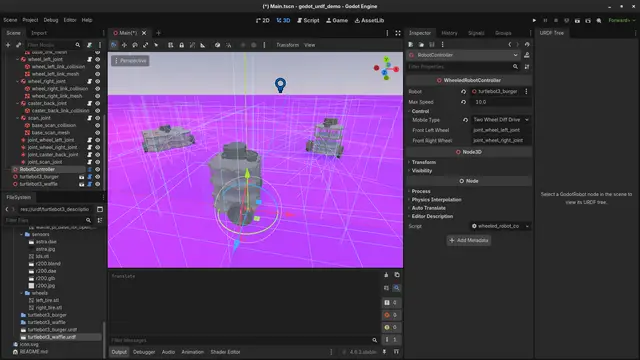
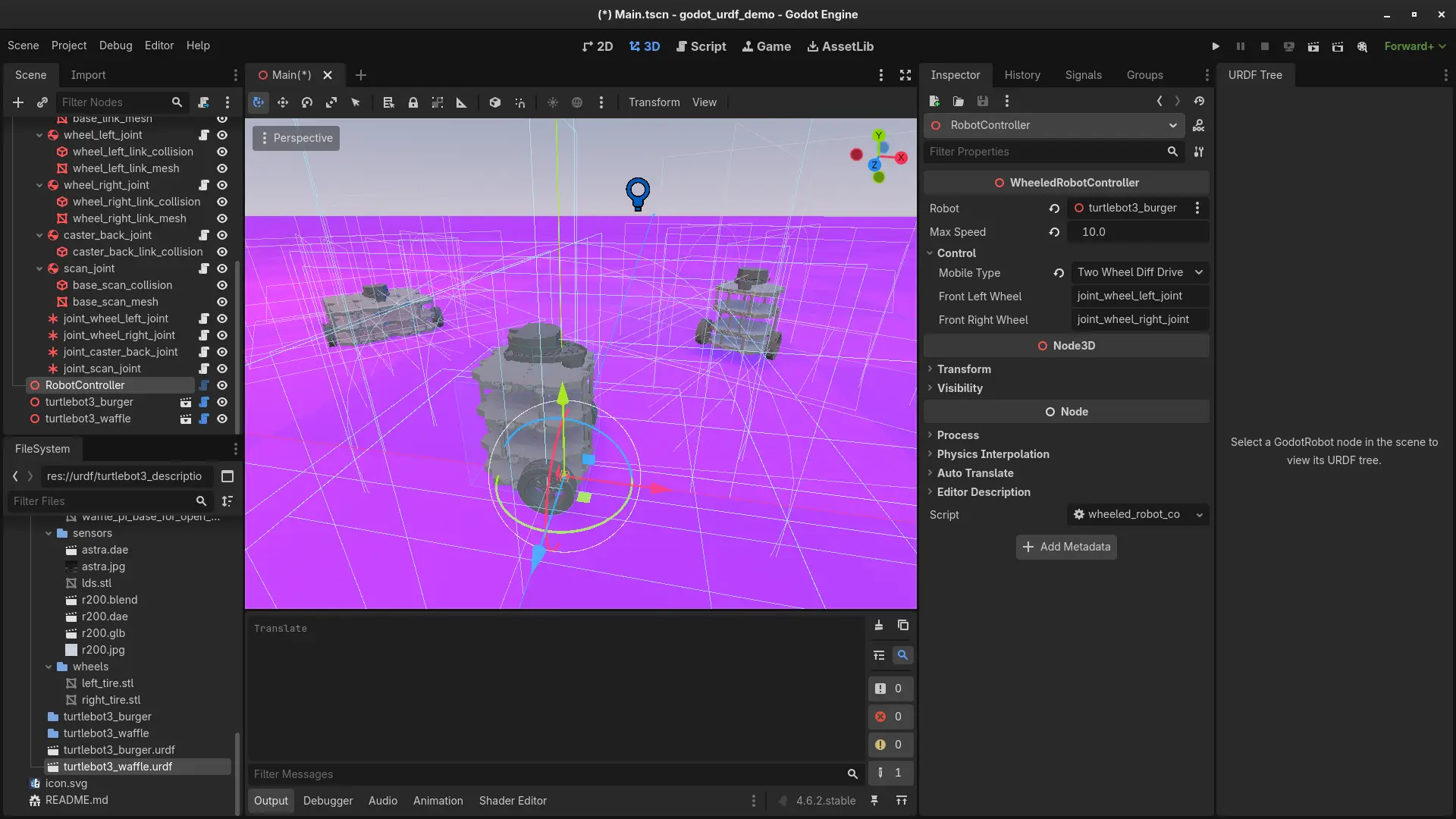
This repository provides a controller for wheeled robots, you only need to configure the movement type (e.g. Differential drive) and the generated 6DOF-Joints of the wheels and can control the robot using the W A S D keys.
Demo
You can see the addon in action in this demo repository with turtlebot and Boston Dynamics Spot robot.
The plugin has also been tested with a modified version of the Unitree G1 Humanoid and additional Robots by the DFKI Robotics Innovation Center. Additional Demos will be provided soon.
Technical details
The collisions are represented as CollisionShape3D which are children of generated RigidBody3D, next to Generic6DOFJoint3D. This flattens the XML structure, so we also provide a custom dock that shows the original structure as tree.
Screenshots / Examples
Driving around
 Fig. 1: The main Scene with the controllable turtlebot in the front. Note that the original URDF for the Turtlebot 3 defines the caster wheel in the back as box, a sphere would be more realistic.
Importing a quadruped
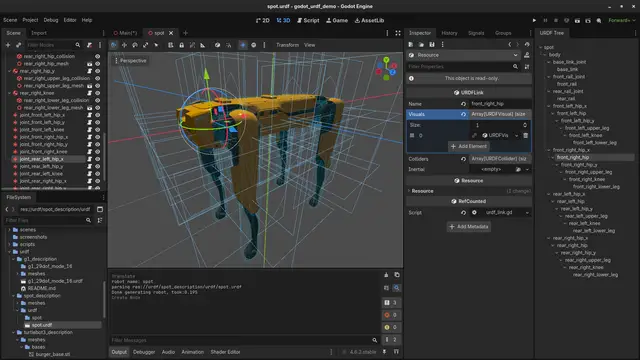
 Fig 2: The imported Spot Robot from Boston Dynamics (with custom configured collision meshes). Note that it is missing a controller so the robot will just collapse in on itself when you put it on any surface.
Importing a humanoid
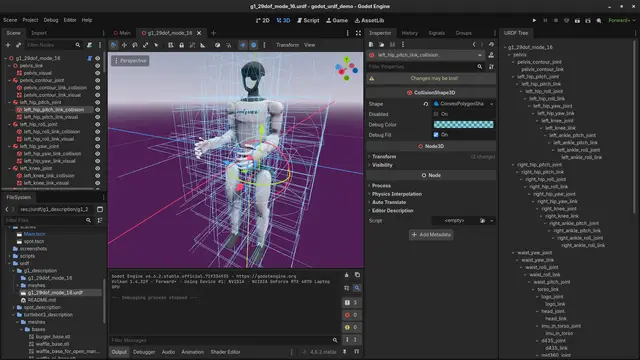
 Fig 3: The imported Unitree G1 Robot.
Recommendation
Use this URDF-parser in combination with godot-stl-io by @onze, MIT license: https://github.com/onze/godot-stl-io/ to load URDFs that reference STL-files.
Import robots into Godot from their URDF files. Simply Drag-and-Drop URDF-files in your Godot scene, visuals and collisions will be generated automatically. Alternatively you can attach the urdf_loader.gd-script to a Node3D and the robots nodes will be created at its children, so you can easily modify/extend your robot.
Also provides a simple controller for wheel-based robots.
Reviews
Quick Information
Godot URDF
Import robots into Godot from their URDF files. Simply Drag-and-Drop URDF-files in your Godot scene, visuals and collisions will be generated automatically. Alternatively you can attach the urdf_loader.gd-script to a Node3D and the robots nodes will be created at its children, so you can easily modify/extend your robot.Also provides a simple controller for wheel-based robots.
Supported Engine Version
4.6
Version String
1.0
License Version
BSD-3-Clause
Support Level
community
Modified Date
4 hours ago
Git URL
Issue URL