

This is a Godot 4 plugin providing a comprehensive suite of shaders and tools to recreate the PlayStation 1 aesthetic. It features vertex snapping, affine texture mapping, distance-based fog, and post-processing dithering managed through Global Shader Uniforms.The plugin includes specialized shaders for opaque, transparent, and double-sided materials, along with two key autoloads: PsxVisualsGd4AutoLoad for screen-space dithering and PsxVisualsGd4AutoApply for automatic runtime material conversion.To install, copy the addons folder to your project and enable the plugin in Project Settings. A setup dialog will appear to initialize Shader Globals and toggle autoloads.Users can apply effects manually using the provided shaders or use the Auto-Apply system which replaces StandardMaterial3D at runtime. For fine-tuned control, right-click any node in the Scene Tree to access the PSX Visuals Settings menu to toggle effects or override material types for specific branches.Global settings like vertex snap distance, affine strength, and fog color are managed under Project Settings > Globals > Shader Globals.When updating, disable the plugin and ensure the cleanup options for Shader Globals and Metadata are unchecked to preserve your project configuration before replacing the addon folder.Full documentation available at:https://github.com/scolastico/psx_visuals_gd4
gd_planar_reflections
An asset by RisingThumb
Quick Information

gd_planar_reflections
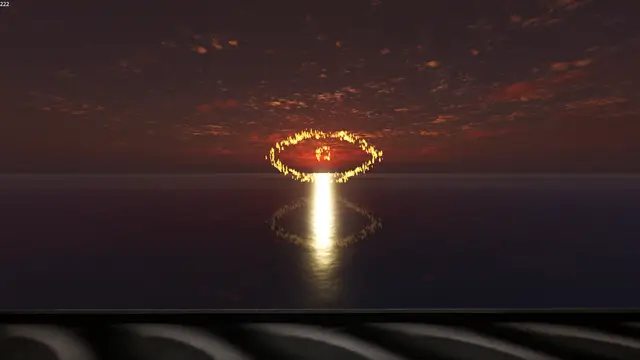
This provides a planar reflection shader and the related camera logic for doing planar reflecitons.
Supported Engine Version
4.3
Version String
1.0.1
Support Level
community
Modified Date
1 year ago
Git URL
Issue URL
gd_planar_reflections
Motive
Godot has screenspace reflections and similar solutions but no planar reflections. This exists to fix that.
Eye candy


Use
Your planar reflections node will have 2 parameters. One for the camera and one for the resolution of the reflected view.
Please see the example scene as an example of this.
Additionally this is set up to be like water currently. As a result the shader has a lot of settings to distort it like water. Feel free to turn these down if you want a pure mirror, or turn them up if you want rippling water.
FAQ
- Why is it pink in the editor?
- So you know what is being reflected. Also because planar reflections involves rendering the scene twice, I didn't want to do that for the editor.
- How can I change how it looks?
- Look at the shader script.
- Can I...?
- Probably.
Contributing/bugs
Feel free to raise issues or bugs as needed.
This provides a planar reflection shader and the related camera logic for doing planar reflecitons.
Reviews
0 total reviews
Quick Information
gd_planar_reflections
This provides a planar reflection shader and the related camera logic for doing planar reflecitons.
Supported Engine Version
4.3
Version String
1.0.1
Support Level
community
Modified Date
1 year ago
Git URL
Issue URL
Related Assets
More in Shaders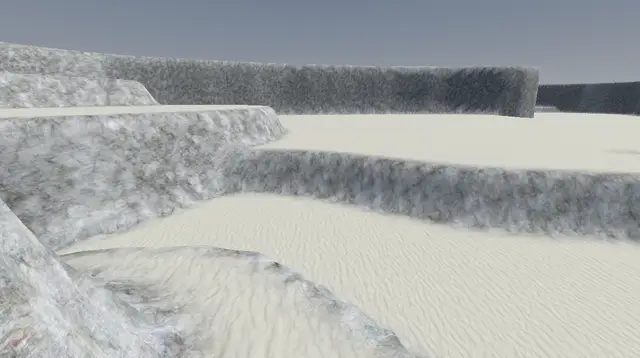

Split texture, stochastic sampling, triplanar projection shader for Godot4


The Godot Sprite Shader Mixer is an add-on for Godot that allows Sprite2D and AnimationSprite2D (Label and ColorRect since version 1.2.0) nodes to blend shaders from a collection of available shaders. Users can select and add shaders to sprites dynamically, automatically downloading them from GitHub as needed. The plugin handles shader generation and blending, resulting in a texture that combines all selected shaders.The add-on allows you to download a set of shaders from a collection (the collection is public on GitHub and you can collaborate on adding new ones). Once downloaded the tool will mix them in a unique shader for your sprite. Since then you can manipulate the shader as usual, customizing the input variables of each shader.version 1.2.0 Update:- Added Label and ColorRect nodes to add shader mixer- default opacity parameter for all shadersVersion 1.1.0 Update:- Added a Search Manager Window to easily select the shaderBasic instructions:- You only need to download the addon folder to your project- Active the plugin- Select a Sprite2D or AnimatedSprite2D node (also Label and ColorRect since version 1.2.0)- At the right, you will see a button to create a shader mixer- Press the button to Sync the list of available shaders (ensure it is pressed, if not the combo will be empty)- Select a Shader and download it (repeat this if you want to merge several shaders)- Go to your material->Shader->Parameters to tune the shaderFULL INSTRUCTIONS AND EXAMPLES HERE: https://github.com/spheras/godot-sprite-shader-mixer#godot-sprite-shader-mixerIMPORTANT: Those shaders are compatible with GODOT 4.1, but not older versions.


Transforms a vector between different coordinate spaces.